
CHROX H728 4GB+64GB
CHROX Android 14.0 TV Box User Manual
Model: H728 4GB+64GB
Brand: CHROX
1. تعارف
This user manual provides comprehensive instructions for the setup, operation, and maintenance of your CHROX Android 14.0 TV Box. Please read this manual carefully before using the device to ensure optimal performance and safety.

Image: The CHROX Android TV Box and its accompanying remote control. The box is compact and black with a textured top surface, while the remote is sleek and black with clearly labeled buttons for navigation and media control.
2. پيڪيج مواد
مھرباني ڪري ھيٺ ڏنل شين لاءِ دٻي کي چيڪ ڪريو:
- 1 x CHROX Android 14.0 TV Box
- 1 x ريموٽ ڪنٽرول (بيٽريون شامل نه آهن)
- 1 x HDMI ڪيبل
- 1 x پاور اڊاپٽر (ڊي سي 5V/2A)
- 1 x استعمال ڪندڙ دستياب
3. مصنوعات جون خاصيتون ۽ وضاحتون
The CHROX Android 14.0 TV Box is designed to provide a superior media experience with its advanced hardware and software capabilities.
اهم خاصيتون:
- Latest Android 14.0 OS: Offers enhanced compatibility with software, games, and applications, along with an optimized user interface.
- H728 Chipset: Powered by a Quad-core ARM Cortex A53 CPU (RK3528A), providing improved execution speed and professional image processing capabilities.
- 4GB RAM & 64GB ROM: Ensures better performance and larger storage capacity.
- USB 3.0 ڪنيڪشن: 10 times faster than USB 2.0, allowing for quick transfer of large files ۽ وڊيوز.
- Dual WiFi 2.4G/5G & Bluetooth 5.0: Equipped with integrated WiFi 6 and Bluetooth 5.0 for stable and convenient wireless connections.
- Ethernet Support: Compatible with 100/1000M Ethernet for reliable wired network access.
- 4K/8K Decoding Support: Capable of decoding high-resolution video content up to 8K.

تصوير: مٿانview of the Tanix TX7 Android 14.0 TV Box highlighting its key features including the H728 chipset, HDR10+, Bluetooth 5.4, 8K Ultra HD support, Android 14 OS, and dual-band 2.4G & 5G WiFi.
ٽيڪنيڪل وضاحتون:
| جزو | تفصيل |
|---|---|
| آپريٽنگ سسٽم | Android 14.0 |
| سي پي يو | H728 Cortex ARM A55 64-bit CPU |
| جي پي يو | G31 MP2 GPU Processor |
| SDRAM | 4 جي بي |
| فليش اسٽوريج | 64 جي بي |
| وائي فائي | 2.4G & 5G Dual-band WiFi 6 |
| بلوٽوٿ | بي ٽي 5.0 |
| ايٿرنيٽ | Standard 10/100M RJ-45 |
| HDMI آئوٽ | HDMI 2.0, 8K x 4K @ 60fps Max Resolution Output |
| SPDIF | ڊجيٽل آڊيو انٽرفيس |
| USB ميزبان | 1 x USB 2.0 ، 1 x USB 3.0 |
| وڊيو ڊيڪوڊر | H.265 HEVC/MVC, H.264 AVC/MVC, VP9, VP8 |
| Video Coder | H.264/AVC, H.265/HEVC |
| JPEG Decoder | Supports YUV400/411/420/422/440/444, 1920x1080@120fps, MJPEG |
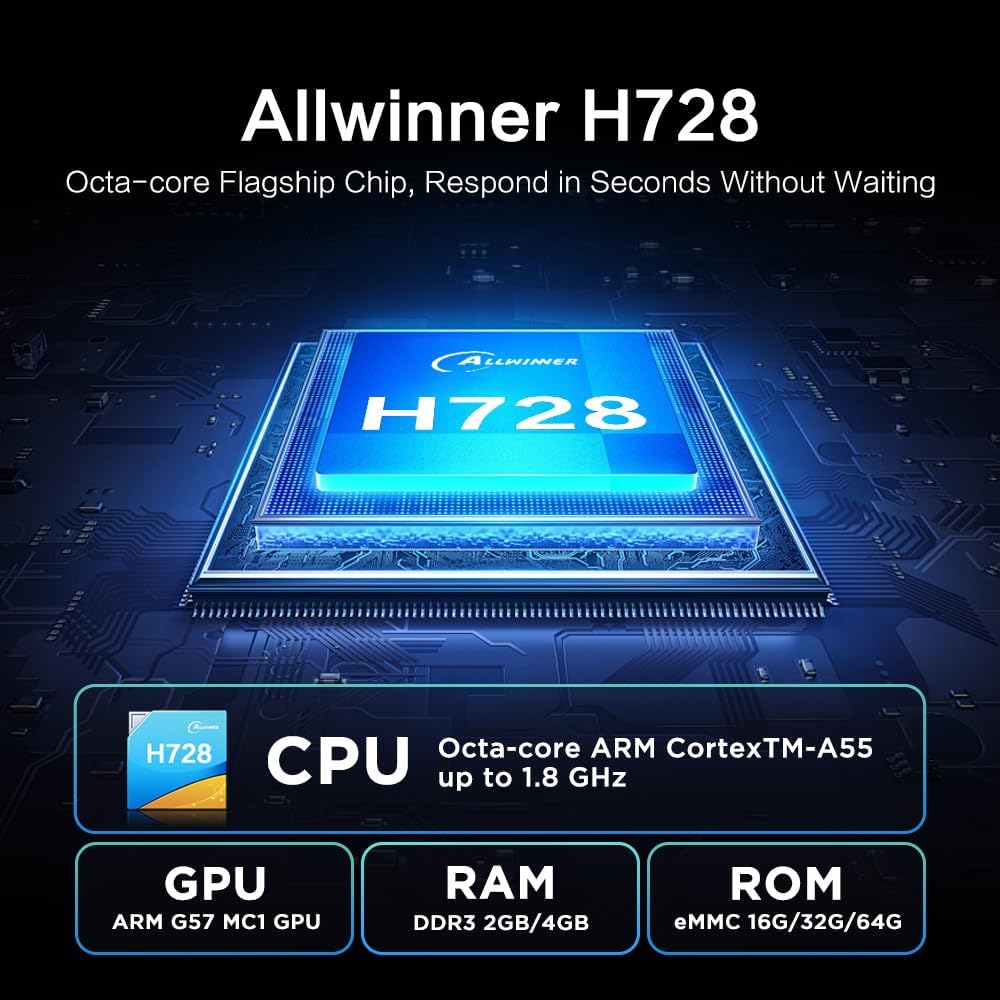
تصوير: تفصيلي view of the Allwinner H728 Octa-core Flagship Chip, showing its CPU (ARM Cortex-A55 up to 1.8 GHz), GPU (ARM G57 MC1), RAM (DDR3 2GB/4GB), and ROM (eMMC 16G/32G/64G) specifications.

Image: Illustration demonstrating the TV Box's support for 8K decoding, comparing resolutions of 1080p, 4K, and 8K on a television screen.
4. سيٽ اپ گائيڊ
Follow these steps to set up your CHROX Android TV Box:
- ٽي وي سان ڳنڍيو: Connect one end of the provided HDMI cable to the HDMI port (4) on the TV Box and the other end to an HDMI input on your television.
- پاور Connectنيو: Plug the power adapter into the DC 5V/2A port (5) on the TV Box, then plug the adapter into a wall outlet.
- پاور آن: The TV Box should automatically power on. If not, press the power button on the remote control.
- ان پٽ چونڊيو: On your TV, select the correct HDMI input source using your TV's remote control.
- شروعاتي سيٽ اپ: شروعاتي سيٽ اپ مڪمل ڪرڻ لاءِ اسڪرين تي ڏنل هدايتن تي عمل ڪريو، جنهن ۾ ٻولي جي چونڊ، نيٽ ورڪ ڪنيڪشن (وائي فائي يا ايٿرنيٽ)، ۽ گوگل اڪائونٽ لاگ ان شامل آهن.

Image: Diagram illustrating the various connectivity ports on the CHROX Android TV Box, including AV, SPDIF, Ethernet Port, HDMI Output, Power Input, TF Card Slot, and USB ports (USB 2.0 and USB 3.0).
5. آپريٽنگ هدايتون
5.1. ريموٽ ڪنٽرول استعمال
The included remote control allows you to navigate the Android TV Box interface. Insert two AAA batteries (not included) into the remote before use.
- پاور بٽڻ: Turns the device on/off or puts it into standby.
- نيويگيشن بٽڻ (مٿي/هيٺ/کاٻي/ساڄي): Move cursor or selection.
- OKيڪ بٽڻ: چونڊ جي تصديق ڪري ٿي.
- پوئتي بٽڻ: پوئين اسڪرين ڏانهن واپسي.
- هوم بٽڻ: مکيه هوم اسڪرين ڏانهن واپس اچي ٿو.
- حجم بٽڻ (+/-): آڊيو جي مقدار کي ترتيب ڏئي ٿو.
- App Shortcut Buttons (e.g., Netflix, YouTube): Direct access to specified applications.
5.2. نيٽ ورڪ ڪنيڪشن
To access online content, connect your TV Box to the internet:
- وائي فائي: Go to Settings > Network & Internet > Wi-Fi. Select your network from the list, enter the password, and connect.
- Ethernet: Connect an Ethernet cable from your router to the Ethernet port (3) on the TV Box. The connection will be established automatically.
5.3. ايپليڪيشنن کي انسٽال ڪرڻ
You can download and install applications from the Google Play Store:
- Ensure the TV Box is connected to the internet.
- From the home screen, open the "Play Store" application.
- ڳولھيو your desired application and select "Install".

Image: Screenshot of the Android 14.0 user interface on a TV screen, showing various app icons including Google Play Store, Netflix, and YouTube, with the TV Box positioned below the screen.
5.4. Multi-Screen Interaction
The TV Box supports casting content from your mobile phone or tablet to the TV screen, allowing you to share videos and photos easily.

Image: Depiction of the multi-screen interaction feature, showing a smartphone mirroring its content (a video game) onto a large TV screen, with the TV Box placed nearby.
6. مسئلا حل ڪرڻ
جيڪڏهن توهان کي ڪو مسئلو درپيش اچي ٿو، ته مهرباني ڪري هيٺ ڏنل عام مسئلن ۽ حلن جو حوالو ڏيو:
- طاقت ناهي:
- پڪ ڪريو ته پاور اڊاپٽر محفوظ طور تي ٽي وي باڪس ۽ ڪم ڪندڙ پاور آئوٽليٽ سان ڳنڍيل آهي.
- Check if the power indicator light on the TV Box is on.
- ٽي وي تي ڪابه ڊسپلي ناهي:
- Verify the HDMI cable is correctly connected to both the TV Box and the TV.
- پڪ ڪريو ته توهان جو ٽي وي صحيح HDMI ان پٽ سورس تي سيٽ ٿيل آهي.
- پنهنجي ٽي وي تي هڪ مختلف HDMI ڪيبل يا HDMI پورٽ آزمايو.
- وائي فائي ڪنيڪشن ناهي:
- چيڪ ڪريو ته توهان جو روٽر صحيح ڪم ڪري رهيو آهي.
- پڪ ڪريو ته توهان صحيح وائي فائي پاسورڊ داخل ڪيو آهي.
- Try restarting the TV Box and your router.
- Move the TV Box closer to your Wi-Fi router.
- ريموٽ ڪنٽرول جواب نه ڏئي رهيو آهي:
- ريموٽ ڪنٽرول ۾ بيٽرين کي چيڪ ڪريو ۽ تبديل ڪريو.
- پڪ ڪريو ته ريموٽ ۽ ٽي وي باڪس جي وچ ۾ ڪا به رڪاوٽ نه آهي.
- Point the remote directly at the TV Box's IR receiver.
7. سار سنڀال
To ensure the longevity and optimal performance of your TV Box, follow these maintenance guidelines:
- ڊوائيس کي سڪل، سٺي هوادار علائقي ۾ رکو، سڌو سج جي روشني، گرمي جي ذريعن ۽ نمي کان پري.
- Do not block the ventilation openings on the device.
- ڊوائيس کي نرم، سڪل ڪپڙي سان صاف ڪريو. مائع صاف ڪندڙ يا ايروسول استعمال نه ڪريو.
- ڊوائيس کي مضبوط اثرن لاءِ ڇڏڻ يا تابع ڪرڻ کان پاسو ڪريو.
- Unplug the power adapter during lightning storms or when unused for long periods.
8. اهم حفاظتي ڄاڻ
Please handle the device with care and avoid drops and impacts. Ensure the product is assembled securely before use.

Image: A warning label with text in multiple languages, advising users to handle the product with care, avoid drops and impacts, and assemble it securely before use.
9. سپورٽ
If you have any questions or require further assistance, please contact our customer support. We aim to respond to all inquiries within 24 hours.
For support, please refer to the contact information provided with your purchase or on the official CHROX webسائيٽ.
Ask a question about this manual
Ask about setup, troubleshooting, compatibility, parts, safety, or missing instructions. Manuals+ will review the question and use this page’s manual context to help answer it.