
تعارف
This user manual provides detailed instructions for setting up, operating, and maintaining your FIFINE AmpliGame H13BP Wired USB Gaming Headset. Please read this manual thoroughly before using the product to ensure optimal performance and longevity.
دٻي ۾ ڇا آهي
- FIFINE AmpliGame H13BP Gaming Headset
- ڌار ڪرڻ وارو مائڪروفون
- استعمال ڪندڙ دستي

Image: The FIFINE AmpliGame H13BP headset, its detachable microphone, and the user manual as packaged.
پيداوار ختمview
فائين AmpliGame H13BP headset features a robust design with comfortable earcups and an adjustable headband for extended gaming sessions. It includes a versatile USB control box for easy audio management.
اهم اجزاء:
- هيڊٽ: Equipped with 50mm dynamic drivers for clear audio across all frequencies.
- ڌار ڪرڻ وارو مائڪروفون: Features noise-canceling technology for clear communication.
- USB Control Box: In-line controls for volume, mic mute, 7.1 surround sound, EQ modes, and game/chat balance.
- آر بي جي روشني: Customizable RGB effects on the earcups.
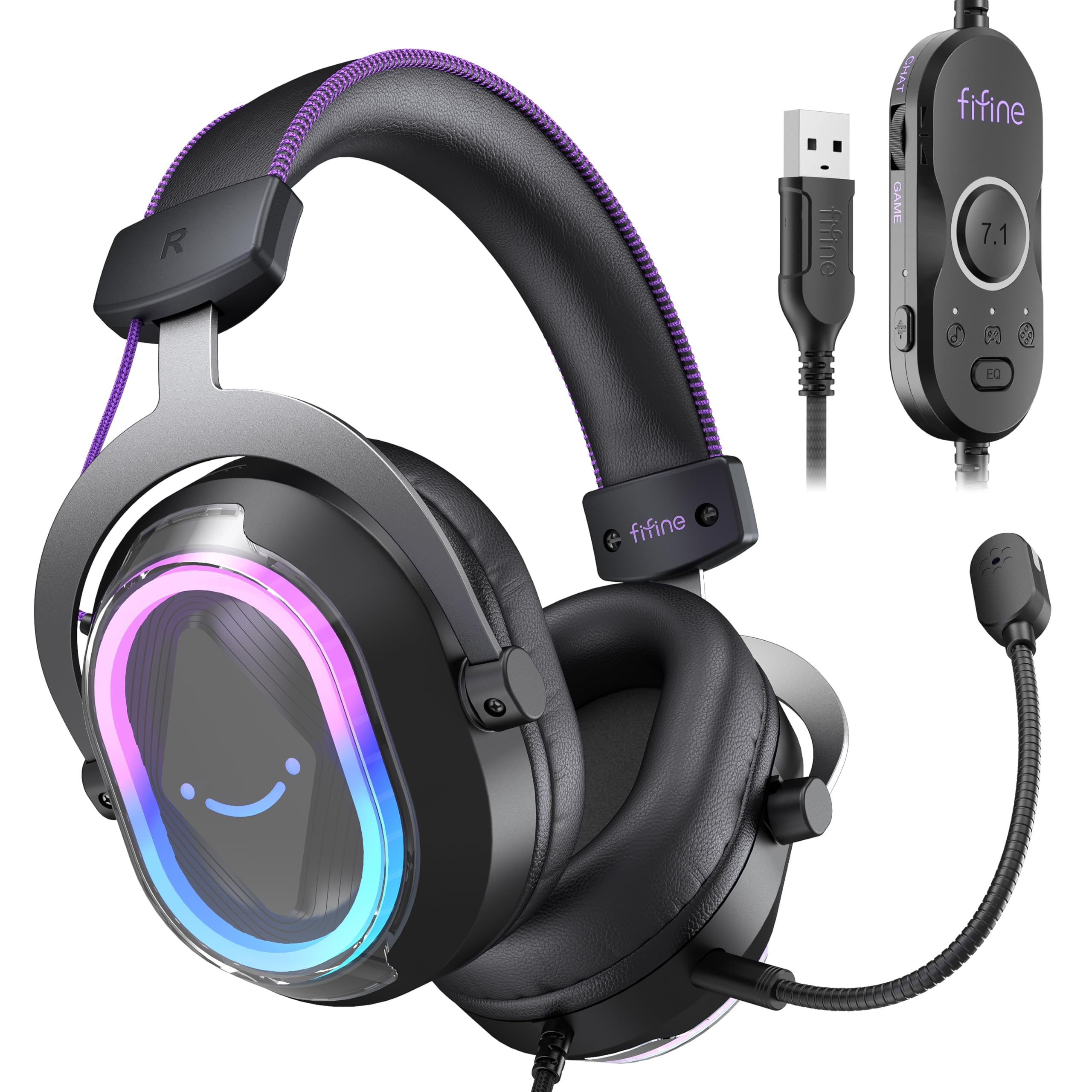
تصوير: هڪ تفصيلي view of the FIFINE AmpliGame H13BP Gaming Headset.

Image: Close-up diagram of the USB Control Box with labeled functions.
سيٽ اپ ڪريو
- هيڊ سيٽ ڳنڍيو: Plug the USB-A connector of the headset into an available USB port on your PC, Mac, PS5, or PS4. No additional software is required for basic functionality.
- مائڪروفون لڳايو: Insert the detachable microphone into the designated port on the left earcup until it clicks into place.
- ترتيب ڏيو: Adjust the headband and earcup positions for a comfortable and secure fit. The protein skin ear pads and memory foam cushions are designed for long-term comfort.

Image: Headset connected to various compatible devices.
آپريٽنگ هدايتون
USB Control Box Functions:
- Headset Volume Control: Use the volume wheel on the side of the control box to adjust the overall headset volume.
- مائڪروفون خاموش: Press the mic mute button on the control box to toggle the microphone on/off. The mic indicator light on the microphone will glow red when muted.
- راند/چيٽ بيلنس: Use the dedicated slider on the control box to prioritize game audio or chat audio. Slide towards 'CHAT' to increase chat volume relative to game volume, or towards 'GAME' to increase game volume.
- 7.1 چوڌاري آواز: Press the 7.1 button on the control box to activate or deactivate 7.1 virtual surround sound.
- EQ موڊس: Press the EQ button to cycle through four pre-set equalizer modes: Default (Balanced Audio), Music (Clear Vocal), Game (Powerful Bass), and Movie (Dynamic Enhancement). Long press the EQ button to return to default mode.

Image: Demonstrating the game/chat balancing feature.

تصوير: مٿانview of the different EQ modes available.
آر جي بي لائيٽنگ ڪنٽرول:
- Change RGB Modes: Press the dedicated button on the earcup to cycle through 11 different RGB lighting modes.
- Turn RGB On/Off: Long press the RGB button to turn the lighting on or off.

Image: Headset displaying various RGB lighting effects.
مائڪروفون خاصيتون
The detachable microphone is designed for clear voice pickup and features noise-canceling capabilities to reduce background distractions, ensuring your teammates hear you clearly.

Image: The microphone with its noise-canceling indicator.
آرام ۽ استحڪام
The H13BP headset is built for comfort during long gaming sessions. It features protein skin ear pads and soft memory foam cushions that conform to your ears. The adjustable headband ensures a snug fit for various head sizes. The durable construction includes metal and plastic components, and the braided cable enhances longevity.

Image: Close-up of the headset's comfortable earcups and adjustable headband.
وضاحتون
| خاصيت | تفصيل |
|---|---|
| برانڊ | FIFINE |
| ماڊل نمبر | H13BP |
| رابطي ٽيڪنالاجي | وائرڊ (USB-A) |
| ڪن جي جڳهه | ڪن مٿان |
| آڊيو ڊرائيور جي ماپ | 50 ملي ميٽر |
| آڊيو ڊرائيور جو قسم | متحرڪ ڊرائيور |
| تعدد جي حد | 20Hz - 20,000Hz |
| رڪاوٽ | 32 اومس |
| شور ڪنٽرول | غير فعال شور منسوخي |
| اضافي خاصيتون | 7.1 Surround Sound, Noise Canceling Mic, RGB Lighting |
| مطابقت رکندڙ ڊوائيسز | PC, Mac, PS5/PS4 (Not compatible with Xbox) |
| ڪيبل جون خاصيتون | Braided material cable (7.55ft) |
| ڪنٽرول قسم | Volume Control, Mic Mute, EQ Modes, 7.1 On/Off, Game/Chat Balance |
| مواد | چمڙو، ڌاتو، پلاسٽڪ |
مشڪلاتون
ڪو به آواز/مائڪروفون ڪم نه ڪري رهيو آهي:
- ڪنيڪشن چيڪ ڪريو: Ensure the USB-A connector is fully inserted into the port.
- Verify Mute Status: Check the mic mute button on the control box and the mic indicator light. Ensure the headset volume is not at minimum.
- سسٽم سيٽنگون: Confirm that the FIFINE H13BP headset is selected as the default audio input and output device in your computer's or console's sound settings.
- مطابقت: Remember that the headset is not compatible with Xbox consoles.
آر بي جي لائٽون ڪم نه ڪري رهيون آهن:
- ڪنيڪشن چيڪ ڪريو: پڪ ڪريو ته هيڊ سيٽ USB ذريعي صحيح طرح سان ڳنڍيل آهي.
- آر جي بي ٽوگل ڪريو: Long press the RGB button on the earcup to ensure the lighting is not simply turned off.
وارنٽي ۽ سپورٽ
For warranty information and detailed support, please refer to the official FIFINE website or contact their customer service. FIFINE offers product specialists assistance and free technical support for their products.
You can visit the FIFINE Store for more information: FIFINE Store on Amazon
سرڪاري پراڊڪٽ وڊيوز
FIFINE H13 USB Gaming Headset Review
وڊيو: هڪ جامع جائزوview of the FIFINE H13 USB Gaming Headset, demonstrating its features and performance.
Testing This Colorful Headset Immersive High-Quality Sound!
Video: A demonstration of the headset's immersive sound quality and vibrant RGB lighting.