
1. تعارف
This manual provides detailed instructions for the installation, operation, and maintenance of your AINAVI 10-inch Touchscreen Car Stereo Radio. Please read this manual thoroughly before using the product to ensure proper functionality and safety.
2. Compatible Vehicle Models
This head unit is designed for specific vehicle models and years. Please verify your vehicle's compatibility before installation.
- For Chevy Silverado: 1500HD / 2500HD / 3500HD (2007-2014, Second Generation)
- شيورليٽ لاءِ: Traverse (2009-2012), Express Van (2008-2011), Avalanche (2007-2011, GMT900), HHR (SS/LT/Panel/LS) (2006-2011), Tahoe (2007-2014, Third Generation), Impala (2006-2012, Ninth Generation), Equinox (2005-2009, First Generation), Suburban (2007-2014, Tenth Generation), Monte Carlo (2006-2007, Seventh Generation)
- For HUMMER: H2 (2008-2009)
- For BUICK: Enclave (2008-2012)
- جي ايم سي لاءِ: Savana (2008-2013), Sierra (Denali) (2007-2014), Yukon (Denali) (2007-2014), Acadia (Denali) (2007-2012)
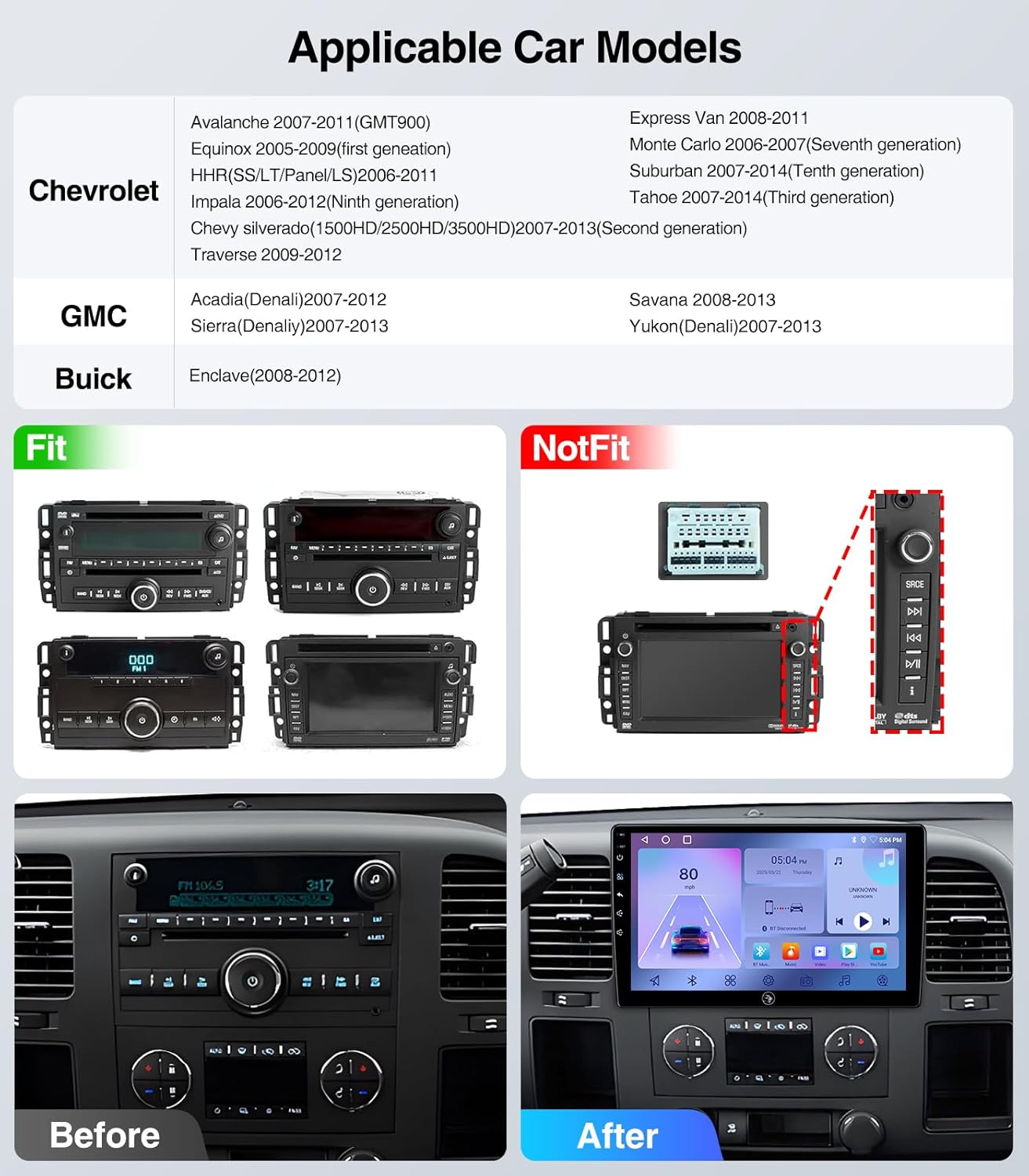
Figure 2.1: Applicable Car Models and Fitment Examples. This image illustrates various car models and their compatibility with the stereo, showing both fitting and non-fitting original radio units.
3. ڇا شامل آهي
پيڪيج ۾ هيٺيان اجزاء شامل آهن:
- 10 Inch 2+64G Android Car Stereo Head Unit
- Power Cable (with CANbus for some models)
- آر سي سي ڪيبل
- خارجي مائڪروفون
- جي پي ايس ماڊل
- USB ڪيبل *2
- ريورسنگ ڪنٽرول ڪيبل
- 1080P ريئر View ڪئميرا
- فريم هٽائڻ وارو اوزار

Figure 3.1: Included Components. This image displays all the parts and cables that come with your AINAVI car stereo system.
Video 3.1: What you will get for Chevy Silverado 07-13 Cable Connection. This video demonstrates the various cables and components included in the package for Chevy Silverado 2007-2013 models.
4. انسٽاليشن گائيڊ
Professional installation is recommended. Ensure the vehicle's power is disconnected before beginning installation. Refer to the specific wiring diagrams for your vehicle model.

Figure 4.1: Before and After Installation. This image illustrates the visual transformation of the car's dashboard after installing the AINAVI stereo.
Video 4.1: How to install radio for Chevy Silverado 07-13 Chevrolet GMC. This video provides a step-by-step guide on installing the car stereo in compatible Chevrolet and GMC models.
Video 4.2: 4Core Car Radio installation. This video demonstrates the installation process for a 4-core car radio, which is applicable to this model.
Video 4.3: Car Radio Stereo for Chevy Chevrolet Silverado/GMC Sierra. This video provides an overview of the car radio stereo and its installation in compatible Chevy and GMC vehicles.
5. آپريٽنگ هدايتون
5.1. ڪار پلي ۽ اينڊرائيڊ آٽو
The unit supports both wireless CarPlay and Android Auto. Connect your iPhone or Android phone wirelessly to access navigation, make calls, send messages, and enjoy music safely while driving.

Figure 5.1: Wireless CarPlay & Android Auto. This image demonstrates the seamless integration of smartphone features onto the car stereo display.
Video 5.1: How to connect wireless Android Auto. This video guides you through the process of connecting your Android phone wirelessly to the car stereo.
Video 5.2: How to connect CarPlay? BT&Tlink. This video explains how to connect your iPhone to the car stereo using Bluetooth and Tlink for CarPlay functionality.
5.2. جي پي ايس نيويگيشن
The unit features built-in GPS navigation and supports online/offline maps. Connect to Wi-Fi for online map access. You can install or delete Android apps from the Application Store, similar to a smartphone.

Figure 5.2: GPS Navigation. This image shows the GPS navigation interface with options for online/offline maps and voice commands.
5.3. بلوٽوت ڪنيڪشن
Supports Bluetooth hands-free calls and music streaming. Equipped with a built-in mic and an external mic for clear audio quality. Pair your device via Bluetooth settings.

Figure 5.3: 5G WiFi Hotspot & BT Connection. This image highlights the unit's capabilities for internet access and Bluetooth pairing.
5.4. ايف ايم ريڊيو
Listen to real-time traffic, news, and weather forecasts with the built-in FM Radio stereo receiver. (Not compatible with Sirius XM).

Figure 5.4: AM / FM / RDS Radio. This image shows the radio interface, allowing users to tune into various stations.
5.5. اسٽيئرنگ ويل ڪنٽرول
Operate all stereo functions directly from your steering wheel. Quickly adjust volume, skip tracks, and answer calls without diverting your attention from driving.

Figure 5.5: WiFi Connection and Steering Wheel Control. This image illustrates the convenience of controlling the stereo directly from the steering wheel.
5.6. وريل View ڪئميرا
The 1080P rear view camera provides HD reversing scenes with an astern ruler line for position information. If your car supports astern trajectory, it will also display on the screen.
Video 5.3: How to connect an aftermarket backup camera for Pickup Truck. This video demonstrates the connection process for an aftermarket backup camera in a pickup truck.
5.7. Split Screen and Screen Mirroring
The Android 13 operating system allows for split-screen functionality, enabling you to run multiple applications simultaneously. Screen mirroring is also supported.
Video 5.4: Split Screen Touchscreen Stereo Radio for Silverado 07-13. This video showcases the split-screen functionality of the touchscreen stereo.
Video 5.5: 5G-WiFi6 User Guide-Split-Screen-BT5.4. This video provides a user guide for 5G WiFi6, split-screen, and Bluetooth 5.4 features.
6. سار سنڀال
پنهنجي AINAVI ڪار اسٽيريو جي ڊگهي عمر ۽ بهترين ڪارڪردگي کي يقيني بڻائڻ لاءِ، انهن سار سنڀال جي هدايتن تي عمل ڪريو:
- صفائي: Use a soft, dry cloth to clean the touchscreen and surrounding areas. Avoid abrasive cleaners or solvents that may damage the screen or finish.
- سافٽ ويئر اپڊيٽ: Periodically check for software updates to ensure you have the latest features and bug fixes. Updates can typically be found on the manufacturer's webسائيٽ يا ڊوائيس جي سيٽنگن ذريعي.
- ماحولياتي حالتون: يونٽ کي انتهائي گرمي پد، ڊگهي عرصي تائين سڌي سج جي روشني، يا گهڻي نمي جي سامهون رکڻ کان پاسو ڪريو.
- ڪيبل ڪنيڪشن: پڪ ڪريو ته سڀئي ڪيبل محفوظ طريقي سان ڳنڍيل آهن. ڍلا ڪنيڪشن وقفي وقفي سان مسئلا پيدا ڪري سگهن ٿا.
7. مسئلا حل ڪرڻ
If you encounter any issues with your car stereo, refer to the following common troubleshooting steps:
- طاقت ناهي: Check all power connections and ensure the vehicle's ignition is on. Verify fuses are intact.
- آواز ناهي: Check volume levels, audio output settings, and speaker connections. Ensure the mute function is not activated.
- بلوٽوٿ ڪنيڪشن جا مسئلا: پڪ ڪريو ته بلوٽوٿ اسٽيريو ۽ توهان جي فون ٻنهي تي فعال آهي. پوئين جوڙي کي ختم ڪريو ۽ ٻيهر ڳنڍڻ جي ڪوشش ڪريو.
- جي پي ايس ڪم نه ڪري رهيو آهي: پڪ ڪريو ته GPS اينٽينا صحيح طرح سان نصب ٿيل آهي ۽ ان ۾ صاف آهي view of the sky. Check GPS settings for any disabled features.
- ٽچ اسڪرين غير جوابده: Try restarting the unit. If the issue persists, a factory reset might be necessary (refer to the settings menu).
- ڪار پلي/اينڊرائيڊ آٽو نه ڳنڍجي رهيو آهي: Ensure your phone's operating system is up to date. Check the USB cable if using a wired connection, or Bluetooth/Wi-Fi for wireless.
مسلسل مسئلن لاءِ، مھرباني ڪري ڪسٽمر سپورٽ سان رابطو ڪريو.
8. وضاحتون
| خاصيت | تفصيل |
|---|---|
| برانڊ | AINAVI |
| ماڊل | 10" 2G+64G |
| اسڪرين جي ماپ | 10 انچ |
| ڊسپلي جو قسم | QLED, Capacitive Touchscreen |
| آپريٽنگ سسٽم | Android 13 |
| ميموري رکڻ جي صلاحيت | 64 جي بي |
| خاص خاصيتون | Bluetooth, Touchscreen, Wired/Wireless CarPlay and Android Auto |
| رابطي ٽيڪنالاجي | Bluetooth, USB, Wi-Fi, Wired/Wireless CarPlay Android Auto |
| سپورٽ سيٽلائيٽ نيويگيشن سسٽم | GPS (North America, Worldwide maps) |
| آڊيو آئوٽ پٽ موڊ | اسٽيريو |
| شيءِ جو وزن | 1.45 ڪلوگرام |
9. وارنٽي ۽ سپورٽ
توهان جو AINAVI ڪار اسٽيريو هڪ سان گڏ اچي ٿو 12 مهينن جي ٺاهيندڙ جي گارنٽي.
For technical support, installation assistance, or warranty claims, please contact AINAVI customer service:
- ڪسٽمر سروس فون: +1 833 858 5016
- ڪم جا ڪلاڪ: 01:00 PM کان 00:00 AM PST
- اي ميل: info@ainavi.com

Figure 9.1: Customer Support Information. This image provides visual contact details for customer assistance.