
1. تعارف
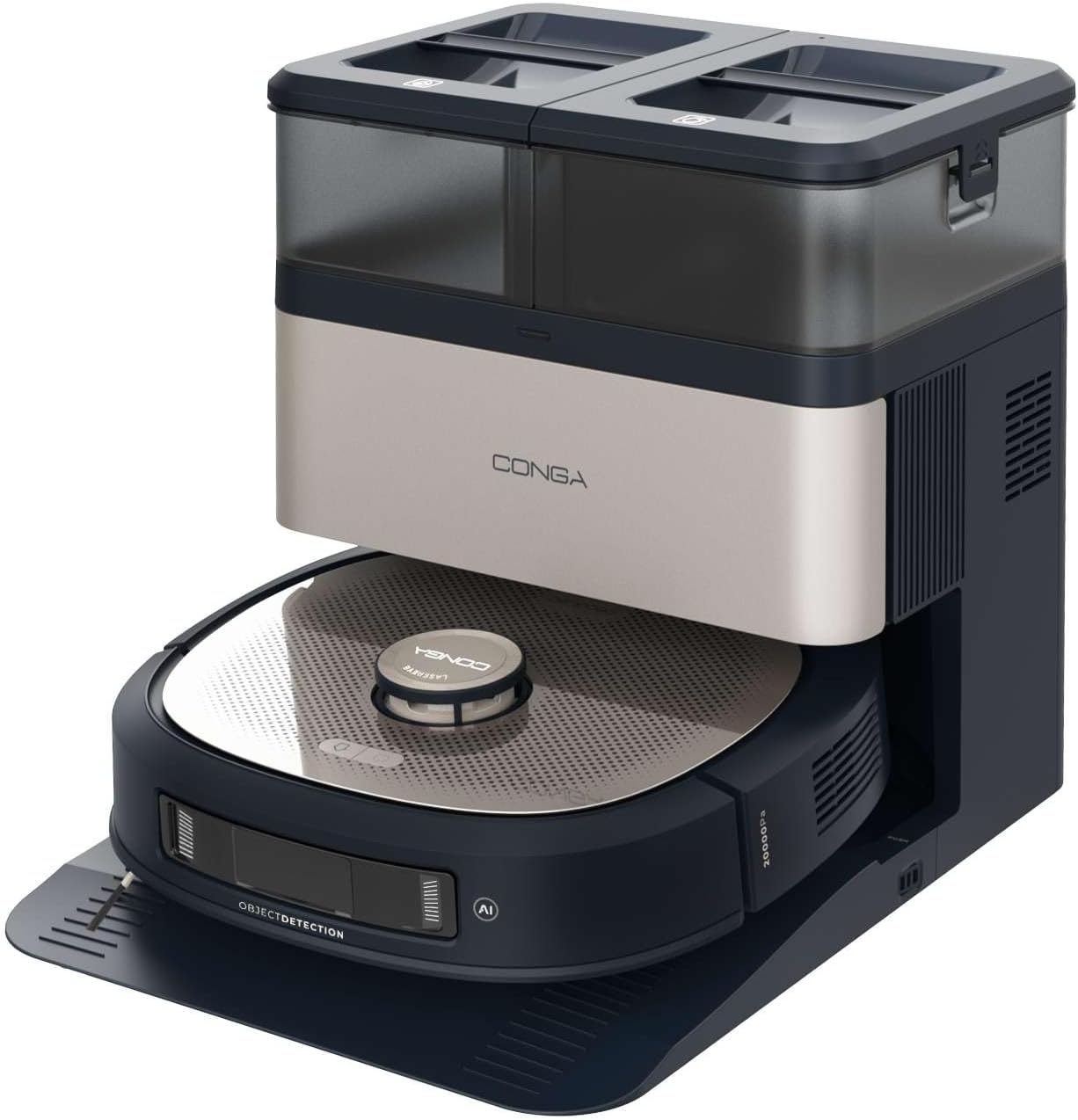
This manual provides essential instructions for the safe and efficient operation, maintenance, and troubleshooting of your Cecotec Conga Z100 X-Treme Robot Vacuum and Mop. This advanced cleaning device combines powerful vacuuming with professional mopping, intelligent navigation, and a convenient self-emptying and mop-cleaning station.
مھرباني ڪري پراڊڪٽ استعمال ڪرڻ کان پھريائين ھن دستور کي چڱي طرح پڙھو ۽ مستقبل جي حوالي لاءِ ان کي برقرار رکو.
2. پيداوار جا حصا
The Cecotec Conga Z100 X-Treme package includes the following items:
- Robot Vacuum and Mop Unit
- Self-Emptying and Mop Cleaning Station
- پاور اڊاپٽر
- Side Brushes (2 units)
- Main Brush (silicone)
- Bimaterial Mop Pad
- Disposable Dust Bag (pre-installed in station)
- Clean Water Tank (in station)
- Dirty Water Tank (in station)
- استعمال ڪندڙ جو دستياب (ھي دستاويز)
3. سيٽ اپ
3.1 پيڪنگ ۽ تياري
- احتياط سان پيڪنگنگ مان سڀني اجزاء کي هٽايو.
- Remove any protective films, stickers, or foam inserts from the robot and the station.
- پڪ ڪريو ته سيڪشن 2 ۾ درج ڪيل سڀئي جزا موجود آهن ۽ انهن کي نقصان نه پهتو آهي.
3.2 Placing the Self-Emptying and Mop Cleaning Station
- Place the station on a hard, level surface against a wall.
- Ensure there is at least 1 meter (3 feet) of clear space in front of the station and 0.5 meters (1.5 feet) on either side to allow the robot to dock properly.
- Keep the station away from direct sunlight, heat sources, and areas with high humidity.
- Plug the power adapter into the station and then into a wall outlet.
3.3 صاف پاڻي جي ٽانڪي ڀرڻ
- Open the lid of the clean water tank on the station.
- Fill the tank with clean tap water up to the MAX line. Do not use detergents or cleaning solutions not approved by Cecotec.
- Close the tank lid securely.
3.4 سائڊ برش لڳائڻ
- روبوٽ کي مٿي ڦيرايو.
- Align the side brushes with the corresponding posts (L for left, R for right) and press them down until they click into place.
3.5 شروعاتي چارجنگ
- Place the robot onto the charging contacts of the station. Ensure the charging contacts on both the robot and the station are aligned.
- روبوٽ پاڻمرادو چارج ٿيڻ شروع ڪندو. ان کي پهرين استعمال کان اڳ مڪمل طور تي چارج ٿيڻ ڏيو (تقريبن 4-6 ڪلاڪ).
3.6 Mobile Application Connection
- Download the official Cecotec Conga app from your smartphone's app store.
- Follow the in-app instructions to register an account and connect your Conga Z100 X-Treme robot. This typically involves connecting to the robot's Wi-Fi network during the setup process.

4. آپريٽنگ هدايتون
4.1 پاور آن/آف
- پاور آن: Press and hold the power button on the robot until the indicator lights illuminate.
- بجلي بند: پاور بٽڻ کي دٻايو ۽ رکو جيستائين اشاري جون بتيون بند نه ٿين.
4.2 صفائي جو چڪر شروع ڪرڻ
- Ensure the robot is fully charged and the clean water tank is filled (for mopping).
- Press the clean button on the robot or use the mobile app to start a cleaning cycle. The robot will automatically leave the station and begin cleaning.
- To pause cleaning, press the clean button once. Press again to resume.
- To send the robot back to the station, press the home button on the robot or use the app.
4.3 صفائي جا طريقا
The robot offers various cleaning modes accessible via the mobile application:
- خودڪار موڊ: The robot intelligently cleans the entire mapped area.
- اسپاٽ موڊ: مرڪوز ڪوشش سان هڪ مخصوص ننڍڙي علائقي کي صاف ڪري ٿو.
- ڪنڊ موڊ: ڀتين ۽ فرنيچر جي ڪنارن سان صفائي ڪري ٿو.
- علائقي جي صفائي: Allows you to define specific areas on the map for cleaning.
4.4 AI Navigation and Obstacle Avoidance
The Conga Z100 X-Treme utilizes AI with LaserEye technology for precise navigation. It identifies small objects, different floor types, and dirt levels, adapting its cleaning strategy accordingly. This allows it to navigate complex environments and avoid obstacles effectively.

4.5 AquaCycle Professional Mopping
The AquaCycle system ensures continuous mopping with clean water. The robot wets the bimaterial mop with clean water and wrings out dirty water into a separate tank, providing efficient and hygienic floor cleaning.

4.6 Wet&Protect Technology
The robot's intelligent mopping adapts to different surfaces. Its bimaterial mop provides deep cleaning with a super-absorbent side. When a carpet is detected, the robot activates CarpetCare mode and uses the smooth side of the mop to protect the carpet from moisture.

4.7 سکشن پاور
With an Ungravity motor providing 20000 Pa of suction power, the robot effectively cleans hidden dirt, even from high-pile carpets and deep tile grout.

5. سار سنڀال
باقاعده سار سنڀال بهترين ڪارڪردگي کي يقيني بڻائي ٿي ۽ توهان جي روبوٽ ويڪيوم ۽ ايم او پي جي عمر وڌائي ٿي.
5.1 Self-Emptying Station Maintenance
- مٽي بيگ متبادل: The station automatically empties the robot's dust bin into a disposable dust bag. Replace the dust bag when the indicator light on the station signals it is full (approximately every 12 weeks, depending on usage).
- صاف پاڻي جي ٽانڪي: Refill with clean water before each mopping cycle.
- گندي پاڻي جي ٽانڪي: Empty and rinse the dirty water tank after each mopping cycle to prevent odors and bacterial growth.
- ميپ خشڪ ڪرڻ: The station dries the mop with hot air after cleaning. Ensure the mop is properly positioned for effective drying.

5.2 روبوٽ جي اجزاء جي صفائي
- مکيه برش: Regularly remove hair and debris from the main silicone brush. Use the cleaning tool provided.
- پاسي وارا برش: Check for tangled hair or debris and clean as needed. Replace if worn or damaged.
- Bimaterial Mop Pad: Remove the mop pad after each mopping cycle and wash it thoroughly. It can be hand-washed or machine-washed (follow care instructions).
- سينسر: Wipe the cliff sensors, wall sensors, and charging contacts with a clean, dry cloth to ensure proper function.
- ڦيٿي: Clean any hair or debris from the robot's wheels.

6. مسئلا حل ڪرڻ
If you encounter issues with your Conga Z100 X-Treme, refer to the following common problems and solutions:
| مسئلو | ممڪن سبب | حل |
|---|---|---|
| روبوٽ نه ٿو ڦري. | بيٽري گهٽ آهي؛ پاور بٽڻ صحيح طرح نه دٻايو ويو آهي. | Place robot on charging station; press and hold power button for 3 seconds. |
| روبوٽ چارجنگ اسٽيشن نه ڳولي سگهيو. | Station obstructed; robot too far from station. | Ensure clear space around station; manually place robot closer to station. |
| خراب صفائي جي ڪارڪردگي. | Brushes or filters dirty/worn; dust bin full. | Clean/replace brushes and filters; empty dust bin. |
| روبوٽ اڪثر ڦاسي پوندو آهي. | Obstacles (cables, small objects); uneven surfaces. | Clear the cleaning area of obstacles; use virtual walls/no-go zones in app. |
| ايپ ڪنيڪٽوٽي جا مسئلا. | Incorrect Wi-Fi password; router too far; app outdated. | Verify Wi-Fi credentials; move robot closer to router; update app; reset robot's Wi-Fi. |
| صفائي ڪرڻ سان لڪيرون نڪرنديون آهن يا بي اثر هونديون آهن. | Mop pad dirty/worn; clean water tank empty; dirty water tank full. | Clean/replace mop pad; refill clean water tank; empty dirty water tank. |
| پاڻي جي پمپ جي غلطي. | Pump malfunction; blockage in water lines. | Check for blockages; contact customer support if issue persists. |
For persistent issues not covered here, please refer to the official Cecotec support channels.
7. وضاحتون
| خاصيت | تفصيل |
|---|---|
| برانڊ | Cecotec |
| ماڊل نالو | Conga Z100 X-Treme |
| ماڊل نمبر | A01_EU01_119672 |
| سکشن پاور | 20000 پي |
| بيٽري جي گنجائش | 5200 mAh |
| نيويگيشن ٽيڪنالاجي | AI with LaserEye |
| ڇڪڻ وارو نظام | AquaCycle Professional Mopping, Wet&Protect Technology, Bimaterial XXL Mop |
| Self-Emptying Station | Yes, with hot air mop drying |
| مٽي بيگ جي گنجائش | 3 ليٽر |
| صاف پاڻي جي ٽانڪي گنجائش | 3 ليٽر |
| گندي پاڻي جي ٽانڪي گنجائش | 3 ليٽر |
| Robot Dimensions (L x W x H) | 35.2 x 35.2 x 10.5 سينٽي |
| روبوٽ وزن | 4.92 ڪلو |
| جلدtage | 240 وولٽ |
| ڪنٽرول قسم | ايپ ڪنٽرول |
8. وارنٽي ۽ سپورٽ
Your Cecotec Conga Z100 X-Treme Robot Vacuum and Mop is covered by a manufacturer's warranty. Please refer to the warranty card included in your product packaging for specific terms and conditions, including the warranty period and coverage details.
For technical support, service, or to inquire about replacement parts and consumables, please contact Cecotec customer service through their official webسائيٽ يا توهان جي وارنٽي دستاويزن ۾ ڏنل رابطي جي معلومات.
Always ensure you have your product model number (A01_EU01_119672) and proof of purchase available when contacting support.