
1. تعارف
Thank you for choosing the FOHERE Professional Bill Counter H-A16. This device is designed to efficiently count banknotes and detect counterfeits, making cash handling faster and more secure. It is ideal for various environments such as retail stores, banks, businesses, and restaurants. This manual provides detailed instructions for setup, operation, maintenance, and troubleshooting to ensure optimal performance and longevity of your bill counter.
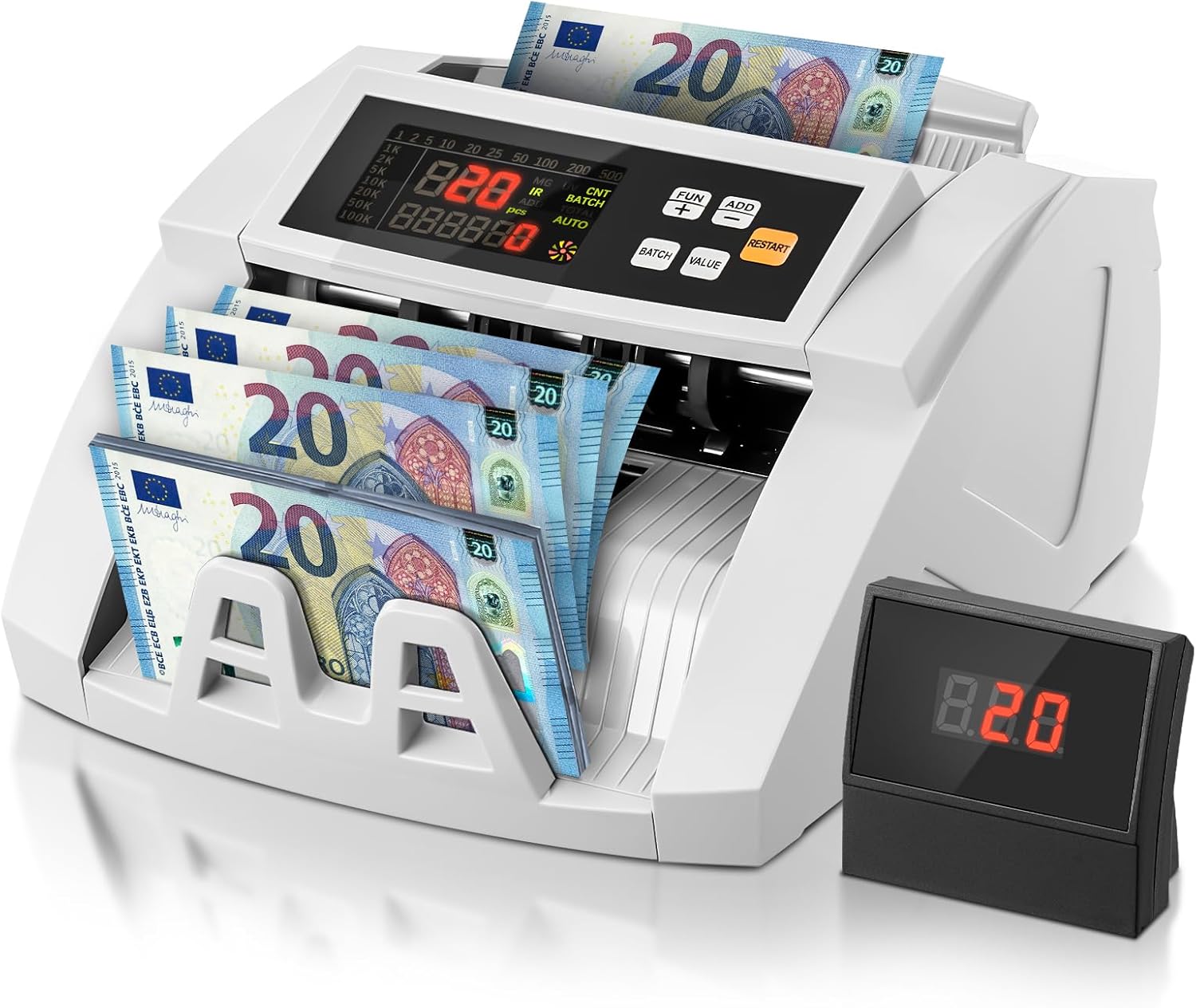
Image 1.1: FOHERE Bill Counter H-A16 processing Euro banknotes. The main LCD display shows counting information, and an external display unit is visible on the right.
2. حفاظتي هدايتون
- ڊوائيس کي هلائڻ کان پهريان سڀ هدايتون پڙهو.
- بجليءَ جي جھٽڪي کان بچڻ لاءِ ڊوائيس کي پاڻي يا ٻين مائعات کان پري رکو.
- ڊوائيس نه کوليو casing. سڀني خدمتن کي قابل اهلڪارن جي حوالي ڪريو.
- صرف مهيا ڪيل پاور اڊاپٽر ۽ ڪيبل استعمال ڪريو.
- پڪ ڪريو ته پاور آئوٽليٽ وال سان ملندو آهيtagڊوائيس جون گهرجون.
- Unplug the device from the power source before cleaning or when not in use for extended periods.
- آپريشن دوران هٿن ۽ ڍِلا ڪپڙن کي بل فيڊنگ ميڪانيزم کان پري رکو.
3. پيڪيج مواد
مھرباني ڪري ھيٺ ڏنل شين لاءِ پيڪيج چيڪ ڪريو:
- 1 x FOHERE Professional Bill Counter H-A16
- 1 x پاور ڪيبل
- 1 x صفائي برش
- 1 x External LCD Display
- 1 x استعمال ڪندڙ دستياب (هي دستاويز)

تصوير 3.1: مٿيview of the FOHERE Bill Counter H-A16 dimensions and included accessories.
4. پراڊڪٽ ختمview
The FOHERE H-A16 Bill Counter features a user-friendly design with a clear LCD display and intuitive controls. Key components include:
- ڇڪڻ وارو: Where bills are loaded for counting.
- اسٽيڪر: Where counted bills are collected.
- ڪنٽرول پينل: Buttons for mode selection, batch settings, and other functions.
- LCD ڊسپلي: Shows counting results, error messages, and mode indicators.
- External Display Port: For connecting the included external display.
- سينسر: UV, MG, IR, DD for counterfeit detection.

Image 4.1: Design features emphasizing efficiency and durability, including high-strength materials, user-friendly controls, and an improved bill rotor.
5. سيٽ اپ
- پيڪ ڪريو: Carefully remove the bill counter and all accessories from the packaging.
- لڳائڻ: Place the device on a stable, flat, and dry surface, ensuring adequate ventilation.
- پاور ڪنيڪشن: Connect the power cable to the device's power input and then plug it into a suitable electrical outlet.
- خارجي ڊسپلي (اختياري): If desired, connect the external LCD display to the designated port on the back of the bill counter.
- پاور آن: Press the power switch, usually located on the back or side of the machine. The device will perform a self-test, and the display will light up.
6. آپريٽنگ هدايتون
The FOHERE H-A16 offers multiple counting modes and advanced counterfeit detection.
6.1 بنيادي ڳڻپ
- Ensure the machine is powered on and in the default counting mode (usually AUTO).
- Fan out the bills to prevent them from sticking together.
- Place the stack of bills neatly into the hopper. Ensure they are aligned correctly and not folded or crumpled.
- The machine will automatically start counting. The count will be displayed on the LCD screen.
- Once counting is complete, remove the bills from the stacker.
6.2 Counting Modes
Use the control panel buttons to select different operational modes:
- خودڪار موڊ: The default mode for continuous counting.
- بيچ موڊ: Allows you to count bills in specific quantities. Press the 'BATCH' button, then use the numeric keys or '+' / '-' buttons to set the desired batch size (e.g., 10, 20, 50, 100). The machine will stop after counting the set number of bills.
- ADD موڊ: For cumulative counting. Each new count is added to the previous total. Press the 'ADD' button to activate.
- VALUE موڊ: Calculates the total monetary value of a stack of bills. اهم: This mode only works accurately for bills of the same denomination. Manually separate bills of different denominations and count them individually in this mode. Press the 'VALUE' button and select the denomination.

Image 6.1: Illustration of the four professional counting modes: Count, Add, Batch, and Value calculation.

Image 6.2: Display in Value Counting Mode, showing the quantity of bills and their total value. Note: Only count one denomination at a time for accurate value calculation.
6.3 جعلي جي ڳولا
The FOHERE H-A16 is equipped with multiple detection technologies:
- UV (Ultraviolet): Detects UV features present in genuine banknotes.
- MG (Magnetic): Scans for magnetic ink patterns on bills.
- IR (Infrared): Checks for infrared security features.
- DD (Dimension Detection): Verifies the physical dimensions of the banknotes.
If a suspicious bill is detected, the machine will automatically stop, display an error message on the screen, and emit an audible alarm. Remove the suspicious bill and press 'RESTART' to continue counting.
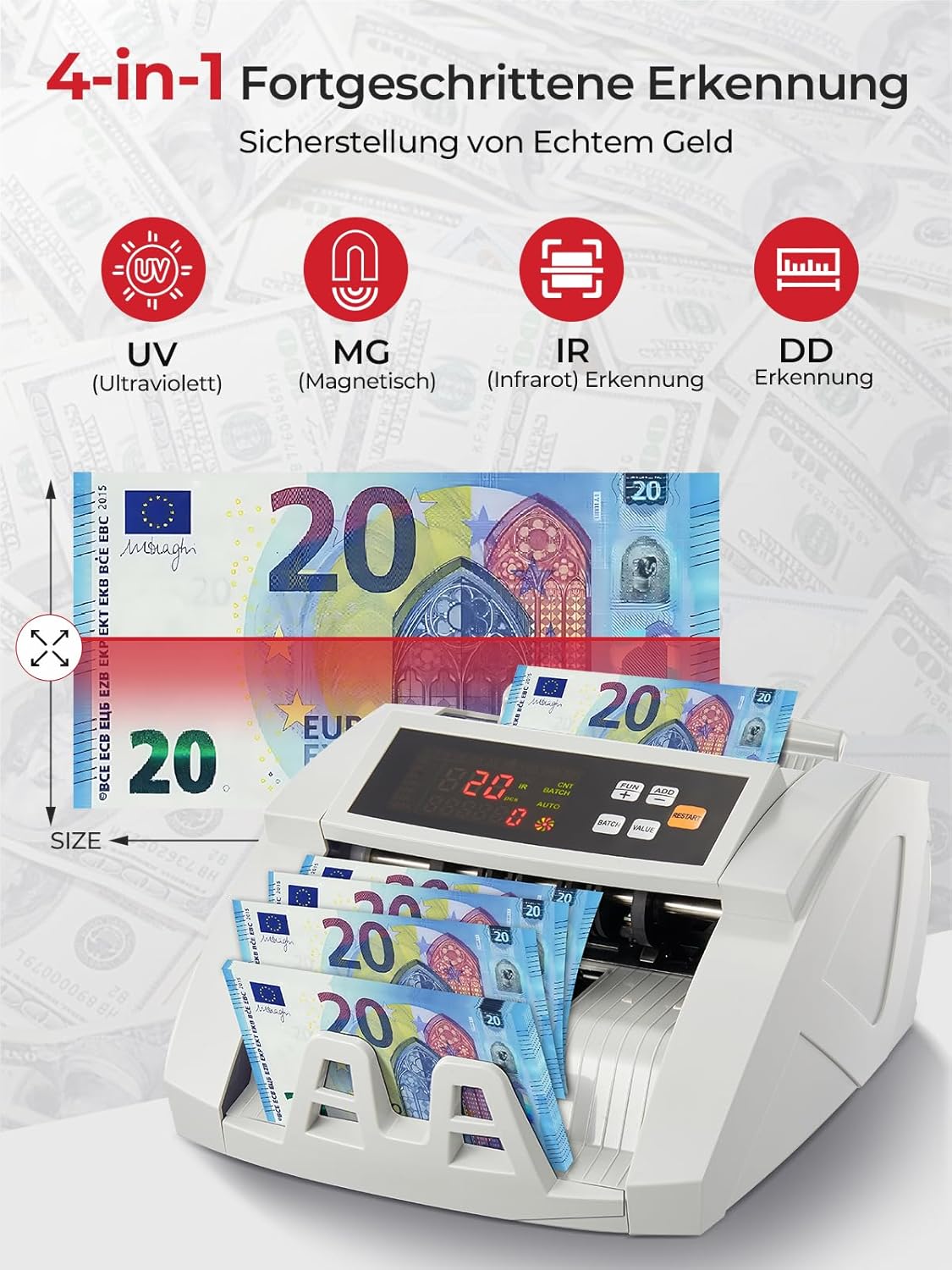
Image 6.3: Visual representation of the 4-in-1 advanced counterfeit detection system (UV, MG, IR, DD).
7. سار سنڀال
Regular maintenance ensures the accuracy and longevity of your bill counter.
7.1 صفائي
- بجلي بند: Always turn off and unplug the machine before cleaning.
- مٽي هٽائڻ: Use the provided cleaning brush or a soft, dry cloth to gently remove dust and debris from the hopper, stacker, and internal sensors.
- سينسر جي صفائي: Pay special attention to the UV, MG, and IR sensors. Accumulated dust can affect detection accuracy. Use a soft, lint-free cloth, possibly lightly dampened with isopropyl alcohol, to clean the sensor surfaces. Ensure they are completely dry before powering on.
- ٻاهران: مشين جي ٻاهرين حصي کي نرم، سڪل ڪپڙي سان صاف ڪريو. رگڙيندڙ صاف ڪندڙ يا محلول استعمال نه ڪريو.
7.2 اسٽوريج
When not in use for extended periods, store the bill counter in a clean, dry place, away from direct sunlight and extreme temperatures.
8. مسئلا حل ڪرڻ
عام مسئلن ۽ انهن جي حل لاءِ هيٺ ڏنل جدول جو حوالو ڏيو:
| مسئلو | ممڪن سبب | حل |
|---|---|---|
| مشين تي طاقت نه آهي | Power cable not connected; Power switch off; Power outlet issue | Check power cable connection; Ensure power switch is ON; Try a different power outlet. |
| Bills jam frequently | Bills not fanned out; Bills are crumpled/folded; Dust on rollers/sensors | Fan out bills before loading; Straighten bills; Clean rollers and sensors as per maintenance section. |
| Inaccurate counting results | Dust on sensors; Bills not inserted correctly; Worn rollers | Clean all sensors; Re-insert bills properly; Contact support if rollers appear worn. |
| Counterfeit detection errors | Dust on UV/MG/IR sensors; Bills are heavily worn or damaged | Clean UV, MG, and IR sensors; Try counting the bill manually or with another known genuine bill for comparison. |
| ٻاهرين ڊسپلي ڪم نه ڪري رهيو آهي | Cable not connected properly; Faulty display unit | Check the connection cable; Test with another external display if available, or contact support. |
9. وضاحتون
| خاصيت | تفصيل |
|---|---|
| برانڊ | FOHERE |
| ماڊل نمبر | H-A16 |
| ڳڻپ جي رفتار | 1100 بل / منٽ تائين |
| جعلسازي جو پتو لڳائڻ | UV (Ultraviolet), MG (Magnetic), IR (Infrared), DD (Dimension Detection) |
| هوپر جي گنجائش | 200 بل |
| اسٽيڪر جي گنجائش | 200 بل |
| ڏيکاريو | LCD, External Display |
| پيداوار جي ماپ (L x W x H) | 28 x 23.5 x 16 سينٽي |
| شيءِ جو وزن | 3.05 ڪلوگرام |
| Countable Banknote Size | 50 x 100 ملي ميٽر کان 90 x 170 ملي ميٽر |
| بجلي جي فراهمي | 220V 50Hz |
| بجلي جو استعمال | <80W |
| رنگ | اڇو |

Image 9.1: Performance metrics of the FOHERE Bill Counter, including counting speed and capacities.
10. وارنٽي ۽ سپورٽ
FOHERE products are manufactured to high-quality standards. For warranty information, please refer to the documentation provided with your purchase or contact your retailer. If you encounter any issues or have questions regarding the operation or maintenance of your FOHERE Professional Bill Counter H-A16, please contact FOHERE customer support for assistance.