
تعارف
Thank you for choosing the EUQQ YYK-Q10 AI Translator Earbuds. These earbuds are designed to provide seamless real-time language translation, high-quality audio, and effective noise cancellation, making them ideal for communication across language barriers, business meetings, and everyday use. This manual will guide you through the setup, operation, and maintenance of your new device to ensure optimal performance and user experience. Please read this manual thoroughly before using the product.
پيڪيج مواد
مھرباني ڪري ھيٺ ڏنل شين لاءِ پيڪيج چيڪ ڪريو:
- EUQQ YYK-Q10 AI Translator Earbuds (L/R)
- چارج ڪيس
- USB چارجنگ ڪيبل
- ڪنن جي ٽوٽن جا ڪيترائي سائز
- استعمال ڪندڙ دستي
جيڪڏهن ڪا به شيءِ غائب يا خراب آهي، مهرباني ڪري ڪسٽمر سپورٽ سان رابطو ڪريو.
پيداوار ختمview
The EUQQ YYK-Q10 features a compact design with intuitive controls and a smart charging case. Familiarize yourself with the components below.
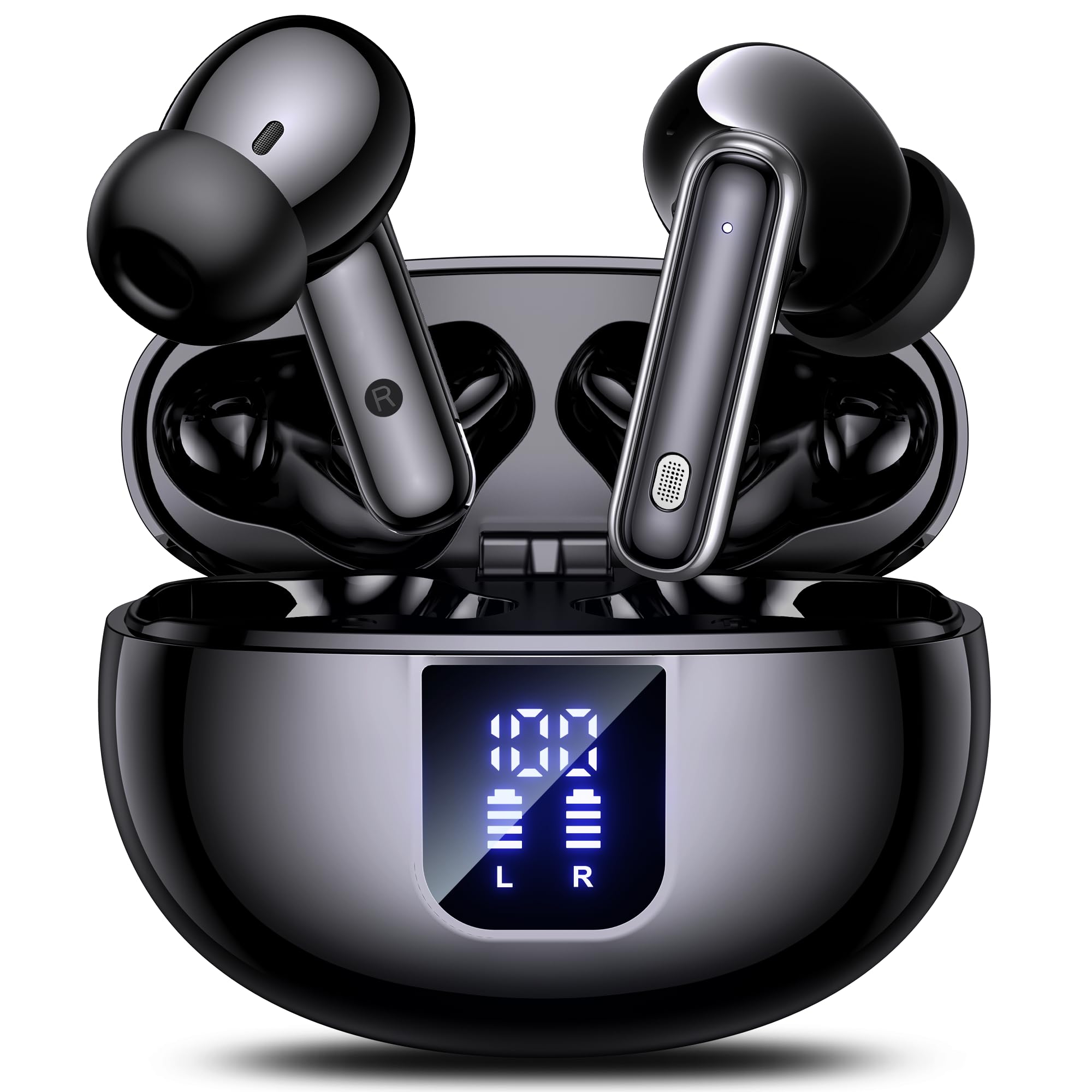
Image: The EUQQ YYK-Q10 AI Translator Earbuds are shown inside their open charging case. The case is black and features a digital display on the front, indicating battery levels for both the case and individual earbuds (L and R). The earbuds themselves are black with silver accents.
اهم اجزاء:
- ڪن جايون: Left (L) and Right (R) earbuds with touch control areas and microphones.
- چارج ڪيس: Stores and charges the earbuds. Features a digital display for battery status.
- چارج پورٽ: USB-C port on the charging case for power input.
- LED اشارا: On earbuds and case to show charging status and connection.
سيٽ اپ ڪريو
1. شروعاتي چارجنگ
- earئي ڪنڊن کي چارجنگ ڪيس ۾ رکو.
- USB چارجنگ ڪيبل کي ڪيس تي چارجنگ پورٽ ۽ پاور سورس سان ڳنڍيو.
- The digital display on the case will show the charging status. Ensure both earbuds and the case are fully charged before first use (approximately 1-2 hours).
2. بلوٽوٽ جوئر
- Open the charging case. The earbuds will automatically enter pairing mode, indicated by flashing LED lights.
- توهان جي اسمارٽ فون يا ڊوائيس تي، بلوٽوت کي فعال ڪريو ۽ دستياب ڊوائيسز جي ڳولا ڪريو.
- Select "EUQQ YYK-Q10" from the list of devices.
- Once connected, the earbud LEDs will stop flashing, and a voice prompt will confirm the connection.
3. ايپ انسٽاليشن (ترجمي جي خاصيتن لاءِ)
To utilize the real-time translation features, download the dedicated EUQQ translation app from your device's app store (iOS App Store or Google Play Store). Follow the in-app instructions to connect your earbuds and configure language settings.
آپريٽنگ هدايتون
پاور آن / آف
- پاور آن: چارجنگ ڪيس کوليو، يا ڪيس مان ائربڊس ڪڍو. اهي پاڻمرادو آن ٿيندا.
- بجلي بند: ائربڊس کي چارجنگ ڪيس ۾ واپس رکو ۽ ڍڪ بند ڪريو. اهي پاڻمرادو بند ٿي ويندا.
Music Playback Controls (Touch Controls)
- راند/روڪ: ٻنهي ائربڊ تي هڪ ڀيرو ٽيپ ڪريو.
- اڳيون ٽريڪ: ساڄي ائربڊ تي ٻٽي ٽيپ ڪريو.
- پويون ٽريڪ: کاٻي ائربڊ تي ٻٽي ٽيپ ڪريو.
- حجم مٿي ساڄي ائربڊ تي ٽي ڀيرا ٽيپ ڪريو.
- حجم ھيٺ کاٻي ائربڊ تي ٽي ڀيرا ٽيپ ڪريو.
Call Management (Touch Controls)
- جواب/آخر ڪال: ٻنهي ائربڊ تي هڪ ڀيرو ٽيپ ڪريو.
- ڪال رد ڪريو: 2 سيڪنڊن لاءِ ٻئي ائربڊ کي دٻايو ۽ رکو.
Translation Mode
Activate translation mode through the dedicated EUQQ app. The app will guide you through selecting source and target languages. Depending on the app's features, you may use different modes:
- ڳالهه ٻولهه جو طريقو: Speak into your earbud's microphone, and the translation will be played through the other person's earbud or your phone's speaker.
- Interpreter Mode: One person wears an earbud, the other speaks into the phone.
- Touch-to-Speak Mode: Tap an earbud to speak, release to translate.
Refer to the EUQQ app's help section for detailed instructions on specific translation modes and features.
شور جي منسوخي
The earbuds feature dual-mic noise cancelling. This feature is typically active by default or can be toggled via the companion app. It helps reduce ambient noise during calls and translation sessions for clearer communication.
سار سنڀال
- صفائي: ائربڊس ۽ چارجنگ ڪيس کي باقاعدي طور تي نرم، سڪل، لِنٽ فري ڪپڙي سان صاف ڪريو. سخت ڪيميڪل يا رگڙيندڙ مواد استعمال نه ڪريو.
- ڪن جي صلاح: Remove and clean ear tips periodically with water and mild soap. Ensure they are completely dry before reattaching.
- رابطا چارج ڪرڻ: صحيح چارجنگ کي يقيني بڻائڻ لاءِ ائربڊس ۽ ڪيس ٻنهي تي چارجنگ ڪانٽيڪٽس کي سڪل ڪپهه جي سواب سان نرميءَ سان صاف ڪريو.
- اسٽوريج: When not in use, store the earbuds in their charging case to protect them and keep them charged. Avoid extreme temperatures and humidity.
مشڪلاتون
| مسئلو | حل |
|---|---|
| ائربڊس نه ملائي رهيا آهن |
|
| ڪوبه آواز يا گهٽ حجم نه |
|
| چارج ڪرڻ جا مسئلا |
|
| ترجمو ڪم نٿو ڪري. |
|
وضاحتون
| خاصيت | تفصيل |
|---|---|
| برانڊ | EUQQ |
| ماڊل نالو | YYK-Q10 |
| رابطي ٽيڪنالاجي | وائرليس |
| هيڊ فون فارم فيڪٽر | ڪن ۾ |
| رنگ | ڪارو |
| شامل اجزاء | Instruction Manual (and other standard accessories like earbuds, case, cable, ear tips) |
| شين جو تعداد | 1 (product unit) |
| بيٽرين جي ضرورت آهي | No (built-in rechargeable) |
| ٺاهيندڙ ماڊل نمبر | YYK-Q10 |
| پيڪيج جي ماپ | 0.1 X 0.1 x 0.1 سينٽي ؛ 45.36 گ |
| ASIN | B0FN3WC8LW |
وارنٽي ڄاڻ
The EUQQ YYK-Q10 AI Translator Earbuds come with a standard manufacturer's warranty. For detailed information regarding warranty coverage, terms, and conditions, please refer to the warranty card included in your package or visit the official EUQQ webسائيٽ. مھرباني ڪري وارنٽي دعوائن لاءِ خريداري جو ثبوت رکو.
ڪسٽمر سپورٽ
If you encounter any issues or have questions regarding your EUQQ YYK-Q10 AI Translator Earbuds, please do not hesitate to contact our customer support team. You can find contact information on the official EUQQ website or through the support section of the EUQQ translation app.
آن لائين وسيلا:
- Official EUQQ Webسائيٽ: Visit EUQQ Store on Amazon
- EUQQ Translation App (for in-app support)