
تعارف
This manual provides detailed instructions for the installation, operation, maintenance, and troubleshooting of your AMASE AUDIO Ultra-Thin Android 13 Car Radio. This unit is designed for seamless integration into Old Mazda 3 models from 2004 to 2009, offering advanced features such as Android 13 OS, wireless CarPlay/Android Auto, DSP+, 4G WiFi, Bluetooth 5.0, and GPS navigation.
سيٽ اپ ۽ تنصيب
مطابقت جي چڪاس
Ensure your vehicle is an Old Mazda 3 manufactured between 2004 and 2009. This unit is designed for a direct 'Plug and Play' installation, eliminating the need for additional frames or cable modifications. It includes CANBUS support for integration with original vehicle functions.
تنصيب جا مرحلا
- Carefully remove the original car radio unit from your Mazda 3.
- Connect the provided wiring harness from the new AMASE AUDIO unit to your vehicle's existing wiring. The 'Plug and Play' design ensures a straightforward connection.
- Connect the CANBUS decoder to integrate steering wheel controls and other original vehicle signals.
- If installing a rear-view camera (included in some packages), connect it to the designated input on the unit.
- Secure the new car radio unit into the dashboard opening.
- Power on the vehicle to test the unit's functionality.
Physical Connections Overview

This image displays the rear panel of the car radio, highlighting the various input and output ports for power, speakers, USB, GPS antenna, and other accessories. Proper connection of these ports is crucial for full functionality.
آپريٽنگ هدايتون
سسٽم ختمview
Your car radio operates on a real Android 13.0 system, powered by a Qualcomm 8-Core processor (Quad-core ARM Cortex-A73 2.0GHz + Quad-core ARM Cortex-A53 1.8GHz) with 4GB RAM and 64GB ROM. It features a QLED 1280x720 pixel 9-inch capacitive touch screen and a built-in DSP for enhanced audio.
وائرليس ڪار پلي ۽ Android آٽو
The unit comes with a built-in application for both Apple CarPlay and Android Auto. Connect your iPhone or Android phone wirelessly via Bluetooth to access navigation, music, messages, and more directly on the car radio screen. No additional dongles or cables are required for wireless functionality.
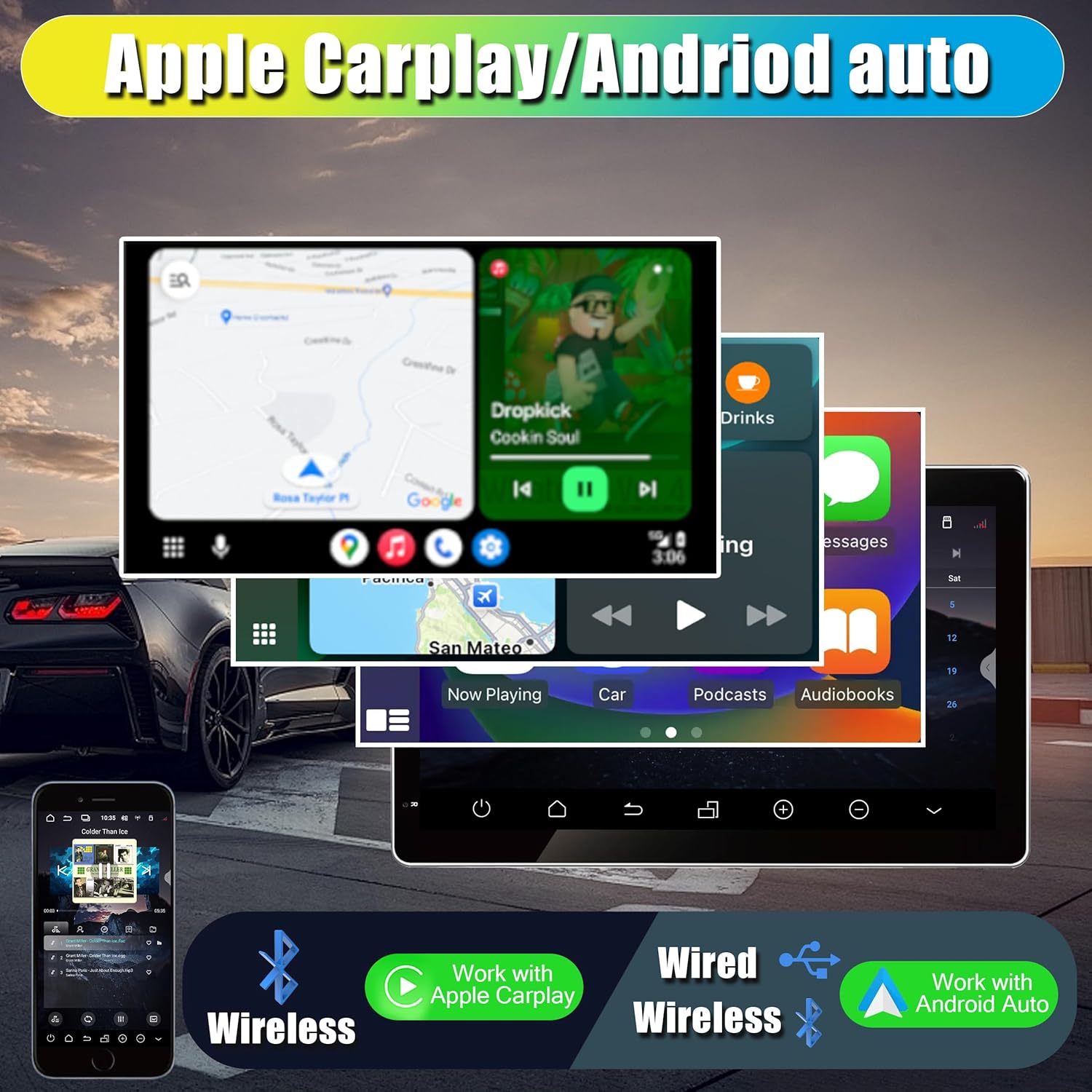
This image illustrates the integration of Apple CarPlay and Android Auto on the car radio's display, showing various applications like maps and music players.
4G WiFi & Bluetooth Connectivity
The unit supports 4G WiFi with 5GHz/2.4GHz bands, allowing you to connect to the internet while driving. You can also insert a 4G SIM card for a faster internet experience. Bluetooth 5.0 enables wireless music streaming and hands-free calling, enhancing driving safety.
ڊجيٽل سائونڊ پروسيسر (DSP)
The integrated DSP (Digital Sound Processor) with a built-in decoding chip allows for precise audio customization. Adjust equalization (EQ), control volume levels, and fine-tune sound settings to optimize your in-car audio experience.

This image shows the advanced audio settings interface, including EQ controls and precise volume adjustments, enabled by the DSP.
GPS نيويگيشن
Utilize the built-in Google Maps for online navigation. The system supports various navigation applications, providing real-time traffic updates and turn-by-turn directions.
Multimedia and User Interface
- 1080p Movie Playback: Enjoy high-definition video playback directly on the 9-inch screen.
- تقسيم اسڪرين ڪارڪردگي: Perform multiple tasks simultaneously, such as running navigation and music apps side-by-side.
- Multicolor LED Buttons: Customize the color of the unit's physical buttons to match your car's interior lighting.
- User Interface Themes: Select from three distinct UI themes to personalize your display.
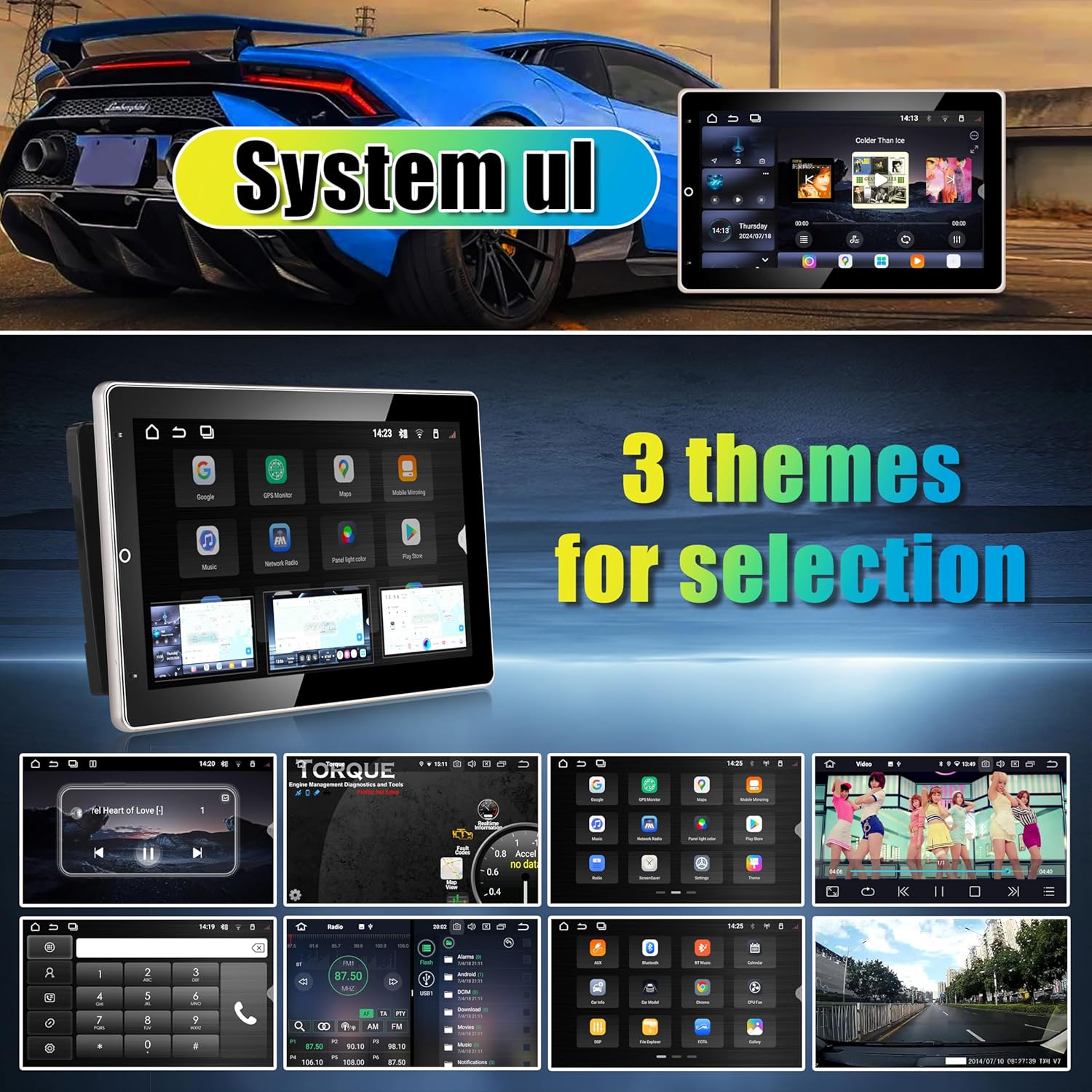
This image presents the three customizable user interface themes available, allowing users to select their preferred visual style for the system.
اسڪرين جي گردش
The unit supports one-touch automatic screen rotation to 90 degrees, and the user interface will adjust dynamically for optimal viewپورٽريٽ ۽ لينڊ اسڪيپ اورينٽيشن ٻنهي ۾.

This image demonstrates the automatic screen rotation feature, where the display and its user interface adapt when the unit is physically rotated.
ريڊيو جي ڪارڪردگي
The built-in radio module supports FM (87.5-107.9MHz) and AM (530-1620KHz) frequencies, including RDS (Radio Data System). DAB/DAB+ functionality is available with an optional external module.
سار سنڀال
پنهنجي ڪار ريڊيو جي ڊگهي عمر ۽ بهترين ڪارڪردگي کي يقيني بڻائڻ لاءِ، انهن سار سنڀال جي هدايتن تي عمل ڪريو:
- صفائي: اسڪرين ۽ ٻاهرين حصي کي صاف ڪرڻ لاءِ نرم، سڪل ڪپڙو استعمال ڪريو. رگڙيندڙ ڪلينر يا محلولن کان پاسو ڪريو جيڪي مٿاڇري کي نقصان پهچائي سگهن ٿا.
- گرمي پد: يونٽ کي گهڻي عرصي تائين گرم ۽ سرد ٻنهي سخت گرمي پدن ۾ بي نقاب ڪرڻ کان پاسو ڪريو.
- سافٽ ويئر اپڊيٽ: Periodically check for system software updates to ensure you have the latest features and security patches. Updates can typically be performed over WiFi.
- طاقت جو انتظام: Ensure your vehicle's electrical system is in good condition to prevent power fluctuations that could affect the unit.
مشڪلاتون
جيڪڏهن توهان کي پنهنجي ڪار ريڊيو سان مسئلا درپيش اچن ٿا، ته هيٺ ڏنل عام مسئلا حل ڪرڻ واري قدمن جو حوالو ڏيو:
- طاقت ناهي: Check all power connections and ensure the vehicle's ignition is on. Verify fuses in both the car and the unit's wiring harness.
- آواز ناهي: Check speaker connections. Ensure the volume is not muted or set to zero. Verify audio output settings in the system menu.
- ٽچ اسڪرين غير جوابده: يونٽ کي ٻيهر شروع ڪرڻ جي ڪوشش ڪريو. جيڪڏهن مسئلو برقرار رهي ٿو، ته فيڪٽري ري سيٽ ضروري ٿي سگهي ٿو (نوٽ: اهو سڀ صارف ڊيٽا ختم ڪري ڇڏيندو).
- جي پي ايس ڪم نه ڪري رهيو آهي: پڪ ڪريو ته GPS اينٽينا صحيح طرح سان ڳنڍيل آهي ۽ ان ۾ صاف آهي view of the sky. Check GPS settings within the system.
- بلوٽوٿ/وائي فائي ڪنيڪٽيويٽي جا مسئلا: Ensure Bluetooth/WiFi is enabled in the settings. Try restarting the unit and your connected device. For 4G, ensure the SIM card is correctly inserted and activated.
- ڪار پلي/اينڊرائيڊ آٽو نه ڳنڍجي رهيو آهي: Ensure your phone's Bluetooth is on and paired. Check the CarPlay/Android Auto app settings on both the unit and your phone.
وضاحتون
| خاصيت | تفصيل |
|---|---|
| ايپليڪيشن ماڊل | Old Mazda 3 (2004-2009) |
| آپريٽنگ سسٽم | Android 13 |
| سي پي يو | Qualcomm QCM6125 Octa-core (Quad-core ARM Cortex-A73 2.0GHz + Quad-core ARM Cortex-A53 1.8GHz) |
| اندروني اسٽوريج | 4GB رام ۽ 64GB روم |
| قرارداد | 1280*720 |
| اسڪرين جي ماپ | 9 inch TFT LCD, capacitive touch screen |
| بلوٽوٿ | 5.0 |
| ريڊيو Tuner | TDA7708L (FM/AM, RDS, DAB/DAB+ optional) |
| قسم | ڊبل ڊين |
| ڪم ڪندڙ درجه حرارت | -20 کان 60 درجا سينس |
| وائي فائي | Built-in WiFi Modem (5GHz/2.4GHz bands) |
| USB سپورٽ | USB flash drive, MP3 player, Micro SD card (for Media/Camera/DAB+ Box/Smartphone) |
| Surround Stereo Output | 4*50W |
| ٻوليون | More than 70 languages supported |
| خاص خاصيتون | DSP, GPS Navigation, LCD, Wireless CarPlay, Android Auto, Split Screen, Multicolor LED Buttons, OBDII & Rear Camera support |
| پيڪيج جي ماپ | 13.39 x 11.61 x 4.33 انچ |
| شيءِ جو وزن | 1.87 پائونڊ (850 گرام) |
| رنگ | ڪارو |
وارنٽي ڄاڻ
This AMASE AUDIO car radio comes with a هڪ سال وارنٽي from the date of purchase. This warranty covers defects in materials and workmanship. It allows for free replacement of defected parts, excluding the screen. Please note that human-induced damage is not covered under this warranty.
For warranty claims or service, please retain your proof of purchase and contact AMASE AUDIO customer support.
حمايت
For further assistance, technical support, or to explore other AMASE AUDIO products, please visit our official store: