
Tongtion TGN-W3401-B-YK-001
Tongtion Wireless Display Dongle Adapter User Manual
Model: TGN-W3401-B-YK-001
1. تعارف
Thank you for choosing the Tongtion Wireless Display Dongle Adapter. This device provides a seamless and portable solution for mirroring content from your smartphone, PC, or tablet to a larger display such as a TV, monitor, or projector. Featuring 1080p HDMI streaming, 5GHz WiFi, and support for AirPlay and Miracast, it offers a plug-and-play experience for various applications including business presentations, home entertainment, and multimedia education.
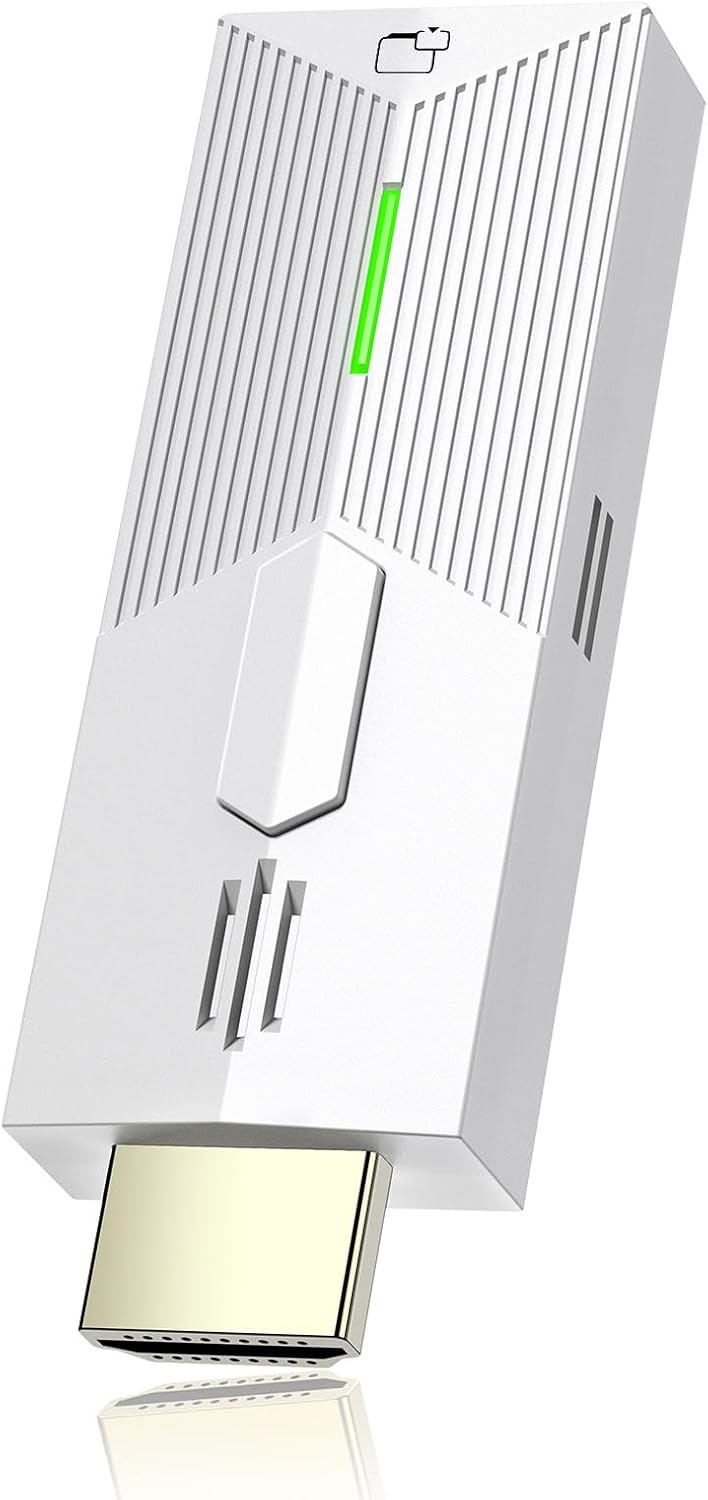
Image: The Tongtion Wireless Display Dongle Adapter, a compact white device with an HDMI connector and status indicator.
2. پيڪيج مواد
مھرباني ڪري تصديق ڪريو ته سڀ شيون توھان جي پيڪيج ۾ موجود آھن:
- Tongtion Wireless HDMI Display Dongle Adapter
- USB Power Cable (often integrated or separate for power)
- استعمال ڪندڙ جو دستياب (ھي دستاويز)
3. پراڊڪٽ ختمview
The Tongtion Wireless Display Dongle Adapter is designed for ease of use and stable performance. Below are the key components and their functions:
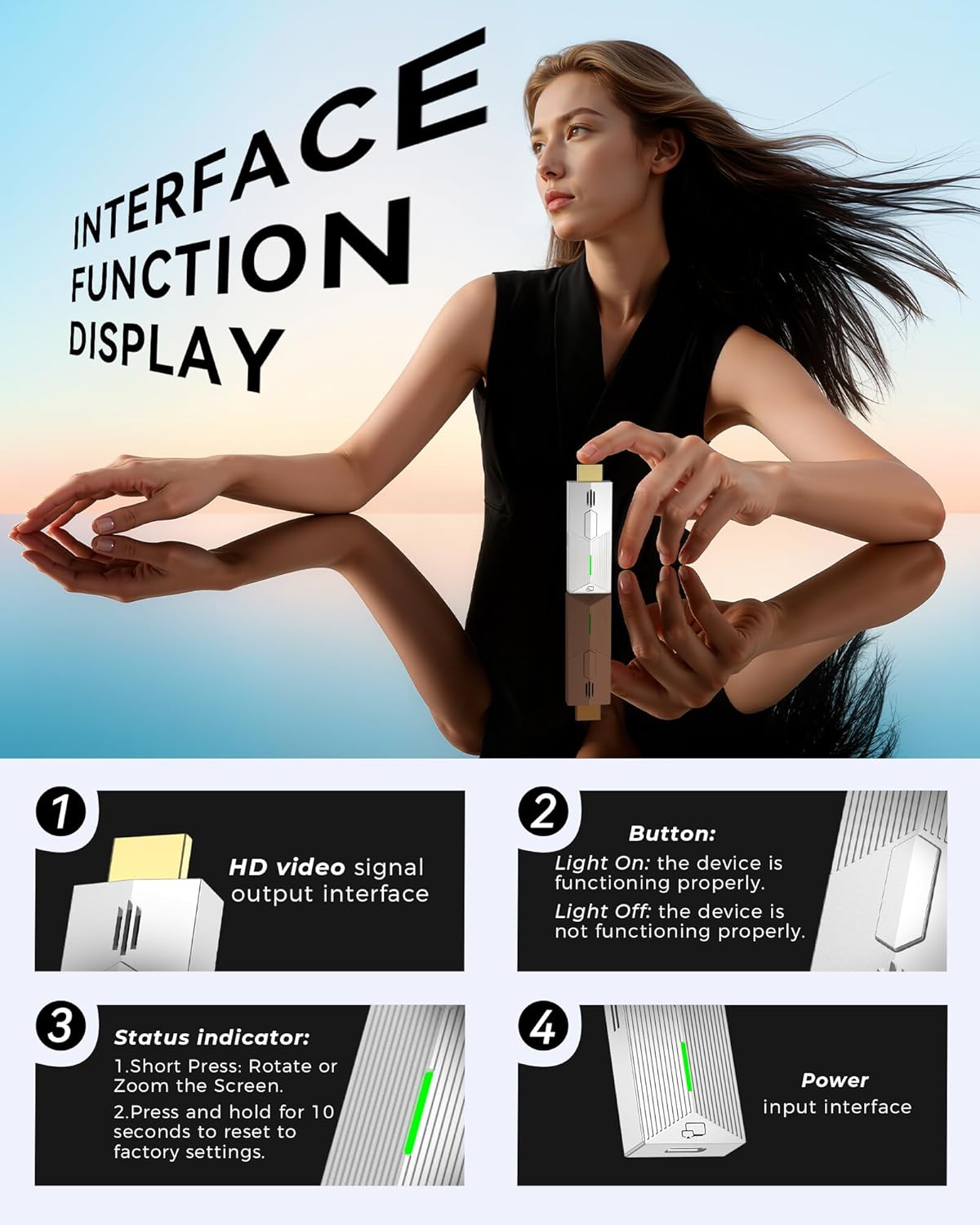
تصوير: تفصيلي view of the dongle's interface, highlighting the HDMI output, button, status indicator, and power input.
- HD Video Signal Output Interface: This is the HDMI connector that plugs into your TV, monitor, or projector.
- بٽڻ:
- Short Press: Rotates or zooms the screen.
- Press and hold for 10 seconds: Resets the device to factory settings.
- حالت اشارو:
- Light On: The device is functioning properly.
- Light Off: The device is not functioning properly.
- پاور ان پٽ انٽرفيس: Connects to the USB power cable for device operation.
The device supports 5G stable transmission for low latency and a smooth viewing experience. It is compatible with a wide range of devices and operating systems, including iOS, Android, Windows, and macOS.

Image: Diagram showing compatibility with various devices including iPhone, Android, Tablet, Laptop, TV, Monitor, and Projector, along with supported operating systems and protocols like WiFi, AirPlay, DLNA, Miracast, Windows, iOS, Android, and macOS.
4. سيٽ اپ گائيڊ
Follow these steps to set up your Tongtion Wireless Display Dongle Adapter:
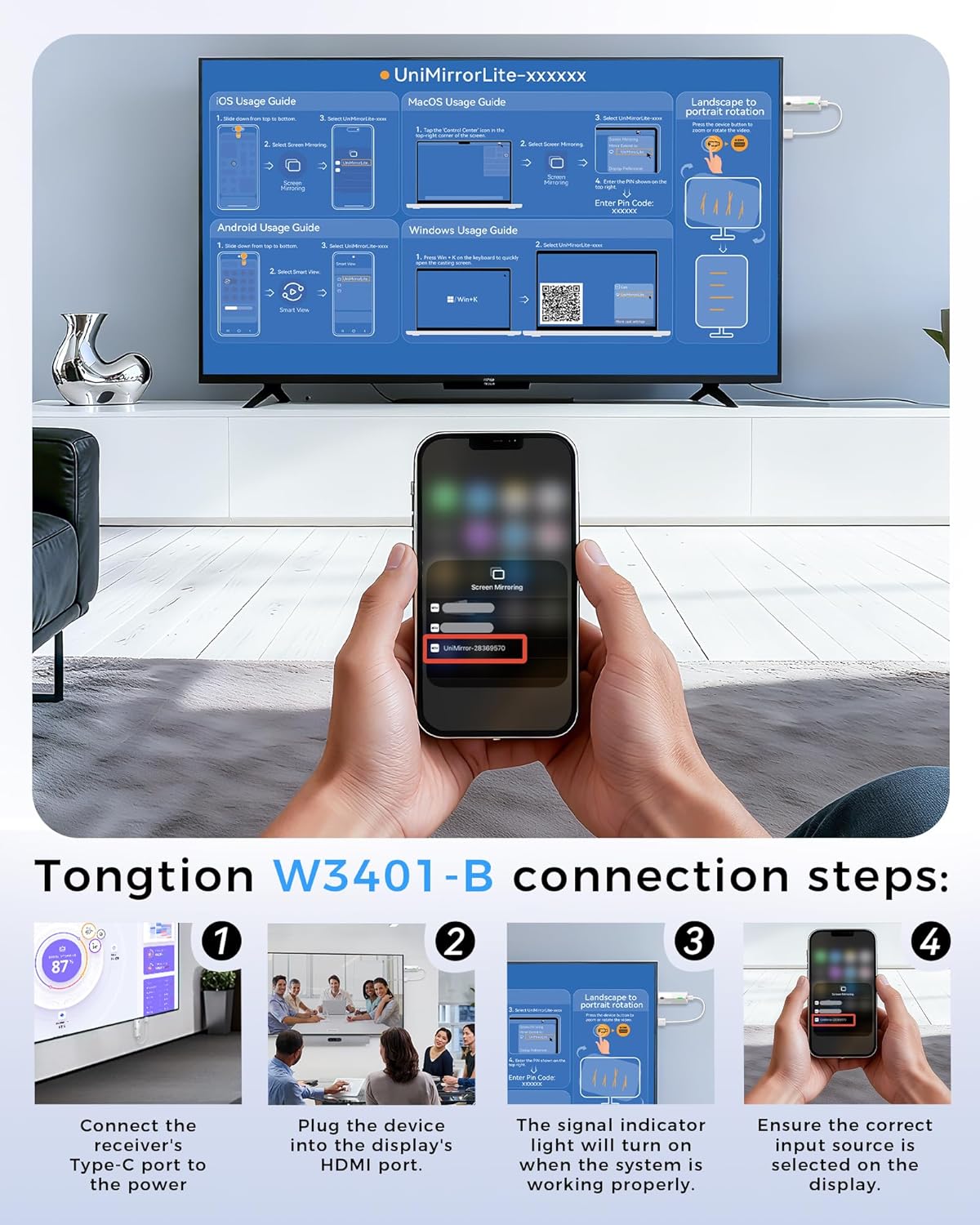
Image: Visual guide demonstrating the four connection steps for the Tongtion Wireless Display Dongle.
- پاور Connectنيو: Connect the receiver's Type-C port (or USB power input) to a power source using the provided USB cable. This can be a USB port on your TV or a separate USB power adapter (5V/2A recommended).
- Plug into Display: Plug the device into an available HDMI port on your TV, monitor, or projector.
- Verify Indicator: Ensure the signal indicator light on the dongle turns on, indicating the system is working properly.
- ان پٽ چونڊيو: On your display device (TV/monitor/projector), use its remote control to select the correct HDMI input source that the dongle is connected to.
Once connected, your display should show a setup screen with instructions for connecting your source device (smartphone, PC, etc.). The specific network name (SSID) and PIN will be displayed on your screen.
5. آپريٽنگ هدايتون
The Tongtion Wireless Display Dongle supports various wireless protocols for screen mirroring. No dedicated app is required for most devices.

Image: Comprehensive usage guides for connecting iOS, macOS, Android, and Windows devices, including steps for screen mirroring and screen rotation.
5.1. iOS Usage Guide (AirPlay)
- Slide down from the top-right corner of your iPhone/iPad screen to open Control Center.
- Tap the "Screen Mirroring" icon.
- Select "UniMirrorLite-xxxxxx" (the name displayed on your TV screen) from the list of available devices.
- توهان جي iOS ڊوائيس جي اسڪرين هاڻي ڊسپلي تي آئيني ڪئي ويندي.
5.2. macOS Usage Guide (AirPlay)
- Click the "Control Center" icon in the top-right corner of your macOS screen.
- Select "Screen Mirroring".
- Choose "UniMirrorLite-xxxxxx" (the name displayed on your TV screen) from the list.
- If prompted, enter the PIN code displayed on your TV screen.
5.3. Android Usage Guide (Miracast/Smart View)
- Slide down from the top of your Android screen to open the Quick Settings panel.
- Tap the "Smart View" (or "Cast", "Wireless Display", "Screen Mirroring") icon.
- Select "UniMirrorLite-xxxxxx" (the name displayed on your TV screen) from the list of available devices.
- توهان جي اينڊرائيڊ ڊيوائس جي اسڪرين هاڻي ڊسپلي تي آئيني ۾ هوندي.
5.4. Windows Usage Guide
- کي دٻايو Windows key + K on your keyboard to quickly open the "Connect" sidebar.
- Select "UniMirrorLite-xxxxxx" (the name displayed on your TV screen) from the list of available wireless displays.
- Your Windows screen will now be mirrored or extended to the display.
5.5. Screen Rotation and Zoom
The Wireless HDMI Display Adapter supports mirror mode and off-screen mode. By clicking the button in the middle of the dongle, you can easily zoom in and out of the screen or rotate the display to enhance the viewتجربو.

Image: A laptop displaying content on its screen while simultaneously extending the display to a large TV via the wireless dongle, illustrating the extended mode functionality.
6. سار سنڀال
To ensure the longevity and optimal performance of your Tongtion Wireless Display Dongle Adapter, please follow these maintenance guidelines:
- صفائي: ڊوائيس کي صاف ڪرڻ لاءِ نرم، سڪل ڪپڙو استعمال ڪريو. مائع صاف ڪندڙ يا ايروسول استعمال ڪرڻ کان پاسو ڪريو.
- اسٽوريج: ڊوائيس کي سڌي سج جي روشني ۽ انتهائي گرمي پد کان پري ٿڌي، سڪل جاءِ تي رکو.
- سنڀالڻ: ڊوائيس کي احتياط سان هلايو. ان کي ڇڏڻ يا ان کي مضبوط ڌڪن جي تابع ڪرڻ کان پاسو ڪريو.
- طاقت: Always use the recommended power adapter (5V/2A) to prevent damage.
7. مسئلا حل ڪرڻ
If you encounter issues with your Tongtion Wireless Display Dongle Adapter, refer to the following common problems and solutions:
| مسئلو | ممڪن سبب / حل |
|---|---|
| ٽي وي/مانيٽر تي ڪابه ڊسپلي ناهي. |
|
| Unstable connection or lag. |
|
| Cannot mirror certain apps (e.g., Netflix, Amazon Prime Video). | This dongle does not support certain paid applications that employ "HDCP" video copyright protection. These include, but are not limited to, Netflix, Amazon Prime Videos, Hulu, Comcast TV, Xfinity, Vudu, Sky Go, and BT Sport. This is a limitation due to copyright protection, not a device malfunction. |
| Device not found during screen mirroring. |
|
8. وضاحتون
| خاصيت | تفصيل |
|---|---|
| برانڊ | ٽونگشن |
| ماڊل نمبر | TGN-W3401-B-YK-001 |
| رابطي ٽيڪنالاجي | HDMI, 5GHz WiFi |
| ڪنيڪٽر جو قسم | HDMI |
| قرارداد | 1080p Full HD Output (supports 4K decoding) |
| سپورٽ پروٽوڪول | AirPlay, DLNA, Miracast, Cast |
| سپورٽ ٿيل OS | iOS، Android، ونڊوز، macOS |
| شيءِ جو وزن | 2.39 اونس |
| پيداوار جي ماپ | 5.8 x 3.7 x 1 انچ |
9. وارنٽي ۽ سپورٽ
Tongtion products are designed for reliability and performance. For warranty information and technical support, please refer to the official Tongtion webسائيٽ يا اسان جي ڪسٽمر سروس ٽيم سان رابطو ڪريو.
- آن لائن سپورٽ: جو دورو ڪريو Tongtion Store on Amazon پراڊڪٽ جي معلومات ۽ اڪثر پڇيا ويندڙ سوالن لاءِ.
- رابطو: For further assistance, please reach out to Tongtion customer support through the contact methods provided on our official channels.
Ask a question about this manual
Ask about setup, troubleshooting, compatibility, parts, safety, or missing instructions. Manuals+ will review the question and use this page’s manual context to help answer it.