
1. تعارف
The BAOFENG UV-5R Mini is a compact, dual-band walkie-talkie designed for reliable communication. It features app programming, frequency copying, NOAA weather alerts, and adjustable power output. This manual provides essential information for the safe and efficient use of your radio.
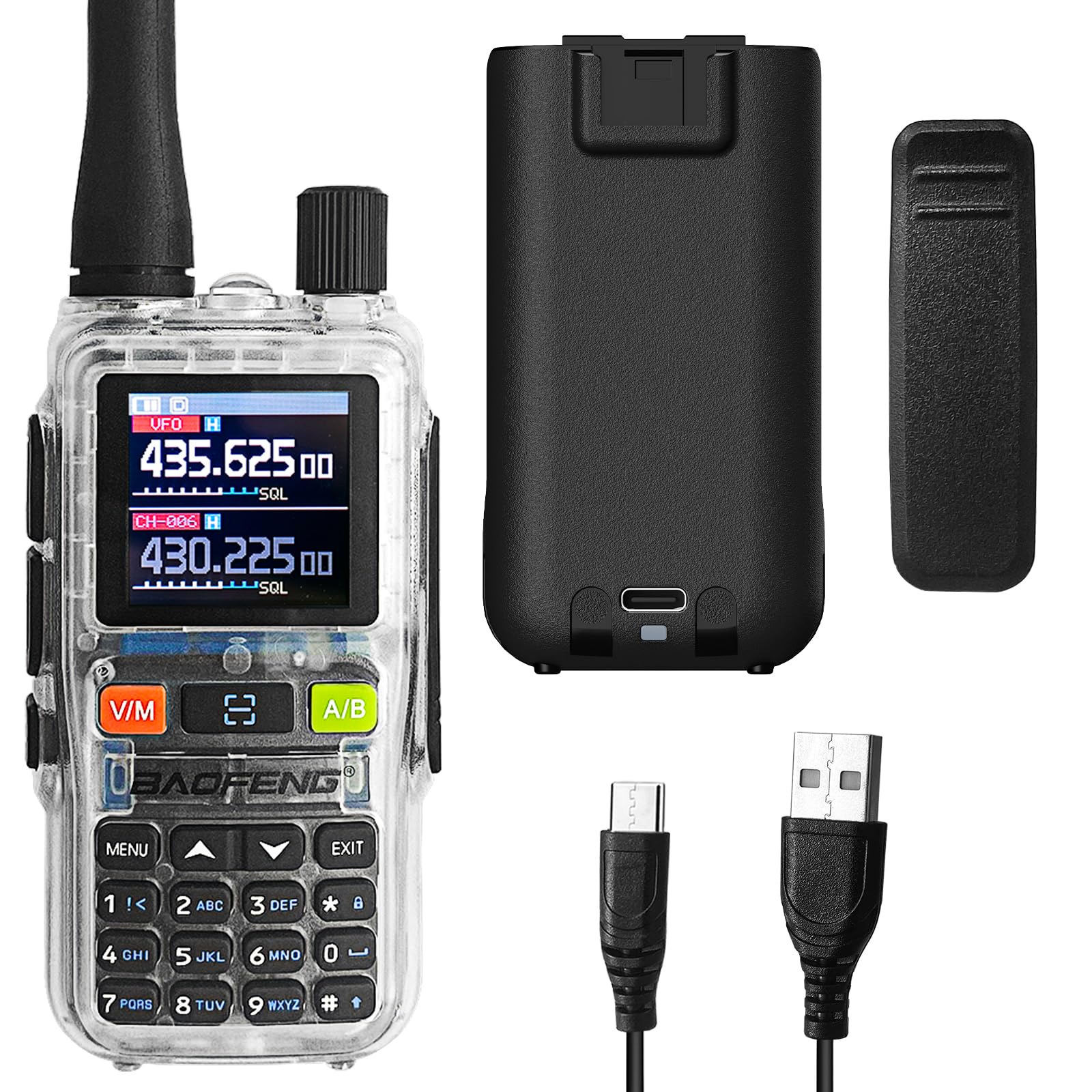
Figure 1: BAOFENG UV-5R Mini Radio. This image shows the front of the radio with its display and keypad.
2. Package Contents and Device Overview
2.1 پيڪيج مواد
پڪ ڪريو ته سڀئي شيون توهان جي پيڪيج ۾ موجود آهن:
- BAOFENG UV-5R Mini Radio
- اينٽينا
- بيٽري
- بيلٽ ڪلپ
- USB-C چارجنگ ڪيبل
- استعمال ڪندڙ دستي
2.2 ڊوائيس ختمview

شڪل 2: سامهون view of the radio with key components labeled, including Antenna, Flashlight, Volume Power Knob, LED Indicator, PTT-A Button, PTT-B Button, Screen, Accessory Port, A/B button, Microphone, Monitor button, Search/Flashlight button, V/M-VFO/MR button, and Numeric Keypad.

شڪل 3: پاسي view of the radio, showing the PTT buttons and accessory port.

شڪل 4: پوئتي view of the radio, highlighting the USB-C charging port.
3. سيٽ اپ
3.1 بيٽري لڳائڻ ۽ چارج ڪرڻ
- Align the battery with the compartment on the back of the radio and slide it into place until it clicks.
- To charge, connect the provided USB-C cable to the radio's USB-C port and a compatible power source (e.g., computer, wall adapter, power bank, car charger).
- The LED indicator will show charging status. A full charge typically takes several hours.

Figure 5: The radio can be charged via USB-C from multiple sources, including a computer, wall plug, power bank, or car charger.
3.2 Antenna and Belt Clip Attachment
- اينٽينا کي ريڊيو جي چوٽيءَ تي ڪنيڪٽر تي گھڙيال جي طرف اسڪرو ڪريو جيستائين اهو آڱر سان تنگ نه ٿئي. وڌيڪ تنگ نه ڪريو.
- Attach the belt clip to the designated slot on the back of the radio by sliding it down until it locks securely.
4. بنيادي آپريشن
4.1 پاور آن/آف ۽ واليوم ڪنٽرول
- To power on, rotate the Volume Power Knob clockwise.
- To power off, rotate the Volume Power Knob counter-clockwise until it clicks.
- Adjust the volume by rotating the Volume Power Knob.
4.2 Channel Selection and Frequency Mode
- استعمال ڪريو وي/م button to switch between Frequency (VFO) mode and Channel (MR) mode.
- In Channel mode, use the up/down arrow keys to select a channel.
- In Frequency mode, enter frequencies directly using the numeric keypad.
4.3 منتقلي ۽ وصول ڪرڻ
- Press and hold the PTT-A or PTT-B button to transmit. Speak clearly into the microphone.
- حاصل ڪرڻ لاءِ PTT بٽڻ کي دٻايو.
- The radio supports dual-band TX/RX and dual standby, allowing monitoring of two frequencies simultaneously.
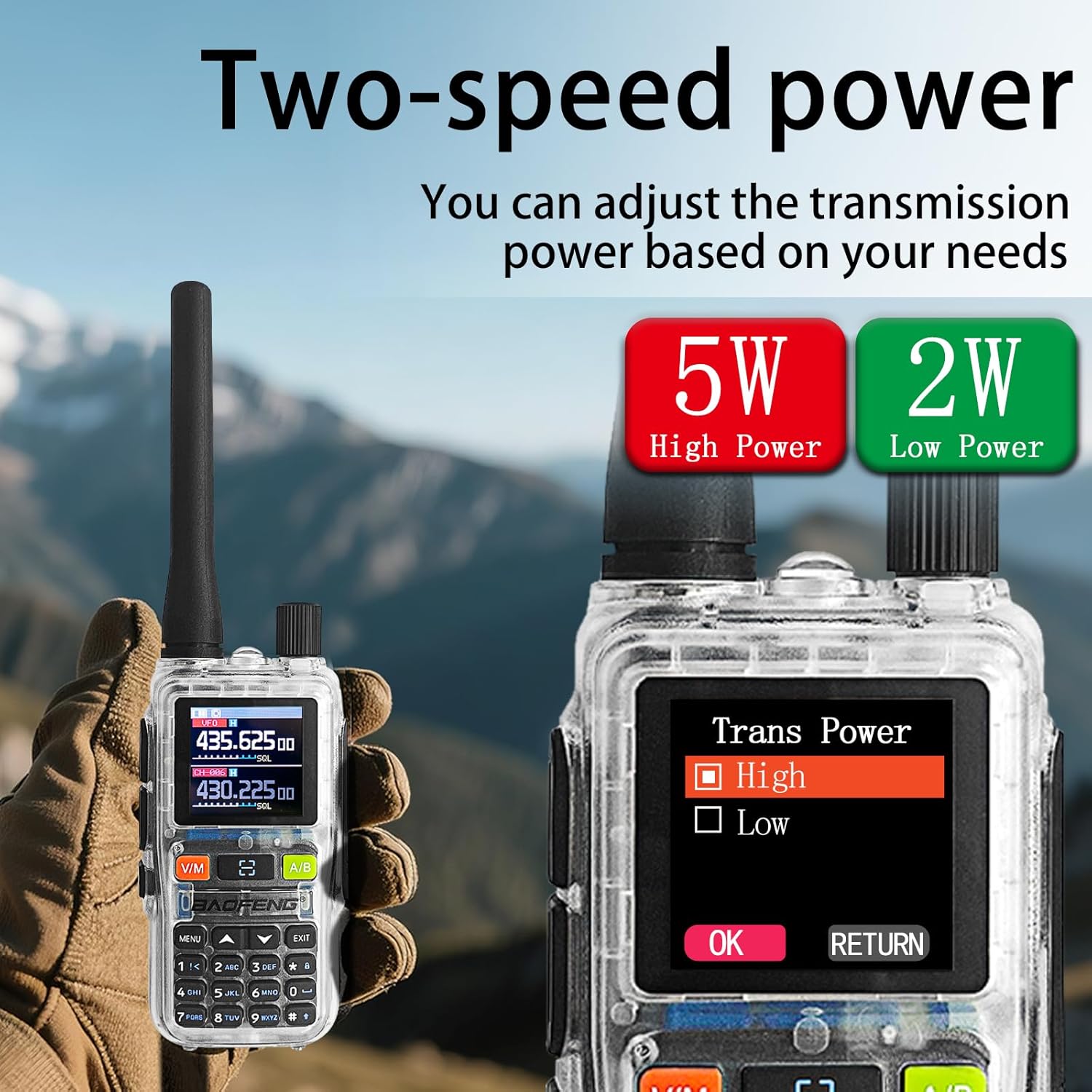
Figure 6: The radio's display showing two active frequencies for dual-frequency standby, with the PTT A/B buttons highlighted.
4.4 NOAA موسم جي خبرداري
- The radio can receive NOAA weather alerts. Refer to the menu settings for activating and configuring NOAA channels.

Figure 7: The radio supports NOAA Weather Alerts, providing critical weather information.
4.5 Adjustable Power Output
- The radio supports adjustable power output (5W/2W). This can be configured through the menu or app.
- Higher power (5W) provides greater range, while lower power (2W) conserves battery life.
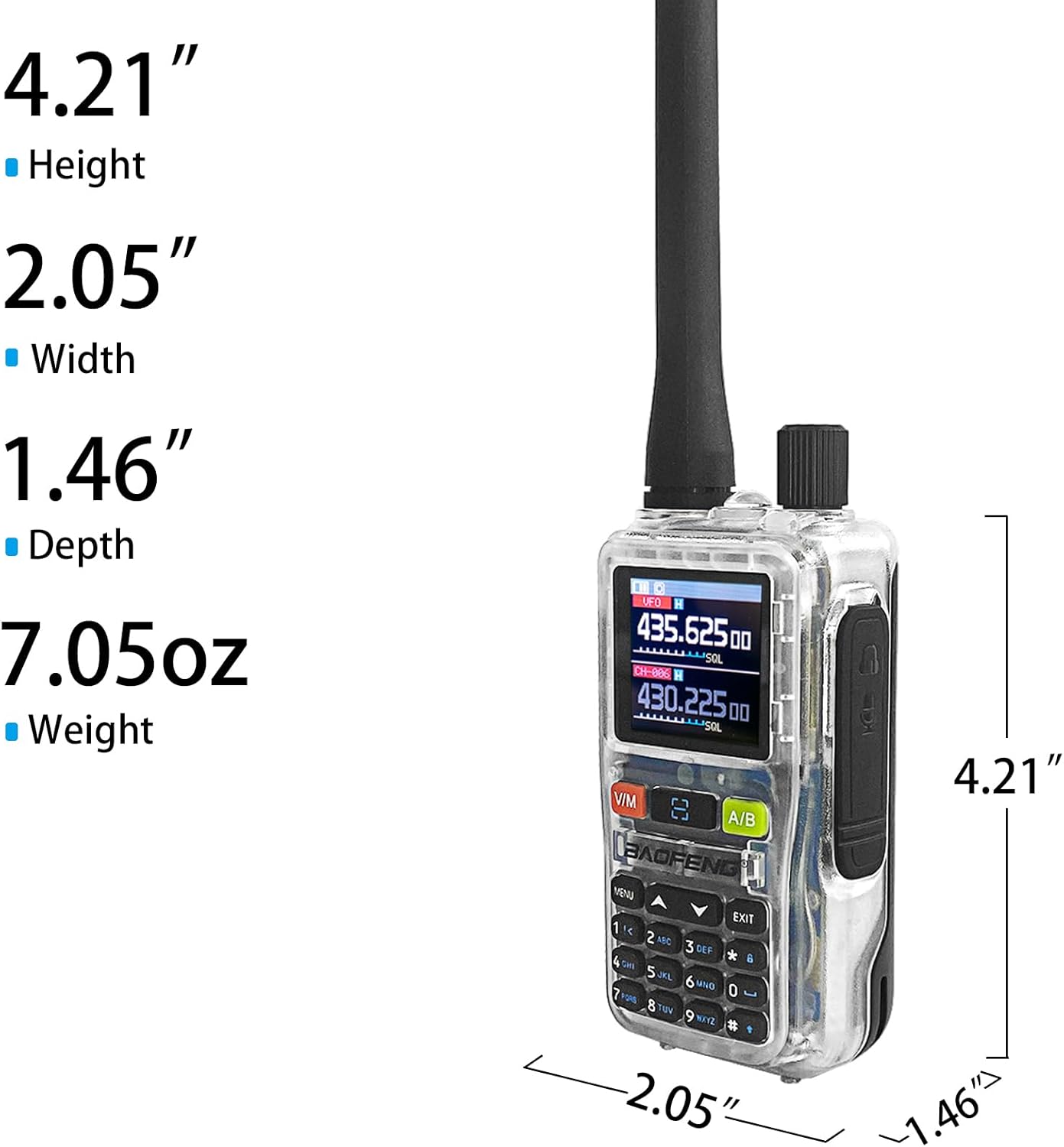
Figure 8: The radio offers adjustable transmission power, with options for 5W (High Power) and 2W (Low Power).
5. Advanced Features and Programming
5.1 App Programming (Ola Radio)
The BAOFENG UV-5R Mini can be programmed using the Ola Radio app on iOS or Android devices. This allows for efficient batch updates and configuration of multiple devices.
- Download the "Ola Radio" app from your device's app store.
- Enable "Wireless Cps" in the radio's menu (MENU > Wireless Cps > ON).
- Open the app and connect to your radio.
- Configure channel settings, frequency mode, RX/TX CTCSS/DCS codes, and power settings within the app.
- Save and upload configurations to the radio.

Figure 9: The radio's display showing "Wireless Cps" setting and a smartphone screen displaying the Ola Radio app for programming.
وڊيو 1: ختمview of the BAOFENG UV-5R Mini Transparent Radio, demonstrating its features and compact design.
Video 2: Demonstration of the BAOFENG UV-5R Mini Radio, highlighting its dual-band capabilities and walkie-talkie functions.
5.2 One-Key Frequency Pairing
The radio supports one-key frequency pairing to quickly synchronize frequencies between two radios.
- Ensure both radios are powered on.
- On the transmitting radio, long-press the scan button (often labeled with a magnifying glass icon or similar).
- The radio will enter search mode and automatically detect the frequency of another nearby radio.
- Once detected, you can save the frequency to a channel.

Figure 10: Two radios shown side-by-side, illustrating the process of one-key frequency pairing by long-pressing the scan button.
5.3 Customizable Side Key (SK1)
The SK1 side key can be assigned to various functions for quick access:
- ٽارچ: بلٽ ان ٽارچ کي چالو ڪري ٿو.
- VOX: Enables Voice Operated Exchange for hands-free transmission.
- الارم: Activates an emergency alarm.
- اسڪين: چينل يا فريڪوئنسي اسڪيننگ شروع ڪري ٿو.
Refer to the radio's menu for customizing the SK1 function.

Figure 11: The radio's flashlight function is shown in use, useful for dark environments.
6. سار سنڀال
6.1 صفائي
- هڪ نرم سان ريڊيو کي مسح ڪريو، ڊيamp ڪپڙو. استعمال نه ڪريو سخت ڪيميائي يا گھڻائي صاف ڪندڙ.
- Ensure the USB-C port is free of dust and debris.
6.2 بيٽري جي سنڀال
- پهرين استعمال کان پهريان بيٽري مڪمل طور تي چارج ڪريو.
- بيٽري کي وڌيڪ چارج ڪرڻ يا مڪمل طور تي ختم ڪرڻ کان پاسو ڪريو ان جي عمر کي ڊگھو ڪرڻ لاءِ.
- جڏهن گهڻي عرصي تائين استعمال ۾ نه هجي ته ريڊيو ۽ بيٽري کي ٿڌي، سڪل جاءِ تي رکو.
6.3 عام سنڀال
- The radio is not water-resistant. Avoid exposure to water or high humidity.
- انتهائي گرمي پد تي ريڊيو کي بي نقاب نه ڪريو.
- Handle the antenna carefully to prevent damage.
7. مسئلا حل ڪرڻ
| مسئلو | ممڪن سبب | حل |
|---|---|---|
| ريڊيو آن نٿو ٿئي. | بيٽري گهٽ آهي يا صحيح طرح سان نصب نه آهي. | بيٽري چارج ڪريو. بيٽري کي محفوظ طور تي ٻيهر انسٽال ڪريو. |
| منتقل يا وصول نٿو ڪري سگهجي. | Incorrect frequency/channel, low battery, or out of range. | Verify frequency/channel settings. Charge battery. Move closer to other radios. |
| غريب آڊيو معيار. | Weak signal, incorrect squelch setting, or damaged antenna. | Adjust squelch level. Check antenna connection. Move to an area with better signal. |
| App programming fails. | "Wireless Cps" not enabled on radio, or app connection issue. | Ensure "Wireless Cps" is ON in radio menu. Restart app and radio. Check Bluetooth connection. |
8. وضاحتون
| خاصيت | تفصيل |
|---|---|
| برانڊ | باوفينگ |
| ماڊل نمبر | UV-5R ميني |
| چينلن جو تعداد | 999 |
| تعدد جي حد | 136-174MHz، 400-520MHz |
| پاور آئوٽ | 5W/2W (adjustable) |
| ڳالهائڻ جي حد وڌ ۾ وڌ | 5 ڪلوميٽر |
| جلدtage | 12 وولٽ (DC) |
| چارج ڪرڻ | USB-C فاسٽ چارجنگ |
| ڏيکاريو | 1.44 انچ TFT اسڪرين |
| پاڻي جي مزاحمت جي سطح | نه پاڻي مزاحمتي |
| شامل اجزاء | Antenna, Battery, Belt Clip |

Figure 12: Physical dimensions of the BAOFENG UV-5R Mini Radio: Height 4.21", Width 2.05", Depth 1.46", Weight 7.05oz.
9. وارنٽي ۽ سپورٽ
9.1 وارنٽي ڄاڻ
This BAOFENG UV-5R Mini Radio comes with a 1 سال وارنٽي from the date of purchase. This warranty covers manufacturing defects and malfunctions under normal use. It does not cover damage caused by misuse, accidents, unauthorized modifications, or natural disasters.
مھرباني ڪري وارنٽي دعوائن لاءِ خريد ڪرڻ جو پنھنجو ثبوت رکو.
9.2 ڪسٽمر سپورٽ
For technical assistance, troubleshooting, or warranty inquiries, please contact BAOFENG customer support through the retailer where the product was purchased or visit the official BAOFENG webرابطي جي معلومات لاء سائيٽ.