
HOSTACK B0FQP83VYY
HOSTACK Twin LED Bed Frame User Manual
Model: B0FQP83VYY
1. تعارف
خريد ڪرڻ لاءِ مهربانيasing the HOSTACK Twin LED Bed Frame with Storage Headboard and Charging Station. This manual provides detailed instructions for assembly, operation, maintenance, and troubleshooting to ensure safe and optimal use of your new bed frame. Please read this manual thoroughly before beginning assembly or use.

Image 1.1: Fully assembled HOSTACK Twin LED Bed Frame in a bedroom setting.
2. حفاظت جي ڄاڻ
خبردار: انهن حفاظتي هدايتن تي عمل ڪرڻ ۾ ناڪامي جي نتيجي ۾ پيداوار کي نقصان يا نقصان پهچي سگهي ٿو.
- بستري جي فريم تي 700 پائونڊ کان وڌيڪ وزن نه لوڊ ڪريو.
- Exercise caution with sharp edges during assembly.
- Keep fingers clear of drawers and the charging station area while in use to prevent pinching.
- Ensure all connections for the LED lights and charging station are secure before use.
- ننڍن ٻارن ۽ پالتو جانورن کي اسيمبلي واري علائقي کان پري رکو.
3. پيڪيج مواد
اسيمبلي کان اڳ، پڪ ڪريو ته سڀئي حصا موجود آهن ۽ انهن کي ڪو نقصان نه پهتو آهي. جيڪڏهن ڪو به حصو غائب يا خراب آهي، مهرباني ڪري ڪسٽمر سپورٽ سان رابطو ڪريو.
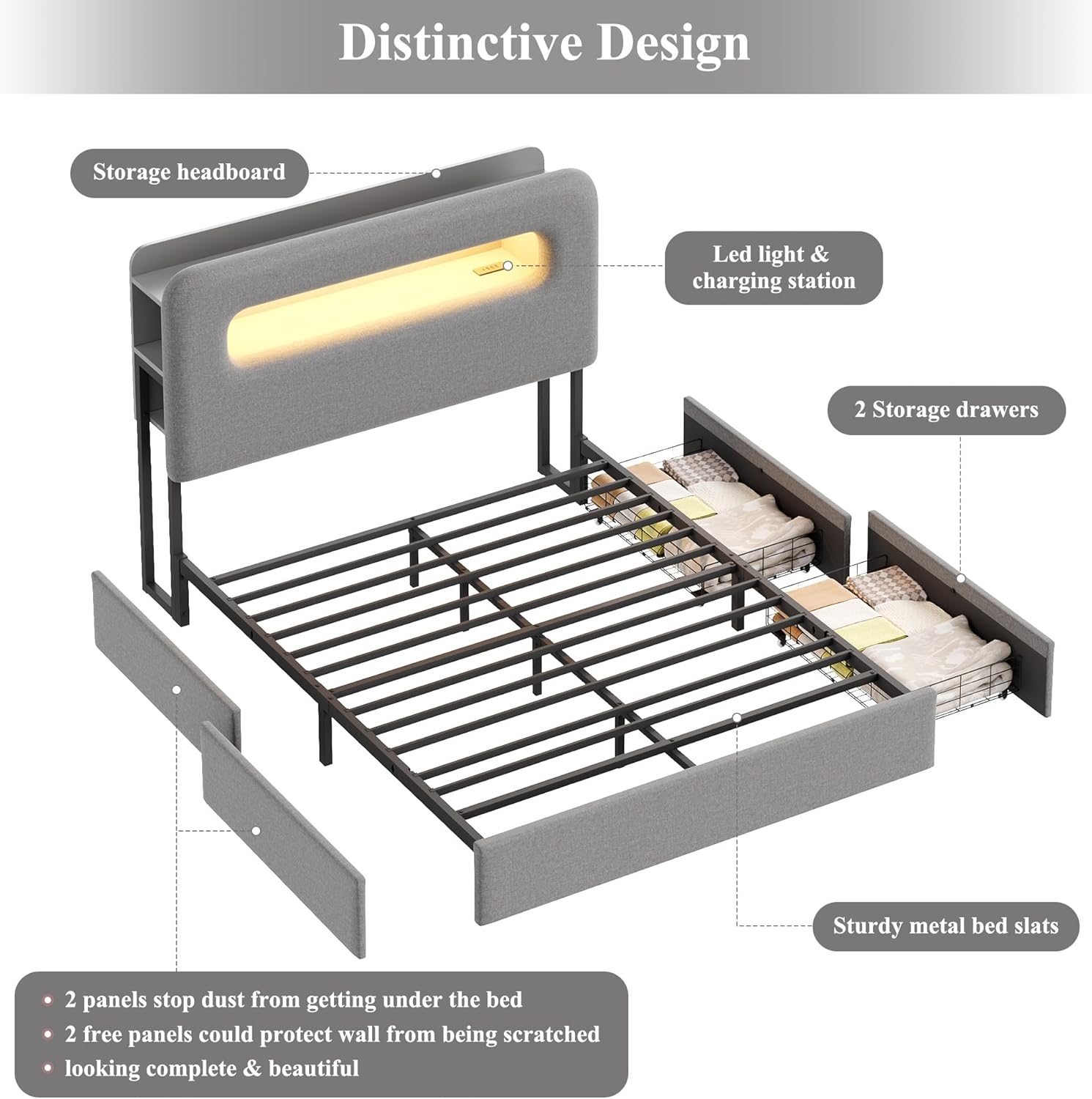
تصوير 3.1: ڦاٽي پيو view illustrating the main components of the bed frame.
- Upholstered Headboard with LED Lights and Charging Station
- Bed Frame Rails (Left and Right)
- Metal Bed Slats and Support Structure
- 2 Under-Bed Storage Drawers with Wheels
- هارڊويئر پيڪ (اسڪرو، بولٽ، ايلن رنچ، وغيره)
- ھدايت وارو دستور
4. اسيمبليءَ جون هدايتون
Estimated assembly time: Approximately 40 minutes. Two people are recommended for easier assembly.
4.1 تياري
- اسيمبليءَ لاءِ هڪ وسيع علائقو صاف ڪريو.
- سڀني حصن کي کوليو ۽ انهن کي نرم، صاف مٿاڇري تي رکو ته جيئن خرچي نه اچي.
- پيڪيج جي مواد جي فهرست جي خلاف سڀني حصن جي سڃاڻپ ڪريو.
4.2 قدم بہ قدم اسيمبلي
Follow the detailed diagrams and instructions provided in the included assembly guide. The general steps are:
- Assemble the main metal frame structure.
- Attach the upholstered side rails to the frame.
- Install the wood slats onto the frame. Ensure the noise-free muter bar is correctly positioned for quiet operation.
- Attach the headboard to the assembled frame.
- Assemble the two under-bed storage drawers.
- Insert the drawers into their desired positions under the bed.

Image 4.1: Diagram showing key dimensions and components for assembly.
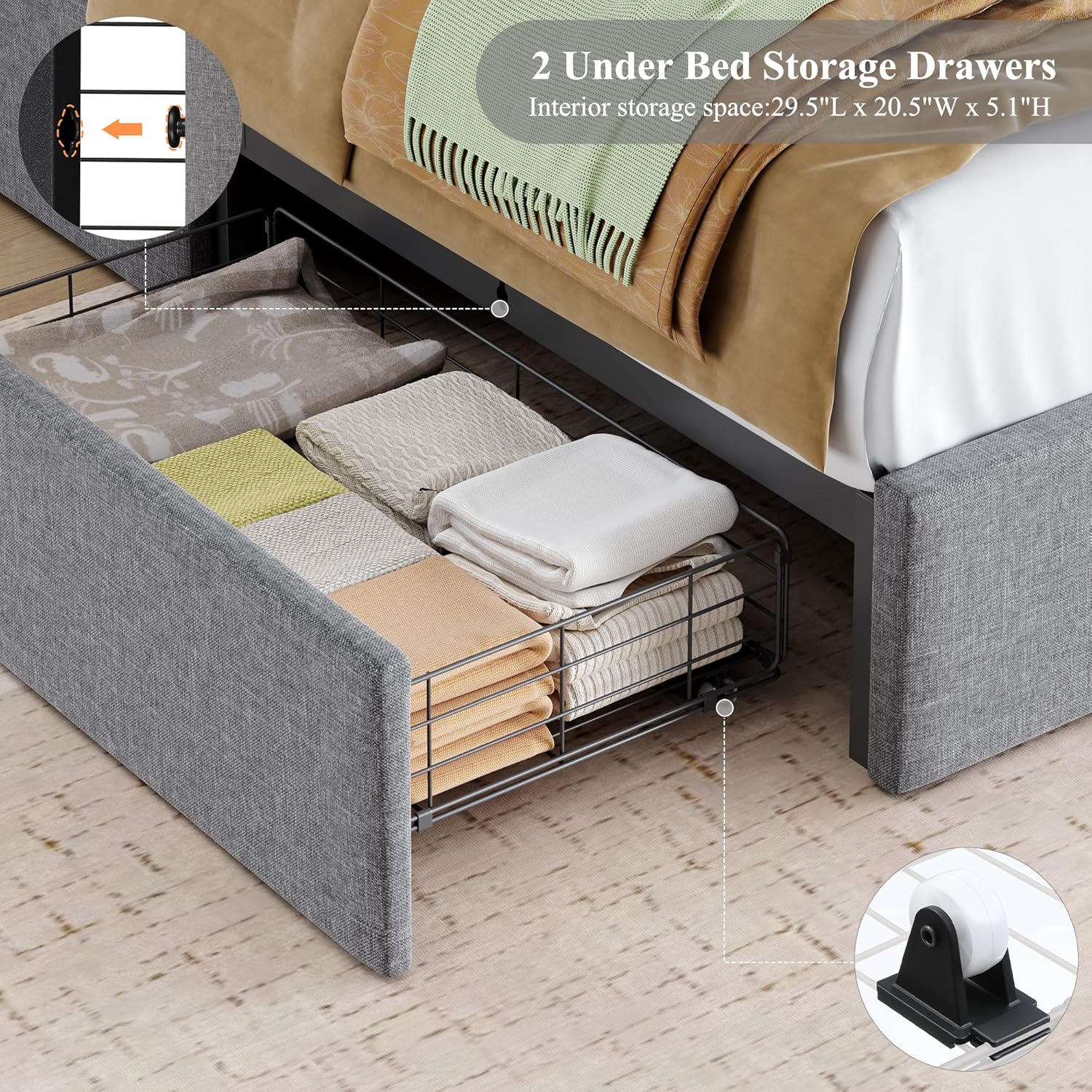
Image 4.2: Detail of the under-bed storage drawers, showing interior dimensions (29.5"L x 20.5"W x 5.1"H).
5. سيٽ اپ
5.1 Drawer Placement
The two storage drawers can be placed in any of the four positions under the bed (either side, or both sides). Position them according to your room layout and storage needs.

Image 5.1: Illustration of flexible drawer placement options (one on each side, two on left, or two on right).
5.2 پاور ڪنيڪشن
Connect the power adapter for the LED lights and charging station to a suitable wall outlet. Ensure the cable is routed safely to avoid tripping hazards.
6. آپريٽنگ هدايتون
6.1 LED لائيٽون
The integrated LED lights in the headboard can be controlled via a remote control or a smartphone application. You can customize the light color and ambiance from over 60,000 colors, set timing modes, music modes, and mic modes.

تصوير 6.1: مٿيview of LED light features, including remote and app control for color and mode selection.
To use the app control, scan the QR code provided in the packaging or search for the app in your device's app store (compatible with iOS and Android).
6.2 چارجنگ اسٽيشن
The headboard features a built-in charging station with USB ports. Simply plug your electronic devices into the available ports to charge them.

Image 6.2: Detail of the built-in charging station within the headboard's storage compartment.
6.3 اسٽوريج دراز
The two under-bed drawers are designed for smooth operation on wheels. They provide ample storage space for various items. The buckle design effectively secures the drawer in place when pushed under the bed.
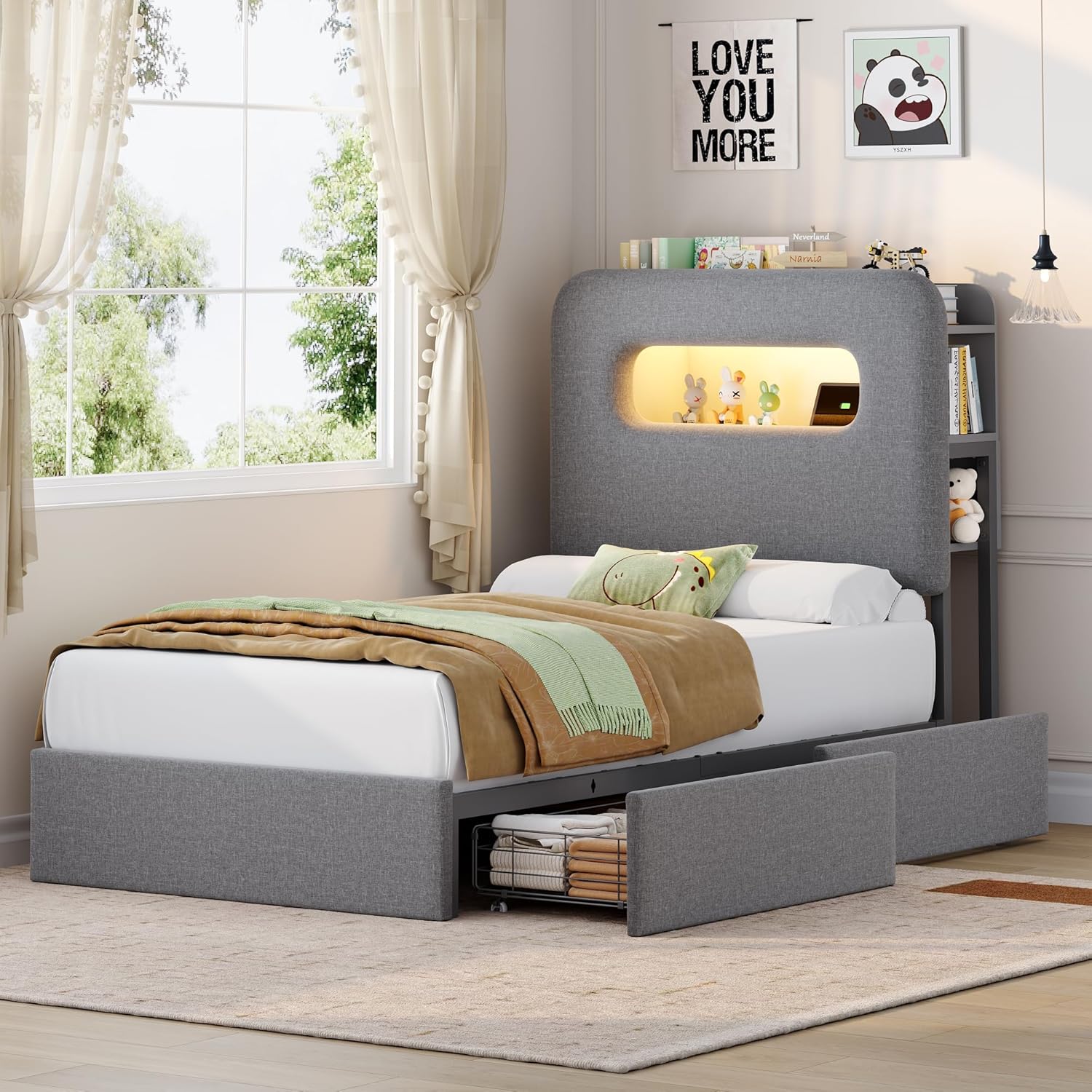
Image 6.3: The bed frame with both under-bed drawers extended, showcasinجي اسٽوريج جي گنجائش.
پيداوار جون خاصيتون ختم ٿي ويونview وڊيو
Video 6.4: An official product video from Seleadc (Seller) demonstrating the features of the bed frame, including LED lights, charging station, and storage drawers. This video provides a visual guide to the product's functionality and design.
7. سار سنڀال
7.1 Cleaning the Upholstery
The velvet upholstery can be cleaned with a soft, damp ڪپڙو. ڦُلڻ جي صورت ۾، صاف، سڪل ڪپڙي سان فوري طور تي صاف ڪريو. سخت ڪيميڪل يا رگڙيندڙ ڪلينر استعمال ڪرڻ کان پاسو ڪريو، ڇاڪاڻ ته اهي ڪپڙي کي نقصان پهچائي سگهن ٿا.
7.2 Frame Care
Wipe the metal frame and wooden slats with a dry or slightly damp cloth to remove dust. Periodically check all screws and bolts to ensure they remain tight. Retighten if necessary.
7.3 Drawer Maintenance
Ensure the drawer wheels are free of debris for smooth operation. If drawers become stiff, clean the wheel tracks and wheels.
8. مسئلا حل ڪرڻ
| مسئلو | ممڪن سبب | حل |
|---|---|---|
| LED بتيون ڪم نه ڪري رهيو آهي | Power cable disconnected; remote/app not paired; faulty LED strip. | Check power connection; re-pair remote/app; contact support if faulty. |
| چارجنگ اسٽيشن بجلي فراهم نه ڪري رهيو آهي | Power cable disconnected; device cable faulty; charging station malfunction. | Ensure power is connected; try a different charging cable; contact support. |
| Bed frame is noisy/squeaks | Loose bolts; incorrect slat placement; missing noise-free muter bar. | Tighten all bolts; ensure slats are correctly seated; verify muter bar is in place. |
| دراز کولڻ/بند ڪرڻ ڏکيو آهي | Debris in wheel track; damaged wheels; drawer overloaded. | Clean wheel tracks; inspect wheels for damage; reduce drawer load. |
9. وضاحتون
- برانڊ: HOSTACK
- ماڊل: B0FQP83VYY
- ماپ: ٽوئن
- پيداوار جي ماپ: 84.6"ليٽر x 40.9"ڊبليو x 44.5"ايڇ
- خاص خاصيتون: Storage Headboard, 2 Drawers, Charging Station, LED Lights
- رنگ: ڀورو
- شامل اجزاء: Headboard, Drawers, Rails, Wood Slats
- مطابقت رکندڙ گدو سائيز: ٽوئن
- اسيمبلي جي ضرورت آهي: Yes (estimated 40 minutes)
- Headboard Material: مخمل
- Max Loading Capacity: 700 پائونڊ
- Drawer Interior Dimensions: 29.5"ليٽر x 18.1"ڊبليو x 5.1"ايڇ
10. وارنٽي ۽ سپورٽ
For warranty information or technical support, please refer to the documentation included with your purchase or contact the seller directly. Keep your purchase receipt for warranty claims.
ٺاهيندڙ: HOSTACK
Ask a question about this manual
Ask about setup, troubleshooting, compatibility, parts, safety, or missing instructions. Manuals+ will review the question and use this page’s manual context to help answer it.