1. تعارف
This manual provides detailed instructions for the installation, setup, and operation of your JOYING JY-TT163N4 Android 13 Car Stereo. This unit is designed specifically for Toyota Corolla models manufactured between 2008 and 2013, offering advanced features such as Android 13 operating system, 9-inch touch screen, CarPlay, Android Auto, GPS navigation, and Bluetooth connectivity.
مھرباني ڪري انسٽاليشن کان اڳ ھن دستور کي چڱي طرح پڙھو ۽ مناسب ڪم ۽ حفاظت کي يقيني بڻائڻ لاءِ استعمال ڪريو.
2. پيڪيج مواد
پڪ ڪريو ته هيٺ ڏنل سڀئي شيون توهان جي پيڪيج ۾ شامل آهن:
- 9" Radio Unit (x1)
- Single Din Cage (x1)
- Left & Right Bracket (x1)
- WiFi Antenna (x1)
- GPS Antenna (x1)
- 4G اينٽينا (x2)
- External Mic (x1)
- USB ڪيبل (x2)
- AR Cable (x1)
- Screen Ribbon Cable (x1)
- پاور ڪيبل (x1)
- يوزر مينوئل (x1)

Figure 2.1: All included accessories for the JOYING JY-TT163N4 car stereo.
3. انسٽاليشن گائيڊ
پيشيورانه انسٽاليشن جي سفارش ڪئي وئي آهي. انسٽاليشن شروع ڪرڻ کان اڳ پڪ ڪريو ته گاڏي جي بجلي بند ٿيل آهي.
3.1. مطابقت جي چڪاس
This unit is designed for Toyota Corolla 2008-2013. Please verify your car's dashboard configuration to ensure compatibility, especially regarding JBL amplifier systems and screen sizes.

Figure 3.1: Dashboard compatibility for models without factory JBL amplifier (Option A).
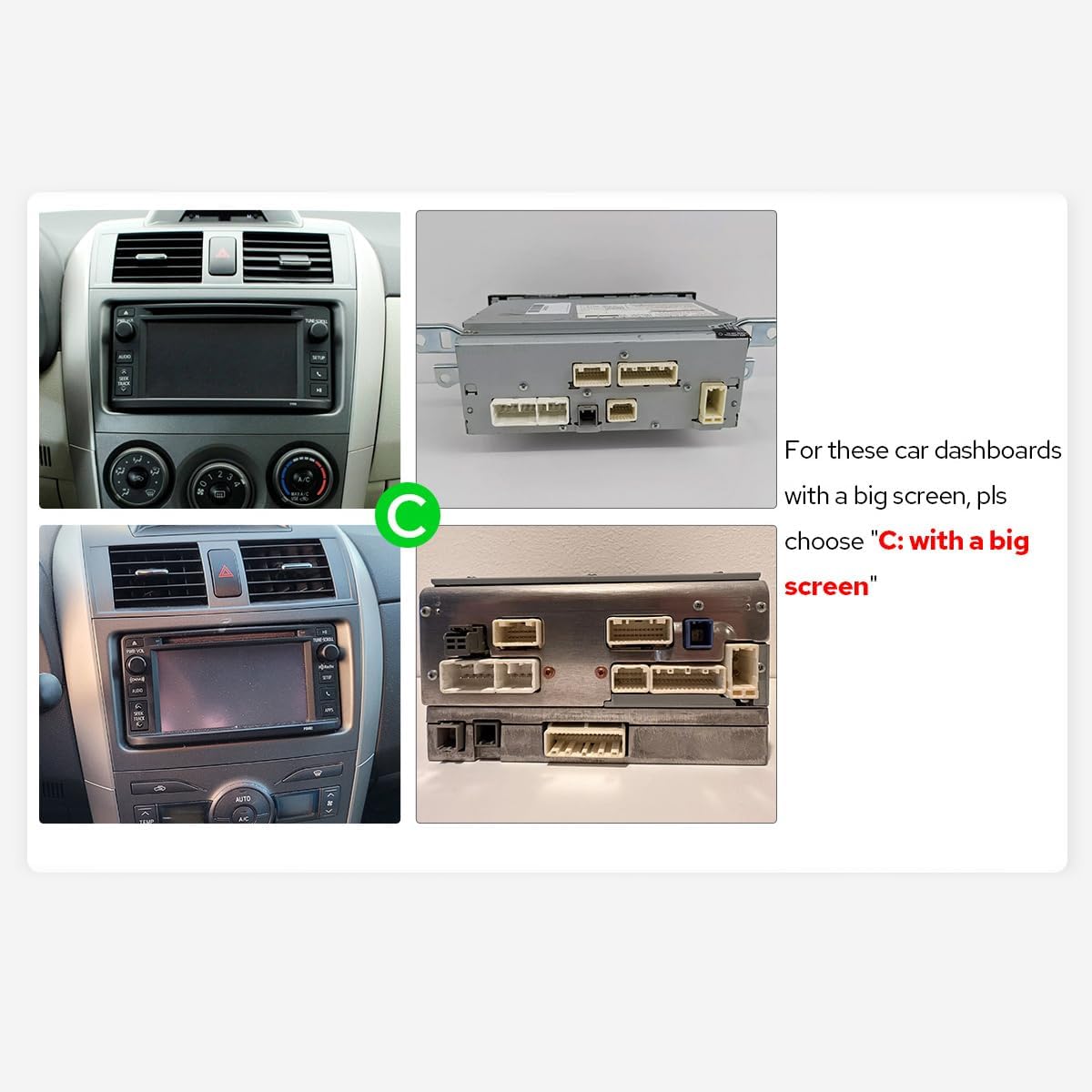
Figure 3.2: Dashboard compatibility for models with a big screen (Option C).
3.2. وائرنگ ڪنيڪشن
Connect the provided cables to the corresponding ports on the car stereo and your vehicle's harness. Ensure all connections are secure.

شڪل 3.3: پوئتي view of the car stereo with labeled connection ports.
Video 3.1: This video demonstrates the general wiring operation for car stereo installation. It shows how to connect the power cable, RCA harness, USB adapter cables, radio antenna, and GPS antenna to the head unit.
Video 3.2: This video illustrates the installation effect of a car stereo in a Toyota Corolla 2009-2013 model, providing a visual reference for the final appearance.
4. شروعاتي سيٽ اپ
4.1. پهريون بوٽ
Upon inserting the car key, the unit will start up and enter the user interface within 2 seconds (initial boot may take 30-40 seconds).
4.2. AC Settings
To adjust AC settings, including temperature units (Fahrenheit) and display options:
- Navigate to the main home screen.
- Tap on 'My Car'.
- Select 'Setting'.
- Choose 'AC setting'.
- Toggle the 'Fahrenheit' option to your preference.
- Ensure 'Display large Air' is enabled for full AC display.
- Click 'Confirm' to save changes.
Video 4.1: This video demonstrates how to access and adjust the AC settings on your car stereo, including switching between Celsius and Fahrenheit and enabling the large air display option.
5. آپريٽنگ هدايتون
5.1. ڪار پلي ۽ اينڊرائيڊ آٽو
Connect your mobile phone via USB cable or Bluetooth to share apps, navigation, make calls, and listen to music on the larger screen.

Figure 5.1: Built-in CarPlay and Android Auto interfaces.
Video 5.1: This video demonstrates the main functions of the car stereo, including how to connect and use CarPlay, Android Auto, and Mirror Link features.
Video 5.2: This video provides instructions on how to set up and use Wireless CarPlay and Android Auto with the car stereo.
Video 5.3: This video guides users through the process of connecting their smartphone to the car stereo for CarPlay and Android Auto functionality.
Video 5.4: This video demonstrates the steps to connect your device to the car stereo for CarPlay functionality.
5.2. آئيني جي لنڪ
Mirror your smartphone screen directly onto the car stereo display for enhanced viewing of apps and content.
وڊيو 5.5: هي مختصر پريview video demonstrates the wireless mirroring feature, showing a smartphone screen duplicated on the car stereo display.
5.3. جي پي ايس نيويگيشن
The unit features precise GPS engines and includes GPS antennas for accurate positioning and faster real-time navigation. Offline maps are supported in areas where data download is available.
5.4. بلوٽوٿ 5.0
Supports audio streaming, automatic phone book transfer, and hands-free calling. Note: It primarily supports phone and OBD dongle connections.
5.5. ميڊيا پلے بیک
Enjoy music and videos from various sources. The unit supports split-screen multitasking, allowing you to run two applications simultaneously.
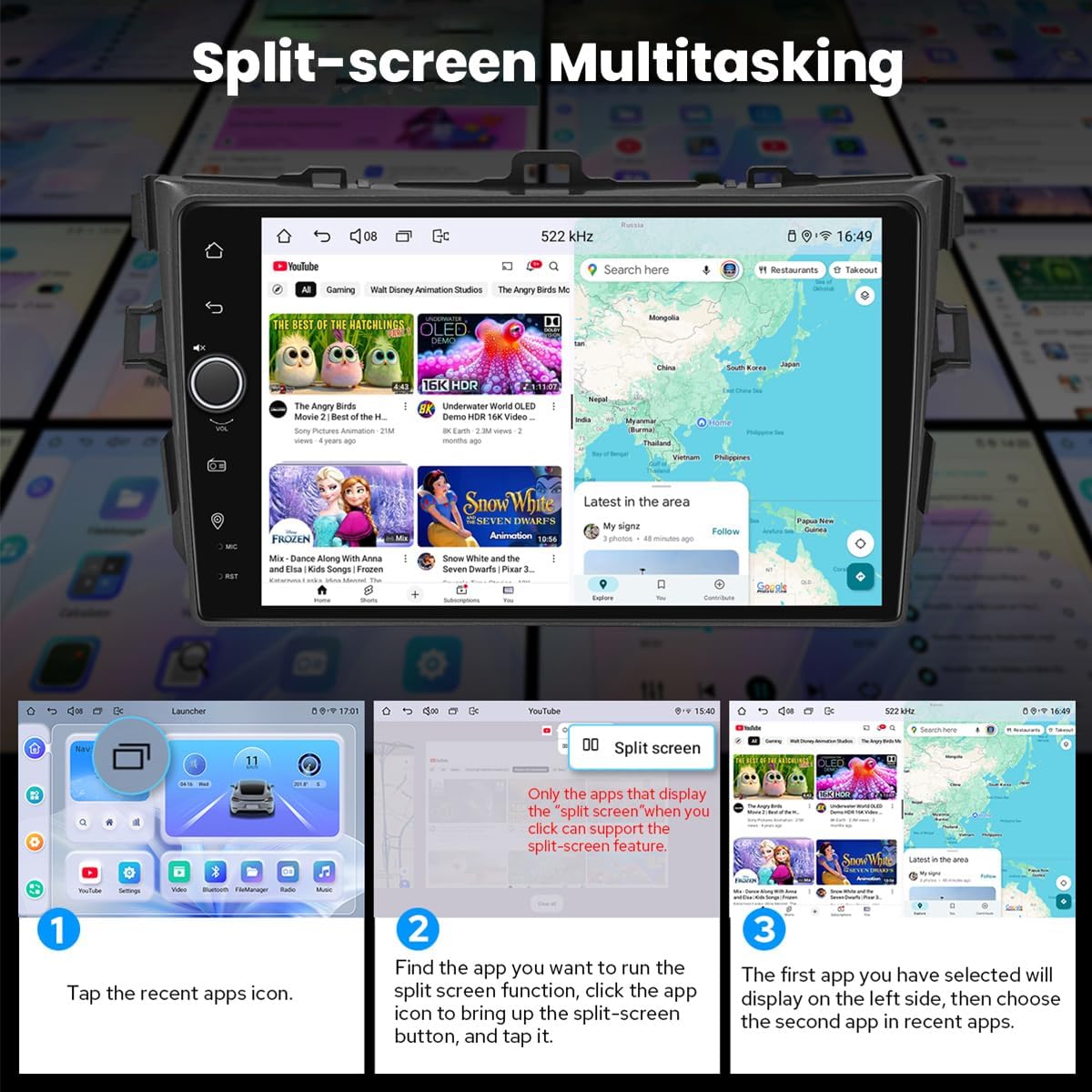
Figure 5.2: Split-screen multitasking interface.
5.6. Personalized Settings
Customize your stereo with various options including car boot logos, wallpapers, and changeable button colors.

Figure 5.3: Personalized settings options.
5.7. Sound Enjoyment
Equipped with a TDA7851 DSP chip, a 48-Band Graphic Equalizer, and 4x50W Max Output Power. Supports aftermarket amplifiers with 4 Audio Outputs, 1 SUB Output, Fiber Optical Output, SPDIF Coaxial Output, and Center Channel Output.

Figure 5.4: High-quality sound features.
5.8. Built-in 4G Module
Insert a SIM card for internet access. Supports FDD-LTE: B2/B4/B5/B7/B12/B13/B14/B17/B25/B26/B38/B66/B71 and TDD-LTE: B41. Does not support phone calls or SMS.
5.9. HDMI ٻاھر
Provides full digital image and sound output for external displays like headrest monitors, offering 1080P clear picture without stuttering. HDMI cable is not included.
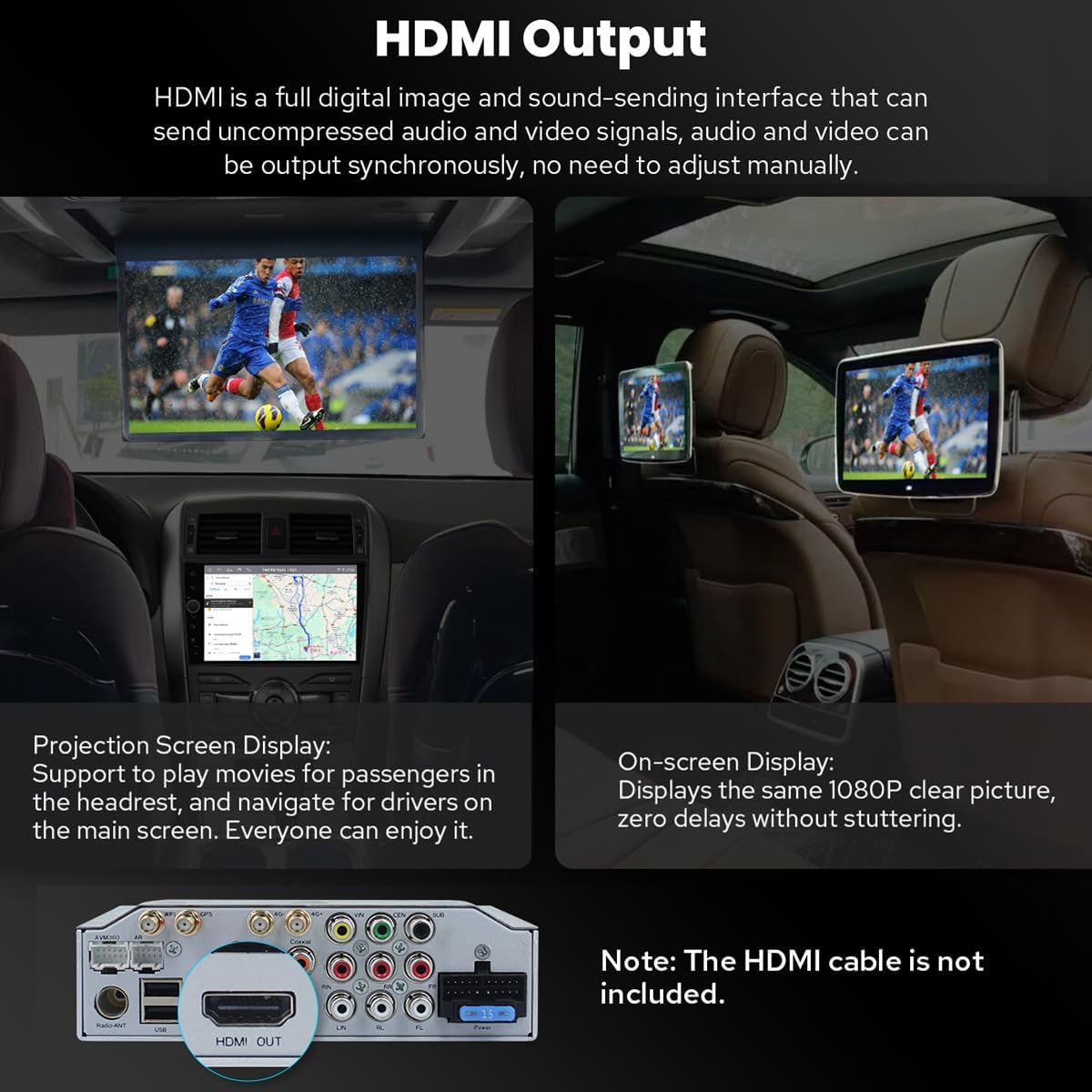
Figure 5.5: HDMI Output functionality.
5.10. ٻيون خاصيتون
Includes Picture-in-Picture, 3 USB Ports, Micro SD Card Slot, and 4G SIM Card Slot.

شڪل 5.6: ختمview of additional features.
6. سار سنڀال
6.1. اسڪرين صاف ڪرڻ
اسڪرين کي نرميءَ سان صاف ڪرڻ لاءِ نرم، لِنٽ فري ڪپڙو استعمال ڪريو. ضدي داغن لاءِ، ٿورو ڊيampڪپڙي کي پاڻي يا اسڪرين محفوظ ڪلينر سان ڌوئڻ ڏيو. سخت ڪيميڪلز يا رگڙيندڙ مواد کان پاسو ڪريو.
6.2. کولنگ سسٽم
The unit features a dual heat sink design for superior heat dissipation and improved temperature control. A warning value can be set for volume or CPU temperature; if exceeded, the fan will automatically activate to prevent overheating.

Figure 6.1: Cooling system features.
6.3. WiFi Signal
An independent WiFi antenna ensures stable signal quality and provides fast and smooth internet access, supporting 802.11a/b/g/n/AC standards across 2.4GHz/5GHz spectral bands.

Figure 6.2: WiFi signal features.
7. مسئلا حل ڪرڻ
If you encounter any issues, please refer to the following general troubleshooting steps:
- طاقت ناهي: سڀني بجلي ڪنيڪشن ۽ فيوز چيڪ ڪريو. پڪ ڪريو ته اگنيشن آن آهي.
- آواز ناهي: اسپيڪر ڪنيڪشن، واليوم ليول، ۽ آڊيو آئوٽ پٽ سيٽنگز جي تصديق ڪريو.
- بلوٽوٿ ڪنيڪشن جا مسئلا: پڪ ڪريو ته بلوٽوٿ اسٽيريو ۽ توهان جي ڊوائيس ٻنهي تي فعال آهي. ڊوائيسز کي ختم ڪرڻ ۽ ٻيهر جوڙڻ جي ڪوشش ڪريو.
- جي پي ايس سگنل جو نقصان: پڪ ڪريو ته GPS اينٽينا صحيح طرح سان نصب ٿيل آهي ۽ ان ۾ صاف آهي view آسمان جو.
- ٽچ اسڪرين غير جوابده: يونٽ کي ٻيهر شروع ڪرڻ جي ڪوشش ڪريو. جيڪڏهن مسئلو برقرار رهي، ته سپورٽ سان رابطو ڪريو.
For more specific issues, consult the detailed troubleshooting section in the full user manual or contact JOYING customer support.
8. وضاحتون
| خاصيت | تفصيل |
|---|---|
| شيون ماڊل نمبر | JY-TT163N4 |
| ڊسپلي سائيز | 9 انچ |
| اسڪرين جي ماپ | 9 انچ |
| ٽچ اسڪرين جو قسم | گنجائش وارو |
| آپريٽنگ سسٽم | Android, iOS (via CarPlay/Android Auto) |
| ميموري رکڻ جي صلاحيت | 64 جي بي |
| رابطي ٽيڪنالاجي | بلوٽوٿ، ايٿرنيٽ، يو ايس بي، وائي فائي |
| خاص خصوصيت | بلوٽوٿ، ٽچ اسڪرين |
| آڊيو آئوٽ پٽ موڊ | اسٽيريو |
| نقشي جو قسم | اتر آمريڪا |
| ٺاهيندڙ | خوشي |
9. وارنٽي ۽ سپورٽ
9.1. وارنٽي ڄاڻ
This JOYING car stereo comes with a 2-سال وارنٽي خريداري جي تاريخ کان. مھرباني ڪري وارنٽي دعوائن لاءِ خريداري جو ثبوت رکو.
9.2. ڪسٽمر سپورٽ
For technical assistance, troubleshooting, or warranty inquiries, please contact JOYING customer support through the retailer where the product was purchased or visit the official JOYING webرابطي جي معلومات لاء سائيٽ.