
تعارف
This manual provides essential information for setting up, operating, and maintaining your Roku 32-Inch Select Series 1080p Full HD Smart TV. Designed for a delightful streaming experience, this TV offers excellent picture quality, clear sound, and automatic updates. Please read this manual thoroughly before using your television.
دٻي ۾ ڇا آهي
پڪ ڪريو ته سڀئي جزا پيڪنگ ۾ موجود آهن:
- Roku 32-Inch Select Series 1080p Full HD Smart TV
- ريموٽ ڪنٽرول
- اسٽينڊ (2 ٽڪرا)
- اسٽينڊ اسڪرو (4 ٽڪرا)
- پاور ڪيبل
- استعمال ڪندڙ جو دستياب (ھي دستاويز)

Image: Contents of the Roku TV box, showing the television, remote control, two stand pieces, and four screws.
سيٽ اپ جون هدايتون
1. ٽي وي اسٽينڊ ڳنڍڻ
- Carefully place your TV face-down on a soft, clean surface to prevent damage to the screen.
- ٽي وي جي تري ۾ اسڪرو سوراخن سان اسٽينڊ جي ٽڪرن کي ترتيب ڏيو.
- Secure each stand piece with two screws using a Phillips head screwdriver. Do not overtighten.
2. بجلي ۽ ڊوائيسز کي ڳنڍڻ
- پاور ڪيبل کي ٽي وي جي پاور ان پٽ سان ڳنڍيو ۽ پوءِ وال آئوٽليٽ سان.
- Connect your external devices (e.g., cable box, gaming console, Blu-ray player) to the available HDMI ports on the back of the TV. This model features 3 HDMI ports.
- For older devices, use the AV input ports (yellow, white, red).
- An optical audio output is available for connecting to soundbars or home theater systems.
- A USB port is provided for media playback.

تصوير: پوئين پاسي view of the Roku TV displaying HDMI, AV, Antenna, USB, Optical, and Headphone ports.
3. شروعاتي پاور آن ۽ نيٽ ورڪ ڪنيڪشن
- ريموٽ ڪنٽرول يا ٽي وي تي پاور بٽڻ دٻايو.
- Follow the on-screen instructions to select your language and connect to your Wi-Fi network.
- Activate your Roku account or create a new one. This is required to access streaming channels and features.
آپريٽنگ هدايتون
1. Roku OS Interface
The Roku OS provides a simple and intuitive home screen for accessing all your entertainment. Easily navigate between streaming apps, live TV, and connected devices.

Image: The Roku TV home screen with a menu on the left and app icons on the right, including Netflix, Disney+, Apple TV, and Roku Channel.
2. Voice Remote
Your Roku TV comes with a voice remote for convenient control. Use your voice to search for content, launch apps, and control playback.
- آواز جي ڳولا: Press the voice button and speak your command (e.g., "Find comedies," "Open Netflix").
- ايپ شارٽ ڪٽ: Dedicated buttons provide quick access to popular streaming services.
- حجم ڪنٽرول: Adjust volume using the side buttons.
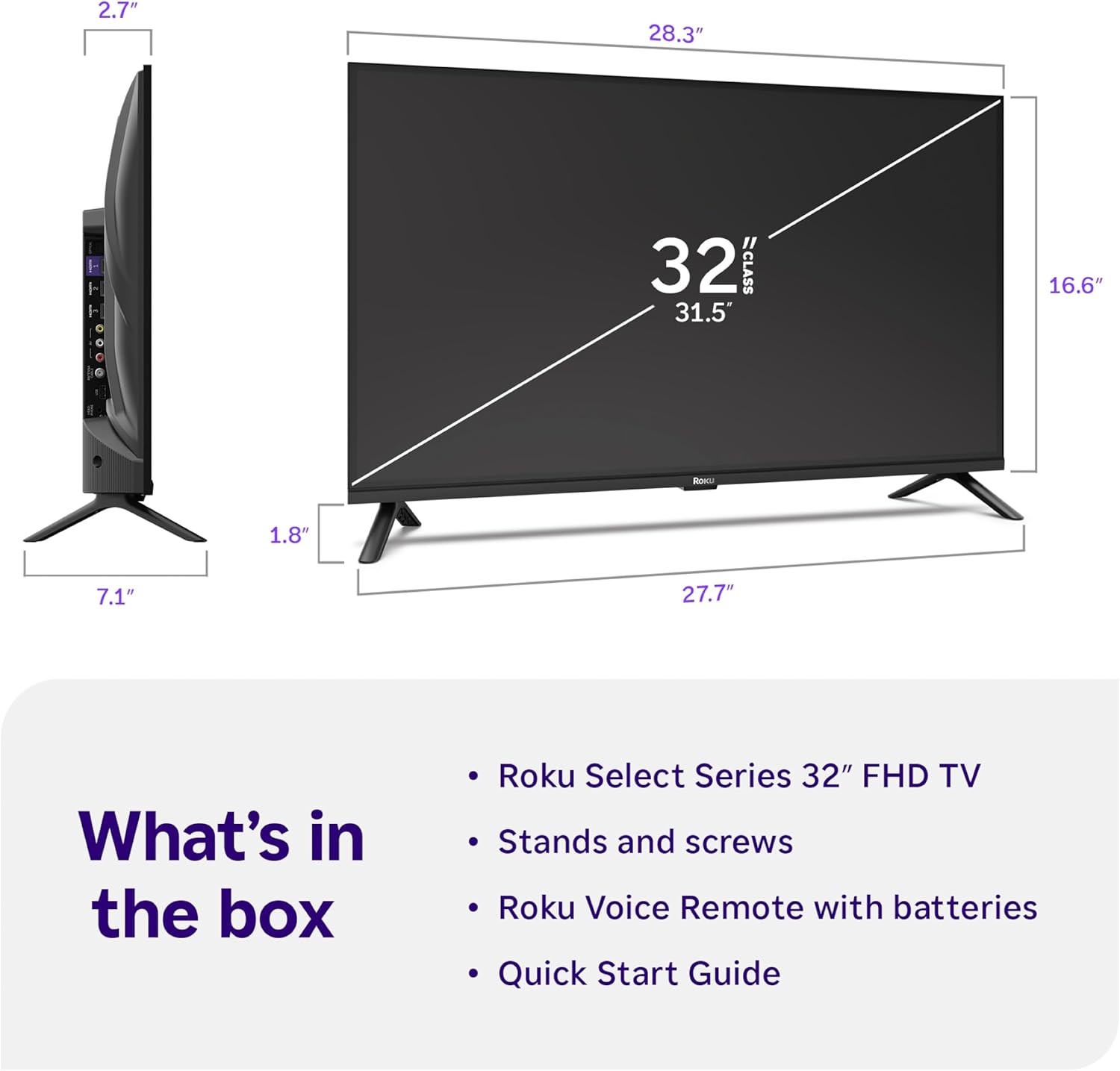
Image: Close-up of the Roku Voice Remote, highlighting buttons for TV power, volume, mute, voice search, instant replay, options, and dedicated app shortcuts.
3. Streaming Apps and Live TV
Access thousands of streaming channels, including Netflix, Disney+, Hulu, Prime Video, and Apple TV+. The Roku Channel also offers free live TV and on-demand content.

Image: A vibrant Roku TV home screen displaying a selection of popular streaming applications and recommended shows.
4. تصويري سيٽنگون
توهان جي اصلاح ڪريو viewمختلف تصويري سيٽنگن سان تجربو:
- روڪو اسمارٽ تصوير: Automatically adjusts picture mode for optimal viewing.
- تصوير جا طريقا: Choose from presets like Movie, Sports, Vivid, Standard, or Low Power.
- حسب ضرورت: Adjust brightness, contrast, sharpness, color, and tint for a personalized picture.
5. آواز جوڙ
پنهنجي آڊيو تجربي کي بهتر بڻايو:
- ڊولبي آڊيو: Enjoy clear speech and louder sound.
- آواز جا طريقا: Select from Standard, Dialogue, Movie, Music, or Night mode.
- Bluetooth Headphone Mode: Connect your wireless headphones to listen without disturbing others.

Image: A child wearing wireless headphones while watching the Roku TV, demonstrating the Bluetooth Headphone Mode.
6. سمارٽ هوم انٽيگريشن
Your Roku TV is compatible with various smart home ecosystems:
- وائس ڪنٽرول: Use Roku Voice, Siri, Alexa, or Google Assistant for hands-free control.
- ايپل ايئر پلي: Effortlessly share videos, photos, and music from your Apple devices.
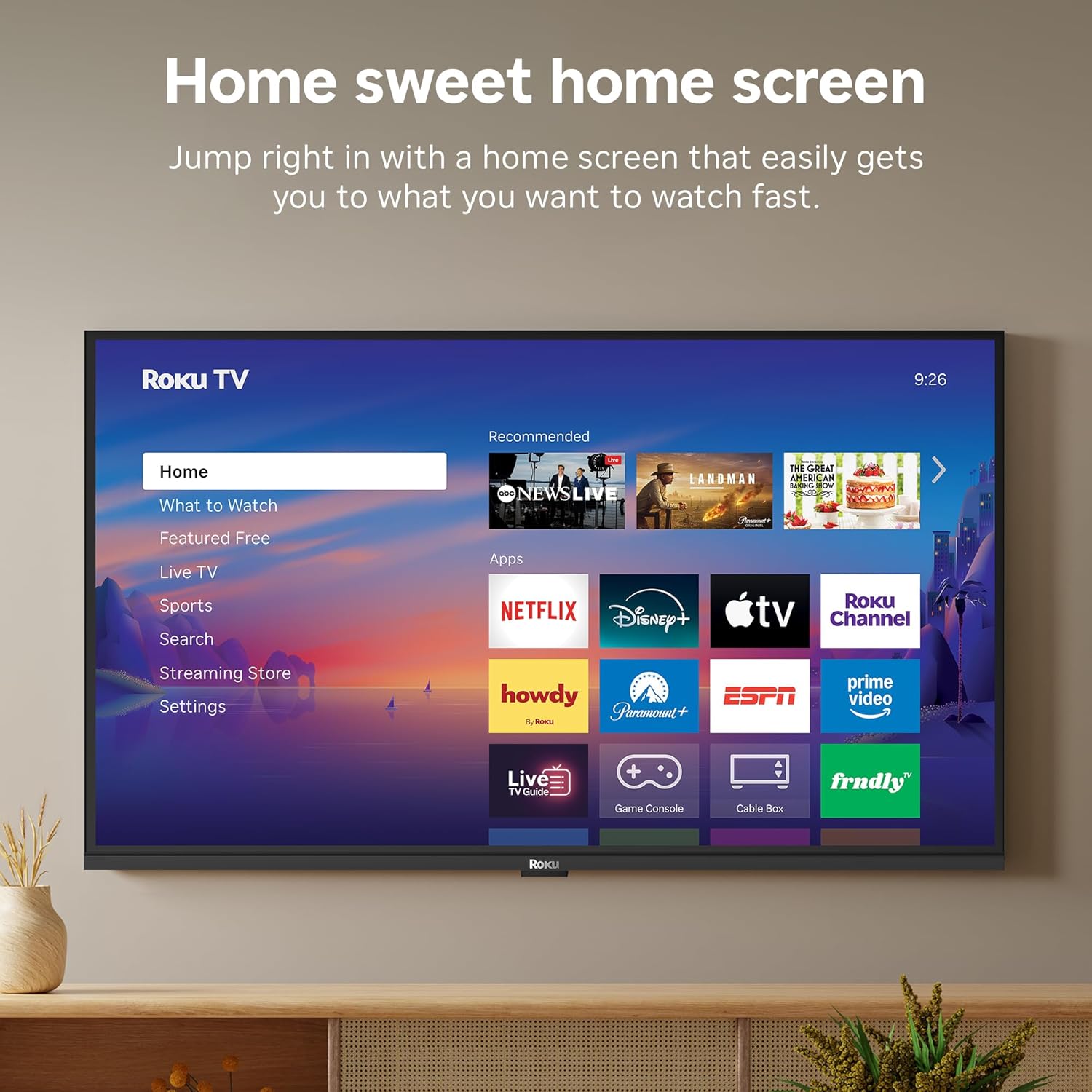
Image: The Roku TV screen displaying smart home compatibility logos for Roku Smart Home, Apple AirPlay, Apple Home, Alexa, and Google Home, with a smart speaker nearby.
7. والدين ڪنٽرول
Manage content access with built-in parental controls, including V-Chip technology, to ensure a safe viewٻارن لاء ماحول.
سرڪاري پراڊڪٽ وڊيو
وڊيو: هڪ اوورview of the Roku TV OS, demonstrating its user-friendly interface, app selection, and smart features. This video is provided by Roku, Inc.
وضاحتون
- اسڪرين جي ماپ:
- 32 انچ
- قرارداد:
- 1080p مڪمل ايڇ ڊي
- ڊسپلي ٽيڪنالاجي:
- ايل اي ڊي
- ريفريش جي شرح:
- 60 هز
- خاص خاصيتون:
- Bluetooth Headphone Mode, Dolby Audio, Voice Remote, Roku Smart Picture
- رابطي ٽيڪنالاجي:
- بلوٽوٽ ، وائي فائي
- هارڊويئر انٽرفيس:
- 3 HDMI Ports, 1 USB Port, S/PDIF (Optical Audio Out)
- آپريٽنگ سسٽم:
- Roku OS
- پيداوار جا طول و عرض (ڊي x ڊبليو x ايڇ):
- 7.1"ڊي x 28.3"ڊي x 18.4"ايڇ
- شيء جو وزن:
- 7.7 پائونڊ (اسٽينڊ سان)
- VESA جبل معيار:
- 200 x 200 ملي ميٽر
- ماڊل نمبر:
- 32R3 اي 5
- UPC:
- 829610009469
مشڪلاتون
If you encounter issues with your Roku TV, please refer to the following common solutions:
- طاقت ناهي: پڪ ڪريو ته پاور ڪيبل ٽي وي ۽ ڪم ڪندڙ بجلي جي آئوٽليٽ ٻنهي سان محفوظ طور تي ڳنڍيل آهي. هڪ مختلف آئوٽليٽ آزمايو.
- ڪابه تصوير/آواز ناهي: Verify that the correct input source is selected on your TV. Check all cable connections (HDMI, AV, etc.) for looseness.
- ريموٽ جواب نه ڏيڻ: Replace the batteries in your remote control. Ensure there are no obstructions between the remote and the TV.
- نيٽ ورڪ ڪنيڪشن جا مسئلا: Restart your Wi-Fi router and modem. Go to the TV's Settings > Network > Check connection to diagnose and reconnect.
- ايپ لوڊ نه ٿي رهي آهي: Restart the app. If the issue persists, try removing and reinstalling the app from the Roku Channel Store.
For more detailed troubleshooting, visit the official Roku support webسائيٽ.
سار سنڀال
To ensure the longevity and optimal performance of your Roku TV, follow these maintenance guidelines:
- اسڪرين جي صفائي: نرم، سڪل مائڪروفائيبر ڪپڙي سان اسڪرين کي نرميءَ سان صاف ڪريو. ضدي داغن لاءِ، هلڪو ڊيampڪپڙي کي پاڻي يا اسڪرين صاف ڪرڻ واري محلول سان صاف ڪريو جيڪو خاص طور تي اليڪٽرانڪس لاءِ ٺهيل آهي. اسڪرين تي سڌو سنئون مائع نه اسپري ڪريو.
- ٽي وي باڊي جي صفائي: Use a soft, dry cloth to wipe the exterior of the TV. Avoid abrasive cleaners or solvents.
- وينٽيليشن: پڪ ڪريو ته ٽي وي جي وينٽيليشن جا سوراخ بند نه آهن ته جيئن گرم ٿيڻ کان بچي سگهجي. هوا جي گردش لاءِ ٽي وي جي چوڌاري مناسب جاءِ برقرار رکو.
- سافٽ ويئر اپڊيٽ: Your Roku TV automatically receives software updates. Ensure your TV is connected to the internet to receive the latest features and performance improvements.
- طاقت جو انتظام: بجلي جي طوفانن دوران يا جڏهن اهو ڊگهي عرصي تائين نظر نه ايندو ته ٽي وي کي پاور آئوٽليٽ مان ڪڍو.
وارنٽي ۽ سپورٽ
وارنٽي ڄاڻ
Roku warrants the hardware of this device against defects in materials and workmanship under normal use for a period of one (1) year from the date of purchase ("Warranty Period"). If Roku determines that the device’s hardware is defective during the Warranty Period, Roku’s sole obligation, and your exclusive remedy, will be to either repair or replace the unit with either a new or rebuilt device, at its option. This warranty applies if the device is used in accordance with the provided documentation.
Important information about warranty returns and replacements is available on the Roku support site. You may also return a device for any reason, subject to the terms of the applicable return policy: 1) Within thirty (30) days from the date of purchase from Roku; or 2) within the applicable return period if purchased from an authorized reseller or distributor. Additional details regarding product returns can be found on the Roku support site.
ڪسٽمر سپورٽ
For further assistance, technical support, or to access the full range of support resources, please visit the official Roku support webسائيٽ. توهان اتي اڪثر پڇيا ويندڙ سوال، مسئلا حل ڪرڻ جا گائيڊ، ۽ ڪسٽمر سروس لاءِ رابطي جي معلومات ڳولي سگهو ٿا.