
تعارف
Thank you for choosing the Altec Lansing Comfort Pro Over Ear Bluetooth Headphones. These headphones are designed to provide a high-quality audio experience with advanced features such as Active Noise Cancellation (ANC), Environmental Noise Cancellation (ENC), Spatial Audio, and a long-lasting battery. This manual will guide you through the setup, operation, and maintenance of your new headphones.
دٻي ۾ ڇا آهي
- Altec Lansing Comfort Pro Wireless Headphones
- USB-C چارجنگ ڪيبل (واضح طور تي درج نه آهي پر چارج ڪرڻ لاءِ شامل آهي)
- Audio Cable (not explicitly listed but common for wired use)
- Carrying Case (implied by images)
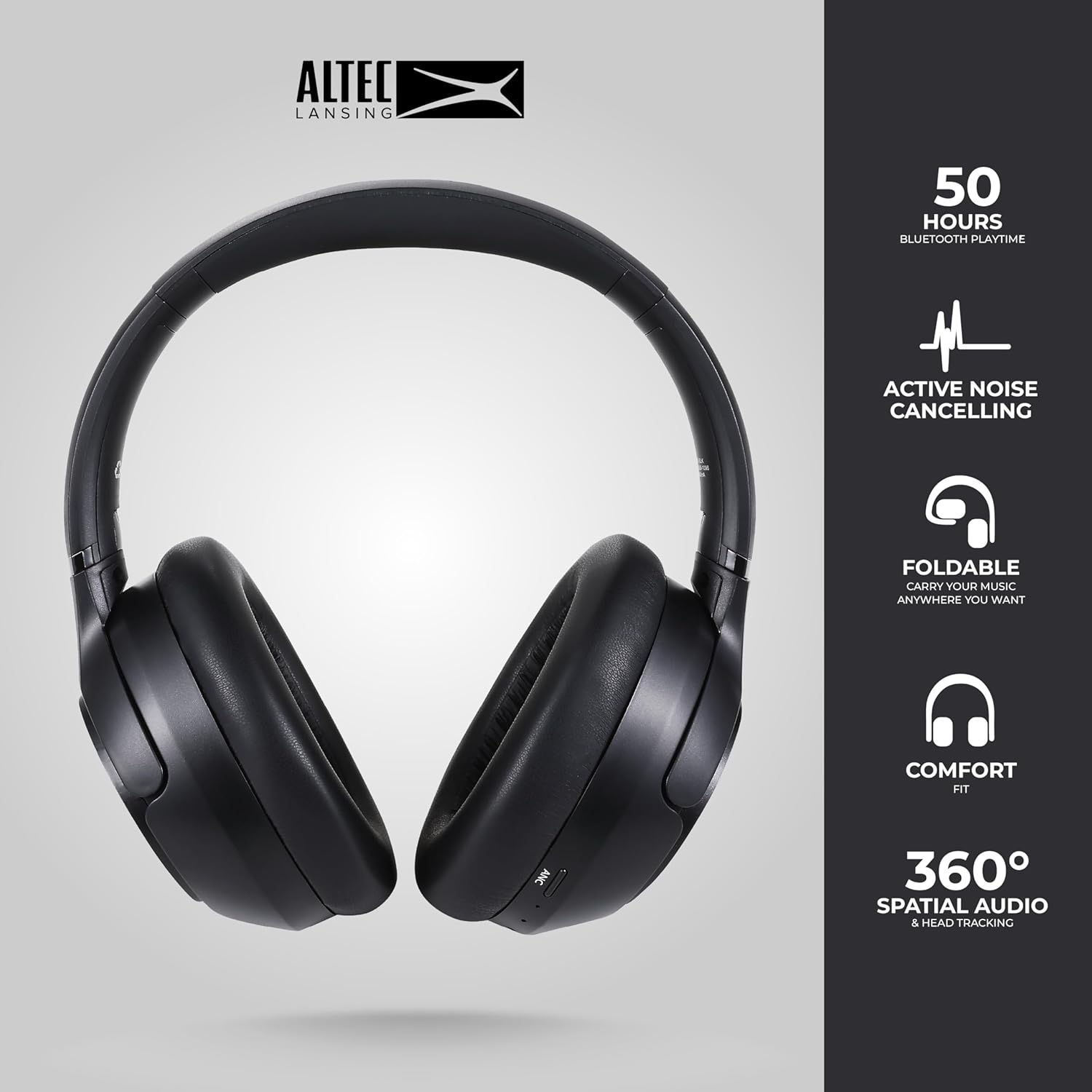
Image: The Altec Lansing Comfort Pro headphones, showcasing their sleek design and key features like 50 hours Bluetooth playtime, Active Noise Cancelling, foldable design, comfort fit, and 360° Spatial Audio & Head Tracking.
سيٽ اپ ڪريو
1. هيڊفون چارج ڪرڻ
Before first use, fully charge your headphones. Connect the provided USB-C charging cable to the charging port on the headphones and the other end to a USB power source. The LED indicator will show charging status and turn off or change color when fully charged. A full charge typically takes approximately two hours.
2. پاور آن/آف
- پاور آن ڪرڻ: پاور بٽڻ کي تقريباً 3 سيڪنڊن تائين دٻايو ۽ رکو جيستائين LED اشارو روشن نه ٿئي.
- پاور آف ڪرڻ: پاور بٽڻ کي تقريباً 3 سيڪنڊن تائين دٻايو ۽ رکو جيستائين LED اشارو بند نه ٿئي.
3. بلوٽوٽ جوئر
The headphones support Bluetooth 5.4 for stable connectivity and multipoint pairing for connecting to two devices simultaneously.
- پڪ ڪريو ته هيڊفون بند ٿيل آهن.
- Press and hold the Power button for approximately 5-7 seconds until the LED indicator flashes rapidly (usually blue and red), indicating pairing mode.
- On your device (smartphone, laptop, tablet), go to Bluetooth settings and enable Bluetooth.
- ڳولھيو available devices and select "Altec Lansing Comfort Pro" from the list.
- هڪ دفعو ڳنڍيو ويو، LED اشارو چمڪائڻ بند ڪندو ۽ مضبوط نيرو رهندو.
- For multipoint pairing, connect to the first device, then put the headphones back into pairing mode and connect to the second device. The headphones will intelligently switch between the two connected devices.

تصوير: هڪ تفصيلي view of the Altec Lansing Comfort Pro headphones highlighting the adjustable headband and the soft, lightweight ear cushions designed for comfort during extended use.
آپريٽنگ
هيڊ فون ڪنٽرول
The headphones feature intuitive controls located on the earcups. Refer to the image below for button identification.

تصوير: هڪ ويجهو تصوير view of the right earcup of the Altec Lansing Comfort Pro headphones, showing the power button, volume controls, and other function buttons.
- پاور بٽڻ: پاور آن/آف ڪرڻ لاءِ دٻايو ۽ رکو. کيڏڻ/روڪ ڪرڻ، ڪالن جو جواب ڏيڻ/ختم ڪرڻ لاءِ مختصر دٻايو.
- حجم وڌايو (+): حجم وڌائڻ لاءِ مختصر دٻايو. ايندڙ ٽريڪ لاءِ ڊگهو دٻايو.
- حجم گھٽ (-): حجم گهٽائڻ لاءِ مختصر دٻايو. پوئين ٽريڪ لاءِ ڊگهو دٻايو.
- ANC بٽڻ: Press to cycle through Active Noise Cancellation modes (ANC On, Ambient Mode, ANC Off).
- ملٽي فنڪشن بٽڻ (MFB): Double press to activate Voice Assistant (Siri/Google Voice). Triple press to activate Low Latency Mode.
Active Noise Cancellation (ANC) & Environmental Noise Cancellation (ENC)
The Comfort Pro headphones feature powerful ANC to block out external noise and ENC for clear calls. Press the dedicated ANC button to toggle between ANC On, Ambient Mode (allowing some environmental sounds for awareness), and ANC Off. ENC is automatically active during calls to ensure your voice is clear.
فضائي آڊيو
Experience immersive sound with Spatial Audio. This feature creates a 3D soundstage, making audio feel more lifelike. Spatial Audio is automatically enabled when supported by your device and content.
گھٽ ويڪرائي موڊ
For gaming or video playback where audio-visual synchronization is critical, activate Low Latency Mode by triple-pressing the MFB. This reduces audio delay for a more synchronized experience.
وائس اسسٽنٽ
Access your device's voice assistant (Siri or Google Voice) by double-pressing the MFB. You can then issue commands through the headphone's microphone.
ڪال انتظام
- جواب/آخر ڪال: پاور بٽڻ کي مختصر دٻايو.
- ڪال رد ڪريو: 2 سيڪنڊن لاءِ پاور بٽڻ کي دٻايو ۽ رکو.
سار سنڀال
صفائي
توهان جي هيڊفونز جي ڪارڪردگي ۽ ظاهر کي برقرار رکڻ لاءِ:
- ڪنن جي ڪپن ۽ هيڊ بينڊ کي نرم، سڪل، لِنٽ فري ڪپڙي سان صاف ڪريو.
- ضد واري مٽي لاء، روشني سان ڊيampڪپڙي کي پاڻي سان ڌوئو. سخت ڪيميڪلز، محلولن، يا رگڙيندڙ صاف ڪندڙ استعمال ڪرڻ کان پاسو ڪريو.
- Do not allow moisture to enter any openings.
ذخيرو
When not in use, store your headphones in the provided carrying case to protect them from dust, scratches, and impacts. The foldable design allows for compact storage.

Image: The Altec Lansing Comfort Pro headphones neatly folded and stored inside their protective carrying case, emphasizing portability and protection.
بيٽري جي سنڀال
- بيٽري کي بار بار مڪمل طور تي چارج ڪرڻ کان پاسو ڪريو.
- Store the headphones with a partial charge if not used for extended periods.
- انتهائي گرمي پد کان پاسو ڪريو، جيڪو بيٽري جي زندگي کي گهٽائي سگھي ٿو.
مشڪلاتون
If you encounter any issues with your Altec Lansing Comfort Pro headphones, refer to the following common solutions:
- هيڊفون آن نه ٿيندا: پڪ ڪريو ته هيڊفون مڪمل طور تي چارج ٿيل آهن. انهن کي پاور سورس سان ڳنڍيو ۽ ڪجهه منٽن کان پوءِ ٻيهر ڪوشش ڪريو.
- ڊوائيس سان جوڙو نه ٿو ٺاهي سگهجي:
- Ensure the headphones are in pairing mode (LED flashing rapidly).
- پنهنجي ڊوائيس تي بلوٽوٿ کي بند ۽ آن ڪريو.
- Delete "Altec Lansing Comfort Pro" from your device's Bluetooth list and attempt to pair again.
- ڊوائيس جي مخصوص مسئلن کي رد ڪرڻ لاءِ ڪنهن ٻئي ڊوائيس سان جوڙڻ جي ڪوشش ڪريو.
- ڪابه آواز يا گهٽ آواز:
- هيڊفونز ۽ توهان جي ڳنڍيل ڊوائيس ٻنهي تي حجم جي سطح چيڪ ڪريو.
- پڪ ڪريو ته هيڊفون بلوٽوٿ ذريعي صحيح طرح سان ڳنڍيل آهن.
- جيڪڏهن وائرڊ ڪنيڪشن استعمال ڪري رهيا آهيو، پڪ ڪريو ته آڊيو ڪيبل مڪمل طور تي هيڊفون ۽ آڊيو سورس ٻنهي ۾ داخل ٿيل آهي.
- ANC اثرائتي ڪم نه ڪري رهيو آهي:
- ANC بٽڻ دٻائي پڪ ڪريو ته ANC چالو آهي.
- پنهنجي ڪنن جي چوڌاري سٺي سيل کي يقيني بڻائڻ لاءِ هيڊفونز جي فٽ کي ترتيب ڏيو.
- ANC is most effective against low-frequency, constant noise. It may not completely block out voices or sudden, high-frequency sounds.
- وائيس اسسٽنٽ جواب نه ڏئي رهيو آهي: Ensure your device's voice assistant is enabled and that the headphones are properly connected. Double-press the MFB firmly.
وضاحتون
| ماڊل نالو | MX3050 (MZX3050-BLK-STK-6) |
| رابطي ٽيڪنالاجي | وائرليس (بلوٽوت) |
| بلوٽوت ورزن | 5.4 |
| بيٽري جي زندگي | Up to 60 Hours (40 Hours with ANC activated) |
| شور ڪنٽرول خاصيتون | Active Noise Cancellation (ANC), Environmental Noise Cancellation (ENC) |
| ڪن جي شڪل | ڪن کان مٿانهون |
| ڪنٽرول جو طريقو | App, Voice, On-headphone buttons |
| مطابقت رکندڙ ڊوائيسز | Smartphones, Laptops, Tablets |
| مواد | Fabric/Silicone and Plastic/Metal (Combination) |
| شيءِ جو وزن | 1 پائونڊ |
| پاڻي جي مزاحمت جي سطح | پنروڪ |
وارنٽي ۽ سپورٽ
For warranty information and customer support, please refer to the documentation included with your purchase or visit the official Altec Lansing website. You can typically find detailed warranty terms, FAQs, and contact information for technical assistance there.
آن لائين وسيلا: www.alteclansing.com