
1. تعارف
This manual provides comprehensive instructions for the LAXASFIT H6 Smart Watch. It covers setup, operation, maintenance, and troubleshooting to ensure optimal use of your device. The H6 Smart Watch features a 2.01-inch TFT display, Bluetooth 5.0 connectivity, and various health and fitness tracking capabilities.
2. پيڪيج مواد
اڳتي وڌڻ کان اڳ، مھرباني ڪري تصديق ڪريو ته سڀئي شيون توھان جي پيڪيج ۾ موجود آھن:
- LAXASFIT H6 Smart Watch
- واچ بينڊ (اڳ ۾ ڳنڍيل يا الڳ)
- چارج ڪيبل
- استعمال ڪندڙ جو دستياب (ھي دستاويز)

Image: The LAXASFIT H6 Smart Watch, its charging cable, and the product packaging.
3. سيٽ اپ
3.1. سمارٽ واچ کي چارج ڪرڻ
Before first use, fully charge your LAXASFIT H6 Smart Watch.
- چارجنگ ڪيبل کي واچ جي پوئين پاسي واري چارجنگ پورٽ سان ڳنڍيو.
- چارجنگ ڪيبل جي USB پڇاڙي کي معياري USB پاور اڊاپٽر (شامل نه آهي) يا ڪمپيوٽر جي USB پورٽ ۾ لڳايو.
- واچ ڊسپلي چارجنگ جي حالت ڏيکاريندو. مڪمل چارج ٿيڻ ۾ عام طور تي لڳ ڀڳ 2 ڪلاڪ لڳن ٿا.
A fully charged battery provides an average life of 1 day, depending on usage.
3.2. ڪمپينين ايپ انسٽال ڪرڻ
To unlock the full functionality of your H6 Smart Watch, you need to install the companion application on your smartphone.
- Scan the QR code provided in the quick start guide (if available) or search for "Laxasfit" in your smartphone's app store.
- Download and install the "Laxasfit" app.

Image: Screenshot of the Laxasfit application available on the Google Play Store.

Image: Screenshot of the Laxasfit application available on the Apple App Store.
3.3. توهان جي اسمارٽ فون سان جوڙڻ
پڪ ڪريو ته توهان جي اسمارٽ فون جو بلوٽوٿ فعال آهي.
- Open the Laxasfit app on your smartphone.
- Follow the in-app instructions to search for and connect to your H6 Smart Watch.
- پنهنجي واچ ۽ اسمارٽ فون ٻنهي تي جوڙي جي درخواست جي تصديق ڪريو.
4. سمارٽ واچ هلائڻ
4.1. بنيادي نيويگيشن
The H6 Smart Watch features a touchscreen interface for navigation.
- مٿي / هيٺ سوائپ ڪريو: مينيو ۽ اطلاعن ذريعي اسڪرول ڪريو.
- کاٻي/ساڄي سوائپ ڪريو: Access quick functions or different screens.
- ٽيپ ڪريو: هڪ شيءِ چونڊيو يا هڪ عمل جي تصديق ڪريو.
- پاسي واري بٽڻ: Typically used to return to the home screen or power on/off the device.
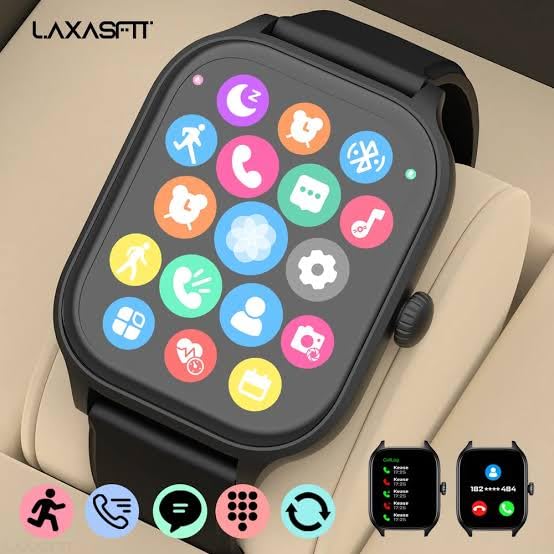
Image: The smartwatch display showing a grid of application icons for various functions.
4.2. Call and Message Management
Once paired, your H6 Smart Watch can display incoming calls and messages.
- ايندڙ ڪالون: The watch will display caller ID. You can accept or reject calls directly from the watch.
- پيغام: View message previews and notifications from various applications.

Image: The smartwatch screen showing an incoming call notification with options to accept or decline.

Image: The smartwatch screen displaying a message notification from a contact.
4.3. صحت جي نگراني
The H6 Smart Watch includes sensors for monitoring various health metrics.
- دل جي شرح مانيٽر: سڄي ڏينهن ۾ توهان جي دل جي شرح کي ٽريڪ ڪري ٿو.
- رت جي آڪسيجن مانيٽر: توهان جي رت جي آڪسيجن جي سنترپتي جي سطح کي ماپي ٿو.
- سمهڻ جي نگراني: Analyzes your sleep patterns.
4.4. Sports Modes and GPS
The watch supports over 100 sports modes to track your physical activities. It also features GPS for accurate outdoor activity tracking.

Image: A person running outdoors, wearing the LAXASFIT H6 Smart Watch on their wrist, displaying activity data.
4.5. ٻيا ڪم
The H6 Smart Watch offers a range of additional features:
- Dial-up Call & Call Record: Initiate calls and view ڪال تاريخ.
- ڊائريڪٽري: Access your phone contacts.
- نوٽيفڪيشن: Receive alerts from various apps.
- Find a Cell Phone: پنھنجو جوڙيل اسمارٽ فون ڳولھيو.
- روشني: اسڪرين جي روشني کي ترتيب ڏيو.
- راند: سادي راندين تائين رسائي حاصل ڪريو.
- ريموٽ ڪنٽرول ڪئميرا: پنهنجي فون جي ڪئميرا کي ريموٽ ڪنٽرول ڪريو.
- الارم: الارم مقرر ڪريو.
- وائرليس موسيقي: پنهنجي فون تي ميوزڪ پلے بیک کي ڪنٽرول ڪريو.
- ڪيلڪيوليٽر: بنيادي ڪيلڪيوليٽر فنڪشن.
- موسم: View current weather information.
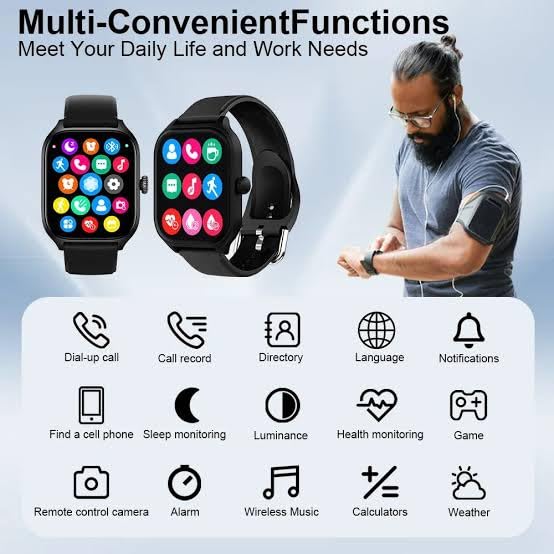
Image: An infographic illustrating multiple convenient functions of the smartwatch, including call, message, health monitoring, and music control.
5. سار سنڀال
5.1. صفائي
پنهنجي گھڙي کي باقاعدي صاف ڪريو ته جيئن ان جي ظاهر ۽ ڪارڪردگي برقرار رهي.
- اسڪرين ۽ پٽي کي نرم، ڊي سان صاف ڪريوamp ڪپڙو.
- سخت ڪيميائي يا ٻرندڙ مواد استعمال ڪرڻ کان پاسو ڪريو.
- چارج ڪرڻ کان اڳ پڪ ڪريو ته چارجنگ رابطا صاف ۽ سڪل آهن.
5.2. پاڻي جي مزاحمت
The LAXASFIT H6 Smart Watch is IP67 waterproof. This means it is protected against dust ingress and can withstand immersion in water up to 1 meter for up to 30 minutes. It is suitable for daily use and light water exposure like hand washing or rain. However, it is سفارش نه ڪئي وئي for swimming, showering with hot water, or diving.
5.3. بيٽري جي سنڀال
- بيٽري کي بار بار مڪمل طور تي چارج ڪرڻ کان پاسو ڪريو.
- جيڪڏهن گهڻي عرصي تائين استعمال نه ڪيو وڃي ته گھڙي کي ٿڌي، سڪل جاءِ تي رکو.
- صرف مهيا ڪيل چارجنگ ڪيبل استعمال ڪريو.
6. مسئلا حل ڪرڻ
If you encounter issues with your LAXASFIT H6 Smart Watch, refer to the following common solutions:
- واچ آن نه ٿي رهي آهي: پڪ ڪريو ته گھڙي مڪمل طور تي چارج ٿيل آهي. ان کي گهٽ ۾ گهٽ 30 منٽن لاءِ چارجر سان ڳنڍيو.
- فون سان جوڙو نه ٿو ٺاهي سگهجي: Make sure Bluetooth is enabled on your phone and the watch is within range. Restart both the watch and your phone, then try pairing again through the Laxasfit app.
- صحت جي غلط ڊيٽا: پڪ ڪريو ته گھڙي توهان جي کلائي تي مضبوطيءَ سان لڳل آهي، نه ته تمام گهڻي تنگ ۽ نه ئي گهڻي ڍلي. گھڙي جي پوئين پاسي واري سينسر کي صاف ڪريو.
- نوٽيفڪيشن ظاهر نه ٿي رهيا آهن: Check app notification settings on your phone and within the Laxasfit app to ensure they are enabled for the watch.
- اسڪرين غير جوابده: Try restarting the watch by pressing and holding the side button.
7. وضاحتون
| خاصيت | تفصيل |
|---|---|
| برانڊ | لڪساسفٽ |
| ماڊل | H6 اسمارٽ واچ |
| ڊسپلي جو قسم | AMOLED |
| اسڪرين جي ماپ | 1.9 Inches (2.01" TFT Display mentioned in title) |
| رابطي | بلوٽوٿ 5.0 |
| آپريٽنگ سسٽم | واچ او ايس |
| ميموري رکڻ جي صلاحيت | 500 ايم بي |
| رام ميموري انسٽال ٿيل سائيز | 0.13 ايم بي |
| خاص خاصيتون | GPS, Heart Rate Monitor, Blood Oxygen Monitor, 100+ Sports Modes |
| پاڻي جي مزاحمت | IP67 |
| بيٽري جي گنجائش | 100 Amp ڪلاڪ |
| سراسري بيٽري جي زندگي | 1 ڏينهن |
| چارج ڪرڻ وقت | 2 ڪلاڪ |
| مطابقت رکندڙ ڊوائيسز | Android & iOS (Iphone listed in specs) |
| مواد | Silicone (Strap) |
| شيءِ جو وزن | 200 جي |
8. وارنٽي ۽ سپورٽ
For warranty information and customer support, please refer to the official LAXASFIT webسائيٽ تي وڃو يا پنهنجي پرچون ڪندڙ سان رابطو ڪريو. خريداري جي ثبوت طور پنهنجي خريداري جي رسيد رکو.

Image: The LAXASFIT brand logo.