
NOUUI NU-HS012
NOUUI NU-HS012 Open Ear Headphones User Manual
Model: NU-HS012 | Brand: NOUUI
تعارف
Thank you for choosing the NOUUI NU-HS012 Open Ear Headphones. These headphones are designed to provide high-definition stereo sound while allowing you to remain aware of your surroundings. Featuring an AI noise-cancelling microphone, Bluetooth 5.3, and dual device connectivity, they are suitable for various activities including work, workouts, and calls. This manual provides essential instructions for setup, operation, and maintenance to ensure optimal performance and longevity of your device.
پيڪيج مواد
- NOUUI NU-HS012 Open Ear Headphones
- مقناطيسي انڊڪشن چارجر
- استعمال ڪندڙ دستي
پيداوار ختمview
Familiarize yourself with the components of your NOUUI NU-HS012 headphones.

تصوير 1: NOUUI NU-HS012 Open Ear Headphones. This image displays the overall design of the headphones, highlighting the open-ear hooks and the adjustable microphone boom.
- Open-Ear Hooks: Designed to rest gently on the outer ear, providing comfort and situational awareness.
- ترتيب ڏيڻ وارو مائڪروفون: A 270° rotatable boom microphone with AI noise cancellation for clear voice pickup.
- ملٽي فنڪشن بٽڻ (MFB): Controls power, calls, and music playback.
- حجم ڪنٽرول: Buttons located on the side for adjusting audio levels.
- چارج پورٽ: For connecting the magnetic induction charger.
سيٽ اپ ڪريو
1. هيڊفون چارج ڪرڻ
Before first use, fully charge your NOUUI NU-HS012 headphones.
- Connect the magnetic induction charger to a USB power source.
- Place the headphones onto the charging base, ensuring the magnetic contacts align.
- The indicator light on the headphones will show charging status (refer to LED indicator section for details).
- مڪمل چارج ۾ لڳ ڀڳ 2 ڪلاڪ لڳن ٿا ۽ 14 ڪلاڪن تائين پلے بیک وقت فراهم ڪري ٿو.
2. بلوٽوٽ جوئر
Pair your headphones with your device (smartphone, tablet, laptop, etc.) via Bluetooth.
- پڪ ڪريو ته هيڊفون بند ٿيل آهن.
- Press and hold the Multifunction Button (MFB) until the LED indicator flashes blue and red, indicating pairing mode.
- توهان جي ڊوائيس تي، بلوٽوت کي فعال ڪريو ۽ دستياب ڊوائيسز جي ڳولا ڪريو.
- Select "NOUUI NU-HS012" from the list.
- هڪ connectedيرو connectedنيل ، ايل اي ڊي اشاري آهستي آهستي چمڪندي.
نوٽ: The effective Bluetooth range is up to 15 meters (49 feet).
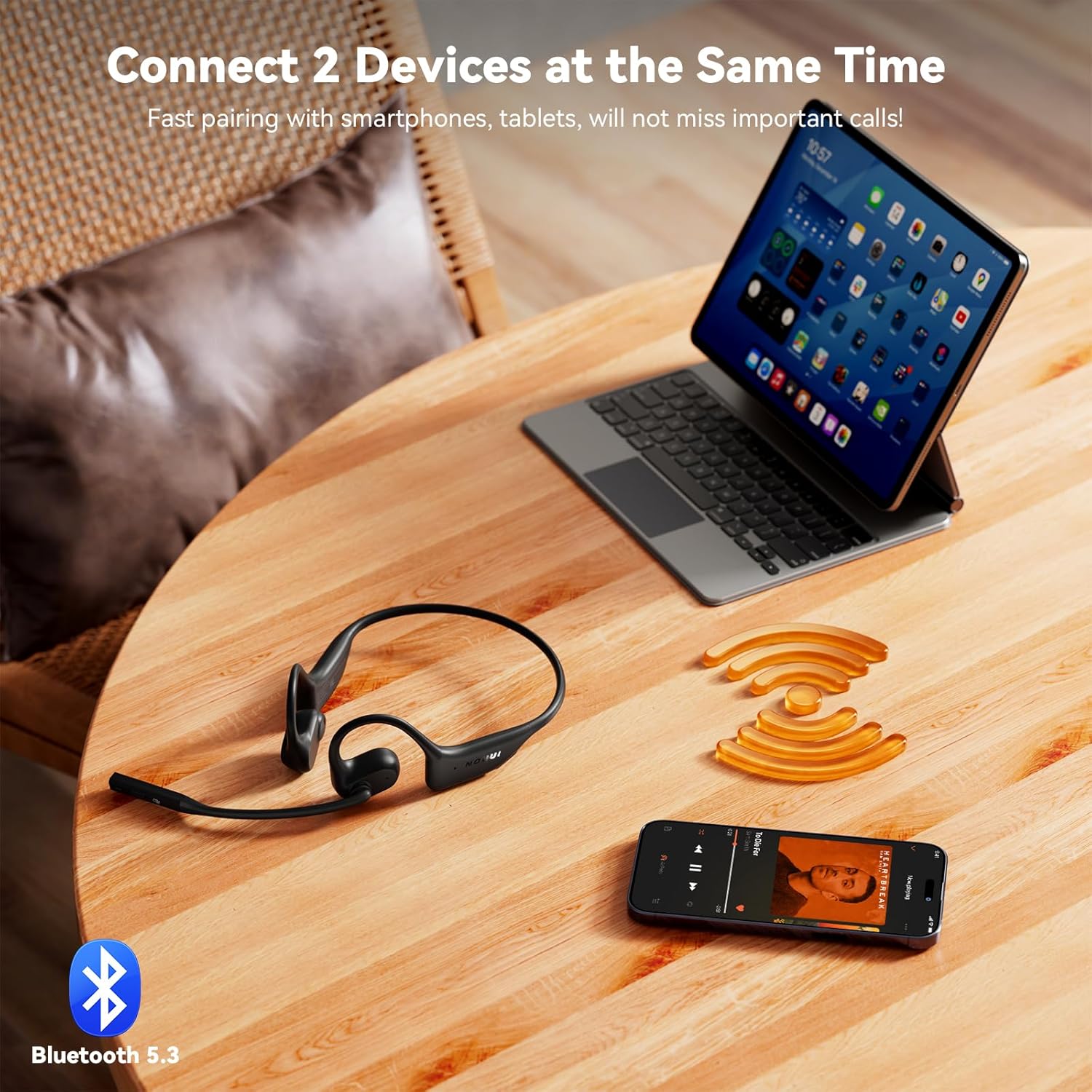
تصوير 2: NOUUI NU-HS012 Headphones demonstrating dual connection. The headphones are shown wirelessly connected to both a smartphone and a tablet, illustrating the ability to pair with two devices simultaneously.
آپريٽنگ هدايتون
پاور آن / آف
- پاور آن: Press and hold the MFB for 3 seconds. The LED indicator will flash blue.
- بجلي بند: Press and hold the MFB for 5 seconds. The LED indicator will flash red and then turn off.
ڪال انتظام
- جواب/آخر ڪال: هڪ ڀيرو ايم ايف بي کي دٻايو.
- ڪال رد ڪريو: 2 سيڪنڊن لاءِ ايم ايف بي کي دٻايو ۽ رکو.
- مائڪروفون بند ڪريو: During a call, press the dedicated mute button on the microphone boom. Press again to unmute.
- Adjust Microphone: The microphone boom can be rotated 270° to position it optimally for clear voice pickup.

تصوير 3: Illustration of AI Noise Cancelling for clear calls. This image shows a person using the headphones while running, with a graphic demonstrating how background noise is reduced for clearer communication.
موسيقي پلے بیک
- راند/روڪ: هڪ ڀيرو ايم ايف بي کي دٻايو.
- اڳيون ٽريڪ: MFB کي ٻه ڀيرا دٻايو.
- پويون ٽريڪ: MFB کي ٽي ڀيرا دٻايو.
حجم ڪنٽرول
- حجم و :ايو: واليوم اپ بٽڻ دٻايو.
- حجم گھٽايو: واليوم ڊائون بٽڻ دٻايو.
ٻٽي ڊوائيس ڪنيڪشن
The NOUUI NU-HS012 headphones can be connected to two Bluetooth devices simultaneously.
- "بلوٽوٿ پيئرنگ" سيڪشن ۾ بيان ڪيل پهرين ڊوائيس سان هيڊفون جوڙيو.
- پهرين ڊوائيس تي بلوٽوٿ کي بند ڪريو. هيڊفون ٻيهر پيئرنگ موڊ ۾ داخل ٿيندا.
- هيڊفونز کي ٻئي ڊوائيس سان گڏ ڪريو.
- پهرين ڊوائيس تي بلوٽوٿ کي ٻيهر فعال ڪريو. هيڊفونز کي خودڪار طريقي سان ٻنهي ڊوائيسز سان ڳنڍجي وڃڻ گهرجي.
- Audio will switch between devices based on which one is actively playing media or receiving a call.
سار سنڀال
صفائي
- هيڊفونز کي نرم، سڪل، لِنٽ فري ڪپڙي سان صاف ڪريو.
- گھڙڻ وارا صاف ڪندڙ، محلول، يا ايروسول اسپري استعمال نه ڪريو.
ذخيرو
- هيڊفونز کي سڌي سج جي روشني ۽ انتهائي گرمي پد کان پري ٿڌي، سڪل جاءِ تي رکو.
- هيڊفونز تي ڳري شيون رکڻ کان پاسو ڪريو.
پاڻي جي مزاحمت
اهم: The NOUUI NU-HS012 headphones are پاڻي جي مزاحمت نه ڪندڙنقصان کان بچڻ لاءِ پاڻي، مينهن، پگهر، يا ٻين مائع شين جي سامهون اچڻ کان پاسو ڪريو.
مشڪلاتون
| مسئلو | حل |
|---|---|
| هيڊفون آن نه ٿا ٿين. | Ensure the headphones are fully charged. Connect to the magnetic charger for at least 30 minutes. |
| ڊوائيس سان جوڙو نه ٿو ٺاهي سگهجي. |
|
| ڪابه آواز يا گهٽ آواز ناهي. |
|
| مائڪروفون ڪم نه ڪري رهيو آهي. |
|
وضاحتون
| خاصيت | تفصيل |
|---|---|
| ماڊل نالو | NU-HS012 |
| برانڊ | NOUUI |
| رابطي ٽيڪنالاجي | وائرليس (بلوٽوٿ 5.3) |
| بلوٽوٿ رينج | 15 ميٽر (49 فوٽ) تائين |
| ڪن جي جڳهه | کليل ڪن |
| مائڪروفون | AI Noise Cancelling, 270° Rotating |
| بيٽري جي زندگي | 14 ڪلاڪ تائين |
| چارج ڪرڻ وقت | لڳ ڀڳ 2 ڪلاڪ |
| وزن | 29 گرام (0.99 اونس) |
| پاڻي جي مزاحمت | نه پاڻي مزاحمتي |
| شامل اجزاء | Headphones, Magnetic Induction Charger, User Manual |
وارنٽي ۽ سپورٽ
NOUUI products are designed and manufactured to the highest quality standards. For information regarding warranty coverage, technical support, or customer service, please refer to the warranty card included with your product or visit the official NOUUI webسائيٽ.
اختياري تحفظ جا منصوبا الڳ سان خريد ڪرڻ لاءِ موجود هوندا. تفصيل لاءِ مهرباني ڪري پنهنجي پرچون ڪندڙ سان چيڪ ڪريو.
حفاظت جي ڄاڻ
- مصنوعات کي جدا نه ڪريو، مرمت ڪريو، يا تبديل ڪريو.
- Keep the product away from extreme temperatures, humidity, and corrosive environments.
- پراڊڪٽ کي ڇڏڻ يا مضبوط اثرن جي تابع ڪرڻ کان پاسو ڪريو.
- پراڊڪٽ کي پاڻي يا ٻين مايعات کي ظاهر نه ڪريو.
- پراڊڪٽ ۽ ان جي بيٽري کي مقامي ضابطن جي مطابق ذميواري سان ختم ڪريو.
- Using headphones at high volume for extended periods can cause permanent hearing damage.
- Maintain awareness of your surroundings when using open-ear headphones, especially in traffic or other potentially hazardous situations.

تصوير 4: A man driving a car while wearing NOUUI NU-HS012 headphones. This image emphasizes the importance of maintaining situational awareness, especially when driving, even with open-ear headphones.
Ask a question about this manual
Ask about setup, troubleshooting, compatibility, parts, safety, or missing instructions. Manuals+ will review the question and use this page’s manual context to help answer it.