
1. تعارف
This manual provides detailed instructions for the installation, operation, and maintenance of your AINAVI 11.5-inch Car Radio Stereo. This advanced system is designed to upgrade your vehicle's infotainment experience with Android 13.0, wireless CarPlay, Android Auto, GPS navigation, and various multimedia features. Please read this manual thoroughly before installation and use to ensure proper functionality and safety.
2. پراڊڪٽ ختمview
The AINAVI 11.5-inch Car Radio Stereo is a high-performance multimedia system compatible with specific Jeep Wrangler JK, Dodge Grand Caravan, and Dodge Ram models. It features an 11.5-inch QLED touchscreen with 1280x800 resolution, running on Android 13.0 with 4GB RAM and 64GB ROM for smooth operation. Key features include:
- 11.5 انچ QLED ٽچ اسڪرين: G+G full lamination technology with 178° full-viewزاويه.
- اينڊرائيڊ 13.0 او ايس: Latest operating system for enhanced performance.
- وائرليس/وائرڊ ڪار پلي ۽ اينڊرائيڊ آٽو: بي عيب اسمارٽ فون انضمام.
- جي پي ايس نيويگيشن: آن لائن ۽ آف لائن نقشن کي سپورٽ ڪري ٿو.
- 5G وائي فائي ۽ بلوٽوٿ 5.4: Fast internet connectivity and stable device pairing.
- اي ايم/ايف ايم/آر ڊي ايس ريڊيو: Access to various radio stations.
- اسٽيئرنگ ويل ڪنٽرول: Retains original vehicle controls.

Image: The 11.5-inch HD IPS Touch Screen, showcasing its vibrant display and full lamination technology for clarity and responsiveness.
3. پيڪيج مواد
پڪ ڪريو ته هيٺ ڏنل سڀئي شيون توهان جي پيڪيج ۾ شامل آهن. جيڪڏهن ڪا به شيءِ غائب يا خراب آهي، مهرباني ڪري ڪسٽمر سپورٽ سان رابطو ڪريو.
- 11.5-inch Car Head Unit for Jeep Wrangler JK
- پلاسٽڪ جو فريم
- AHD 1080P ريئر View Camera + Extension Power Cable
- مائڪروفون
- GPS اينٽيننا
- USB 4 پن ڪيبل
- USB 6 پن ڪيبل
- استعمال ڪندڙ جو دستياب (ھي دستاويز)
- پاور ڪيبل
- Power Harness with CAN BUS (for some models)
- نيرو فريم هٽائڻ وارو اوزار
- آر سي سي ڪيبل
- ريورسنگ ڪنٽرول ڪيبل
Note: The specific cables included may vary slightly depending on the vehicle model.
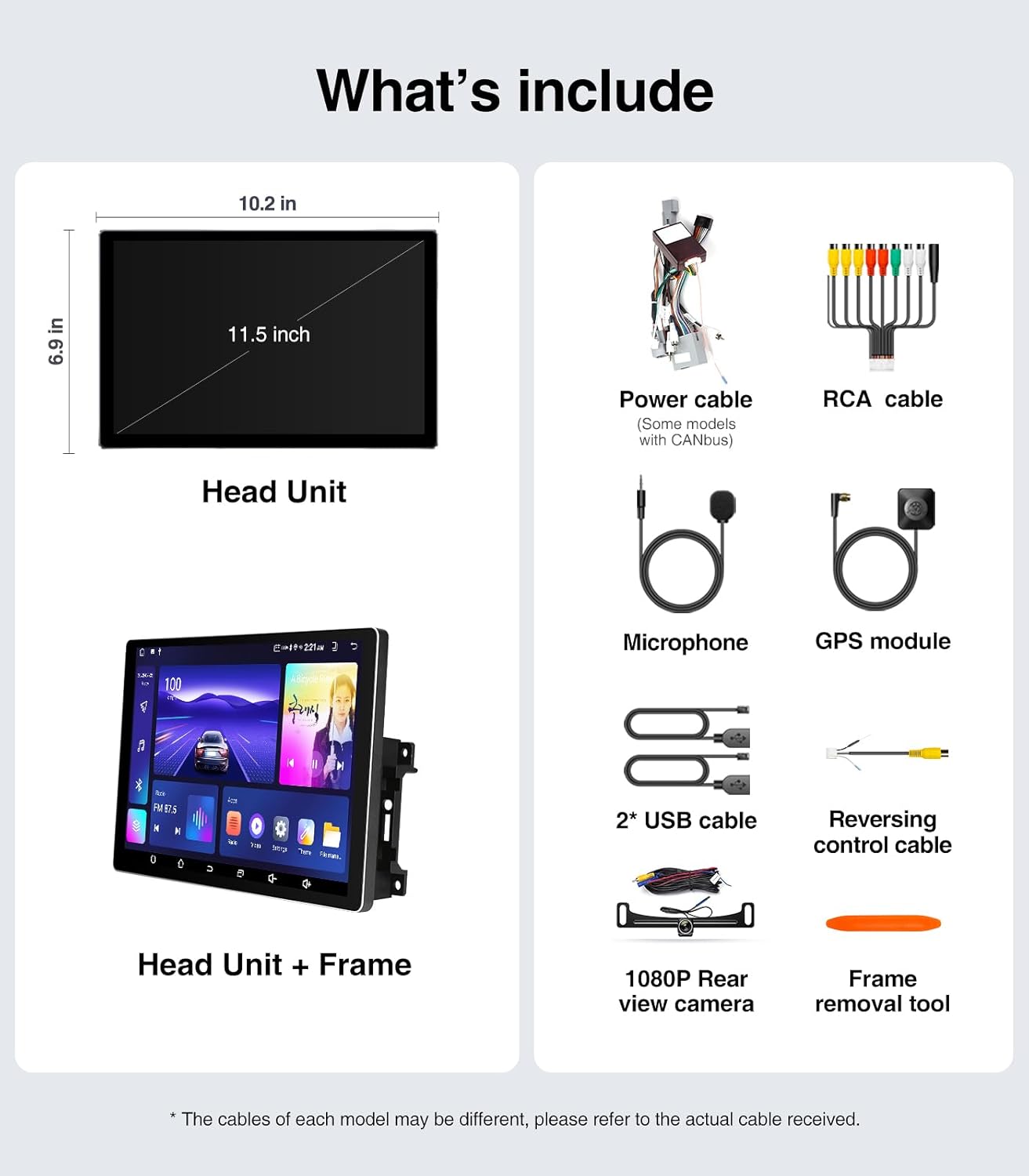
Image: A visual representation of all components included in the package, such as the head unit, frame, various cables, camera, microphone, and tools.
4. انسٽاليشن گائيڊ (سيٽ اپ)
The AINAVI Car Radio Stereo is designed for a plug-and-play installation for compatible vehicles. However, professional installation is recommended if you are unfamiliar with car audio system wiring.
4.1 قبل از انسٽاليشن چيڪ
- Ensure your vehicle is compatible with the head unit (Jeep Wrangler JK 2007-2018, Dodge Grand Caravan 2011-2020, Dodge Ram 2009-2012, etc.).
- Gather all necessary tools, including the provided frame removal tool.
- Disconnect the vehicle's battery before starting the installation to prevent electrical shorts.
4.2 تنصيب جا مرحلا
- Carefully remove the original car radio and dashboard trim using the frame removal tool. Refer to your vehicle's service manual for specific trim removal instructions.
- Connect the provided power harness and CAN BUS (if applicable) to the vehicle's wiring. Ensure all connections are secure.
- Connect the GPS antenna, USB cables, microphone, and rear view camera cables to the corresponding ports on the new head unit.
- Mount the new 11.5-inch head unit into the dashboard opening. Ensure it fits securely within the plastic frame.
- گاڏي جي بيٽري ٻيهر ڳنڍيو.
- Turn on the vehicle's ignition and test the head unit's basic functions (power, audio, touch screen).
- Reinstall the dashboard trim panels.

Image: A comparison showing the vehicle's dashboard before and after the installation of the AINAVI 11.5-inch car radio stereo, highlighting the significant visual upgrade.

Image: Illustrates the plug-and-play nature of the installation, showing a user connecting wiring harnesses, along with icons indicating support for Steering Wheel Control and AMP.
5. آپريٽنگ هدايتون
5.1 بنيادي آپريشن
- پاور آن / آف: The unit powers on with the vehicle's ignition. Press and hold the power button (if available) for manual power control.
- ٽچ اسڪرين: Navigate the Android interface by tapping, swiping, and pinching gestures.
- حجم ڪنٽرول: Adjust volume using the on-screen controls or your vehicle's steering wheel buttons.
5.2 وائرليس/وائرڊ ڪار پلي ۽ اينڊرائيڊ آٽو
Connect your iPhone or Android smartphone for seamless integration of navigation, communication, and entertainment apps.
- Ensure Bluetooth is enabled on your smartphone and the head unit.
- On the head unit, open the CarPlay or Android Auto application.
- For wireless connection, pair your phone via Bluetooth. For wired, connect your phone using a USB cable to the designated USB port.
- Follow the on-screen prompts to complete the connection.
Once connected, you can use voice commands (e.g., "Hey Siri" or "Hey Google") for hands-free operation.

Image: A visual of the head unit displaying the Wireless CarPlay and Android Auto interface, with a smartphone icon indicating connectivity and various app logos.
5.3 GPS نيويگيشن
The unit supports both online and offline navigation.
- آن لائن نقشا: Connect the head unit to a WiFi hotspot (e.g., from your phone) to access real-time traffic information and updated maps.
- آف لائن نقشا: Download maps for your region to the unit's internal storage. This allows navigation without an internet connection.
- Use the pre-installed navigation app or download your preferred app from the Google Play Store.
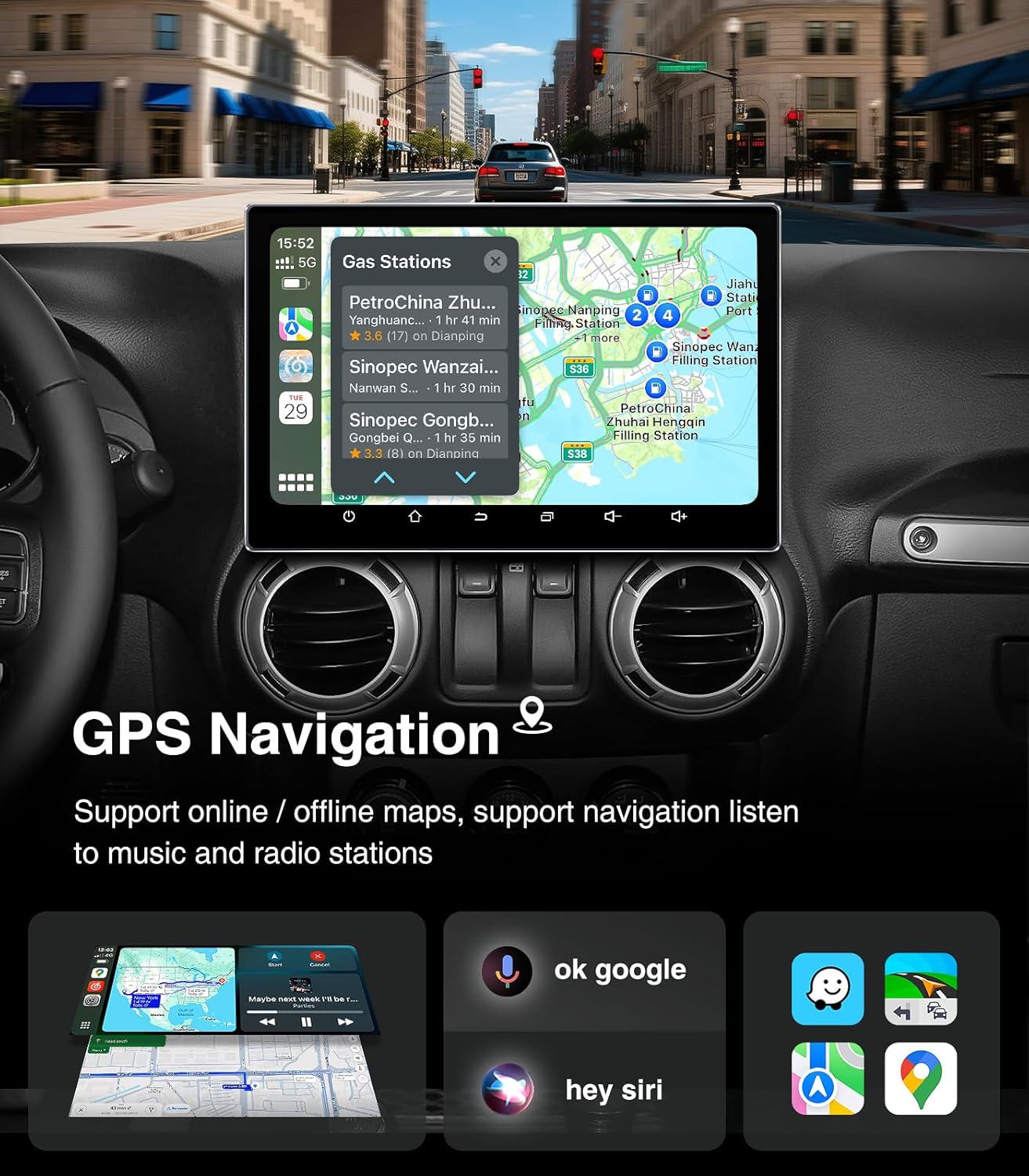
Image: The head unit displaying a GPS navigation map with points of interest and traffic information, alongside icons for voice commands like "ok google" and "hey siri".
5.4 AM/FM/RDS Radio
بلٽ ان ٽيونر سان پنهنجي پسنديده ريڊيو اسٽيشنن تائين رسائي حاصل ڪريو.
- Open the "Radio" application on the head unit.
- Scan for available stations or manually tune to a specific frequency.
- جلدي رسائي لاءِ پنهنجي پسنديده اسٽيشنن کي پري سيٽ طور محفوظ ڪريو.
- The RDS (Radio Data System) feature displays station information where available.

Image: The head unit displaying the AM/FM/RDS radio interface, showing frequency tuning and preset options, with a scenic road background.
5.5 5G WiFi Hotspot & Bluetooth Connection
Enhance your connectivity with fast WiFi and stable Bluetooth.
- وائي فائي: Connect to a mobile hotspot or home WiFi network to browse the internet, download apps, and stream content. Supports dual-band 2.4GHz & 5GHz.
- بلوٽوٽ 5.4: Pair your smartphone for hands-free calls, Bluetooth music streaming, and phonebook synchronization.

Image: The head unit displaying a phone dialer interface, indicating Bluetooth connectivity with a smartphone, and icons for various supported apps like Google Play, Chrome, YouTube, Instagram, and Netflix.
6. سار سنڀال
To ensure the longevity and optimal performance of your AINAVI Car Radio Stereo, follow these maintenance guidelines:
- اسڪرين جي صفائي: ٽچ اسڪرين کي نرميءَ سان صاف ڪرڻ لاءِ نرم، لِنٽ فري ڪپڙو استعمال ڪريو. ضدي داغن لاءِ، ٿورو ڊيampڪپڙي کي پاڻي يا اسڪرين محفوظ ڪلينر سان ڌوئڻ ڏيو. سخت ڪيميڪلز يا رگڙيندڙ مواد کان پاسو ڪريو.
- سافٽ ويئر اپڊيٽ: Periodically check for system updates through the unit's settings menu. Keeping the software updated ensures optimal performance, security, and access to new features.
- گرمي پد ڪنٽرول: Avoid exposing the unit to extreme temperatures for extended periods. While designed for automotive environments, prolonged exposure to direct sunlight or freezing conditions can affect performance.
- ڪيبل ڪنيڪشن: پڪ ڪريو ته سڀئي ڪيبل محفوظ طور تي ڳنڍيل رهن. ڍلا ڪنيڪشن وقفي وقفي سان مسئلا پيدا ڪري سگهن ٿا.
7. مسئلا حل ڪرڻ
If you encounter issues with your car radio stereo, refer to the following common problems and solutions:
| مسئلو | ممڪن سبب | حل |
|---|---|---|
| يونٽ پاور نه آهي | بجلي جو ڪنيڪشن ڍلو، فيوز ڦاٽل، گاڏي جي بيٽري جو مسئلو. | Check power cables and fuse. Ensure vehicle battery is charged. |
| آواز ڪونهي | آواز تمام گهٽ آهي، خاموشي چالو آهي، اسپيڪر وائرنگ جو مسئلو آهي، غلط آڊيو ذريعو آهي. | Increase volume, check mute status, verify speaker connections, select correct audio source. |
| ٽچ اسڪرين غير جوابي | سافٽ ويئر جي خرابي، اسڪرين ڪيليبريشن جو مسئلو. | Restart the unit. If issue persists, perform a factory reset (data will be lost). |
| ڪار پلي/اينڊرائيڊ آٽو ڳنڍي نه رهيو آهي | Bluetooth/USB issue, phone settings, app not updated. | Ensure Bluetooth is on and paired. Try a different USB cable. Update phone OS and apps. |
| GPS سگنل گم ٿي ويو يا غلط | GPS antenna obstruction, poor satellite reception. | پڪ ڪريو ته GPS اينٽينا صاف آهي view آسمان جو. اينٽينا ڪنيڪشن چيڪ ڪريو. |
If these solutions do not resolve the issue, please contact AINAVI customer support.
8. وضاحتون
| خاصيت | تفصيل |
|---|---|
| برانڊ | AINAVI |
| آپريٽنگ سسٽم | Android 13.0 |
| ميموري رکڻ جي صلاحيت | 64 جي بي (روم) |
| رام | 4 جي بي |
| اسڪرين جي ماپ | 11.5 انچ |
| ڊسپلي جو قسم | QLED, G+G Full Lamination |
| قرارداد | 1280x800 |
| رابطي ٽيڪنالاجي | Bluetooth 5.4, USB, Wi-Fi (2.4Ghz & 5Ghz), Wireless CarPlay, Wired Android Auto |
| خاص خاصيتون | AM/FM/RDS radio, 5G WiFi, CarPlay+Android Auto+Mirror Link+AirPlay, Split Screen Function, Touch Screen |
| مطابقت رکندڙ ڊوائيسز | Smartphone, iPhone |
| چڙهڻ جو قسم | ڊيش بورڊ جبل |
| آڊيو آئوٽ پٽ موڊ | اسٽيريو |
| گاڏين جي سروس جو قسم | ڪار |
9. وارنٽي ۽ سپورٽ
AINAVI provides technical support for this product. If you have any questions regarding installation, operation, or troubleshooting that are not covered in this manual, please do not hesitate to contact us via Amazon email. We are committed to providing prompt assistance.
Please retain your proof of purchase for warranty claims. Specific warranty terms and conditions may apply and are available upon request or through the product's purchase platform.