
1. تعارف
This manual provides detailed instructions for the installation, operation, and maintenance of your SENTKENG Y05009 Indoor Camera. Please read this manual thoroughly before using the product to ensure proper function and safety. The SENTKENG Y05009 is a 1080P WiFi camera designed for indoor monitoring, featuring pan/tilt capabilities, two-way audio, IR night vision, and motion detection.
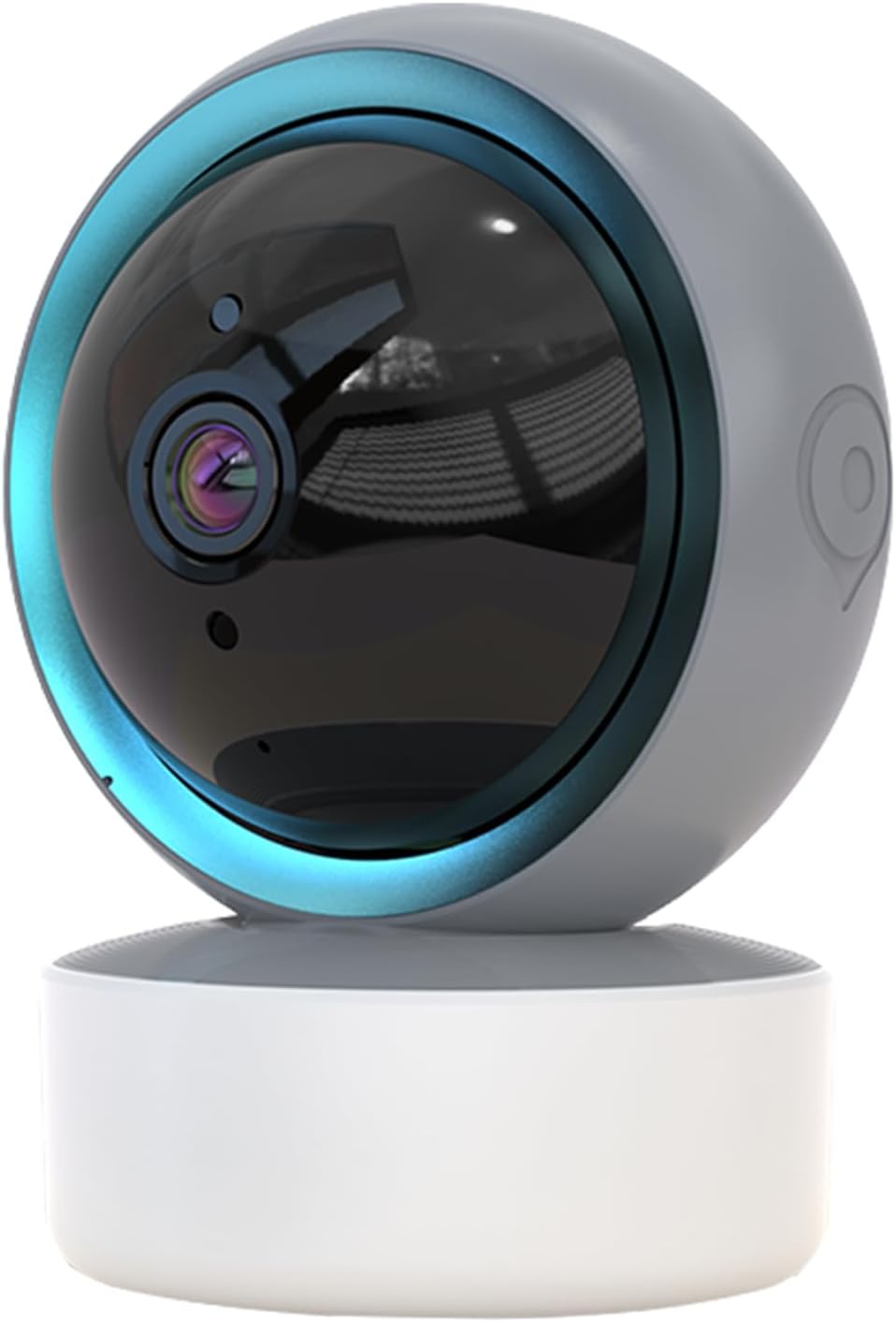
Image 1.1: SENTKENG Y05009 Indoor Camera. This image displays the compact, spherical design of the camera with its lens and base.
2. پيڪيج مواد
مھرباني ڪري تصديق ڪريو ته سڀ شيون پيڪيج ۾ موجود آھن:
- SENTKENG Y05009 Indoor Camera
- USB پاور ڪيبل
- Power Adapter (not explicitly listed but implied for a plug-in device)
- چڙهڻ واري بریکٹ ۽ اسڪرو
- ھدايت وارو دستور

Image 2.1: Package Contents. This image shows the camera, USB cable, mounting accessories, and the user manual included in the box.
3. پراڊڪٽ ختمview
The SENTKENG Y05009 camera features a compact design with essential components for effective indoor monitoring.
3.1 ڪئميرا جا حصا
- لينس: Captures 1080P video.
- Infrared LEDs: رات جي خواب جون صلاحيتون مهيا ڪريو.
- مائڪروفون: آڊيو ان پٽ ۽ ٻه طرفي ڳالهه ٻولهه لاءِ.
- اسپيڪر: آڊيو آئوٽ پُٽ ۽ ٻه طرفي ڳالهه ٻولهه لاءِ.
- مائڪرو ايس ڊي ڪارڊ سلاٽ: 128GB تائين مقامي اسٽوريج جي حمايت ڪري ٿو (ڪارڊ شامل نه آهي).
- ري سيٽ بٽڻ: Used for factory reset or pairing mode.
- پاور پورٽ: USB port for connecting the power cable.
Image 3.1: Camera Component Details. This image highlights the speaker, microSD card slot, reset button, and power port on the camera.
4. سيٽ اپ
Follow these steps to set up your SENTKENG Y05009 Indoor Camera.
4.1 پاور آن
- USB پاور ڪيبل کي ڪئميرا جي پاور پورٽ سان ڳنڍيو.
- USB ڪيبل جي ٻئي ڇيڙي کي مهيا ڪيل پاور اڊاپٽر ۾ لڳايو.
- پاور اڊاپٽر کي معياري اليڪٽريڪل آئوٽليٽ ۾ لڳايو. ڪئميرا پاور آن ڪندو ۽ ان جي شروعاتي ترتيب شروع ڪندو.
4.2 ايپ انسٽاليشن ۽ اڪائونٽ ٺاهڻ
- ڊائون لوڊ ڪريو انسٽا ويزن توهان جي اسمارٽ فون جي ايپ اسٽور (iOS يا Android) مان ايپ.
- Open the InstaVision app and create a new account or log in if you already have one.

Image 4.1: InstaVision App Interface. This image shows the 'Welcome to InstaVision' screen on a smartphone, illustrating the initial app setup.
4.3 وائي فائي سان ڳنڍڻ
The camera supports 2.4GHz Wi-Fi networks only.
- In the InstaVision app, tap 'Add Device' or the '+' icon.
- Select your camera model or 'Smart Camera'.
- Follow the on-screen instructions to connect the camera to your 2.4GHz Wi-Fi network. This typically involves scanning a QR code generated by the app with the camera's lens or listening for an audio prompt.
- هڪ ڀيرو ڳنڍيل، ڪئميرا جي اشاري جي روشني تبديل ٿي ويندي، ۽ توهان کي ايپ ۾ هڪ تصديق ملندي.
4.4 لڳائڻ ۽ چڙهڻ
The camera can be placed on a flat surface or mounted to a ceiling.
- ٽيبل ٽاپ جبل: Place the camera on a stable, flat surface such as a table or shelf.
- ڇت جي انسٽاليشن: Use the provided mounting bracket and screws to secure the camera to the ceiling. Ensure the camera is oriented correctly for optimal viewing.
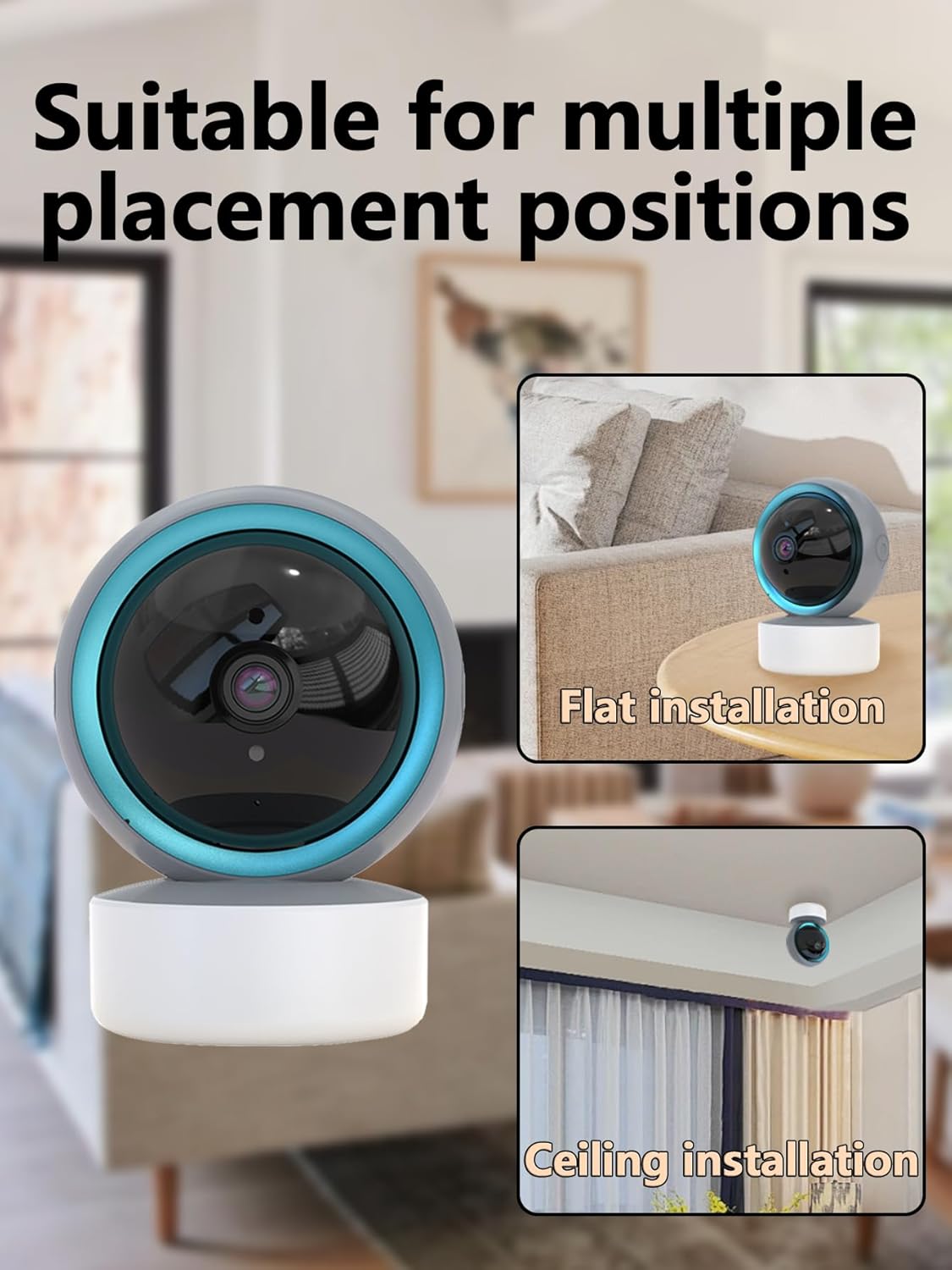
Image 4.2: Multiple Placement Positions. This image illustrates the camera placed on a flat surface and mounted on a ceiling.
5. آپريٽنگ هدايتون
Learn how to use the various features of your SENTKENG Y05009 camera.
5.1 زنده View ۽ پين/ٽِلٽ ڪنٽرول
- Open the InstaVision app and select your camera from the device list.
- You will see the live video feed.
- Use the directional controls within the app to remotely rotate the camera lens: 355 ° افقي طور تي ۽ 90 ° عمودي.

Image 5.1: Multi-Angle Rotation. This image demonstrates the camera's ability to rotate 355 degrees horizontally and 90 degrees vertically.
5.2 ٻه طرفي آڊيو
The camera features a built-in microphone and speaker for real-time communication.
- رهڻ دوران view, tap the microphone icon in the app.
- Speak into your phone to transmit audio through the camera's speaker.
- The camera's microphone will capture audio from its surroundings, which you can hear through your phone.
5.3 حرڪت جي ڳولا ۽ خبرداريون
ڪئميرا حرڪت کي ڳولي سگهي ٿو ۽ توهان جي فون تي فوري اطلاع موڪلي سگهي ٿو.
- Enable motion detection in the InstaVision app settings for your camera.
- ضرورت مطابق حساسيت جي سطح کي ترتيب ڏيو.
- When motion is detected, you will receive a push notification on your smartphone.
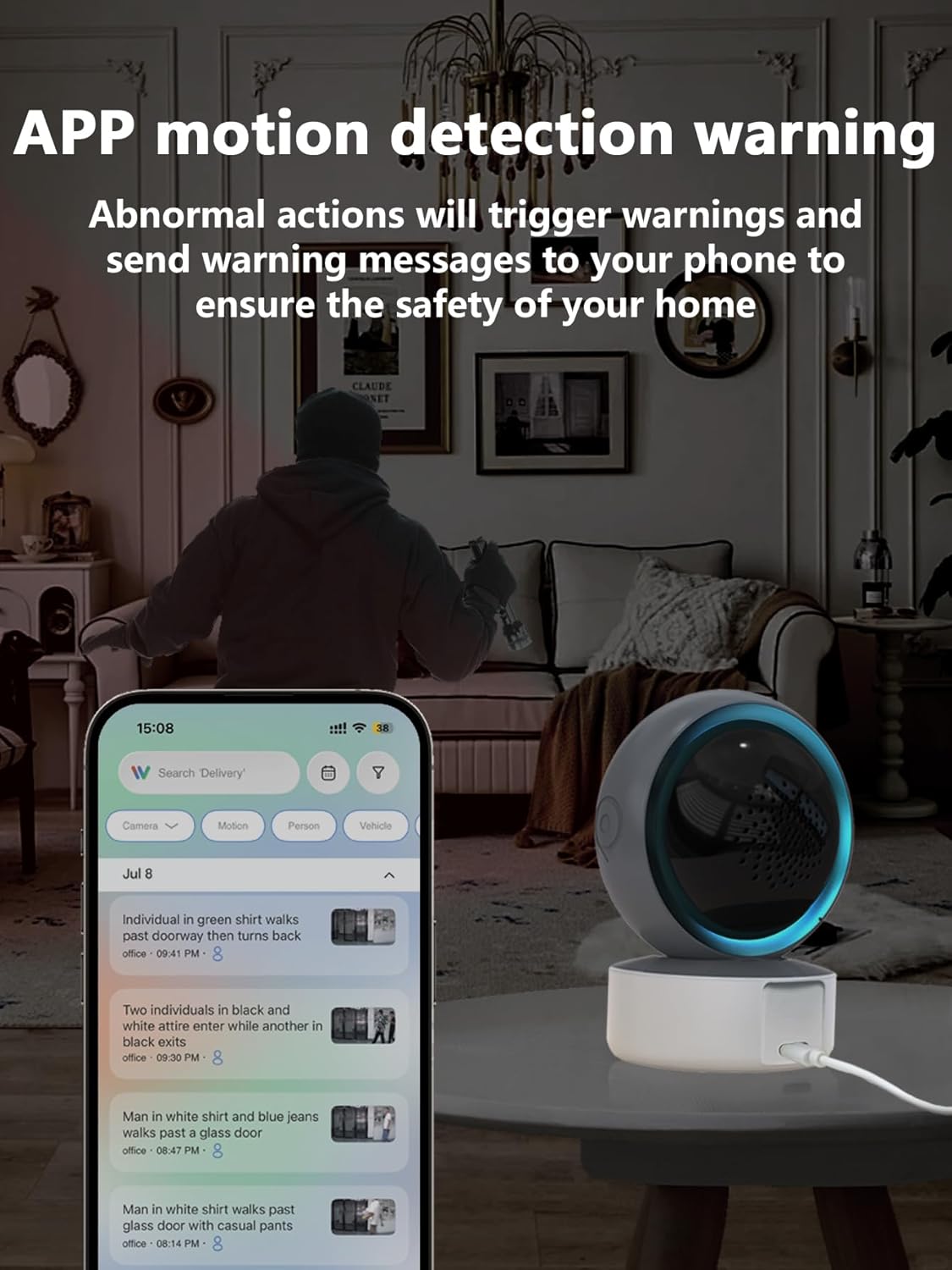
Image 5.2: APP Motion Detection Warning. This image shows a smartphone displaying motion detection alerts from the InstaVision app, with the camera monitoring a room.
5.4 IR Night Vision
ڪئميرا گهٽ روشني واري حالتن ۾ خود بخود انفراريڊ نائيٽ ويزن ۾ تبديل ٿي ويندو آهي.
- Infrared LEDs provide clear black-and-white images up to 8 meters in complete darkness.
- No manual activation is required; the camera adjusts automatically.

Image 5.3: Clear IR Night Vision. This image depicts the camera providing a clear view in a dark room, with a smartphone displaying the night vision feed.
5.5 ويڊيو اسٽوريج
The camera offers two storage options for recorded footage:
- MicroSD ڪارڊ: Insert a microSD card (up to 128GB, not included) into the camera's slot for local storage. Recordings will be saved directly to the card.
- ڪلائوڊ سروس: An optional cloud storage subscription is available through the InstaVision app for remote and secure storage of your video recordings.

Image 5.4: Video Playback & Storage Function. This image shows the camera, a microSD card, and a smartphone displaying cloud storage icons, illustrating the dual storage options.
5.6 AI Detection (Subscription)
Advanced AI-powered detection features are available with a paid InstaVision app subscription. These features may include:
- شخص جي سڃاڻپ
- پالتو جانورن جي چڪاس
- Specific human action recognition
5.7 گھڻ-استعمال ڪندڙ Viewing
The InstaVision app allows multiple users to view the camera feed simultaneously.
- In the app, navigate to the camera settings and find the 'Share Device' option.
- Invite other users by entering their InstaVision account details.
- Shared users will receive an invitation and can then access the camera feed.

Image 5.5: Simultaneous Online Viewing by Multiple Users. This image shows several individuals viewing the camera feed on their smartphones, indicating the family share function.
6. سار سنڀال
باقاعده سار سنڀال توهان جي ڪئميرا جي ڊگهي عمر ۽ بهترين ڪارڪردگي کي يقيني بڻائڻ ۾ مدد ڪري ٿي.
- صفائي: ڪئميرا لينس ۽ جسم کي نرم، سڪل ڪپڙي سان نرميءَ سان صاف ڪريو. سخت ڪيميڪلز يا رگڙيندڙ مواد استعمال ڪرڻ کان پاسو ڪريو.
- سافٽ ويئر اپڊيٽ: Periodically check the InstaVision app for firmware updates for your camera. Keeping the firmware updated ensures you have the latest features and security enhancements.
- پاور سائيڪل: جيڪڏهن ڪئميرا ۾ ڪو مسئلو ٿئي ٿو، ته ان کي 10 سيڪنڊن لاءِ پاور سورس کان ان پلگ ڪرڻ جي ڪوشش ڪريو ۽ پوءِ ان کي واپس پلگ ان ڪريو.
7. مسئلا حل ڪرڻ
If you encounter problems with your SENTKENG Y05009 camera, refer to the following common issues and solutions.
- Camera is offline:
- Ensure the camera is properly powered on and the power adapter is securely plugged in.
- Check your Wi-Fi network connection. Ensure the camera is within range of your 2.4GHz Wi-Fi router.
- ڪئميرا کي ان پلگ ان ۽ ٻيهر پلگ ان ڪري ٻيهر شروع ڪريو.
- If the issue persists, try resetting the camera and re-pairing it with the app.
- وائي فائي سان ڳنڍي نٿو سگهي:
- Verify that your Wi-Fi network is 2.4GHz. The camera does not support 5GHz networks.
- پڪ ڪريو ته توهان صحيح وائي فائي پاسورڊ داخل ڪري رهيا آهيو.
- Move the camera closer to your Wi-Fi router during the setup process.
- ڪئميرا ري سيٽ ڪريو ۽ ڪنيڪشن جي عمل کي ٻيهر ڪوشش ڪريو.
- Motion detection alerts are not received:
- Check the motion detection settings in the InstaVision app to ensure it is enabled and sensitivity is adjusted appropriately.
- Verify that your smartphone's notification settings allow alerts from the InstaVision app.
- پڪ ڪريو ته ڪئميرا ۾ هڪ مستحڪم انٽرنيٽ ڪنيڪشن آهي.
- خراب وڊيو معيار:
- پڪ ڪريو ته ڪئميرا لينس صاف ۽ مٽي يا داغ کان پاڪ آهي.
- پنهنجي وائي فائي سگنل جي طاقت چيڪ ڪريو. ڪمزور سگنل اسٽريمنگ جي معيار کي متاثر ڪري سگهي ٿو.
- Ensure adequate lighting for optimal daytime video.
8. وضاحتون
| خاصيت | تفصيل |
|---|---|
| ماڊل نالو | Y05009 |
| اندروني / ٻاهران استعمال | اندريون |
| وڊيو ڪيپچر ريزوليوشن | 1080 ص |
| رابطي ٽيڪنالاجي | وائرليس (2.4GHz وائي فائي) |
| طاقت جو ذريعو | تار ٿيل برقي |
| پين / ٽائل رينج | افقي 355°، عمودي 90° |
| نائيٽ ويزن رينج | 8 ميٽر |
| اسٽوريج جا اختيار | MicroSD Card (up to 128GB), Cloud Storage (subscription) |
| ٻه طرفي آڊيو | ها |
| حرڪت جي چڪاس | ها |
| AI خاصيتون | Optional (subscription required) |
| مطابقت رکندڙ ڊوائيسز | اسمارٽ فون (iOS، Android) |
| پيداوار جي ماپ | 3.58 x 2.97 x 4.69 انچ |
| شيءِ جو وزن | 9 اونس |
9. سپورٽ جي معلومات
For further assistance or technical support, please refer to the contact information provided with your product packaging or visit the official SENTKENG webسائيٽ.