
1. تعارف
The ORICO CB05 Dual USB Flash Drive is a versatile storage solution designed for universal compatibility across various devices. Featuring both USB-C and USB-A connectors, this flash drive allows for seamless data transfer between smartphones, tablets, laptops, and other compatible devices without requiring additional drivers or software. Its robust metal housing and swivel design ensure durability and ease of use.
اهم خاصيتون:
- ٻٽي ڪنيڪشن: Equipped with both USB-C and USB-A 3.0 connectors for broad device compatibility.
- 360° گھمڻ وارو ڊيزائن: Allows for easy switching between connectors and protects the unused port.
- تيز رفتار ڊيٽا جي منتقلي: Achieves read speeds up to 150MB/s and write speeds up to 70MB/s, significantly faster than USB 2.0.
- پائيدار ڌاتو هائوسنگ: Constructed from zinc alloy with silver electroplating for resistance against scratches, drops, and daily wear.
- پلگ ۽ راند جي ڪارڪردگي: No drivers or software installation required for most operating systems.
- وسيع مطابقت: Supports iPhone 15, Android smartphones, iPads, MacBooks, Windows laptops, gaming consoles, and car audio systems.
2. پراڊڪٽ ختمview
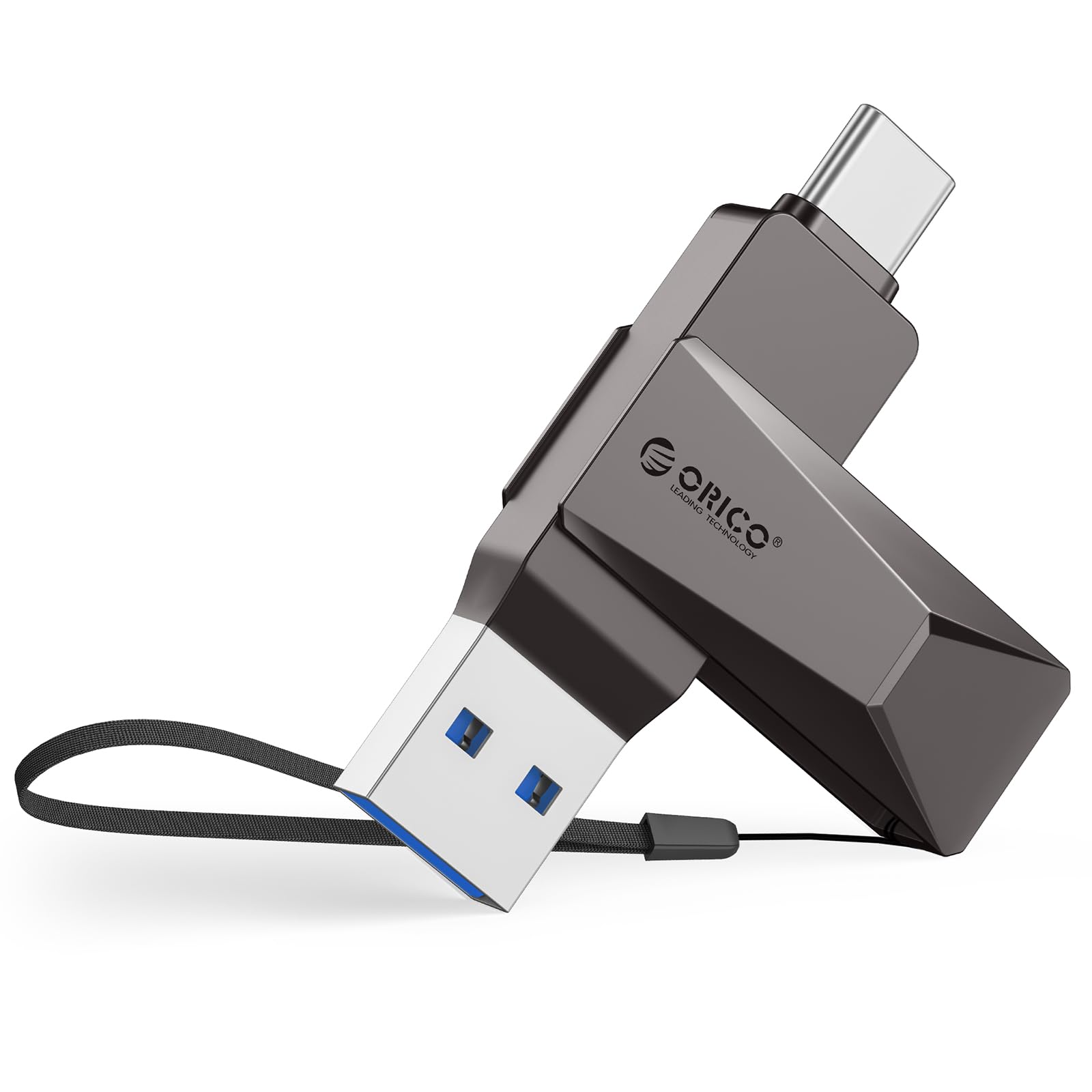
Figure 2.1: The ORICO CB05 128GB Dual USB Flash Drive in Grey, showcasing ان جي ڪمپيڪٽ ڊيزائن.

Figure 2.2: Detail of the dual USB-A and USB-C connectors, highlighting the swivel mechanism.

شڪل 2.3: هڪ اوورview of the ORICO CB05 Dual USB Flash Drive, emphasizing its dual USB-A and USB-C functionality.
3. سيٽ اپ
ڊوائيسز سان ڳنڍڻ:
The ORICO CB05 is designed for plug-and-play operation. No special drivers or software are typically required for basic functionality on most compatible devices.
- صحيح ڪنيڪٽر جي سڃاڻپ ڪريو: The flash drive features both a standard USB-A connector and a reversible USB-C connector. Rotate the metal housing to expose the desired connector.
- Insert into device: Plug the appropriate connector firmly into the corresponding port on your smartphone, tablet, laptop, or other compatible device.
- ڊوائيس جي سڃاڻپ: Your device should automatically detect the flash drive. On computers, it will appear as a removable drive. On smartphones/tablets, you may need to access a file مئنيجر ايپليڪيشن.

Figure 3.1: The ORICO CB05 supports a wide range of devices including PCs, laptops, printers, USB hubs, smartphones, tablets, MacBooks, Nintendo Switch, Smart TVs, and car audio systems.
4. آپريٽنگ هدايتون
File Transfer on Mobile Devices (iOS/Android):
For iOS devices (iPhone 15 series, iPads with USB-C) and Android devices, file management is typically handled through the device's native file مئنيجر ايپ.
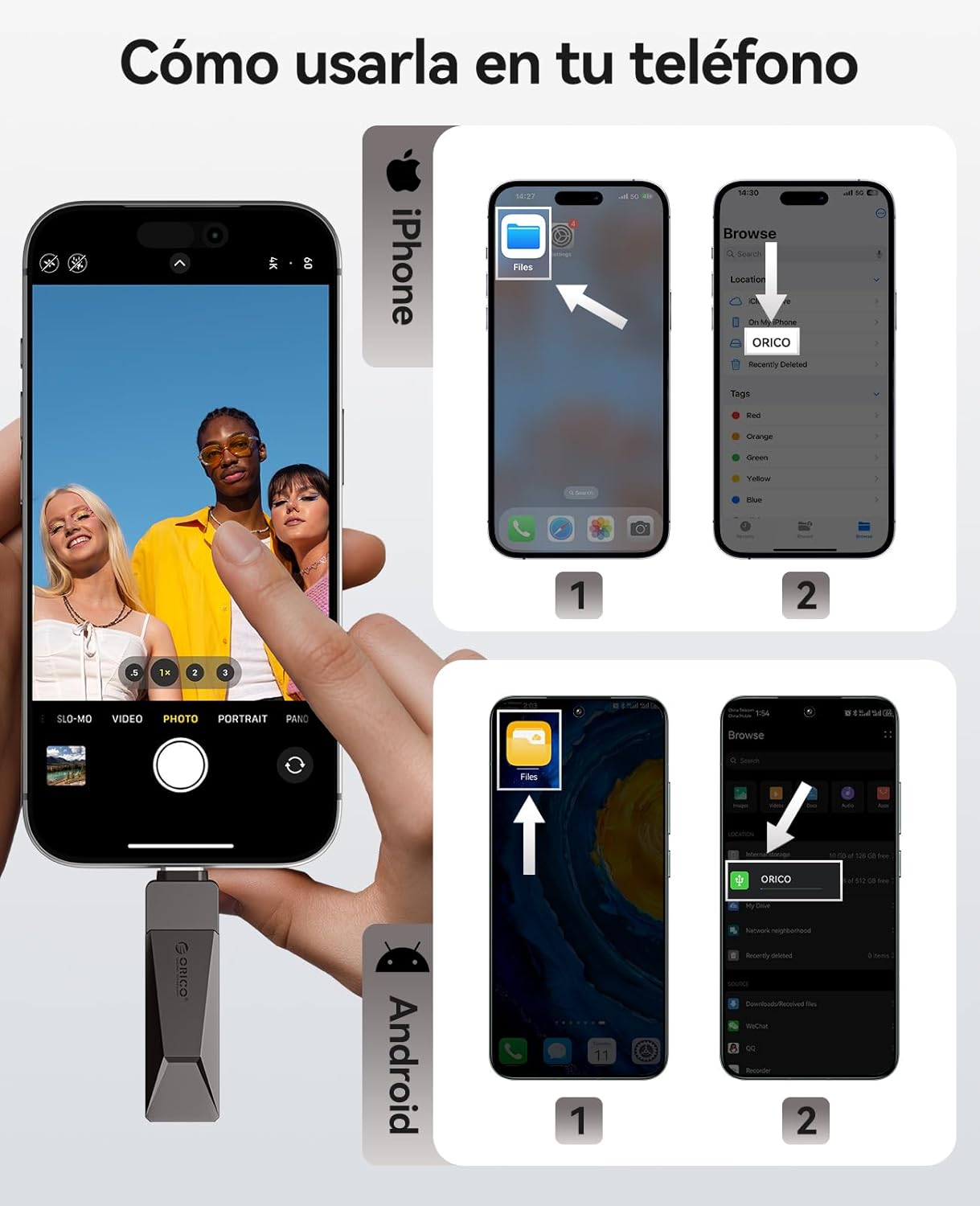
Figure 4.1: Visual guide for connecting and accessing the flash drive on both iPhone and Android devices using their respective file management applications.
iOS Devices (iPhone 15 Series, USB-C iPads):
- Connect the flash drive to your iPhone 15/iPad via the USB-C port.
- Open the 'Files' app on your device.
- Navigate to 'Browse' and select 'ORICO' under Locations.
- توهان هاڻي ڪري سگهو ٿا view, copy, or move files ڏانهن ۽ فليش ڊرائيو کان.
Android ڊوائيسز:
- Connect the flash drive to your Android phone via the USB-C port.
- Open the 'Files' app (or equivalent file manager) on your device.
- The ORICO drive should appear as an external storage device.
- You can now manage files ضرورت مطابق.
File Transfer on Computers (Windows/Mac):
For Windows and Mac computers, the process is straightforward:
- Connect the flash drive to your computer using either the USB-A or USB-C connector.
- The computer will recognize the drive automatically.
- Open 'File Explorer' (Windows) or 'Finder' (Mac) and locate the 'ORICO' drive.
- ڇڪيو ۽ ڇڏي ڏيو files to transfer them to or from the flash drive.
Video 4.1: Demonstration of the ORICO CB05's multi-device compatibility and plug-and-play functionality across various platforms without needing app installations.
Video 4.2: A short video illustrating the convenience of using a single ORICO CB05 drive for both USB-A and USB-C storage needs.
5. ڪارڪردگي
The ORICO CB05 utilizes USB 3.0 technology to deliver fast data transfer speeds, optimizing your workflow for large files, 4K videos, and high-resolution photos.

Figure 5.1: The ORICO CB05 offers speeds up to 150MB/s, making it significantly faster than older USB 2.0 drives.

Figure 5.2: Illustrates the high-speed capability, allowing for quick transfer of large files.
Internal Technology:
The drive incorporates TLC NAND Flash technology, which contributes to faster read/write speeds, stable performance, and an extended lifespan compared to traditional QLC flash.

Figure 5.3: The internal TLC NAND Flash ensures superior performance and reliability.
6. سار سنڀال
The ORICO CB05 is designed for durability with its zinc alloy casing. To ensure longevity and optimal performance:
- صاف رکو: Periodically wipe the exterior with a soft, dry cloth to remove dust and debris. Avoid using harsh chemicals or abrasive materials.
- ڪنيڪٽرن جي حفاظت ڪريو: Utilize the 360° swivel design to protect the unused connector from dust and physical damage when not in use.
- انتهائي حالتن کان بچڻ: Do not expose the drive to extreme temperatures, humidity, or strong magnetic fields.
- محفوظ هٽائڻ: Always safely eject the flash drive from your device before physically removing it to prevent data corruption.

Figure 6.1: The zinc alloy casing provides shockproof, compression-resistant, X-ray shielding, and dustproof protection.
7. مسئلا حل ڪرڻ
If you encounter issues with your ORICO CB05 flash drive, try the following troubleshooting steps:
- ڊرائيو جي سڃاڻپ نه ٿي:
- پڪ ڪريو ته ڊرائيو مڪمل طور تي USB پورٽ ۾ داخل ٿيل آهي.
- پنهنجي ڊوائيس تي هڪ مختلف USB پورٽ آزمايو.
- پنهنجو ڪمپيوٽر يا موبائل ڊيوائس ٻيهر شروع ڪريو.
- For mobile devices, ensure you are using the correct file manager app and that your device supports OTG (On-The-Go) functionality.
- سست منتقلي جي رفتار:
- Ensure you are connected to a USB 3.0/3.2 Gen 1 port for optimal performance. Connecting to a USB 2.0 port will result in slower speeds.
- پڪ ڪريو ته توهان جي ڊوائيس جا ڊرائيور اپڊيٽ آهن.
- ننڍين شين جو وڏو تعداد files can transfer slower than a single large file ساڳئي مجموعي سائيز جي.
- Performance may vary depending on the host device, file خاصيتون، ۽ ٻيا عنصر.
- ڊيٽا ڪرپشن:
- Always safely eject the drive before removing it from your device.
- Avoid disconnecting the drive during a file منتقلي
- Capacity Discrepancy:
- Labeled capacity uses the decimal system (1GB = 1,000,000,000 bytes). Operating systems like Windows/Mac may show slightly less due to using a binary system (1GB = 1024MB). This is normal and not a defect.
8. وضاحتون
| خاصيت | تفصيل |
|---|---|
| برانڊ | ORICO |
| ماڊل نالو | CB05-128GB |
| ميموري رکڻ جي صلاحيت | 128 جي بي |
| ھارڊويئر انٽرفيس | USB, USB 3.2 Gen 1 |
| هارڊويئر ڪنيڪٽوٽي ٽيڪنالاجي | USB قسم A، USB قسم سي |
| پڙهڻ جي رفتار | 150 ميگا بائيٽ في سيڪنڊ |
| لکڻ جي رفتار | 70 ميگا بائيٽ في سيڪنڊ |
| خاص خصوصيت | Dual USB Connector, Lightweight |
| مطابقت رکندڙ ڊوائيسز | iPhone 15, Android smartphones, iPads, MacBooks, Windows laptops, gaming consoles, car audio systems |
| رنگ | ڀورو |
| ٺاهيندڙ | شينزين اوريڪو ٽيڪنالاجيز ڪمپني، لميٽيڊ |
9. وارنٽي ۽ سپورٽ
وارنٽي ڄاڻ:
The ORICO CB05 Dual USB Flash Drive is backed by a 36 مهينن جي ٺاهيندڙ جي وارنٽي. هي وارنٽي عام استعمال هيٺ مواد ۽ ڪاريگري ۾ خرابين کي ڍڪيندي آهي. وارنٽي دعوائن لاءِ مهرباني ڪري خريداري جو ثبوت رکو.
ڪسٽمر سپورٽ:
For technical assistance, warranty claims, or general inquiries, please contact ORICO customer support through their official website or the retailer where the product was purchased. You can visit the Amazon تي ORICO اسٽور وڌيڪ معلومات ۽ سپورٽ وسيلن لاء.