
تعارف
This manual provides detailed instructions for the MOZC Bluetooth Headset 530-2. Please read this guide carefully to understand the product's features, setup, operation, and maintenance. Proper use will ensure optimal performance and extend the lifespan of your device.
سرڪاري پراڊڪٽ وڊيو شوasing the MOZC Bluetooth Headset 530-2.
حفاظت جي ڄاڻ
اهم احتياطي تدبيرون
- Do not expose the headset or charging case to extreme temperatures, direct sunlight, or high humidity.
- ڊوائيس کي مضبوط اثرن لاءِ ڇڏڻ يا تابع ڪرڻ کان پاسو ڪريو.
- ڊوائيس ٻارن ۽ پالتو جانورن جي پهچ کان پري رکو.
- Do not attempt to disassemble, modify, or repair the device yourself. This may void the warranty and cause damage.
- Use only the provided USB-C charging cable and charging case to prevent damage and ensure safety.
- ٻڌڻ کان پاسو ڪريو بلند آواز جي سطح تي وڌايل عرصي تائين ٻڌڻ جي نقصان کي روڪڻ لاءِ.
پيڪيج مواد
پڪ ڪريو ته هيٺ ڏنل سڀئي شيون توهان جي پيڪيج ۾ شامل آهن:
- MOZC Bluetooth Headset (1)
- چارج ڪيس (1)
- USB-C چارجنگ ڪيبل (1)
- Ear Tips (2 pairs - different sizes for optimal fit)
- استعمال ڪندڙ جو دستياب (ھي دستاويز)

The MOZC Bluetooth Headset and its portable charging case, as typically found in the product packaging.
پيداوار ختمview
اجزاء ۽ ڪنٽرول
- ملٽي فنڪشن بٽڻ (MFB): Located on the main body of the headset, used for power, call management, and music control.
- حجم بٽڻ (+/-): Adjacent to the MFB, used to adjust volume and navigate tracks.
- USB-C چارجنگ پورٽ: Located at the end of the headset for direct charging.
- LED اشارو: A small light on the headset that displays power, pairing, and charging status.
- مائڪروفون: Unidirectional with Environmental Noise Cancellation (ENC) for clear voice pickup.
- Adjustable Earhook: Designed to rotate 180° vertically and 360° horizontally, allowing comfortable wear on either the left or right ear.
- ڪنڌ: In-ear design for secure and comfortable fit.

The MOZC Bluetooth Headset featuring its ergonomic design and adjustable earhook.
سيٽ اپ ڪريو
1. هيڊ سيٽ کي چارج ڪرڻ
پهرين استعمال کان اڳ، هيڊ سيٽ ۽ ان جي چارجنگ ڪيس کي مڪمل طور تي چارج ڪريو.
چارجنگ ڪيس سان چارج ڪرڻ:
- Place the headset securely into the charging case.
- Connect the provided USB-C cable to the charging case's port and the other end to a compatible USB power source (e.g., wall adapter, computer USB port).
- The LED display on the charging case will show the current battery percentage, indicating charging status.
- The headset's indicator light will glow red while charging and turn off once fully charged.

The MOZC Bluetooth Headset charging within its case, with the digital display showing battery level.
Direct Charging the Headset:
- Connect the USB-C cable directly to the charging port on the headset.
- USB-C ڪيبل جي ٻئي ڇيڙي کي هڪ مطابقت رکندڙ USB پاور سورس سان ڳنڍيو.
- The headset's indicator light will glow red while charging and turn off once fully charged.

هڪ بند اپ view of the MOZC Bluetooth Headset's USB-C charging port, with the cable connected for direct charging.
2. توهان جي ڊوائيس سان جوڙو ٺاهڻ
- پڪ ڪريو ته هيڊ سيٽ مڪمل طور تي چارج ٿيل آهي ۽ بند آهي.
- کي دٻايو ۽ رکو ملٽي فنڪشن بٽڻ (MFB) for approximately 3 seconds until the LED indicator flashes blue and red alternately. This indicates the headset is in pairing mode.
- On your smartphone or Bluetooth-enabled device, go to the Bluetooth settings menu.
- ڳولھيو available devices. You should see "YYK-530" or "MOZC 530-2" in the list.
- Select the device name to connect. Once successfully paired, the headset's LED indicator will flash blue slowly.
- جيڪڏهن پاسورڊ لاءِ چيو وڃي ته، "0000" داخل ڪريو.

A smartphone screen displaying the Bluetooth settings, with the MOZC headset (YYK-530) shown as connected.
آپريٽنگ
بنيادي ڪم
- پاور آن: 3 سيڪنڊن لاءِ ايم ايف بي کي دٻايو ۽ رکو.
- بجلي بند: 5 سيڪنڊن لاءِ ايم ايف بي کي دٻايو ۽ رکو.
- جواب/آخر ڪال: Single press the MFB during an incoming or active call.
- ڪال رد ڪريو: Long press the MFB for 2 seconds during an incoming call.
- موسيقي هلايو/روڪ ڪريو: Single press the MFB during music playback.
- حجم مٿي / ھيٺ: حجم کي ترتيب ڏيڻ لاءِ '+' يا '-' بٽڻ دٻايو.
- اڳيون / پويون ٽريڪ Long press the '+' button for the next track, long press the '-' button for the previous track.
- وائيس اسسٽنٽ (سري/گوگل اسسٽنٽ) کي چالو ڪريو: MFB کي ٻه ڀيرا دٻايو.
- مائڪروفون بند ڪريو: Double press the volume down button during an active call.
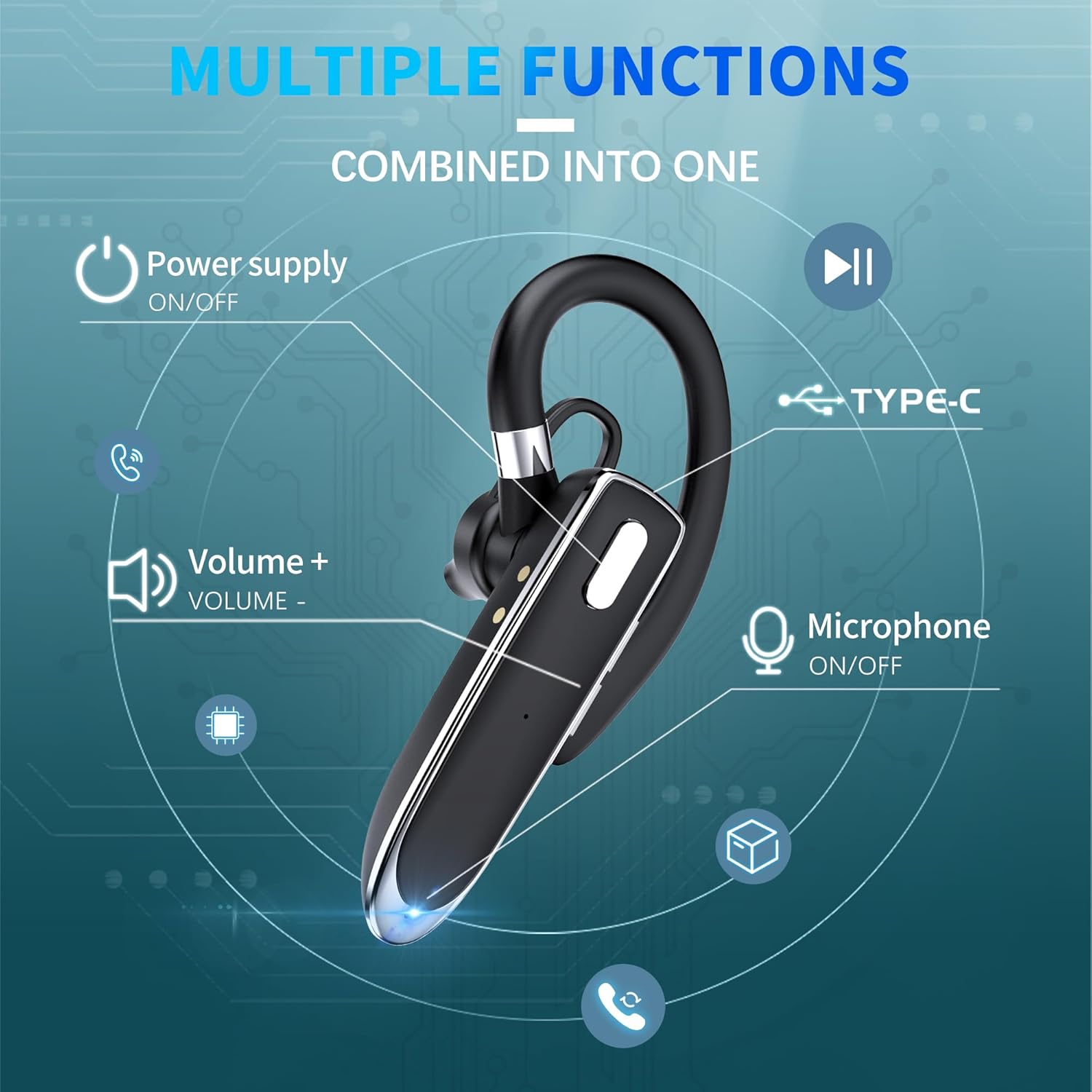
A visual guide to the multi-function buttons and their corresponding actions on the MOZC Bluetooth Headset.
ٻٽي ڊوائيس ڪنيڪشن
The MOZC Bluetooth Headset supports simultaneous connection to two Bluetooth devices, such as two smartphones or a smartphone and a laptop. This allows for seamless switching between calls and media.
- Pair the headset with the first device following the standard pairing instructions.
- Once connected, temporarily disable Bluetooth on the first device.
- Put the headset back into pairing mode (LED flashes blue and red).
- هيڊ سيٽ کي ٻئي ڊوائيس سان جوڙيو.
- After successful pairing with the second device, re-enable Bluetooth on the first device. The headset should automatically connect to both devices.

The MOZC Bluetooth Headset demonstrating its ability to connect to multiple devices like a laptop, tablet, and smartphone.
سار سنڀال
صفائي ۽ سنڀال
- Regularly wipe the headset and charging case with a soft, dry, lint-free cloth.
- Do not use abrasive cleaners, solvents, or harsh chemicals, as these may damage the device.
- Ensure the charging ports and earpiece are clean and free of dust or debris to maintain optimal performance.
پاڻي جي مزاحمت
The MOZC Bluetooth Headset is designed with a waterproof rating, making it resistant to sweat and light splashes. This makes it suitable for use during workouts or in light rain.
اهم: The headset is not designed for submersion in water. Do not use it while swimming, showering, or expose it to strong jets of water. Water damage is not covered under warranty.
مشڪلاتون
عام مسئلا ۽ حل
| مسئلو | حل |
|---|---|
| ڊوائيس سان جوڙو نه ٿو ٺاهي سگهجي | Ensure the headset is in pairing mode (LED flashing blue/red). Turn off and on Bluetooth on your device. Restart both the headset and your device. |
| ڪوبه آواز يا گهٽ حجم نه | Check the volume levels on both your connected device and the headset. Ensure the headset is properly connected to your device. |
| Intermittent connection or disconnections | Ensure your device is within the Bluetooth range (up to 15 meters) of the headset. Avoid physical obstacles between the headset and your device. |
| هيڊ سيٽ چارج نه ٿي رهيو آهي | Verify that the USB-C cable and power source are working correctly. Ensure the headset is correctly placed in the charging case or the cable is securely connected to the headset's charging port. |
| مائڪرو فون ڪم نه ڪري رهيو آهي | Ensure the microphone is not muted (double-press volume down during a call). Check your device's settings to ensure the headset is selected as the microphone input. |
هيڊ سيٽ کي ري سيٽ ڪرڻ
If you encounter persistent issues that cannot be resolved with the above solutions, you may need to reset the headset. Please refer to the detailed instructions in the included paper manual for the specific reset procedure for your model.
وضاحتون
ٽيڪنيڪل تفصيل
- ماڊل نالو: 530-2
- رابطي ٽيڪنالاجي: وائرليس
- وائرليس ڪميونيڪيشن ٽيڪنالاجي: بلوٽوٿ 6.1
- بلوٽوٽ رينج: 15 ميٽر
- Battery Life (Headset): 12 ڪلاڪ
- چارج ڪرڻ جي صلاحيت: 800mAh
- ڪُل راند جو وقت (ڪيس سان): 100 ڪلاڪ تائين
- چارج ڪرڻ وقت: 1.5 ڪلاڪ
- ڪنٽرول قسم: بٽڻ ڪنٽرول (پش بٽڻ)
- شور ڪنٽرول: ماحولياتي شور منسوخي (ENC)
- پاڻي جي مزاحمت جي سطح: پنروڪ
- مواد: Acrylonitrile Butadiene Styrene (ABS)، پلاسٽڪ
- شيء جو وزن: 13 گرام (0.459 آونس)
- ڪن جي جڳھ: ڪن ۾
- خاص خاصيتون: Fast Charging, Lightweight, Noise Cancellation, Voice Assistant Support
- مطابقت رکندڙ ڊوائيسز: Cellphones, Laptops, Tablets, Telephones (compatible with almost all Bluetooth devices)
وارنٽي ۽ سپورٽ
وارنٽي ڄاڻ
MOZC products typically come with a standard manufacturer's warranty. For specific details regarding your product's warranty period, coverage, and terms, please refer to the warranty card included in your product packaging. You may also visit the official MOZC webسڀ کان تازه ترين وارنٽي معلومات لاء سائيٽ.
ڪسٽمر سپورٽ
Should you require any assistance, technical support, or have questions regarding your MOZC Bluetooth Headset 530-2, please do not hesitate to contact our customer service team. Contact information can typically be found on the product packaging, the official MOZC website, or within the included documentation.