
1. حفاظت جي ڄاڻ
مھرباني ڪري اسيمبلي ۽ استعمال کان اڳ سڀ ھدايتون احتياط سان پڙھو. مستقبل جي حوالي لاءِ ھي دستوري رکو.
- Ensure all components are present and undamaged before assembly. Do not use if any parts are missing or damaged.
- ڪرسي کي نرم، صاف مٿاڇري تي گڏ ڪريو ته جيئن ڇڪڻ کان بچي سگهجي.
- اسيمبلي دوران پيچ کي وڌيڪ تنگ نه ڪريو، ڇاڪاڻ ته اهو حصن کي نقصان پهچائي سگهي ٿو.
- اسيمبلي دوران ٻارن ۽ پالتو جانورن کي پري رکو. ننڍا حصا دم گھڙڻ جو خطرو ٿي سگهن ٿا.
- ڪرسي تي نه بيهڻ يا ان کي اسٽيل جي طور تي استعمال نه ڪريو.
- The maximum weight capacity for this chair is 180 kg (396 lbs). Do not exceed this limit.
- مواد جي خراب ٿيڻ کي روڪڻ لاءِ ڪرسي کي سڌي سج جي روشني يا انتهائي گرمي پد جي سامهون رکڻ کان پاسو ڪريو.
- سڀني بولٽن ۽ اسڪرو کي باقاعدي طور تي چيڪ ڪريو ته جيئن پڪ ٿئي ته اهي تنگ آهن. ضرورت مطابق ٻيهر مضبوط ڪريو.
2. پيڪيج مواد
Verify that all parts are included in your package before beginning assembly. If any parts are missing or damaged, please contact customer support.
- پٺاڻ
- نشست جو بنياد
- هٿيار (2)
- گيس لفٽ سلنڈر
- گيس لفٽ ڍڪ
- اسٽار بيس
- ڪاسٽر (5)
- ميڪانيزم پليٽ
- لمبر ڪشن
- هيڊ ريسٽ کشن
- هارڊويئر پيڪ (اسڪرو، واشر، ايلن ڪي)
3. Setup & Assembly Instructions
Follow these steps to assemble your Devoko Ergonomic Gaming Chair. It is recommended to have two people for assembly.
Step 1: Attach Casters to Star Base
Insert each of the five casters into the holes at the end of the star base until they click securely into place.
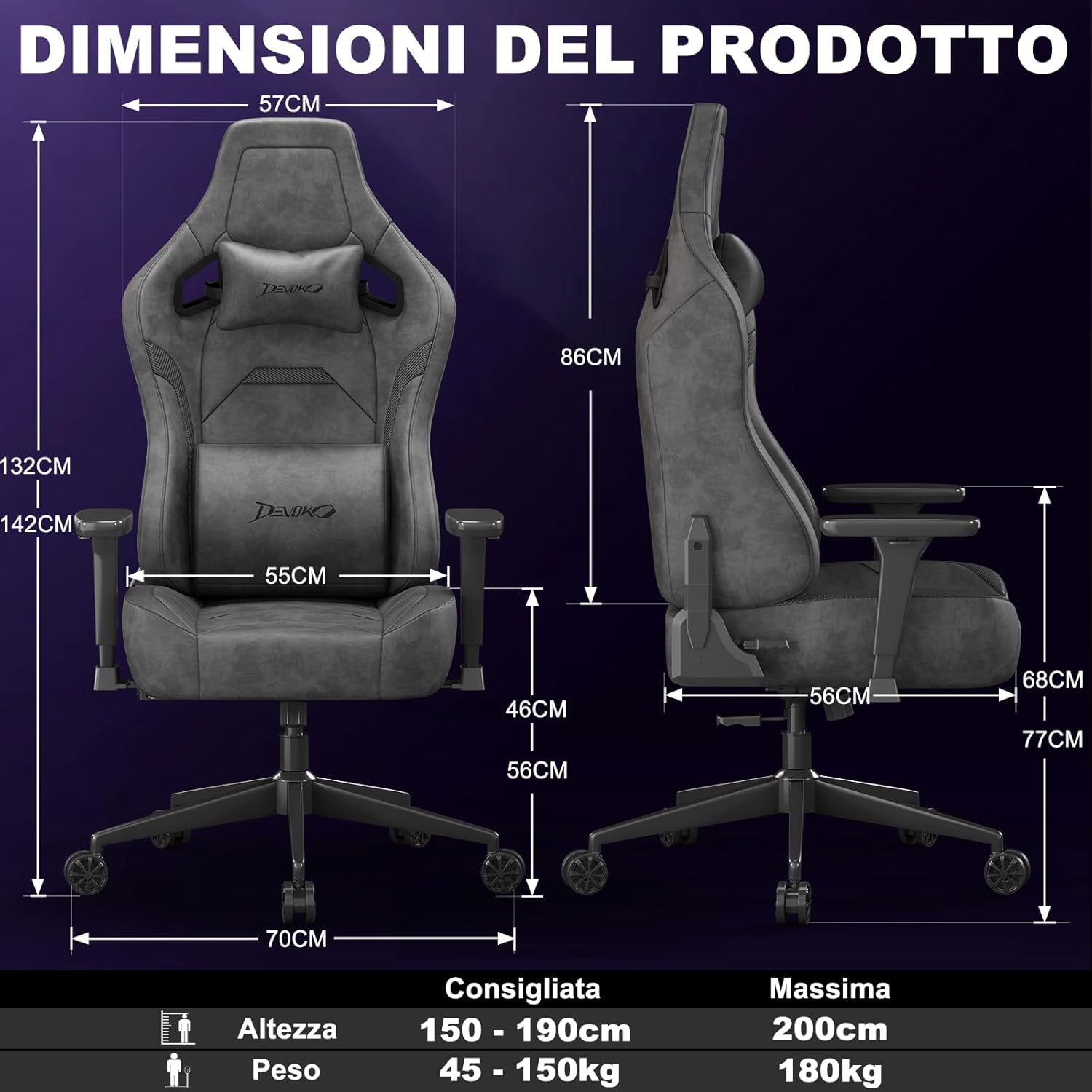
Image: A fully assembled Devoko gaming chair, showcasing its overall design and key features. This image provides a visual reference for the completed product.
Step 2: Install Gas Lift Cylinder
Place the gas lift cylinder into the center hole of the star base. Then, slide the gas lift cover over the cylinder.
Step 3: Attach Mechanism Plate to Seat Base
Align the mechanism plate with the pre-drilled holes on the underside of the seat base. Secure it with the provided screws, ensuring the front of the mechanism faces the front of the seat. Do not overtighten.
Step 4: Attach Armrests to Seat Base
Attach the armrests to the seat base using the designated screws. Pay attention to the "L" (left) and "R" (right) markings on the armrests.

تصوير: هڪ ويجهو تصوير view of the chair's 3D adjustable armrests, illustrating their rotational, height, and forward/backward adjustment capabilities. This highlights a key feature for personalized comfort.
Step 5: Connect Backrest to Seat Base
Align the backrest with the brackets on the seat base and secure it with screws. Ensure a firm connection.
Step 6: Attach Seat Assembly to Gas Lift
گڏ ٿيل سيٽ کي احتياط سان گئس لفٽ سلنڈر تي رکو، پڪ ڪريو ته اهو مرڪز ۾ ۽ مستحڪم آهي.
Step 7: Install Cushions
Attach the headrest and lumbar cushions using their integrated straps. Adjust their positions for optimal comfort.
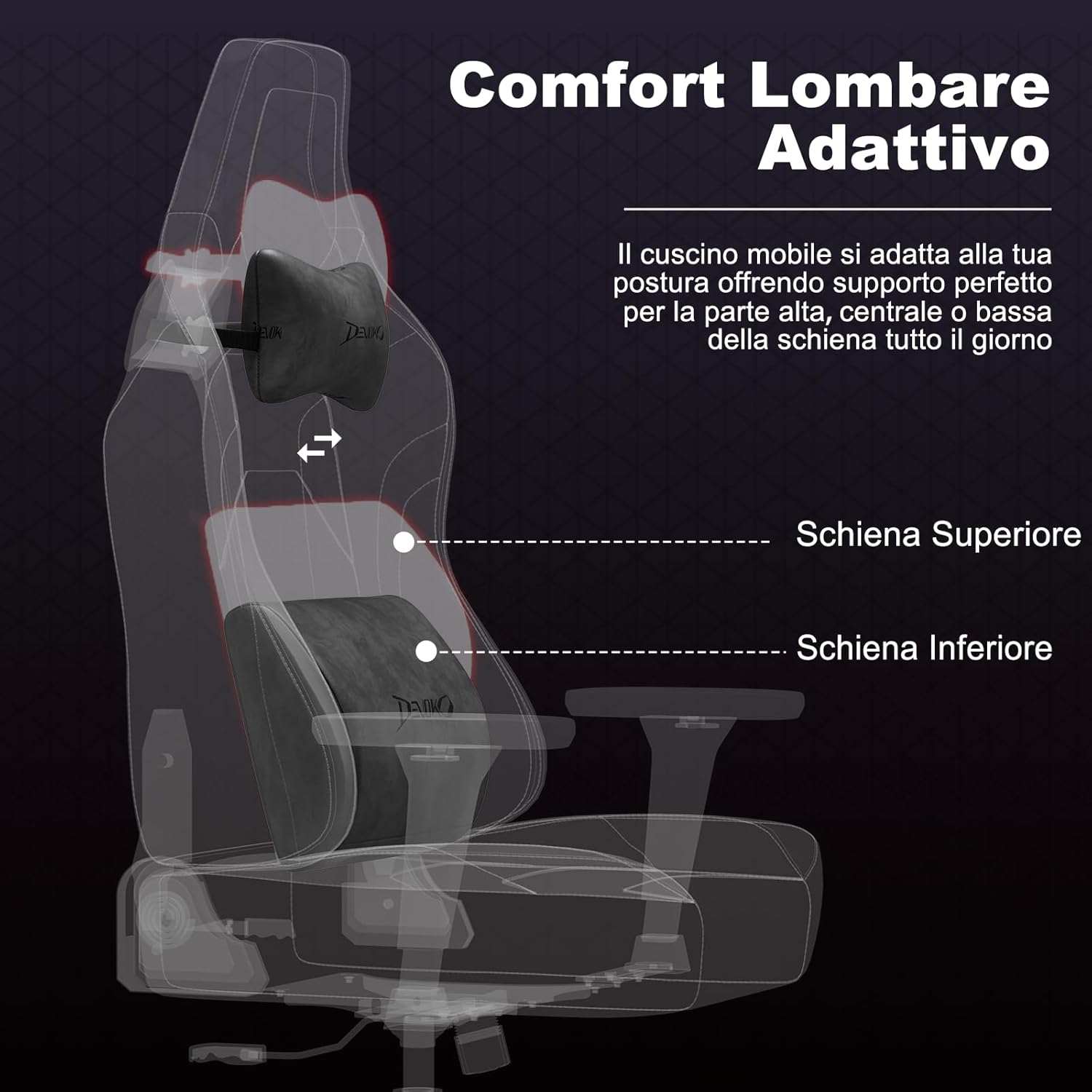
تصوير: هڪ ايڪس ري انداز view of the chair's adaptive lumbar support, showing how the movable cushion adjusts to support the upper, central, or lower back. This illustrates the ergonomic design for back comfort.
4. آپريٽنگ هدايتون
4.1 سيٽ جي اوچائي جي ترتيب
To adjust the seat height, pull the lever located on the right side of the seat upwards. While seated, lift the lever to lower the seat. To raise the seat, lift the lever while standing or with minimal weight on the seat.
4.2 Backrest Recline Adjustment
To recline the backrest, pull the recline lever located on the right side of the chair (below the seat). Lean back to your desired angle (between 90° and 135°). Release the lever to lock the backrest in position. To return to an upright position, pull the lever and lean forward.

Image: A visual representation of the chair's recline functionality, showing three common angles: 90° for work/gaming, 110° for movies/series, and 135° for relaxation. This demonstrates the versatility of the recline feature.
4.3 Armrest Adjustments (3D)
- اونچائي جي ترتيب: Press the button on the side of the armrest and move it up or down to your preferred height. Release the button to lock.
- اڳتي/پوئتي ترتيب: Slide the armrest pad forward or backward to find the optimal position for your arms.
- گردش: Rotate the armrest pad left or right (up to 360°) to support your arms during various activities.
4.4 Lumbar and Headrest Cushion Adjustment
The lumbar and headrest cushions are adjustable. Slide them up or down along the backrest straps to find the most comfortable and supportive position for your back and neck.
5. سار سنڀال
- Cleaning Suede/Carbon Fiber Leather: For general cleaning, wipe with a soft, damp cloth. For tougher stains, use a mild soap solution and wipe gently, then dry immediately with a clean cloth. Avoid harsh chemicals or abrasive cleaners.
- فريم ۽ بنياد: Wipe metal parts with a soft, dry cloth.
- ڪاسٽر: Periodically clean hair and debris from the casters to ensure smooth movement.
- فاسٽنرز: Regularly check all screws and bolts and tighten them if they have loosened over time.
- سج جي سڌي روشني کان پاسو ڪريو: Prolonged exposure to direct sunlight can cause fading and damage to the upholstery.
6. مسئلا حل ڪرڻ
| مسئلو | ممڪن سبب | حل |
|---|---|---|
| ڪرسي لڏپلاڻ ڪري ٿي يا غير مستحڪم آهي. | ڍِلا پيچ يا اڻ برابر اسيمبلي. | Check and tighten all screws. Ensure the chair is assembled on a flat surface. |
| سيٽ جي اوچائي جي ترتيب ڪم نه ڪري رهي آهي. | Gas lift cylinder issue or lever mechanism stuck. | پڪ ڪريو ته ليور مڪمل طور تي لڳل آهي. جيڪڏهن مسئلو برقرار رهي، ته ڪسٽمر سپورٽ سان رابطو ڪريو. |
| پٺيءَ جو ريسٽ نه ٽيڪ ڏئي ٿو ۽ نه ئي بند ٿئي ٿو. | Recline mechanism stuck or damaged. | Check for obstructions. Ensure the recline lever is fully operated. If damaged, contact support. |
| ڪاسٽر آساني سان نه ڦري رهيا آهن. | ڪاسٽرن ۾ ڦاٿل ملبہ. | ڪيسٽر ويلز مان ڪنهن به وار، مٽي، يا ملبي کي هٽايو. |
| ڪڙڪڻ جا آواز. | حصن جي وچ ۾ ڍِلو ڪنيڪشن يا رگڙ. | Tighten all screws. Apply a small amount of silicone lubricant to moving parts if necessary (avoiding upholstery). |
7. وضاحتون

Image: A comprehensive diagram illustrating the various dimensions of the Devoko Ergonomic Gaming Chair, including height, width, depth, and recommended user height and weight.
- برانڊ: ديووڪو
- ماڊل: Ergonomic گيمنگ ڪرسي
- مواد: Suede leather, Carbon fiber leather, High-density shaped foam, Metal base
- رنگ: Anthracite Grey (Note: Other colors may be available for different models)
- Overall Dimensions (Max Height): تقريبن 70 سينٽي ميٽر (ڊي) x 70 سينٽي ميٽر (ڊبليو) x 143 سينٽي ميٽر (ايڇ)
- پسمانده طول و عرض: 57 سينٽي ميٽر (ڊبليو) x 86 سينٽي ميٽر (ايڇ)
- سيٽ جي ماپ: 55 cm (W) x 56 cm (D) x 12 cm (Thickness)
- Adjustable سيٽ اوچائي: 10 cm range (e.g., 46 cm to 56 cm from floor)
- رڪيل زاويه: 90° کان 135°
- بازو: 3D Adjustable (Height, Forward/Backward, Rotation)
- گئس کڻڻ: ڪلاس 4
- وزن جي گنجائش: 180 ڪلو تائين (396 مب)
- تجويز ڪيل استعمال ڪندڙ جي اوچائي: 150 سينٽي - 200 سينٽي ميٽر
- ڪاسٽر: Silent, floor-friendly wheels
8. وارنٽي ۽ سپورٽ
Devoko products are designed for quality and durability. For specific warranty information regarding your purchase, please refer to the documentation included with your product or contact your retailer.
If you encounter any issues or have questions about your Devoko Ergonomic Gaming Chair, please contact Devoko customer support through the retailer where you purchased the product or visit the official Devoko webرابطي جي تفصيل لاءِ سائيٽ.
ڪسٽمر سپورٽ: Please refer to your purchase receipt or the retailer's webسڌي رابطي جي معلومات لاءِ سائيٽ.
آن لائين وسيلا: اضافي معلومات ۽ مدد لاءِ، توهان دورو ڪري سگهو ٿا Devoko Store on Amazon.