
تعارف
This manual provides essential instructions for setting up, operating, and maintaining your XINDADA H12 2025 4G Smartwatch. Please read this manual thoroughly before using the device to ensure proper function and to maximize your user experience.
پيڪيج مواد
پڪ ڪريو ته سڀئي شيون توهان جي پراڊڪٽ پيڪيج ۾ موجود آهن:
- 1 x XINDADA H12 2025 Smartwatch
- 1 x واچ پٽي
- 1 x چارجنگ ڪيبل
- 1 x پراڊڪٽ دستياب
پيداوار ختمview
The XINDADA H12 2025 is a 4G Android 9.0 OS smartwatch featuring a 1.51-inch AMOLED display, a 500W HD camera, GPS, Wi-Fi, and comprehensive health monitoring capabilities. It supports app downloads from the Google Play Store.
اهم خاصيتون:
- Full 4G Netcom: Supports 4G connectivity (EU/UK countries only).
- اعليٰ ڪارڪردگي وارو سي پي يو: SL8541E quad-core processor for smooth operation.
- اينڊرائيڊ 9.0 او ايس: Enhanced performance and security.
- Large AMOLED Display: 1.51-inch screen with 466x466 resolution, wide color gamut, and 178° viewزاويه.
- 500W HD Camera: Rotatable front/rear camera.
- 800mAh بيٽري: Extended battery life.
- صحت جي نگراني: Heart rate, blood oxygen, sleep detection, sedentary reminders, step counting.
- راندين جا طريقا: Running, walking, hiking, mountaineering, rope skipping.
- ايپ سپورٽ: Download apps like WhatsApp, YouTube, Facebook, Instagram, TikTok from Google Play Store.
- Intelligent Crown: Rotating crown for menu navigation.

Image: The smartwatch features a 1.51-inch AMOLED display with 466x466 resolution, offering a wide color gamut (98% Adobe RGB) and a 178-degree ultra-wide viewing angle for clear visuals.
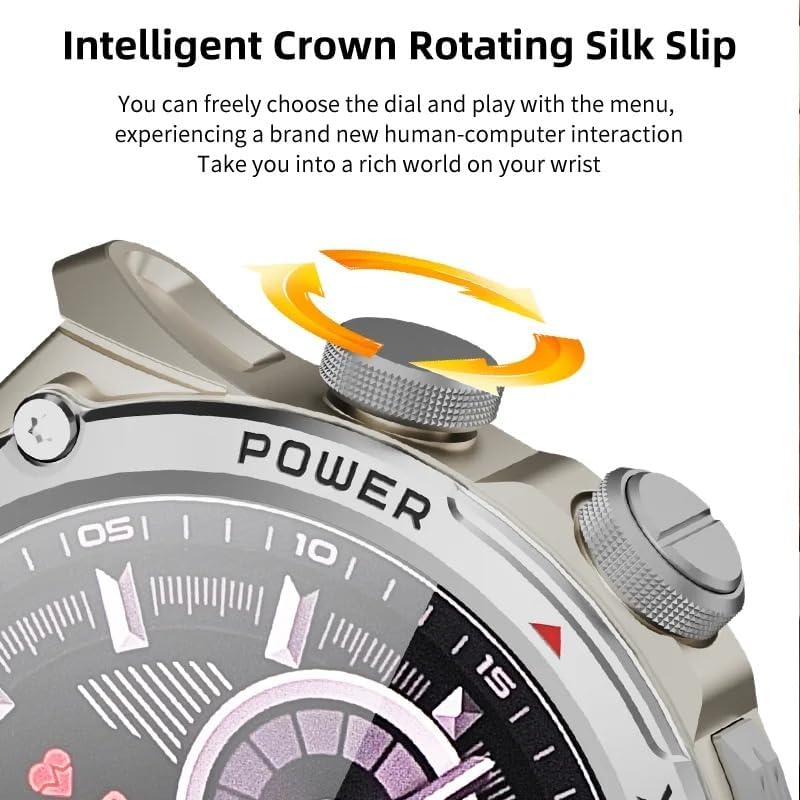
Image: Close-up of the smartwatch's intelligent rotating crown, which allows for intuitive navigation through menus and watch faces.

Image: The smartwatch is equipped with a 500W HD camera that can rotate 180 degrees, functioning as both a front and rear camera.
سيٽ اپ ڪريو
1. ڊوائيس کي چارج ڪرڻ
Before first use, fully charge your smartwatch. Connect the provided charging cable to the charging port on the watch and to a standard USB power adapter (not included). The watch display will indicate charging status.
2. SIM Card Installation (for 4G connectivity)
The smartwatch supports 4G Netcom. Ensure your SIM card is compatible with the supported network bands (2G: B3+B5+B8; 3G: B1+B5+B8; 4G_FDD: B1+B3+B5+B7+B8+B20; 4G_TDD: B34+B38+B39+B40+B41). This feature is primarily for EU/UK countries. Refer to the watch's manual for specific SIM card tray access and insertion instructions.
3. شروعاتي پاور آن
Press and hold the Power button (usually located on the side of the watch) until the XINDADA logo appears. Follow the on-screen prompts to select your language and initial settings.
4. Connecting to the HiSportPro App
To synchronize data and receive notifications from your mobile phone, download and connect to the HiSportPro application.
- قدم 1: Enable Bluetooth on both your smartwatch and your mobile phone.
- قدم 2: On your smartwatch, access the app market and download the "Bluetooth Assistant" application.
- قدم 3: On your mobile phone, download the "HiSportPro" app from your phone's app store (Google Play Store for Android, Apple App Store for iOS).
- قدم 4: Open the Bluetooth Assistant on your smartwatch and enable Bluetooth service.
- قدم 5: In the HiSportPro app on your phone, use the scan function to scan the QR code displayed on your smartwatch to establish the connection.
- قدم 6: Once connected, you can configure notification push settings within the HiSportPro app to receive mobile phone information on your watch.

Image: The smartwatch on a wrist, displaying a message, illustrating its capability for 4G calls and real-time message viewing.
آپريٽنگ هدايتون
بنيادي نيويگيشن
- ٽچ اسڪرين: Tap to select, swipe to navigate through menus and screens.
- گھمندڙ تاج: فهرستن ذريعي اسڪرول ڪرڻ يا سيٽنگون ترتيب ڏيڻ لاءِ ڪرائون کي گھمايو. هوم اسڪرين تي واپس وڃڻ يا چونڊن جي تصديق ڪرڻ لاءِ ڪرائون کي دٻايو.
- پاور بٽڻ: Press to wake/sleep the screen. Long press to power on/off or restart.
- اٿي بيهڻ: The screen can be activated by raising your wrist.
ڪميونيڪيشن جون خاصيتون
- فون ڪالز: With a SIM card installed, you can make and receive calls directly from the watch. Access the "Phone" application.
- پيغام ڏيڻ: View and reply to messages (SMS, WhatsApp, etc.) directly on the watch.
- رابطا: Access your synchronized contacts.
ڪئميرا جو استعمال
The smartwatch features a 500W HD camera. Open the "Camera" application. The camera can rotate 180 degrees to function as both a front-facing and rear-facing camera. Tap the screen to take photos or start video recording.
صحت ۽ تندرستي جي نگراني
- دل جي شرح جي نگراني: Access the "Heart Rate" app to measure your heart rate.
- رت جي آڪسيجن مانيٽرنگ: Use the "Blood Oxygen" app to check your SpO2 levels.
- سمهڻ جي سڃاڻپ: The watch automatically monitors your sleep patterns when worn during sleep. View data in the "Sleep Detection" app or HiSportPro.
- بيڪار ياد ڏياريندڙ: Enable this feature in settings to receive alerts when you have been inactive for too long.
- قدم ڳڻڻ: گھڙي خودڪار طريقي سان توهان جي روزاني قدمن کي ٽريڪ ڪري ٿي.
راندين جا طريقا
The smartwatch supports various sports modes to track your exercise data.

Image: Icons representing various sports modes available on the smartwatch, including running, walking, cycling, mountaineering, and rope skipping.
To start a workout:
- Navigate to the "Sports" application.
- Select your desired activity (e.g., Running, Walking, Mountaineering, Rope Skipping).
- Tap to start the activity. The watch will begin tracking relevant metrics like duration, distance, and calories burned.
- Tap to pause or end the activity. Your exercise data will be saved and can be viewed on the watch or in the HiSportPro app.
Other Applications and Features
- گوگل پلي اسٽور: Download and install additional applications such as WhatsApp, YouTube, Facebook, Instagram, and TikTok directly from the Play Store on your watch.
- موسم: View موجوده موسمي حالتون.
- ميوزڪ پليئر Play music stored on the watch or control music on your phone.
- برائوزر: Access the internet using the built-in browser.
- Calendar, Calculator, Alarm: Standard utility applications.
- او ٽي اي آن لائن اپڊيٽ: The watch supports Over-The-Air software updates. Check for updates periodically in the settings menu to ensure optimal performance and access to new features.
سار سنڀال
- صفائي: پنهنجي سمارٽ واچ ۽ پٽي کي نرم، سڪل ڪپڙي سان باقاعدي صاف ڪريو. سخت ڪيميڪلز يا رگڙيندڙ مواد استعمال ڪرڻ کان پاسو ڪريو.
- پاڻي جي مزاحمت: While the watch may have some water resistance, avoid prolonged exposure to water, swimming, or showering with the watch unless explicitly stated otherwise in the product specifications.
- بيٽري جي سنڀال: To prolong battery life, avoid fully discharging the battery frequently. Charge the watch when the battery level is low. Store the watch in a cool, dry place when not in use for extended periods.
- سافٽ ويئر اپڊيٽ: Keep your watch's software updated to ensure optimal performance and security.
مشڪلاتون
| مسئلو | ممڪن حل |
|---|---|
| واچ آن نٿي ٿئي. | Ensure the watch is fully charged. Connect it to the charger for at least 30 minutes. If it still doesn't turn on, try a long press (10-15 seconds) of the power button. |
| Cannot connect to HiSportPro app. |
|
| 4G network not working. |
|
| اسڪرين غير جوابده آهي. | Restart the watch by long-pressing the power button. If the issue persists, ensure the screen is clean and dry. |
| صحت جي ڊيٽا جي غلط معلومات. | پڪ ڪريو ته گھڙي توهان جي کلائي تي مضبوطيءَ سان پائڻي آهي، تمام گهڻو تنگ يا تمام گهڻو ڍلو نه. گھڙي جي پوئين پاسي سينسر صاف ڪريو. ماپ دوران گهڻي حرڪت کان پاسو ڪريو. |
وضاحتون
| خاصيت | تفصيل |
|---|---|
| برانڊ | زينڊاڊا |
| ماڊل | ايڇ 12 2025 |
| آپريٽنگ سسٽم | Android 9.0 |
| سي پي يو | SL8541E Quad-core |
| ڏيکاريو | 1.51-inch AMOLED, 466x466 resolution |
| ڪئميرا | 500W HD, 180° rotation |
| بيٽري جي گنجائش | 800 mAh |
| رابطي | 4G (EU/UK bands), Wi-Fi, Bluetooth |
| نيٽ ورڪ بينڊ | 2G: B3+B5+B8; 3G: B1+B5+B8; 4G_FDD: B1+B3+B5+B7+B8+B20; 4G_TDD: B34+B38+B39+B40+B41 |
| ايپ مطابقت | HiSportPro (for phone sync), Google Play Store apps |
| پيداوار جو وزن | 100 جي |
| پيڪيج جي ماپ | 5 x 5 x 5 سينٽي |
وارنٽي ۽ سپورٽ
For warranty information and customer support, please refer to the documentation provided with your purchase or contact the retailer/manufacturer directly. Keep your proof of purchase for warranty claims.
Manufacturer: XINDADA