
1. اهم نوٽيس
Please carefully check the store name and ensure you are purchasing products sold by "LUZHAN." We have received customer feedback stating that products received did not match the description and were of poor quality. Upon investigation, we found that these customers did not purchase the products from us. To prevent such incidents from happening again in the future and to avoid unnecessary misunderstandings, please carefully verify the store name LUZHAN.

Image: Important notice to verify seller name LUZHAN for authentic products.
2. کانview
The XIAOMI POCO X8 Pro Max 5G is a high-performance smartphone designed for advanced users. It features a powerful Mediatek Dimensity 9500s processor, a vibrant 1.5K 120Hz AMOLED display, a large 8500mAh battery with 100W HyperCharge, and a 50 MP Light Fusion 600 camera system with OIS. This manual provides essential information for setting up and operating your device.
تصوير: اڳيان ۽ پوئتي view of the POCO X8 Pro Max 5G smartphone.
وڊيو: هڪ اوورview of the POCO X8 Pro Series, highlighting key features and design.
3. سيٽ اپ
3.1 دٻي ۾ ڇا آهي
- XIAOMI POCO X8 Pro Max 5G Smartphone
- چارجر
- اسڪرين پروٽيڪٽر (اڳ ۾ لاڳو ٿيل يا شامل ڪيل)
3.2 شروعاتي ڊوائيس سيٽ اپ
- پاور آن: Press and hold the power button located on the side of the device until the XIAOMI logo appears.
- ٻولي ۽ علائقو: پنهنجي پسنديده ٻولي ۽ علائقو چونڊڻ لاءِ اسڪرين تي ڏنل هدايتن تي عمل ڪريو.
- وائي فائي سان ڳنڍيو: Select your Wi-Fi network and enter the password to connect to the internet. This is necessary for initial setup and software updates.
- گوگل کاتو: پنهنجي گوگل اڪائونٽ سان سائن ان ڪريو يا هڪ نئون ٺاهيو. هي گوگل پلي اسٽور ۽ ٻين گوگل سروسز تائين رسائي حاصل ڪرڻ لاءِ ضروري آهي.
- ڊيٽا جي منتقلي: If you are upgrading from another device, you may have the option to transfer your data (apps, photos, contacts) during this stage.
- سيڪيورٽي سيٽ اپ: Set up your preferred security method, such as a PIN, pattern, password, or fingerprint. The device supports an ultrasonic fingerprint sensor.
- مڪمل سيٽ اپ: سيٽ اپ جي عمل کي مڪمل ڪرڻ لاءِ باقي رهيل هدايتن تي عمل ڪريو.
3.3 SIM Card and eSIM Setup
The POCO X8 Pro Max 5G supports physical SIM cards and eSIM functionality.
- Physical SIM: Use the provided SIM ejector tool to open the SIM tray. Insert your Nano-SIM card(s) into the tray, ensuring proper orientation. Close the tray securely.
- eSIM: eSIM چالو ڪرڻ لاءِ، ڏانهن وڃو سيٽنگون > نيٽ ورڪ ۽ انٽرنيٽ > سمز ۽ هڪ eSIM پرو شامل ڪرڻ لاءِ هدايتن تي عمل ڪريوfile provided by your carrier.
4. آپريٽنگ هدايتون
4.1 ڏيکاريو خاصيتون
Your device features a 6.83-inch 1.5K ultra-bright AMOLED display with a 120Hz refresh rate for smooth visuals and a 24x super resolution touch for enhanced responsiveness. It also includes eye protection features and Corning Gorilla Glass 7i for durability.
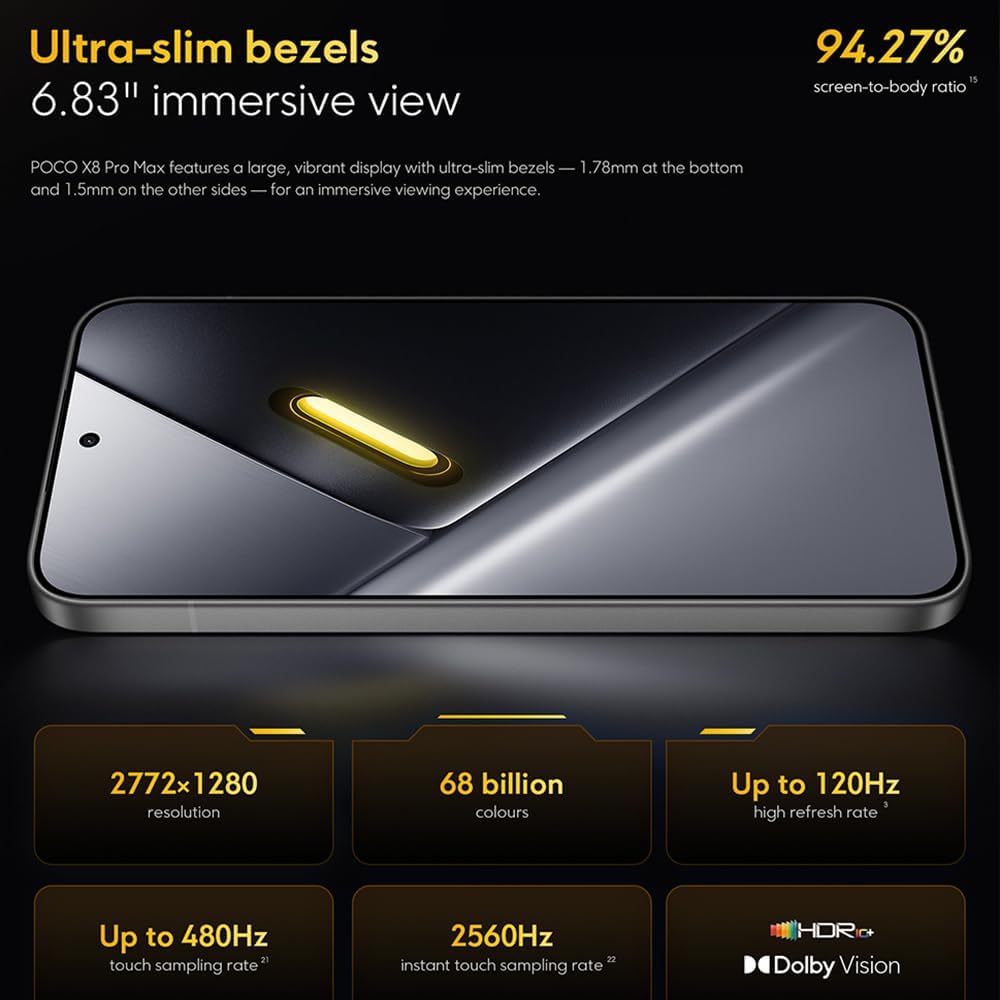
Image: The 6.83-inch 1.5K ultra-bright AMOLED display with minimal bezels.
4.2 ڪارڪردگي
Powered by the Mediatek Dimensity 9500s chipset (3nm, 4+4 All Big Core architecture, NPU890 AI processor), the POCO X8 Pro Max 5G delivers high performance. The POCO 3D IceLoop cooling system ensures efficient heat dissipation, maintaining optimal performance during intensive tasks like gaming.

Image: Diagram illustrating the Mediatek Dimensity 9500s flagship platform.

Image: Illustration of the 5800mm² ultra-large LHP area for cooling.
4.3 ڪئميرا سسٽم
The device features a 50 MP Light Fusion 600 main camera with OIS (Optical Image Stabilization) and an 8 MP ultra-wide camera. It supports portrait mode with bokeh + HDR and dynamic video-to-still conversion.

Image: Close-up of the 50 MP main camera and 8 MP ultra-wide camera system.
4.4 بيٽري ۽ چارج ڪرڻ
Equipped with a massive 8500 mAh (typical) battery, the POCO X8 Pro Max 5G offers extended usage. It supports 100W HyperCharge, allowing for rapid recharging. A 16% ultra-high carbon-silicon content contributes to its high energy density.

Image: Illustration highlighting the massive 8500mAh battery capacity.

Image: Visual representation of the 100W HyperCharge technology.
4.5 آڊيو
The device features symmetrical dual stereo speakers (1115F) for a balanced and immersive audio experience.
4.6 سافٽ ويئر
The POCO X8 Pro Max 5G comes with Xiaomi HyperOS 3 installed, offering an optimized and user-friendly interface based on Android 16.
5. سار سنڀال
5.1 توهان جي ڊوائيس کي صاف ڪرڻ
- اسڪرين ۽ پوئين پينل کي صاف ڪرڻ لاءِ نرم، لِنٽ فري ڪپڙو استعمال ڪريو.
- سخت ڪيميڪلز، رگڙيندڙ مواد، يا ايروسول اسپري استعمال ڪرڻ کان پاسو ڪريو.
- ضدي داغن لاءِ، ٿورو ڊيampen اليڪٽرانڪس لاءِ ٺهيل پاڻي يا اسڪرين ڪلينر سان ڪپڙو.
5.2 مٽي ۽ پاڻي جي مزاحمت
The device is certified for IP68 dust and water resistance. This means it can withstand immersion in up to 2 meters of water for 30 minutes under specific laboratory conditions. However, water and dust resistance may deteriorate over time with normal wear and tear. The warranty does not cover liquid damage. Avoid exposing the device to hot water, saltwater, or other liquids.

Image: Visual representation of the IP68 dust and water resistance.
5.3 سافٽ ويئر اپڊيٽ
باقاعدي طور تي سافٽ ويئر اپڊيٽس جي جانچ ڪريو ۽ انسٽال ڪريو ته جيئن پڪ ڪري سگهجي ته توهان جي ڊوائيس ۾ جديد خاصيتون، سيڪيورٽي پيچ، ۽ ڪارڪردگي بهتري آهي. توهان عام طور تي هي آپشن ڳولي سگهو ٿا Settings > About phone > System update.
6. مسئلا حل ڪرڻ
6.1 عام مسئلا ۽ حل
- ڊوائيس چالو نه آهي: پڪ ڪريو ته بيٽري چارج ٿيل آهي. ڊوائيس کي چارجر سان ڳنڍيو ۽ ان کي ٻيهر آن ڪرڻ جي ڪوشش ڪرڻ کان اڳ ڪجھ منٽ انتظار ڪريو.
- اسڪرين غير جوابده: Try restarting the device by holding the power button for an extended period (e.g., 10-15 seconds) until it reboots.
- ايپس جو ڪريش ٿيڻ: مسئلو واري ايپ جي ڪيش صاف ڪريو (سيٽنگون > ايپس > [ايپ جو نالو] > اسٽوريج > ڪيش صاف ڪريو) or reinstall the app. Ensure your device software is up to date.
- خراب بيٽري زندگي: Check background app usage, reduce screen brightness, disable unnecessary features like GPS or Bluetooth when not in use, and ensure your software is updated.
- نيٽ ورڪ ڪنيڪشن جا مسئلا: Restart your device. Check if your SIM card is properly inserted. Toggle Airplane Mode on and off. Reset network settings (سيٽنگون > سسٽم > ري سيٽ آپشن > وائي فائي، موبائل ۽ بلوٽوٿ ري سيٽ ڪريو).
6.2 فيڪٽري ري سيٽ
If you encounter persistent issues, a factory reset may be necessary. خبردار: هي توهان جي ڊوائس تي سڀ ڊيٽا ختم ڪري ڇڏيندو. اڳتي وڌڻ کان اڳ اهم ڊيٽا جو بيڪ اپ وٺو. ڏانهن وڃو سيٽنگون> سسٽم> ري سيٽ جا اختيار> سڀ ڊيٽا ختم ڪريو (فيڪٽري ري سيٽ) ۽ اسڪرين تي ڏنل هدايتن تي عمل ڪريو.
7. وضاحتون
| خاصيت | تفصيل |
|---|---|
| برانڊ | XIAOMI |
| ماڊل نالو | POCO X8 Pro Max 5G |
| آپريٽنگ سسٽم | Android 16 (with Xiaomi HyperOS 3) |
| ميموري رکڻ جي صلاحيت | 512 جي بي |
| اسڪرين جي ماپ | 6.83 انچ |
| ڊسپلي جو قسم | AMOLED, 1.5K, 120Hz refresh rate |
| سيلولر ٽيڪنالاجي | 5G |
| رنگ | نيرو (ڪارو) |
| ڪنيڪٽر جو قسم | USB قسم سي |
| بايوميٽرڪ سيڪيورٽي | Fingerprint Recognition (Ultrasonic) |
| بيٽري جي گنجائش | 8500 ايم اي ايڇ (ليٿيم-پوليمر) |
| چارج ڪرڻ | 100W هائپر چارج |
| مکيه ڪئميرا | 50 MP Light Fusion 600 with OIS |
| الٽرا وائڊ ڪيمرا | 8 ايم پي |
| پروسيسر | Mediatek Dimensity 9500s |
| مٽي ۽ پاڻي جي مزاحمت | IP68 |
| ماڊل جو سال | 2025 |
| اصل جو ملڪ | چين |
8. وارنٽي ۽ سپورٽ
For detailed warranty information and customer support, please refer to the warranty card included with your product or visit the official XIAOMI webسائيٽ. وارنٽي دعوائن لاءِ خريداري جو ثبوت رکو.
Online resources and FAQs may also be available on the XIAOMI support portal.