1. تعارف
خريد ڪرڻ لاءِ مهربانيasing the AIWA BBTC-550 Portable Radio Cassette Player. This versatile device combines classic audio formats with modern connectivity, allowing you to enjoy your music from various sources. Please read this manual carefully before using the unit to ensure proper operation and to maximize your listening experience. Keep this manual for future reference.
اهم خاصيتون:
- Portable Radio Cassette with CD reader, USB, and Bluetooth 5.0 connection.
- Cassette player and recorder with Auto-Stop function.
- USB port for MP3 music playback.
- AUX IN input (3.5mm) for connecting external audio devices.
- Headphone socket (3.5mm).
- Compatible with CD/CD-R/MP3 discs with 20 programmable memories.
- FM PLL Radio with 40 programmable station presets.
- Digital clock with 24-hour display.
- High-frequency range dynamic speakers with super bass and amplified treble.
- Panoramic LCD screen with soft tonality backlight.
2. پراڊڪٽ ختمview
The AIWA BBTC-550 is designed for ease of use and portability. Below are images illustrating the device's main components and features.

شڪل 2.1: سامهون view of the AIWA BBTC-550, showing the display, control buttons, and speakers.

شڪل 2.2: مٿي کان هيٺ view of the AIWA BBTC-550 with the CD compartment lid open.

شڪل 2.3: پاسي view of the AIWA BBTC-550 with the cassette compartment door open and the telescopic antenna extended.

Figure 2.4: Close-up of the side panel showing the 3.5mm headphone jack, 3.5mm AUX IN port, and USB/MP3 port.
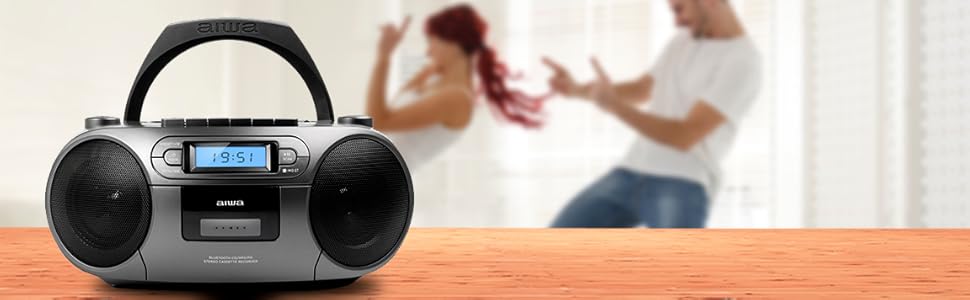
Figure 2.5: Promotional image highlighting the multi-functionality of the AIWA BBTC-550.
3. سيٽ اپ
3.1 پاور سپلائي
The AIWA BBTC-550 can be powered by either AC mains electricity or batteries for portable use.
- اي سي پاور: Connect the provided AC power cord to the AC IN socket on the unit and then to a standard 230V/50Hz wall outlet.
- بيٽري پاور: For portable use, insert 6 x 1.5V LR14/UM2/C batteries into the battery compartment located on the bottom of the unit. Ensure correct polarity (+/-) when inserting batteries.
3.2 اينٽينا ايڊجسٽمينٽ
For optimal FM radio reception, fully extend the telescopic antenna. Adjust its position and angle to achieve the clearest signal.
4. آپريٽنگ هدايتون
4.1 عام ڪنٽرول
- پاور بٽڻ: يونٽ کي آن يا آف ڪرڻ لاءِ پريس ڪريو.
- موڊ بٽڻ: Press to switch between CD, USB, Bluetooth, Radio, and Cassette modes.
- ووليم نوب: Rotate to adjust the sound level.
- LCD ڊسپلي: Shows current mode, track number, frequency, and time.
4.2 سي ڊي پلے بیک
- کي دٻايو موڊ سي ڊي موڊ چونڊڻ لاءِ بٽڻ.
- Open the CD compartment lid and place a CD (CD/CD-R/MP3 compatible) with the label side facing up. Close the lid securely.
- The unit will read the disc, and the total number of tracks will appear on the display.
- کي دٻايو کيڏو/روڪيو (►/❚❚) پلے بیک شروع ڪرڻ لاءِ بٽڻ.
- دٻايو کيڏو/روڪيو (►/❚❚) again to pause, and press once more to resume.
- کي دٻايو SKIP (►►| / |◄◄) ايندڙ يا پوئين ٽريڪ تي وڃڻ لاءِ بٽڻ.
- کي دٻايو روڪيو (■) پلے بیک کي روڪڻ لاءِ بٽڻ
- پروگرام پلي: While in stop mode, press the PROG/TIME بٽڻ استعمال ڪريو SKIP buttons to select a track, then press PROG/TIME again to add it to the program list. Repeat for up to 20 tracks. Press راند ڪريو پروگرام ٿيل پلے بیک شروع ڪرڻ لاءِ.
4.3 ڪيسٽ آپريشن
- کي دٻايو موڊ button to select Cassette mode.
- Open the cassette compartment door and insert a cassette tape. Close the door.
- پلے بیک: کي دٻايو کيڏو (►) button to start playing the tape.
- فاسٽ فارورڊ/وائنڊ: کي دٻايو FF (►►) or ريو (◄◄) بٽڻ. دٻايو روڪيو (■) to stop winding.
- روڪيو: کي دٻايو روڪيو (■) button to stop playback or winding. The unit features an Auto-Stop function at the end of the tape.
- رڪارڊنگ: Insert a blank cassette. Select the desired audio source (CD, USB, Bluetooth, Radio, or AUX IN). Press the رڪارڊ (●) button on the cassette deck. The unit will start recording from the selected source. Press روڪيو (■) رڪارڊنگ ختم ڪرڻ.
4.4 USB پلے بیک
- کي دٻايو موڊ USB موڊ چونڊڻ لاءِ بٽڻ.
- هڪ USB فليش ڊرائيو داخل ڪريو جنهن ۾ MP3 آڊيو هجي. files USB پورٽ ۾.
- The unit will automatically detect and start playing the MP3 files.
- استعمال ڪريو کيڏو/روڪيو (►/❚❚) ۽ SKIP (►►| / |◄◄) buttons for control, similar to CD playback.
4.5 بلوٽوٿ ڪنيڪشن
- کي دٻايو موڊ button to select Bluetooth mode. The display will show 'BT' and start flashing, indicating it's in pairing mode.
- پنهنجي بلوٽوٿ-فعال ڊوائيس (اسمارٽ فون، ٽيبليٽ، وغيره) تي، بلوٽوٿ کي فعال ڪريو ۽ دستياب ڊوائيسز جي ڳولا ڪريو.
- Select 'AIWA BBTC-550' from the list of devices.
- Once paired, the unit will emit a confirmation sound, and 'BT' on the display will stop flashing.
- You can now play audio from your connected device through the AIWA BBTC-550. Use your device or the unit's controls for playback.
4.6 ايف ايم ريڊيو
- کي دٻايو موڊ ايف ايم ريڊيو موڊ چونڊڻ لاءِ بٽڻ.
- بهتر استقبال لاءِ ٽيليسڪوپڪ اينٽينا کي وڌايو.
- خودڪار اسڪين: کي دٻايو ۽ رکو اسڪين button to automatically scan and save available FM stations. The unit can store up to 40 presets.
- دستي ترتيب مختصر طور تي دٻايو اسڪين button to manually tune up or down the frequency.
- اڳواٽ چونڊيو: استعمال ڪريو PRESET (+10) محفوظ ڪيل اسٽيشنن ذريعي سائيڪل هلائڻ لاءِ بٽڻ.
4.7 AUX IN
- کي دٻايو موڊ AUX IN موڊ چونڊڻ لاءِ بٽڻ.
- Connect an external audio device (e.g., MP3 player, smartphone) to the 3.5mm AUX IN port using a 3.5mm audio cable (not included).
- Play audio from your external device. The sound will be output through the AIWA BBTC-550 speakers.
- Adjust the volume using the unit's VOLUME knob and/or your external device's volume control.
4.8 هيڊ فون جو استعمال
To listen privately, plug 3.5mm stereo headphones into the HEADPHONES socket. The speakers will automatically mute when headphones are connected.
4.9 ڪلاڪ مقرر ڪرڻ
The unit features a digital clock with a 24-hour display.
- اسٽينڊ بائي موڊ ۾، دٻايو ۽ رکو PROG/TIME بٽڻ
- استعمال ڪريو SKIP (►►| / |◄◄) ڪلاڪ کي ترتيب ڏيڻ لاءِ بٽڻ. دٻايو PROG/TIME تصديق ڪرڻ.
- استعمال ڪريو SKIP (►►| / |◄◄) منٽ کي ترتيب ڏيڻ لاءِ بٽڻ. دٻايو PROG/TIME to confirm and exit clock setting mode.
5. وضاحتون
| خاصيت | تفصيل |
|---|---|
| برانڊ جو نالو | AIWA |
| ماڊل نمبر | بي بي ٽي سي-550 |
| قسم | AM / FM Radio Cassette Player |
| انداز | Tabletop / Portable |
| جسماني مواد | پلاسٽڪ |
| طول و عرض (WxHxD) | 38 x 38 x 26 سينٽي |
| وزن (پيداوار) | لڳ ڀڳ. 2.04 ڪلو |
| بلوٽوٿ | ها (ورجن 5.0) |
| وائي فائي | نه |
| اسڪرين | Yes (Panoramic LCD with backlight) |
| سي ڊي مطابقت | CD/CD-R/MP3 |
| USB پلے بیک | ايم پي 3 files |
| AUX اندر | 3.5mm جيڪ |
| هيڊ فون آئوٽ | 3.5mm جيڪ |
| ريڊيو presets | 40 (FM PLL) |
| بجلي جي فراهمي (AC) | 230V/50Hz |
| بجلي جي فراهمي (ڊي سي) | 6 x 1.5V LR14/UM2/C batteries |
| سرٽيفڪيشن | سي اي، RoHS |
| اصليت | چين |
| پيڪيج جي ماپ | 36.7 x 29 x 17.7 سينٽي |
| پيڪيج جو وزن | 2.5 ڪلو |
6. سار سنڀال
6.1 يونٽ جي صفائي
- هميشه صاف ڪرڻ کان پهريان يونٽ کي پاور ماخذ کان ڌار ڪريو.
- ٻاهرين سطحن کي صاف ڪرڻ لاءِ نرم، سڪل ڪپڙو استعمال ڪريو.
- ضدي نشانن لاءِ، هلڪو ڊيampڪپڙي کي پاڻي ۽ هلڪي صابڻ سان ڌوئي ڇڏيو، پوءِ فوري طور تي سڪي ڇڏيو.
- گھڙڻ وارا صاف ڪندڙ، موم، يا محلول استعمال نه ڪريو ڇو ته اهي ختم کي نقصان پهچائي سگهن ٿا.
6.2 سي ڊي لينس ڪيئر
- Never touch the CD lens.
- If the CD lens gets dirty, use a commercially available CD lens cleaner to clean it.
6.3 ڪيسٽ ڊيڪ جي سنڀال
- Regularly clean the tape heads, capstan, and pinch roller with a cotton swab lightly moistened with tape head cleaner or isopropyl alcohol.
- Demagnetize the tape heads periodically to prevent sound degradation.
6.4 بيٽري مٽائڻ
- When the unit's performance diminishes or the display dims, it's time to replace the batteries.
- Open the battery compartment, remove old batteries, and insert new ones, ensuring correct polarity.
- مقامي ضابطن جي مطابق ذميواري سان پراڻي بيٽرين کي ختم ڪريو.
- جيڪڏهن يونٽ ڊگهي عرصي تائين استعمال نه ڪيو ويندو ته جيئن رسي کي روڪي سگهجي ته بيٽريون هٽايو.
7. مسئلا حل ڪرڻ
If you encounter any issues with your AIWA BBTC-550, please refer to the following common problems and solutions:
| مسئلو | ممڪن سبب | حل |
|---|---|---|
| طاقت نه آهي | اي سي ڪنڊ صحيح طرح سان ڳنڍيل نه آهي؛ بيٽريون ختم ٿي ويون آهن يا غلط طور تي داخل ڪيون ويون آهن. | اي سي ڪنڊ ڪنيڪشن چيڪ ڪريو؛ بيٽريون تبديل ڪريو، صحيح پولارٽي کي يقيني بڻايو. |
| آواز ڪونهي | Volume too low; Headphones connected; Incorrect mode selected. | Increase volume; Disconnect headphones; Select the correct mode (CD, USB, BT, Radio, AUX). |
| سي ڊي ڇڏڻ يا نه هلڻ | CD is dirty or scratched; CD inserted incorrectly; Lens is dirty. | Clean or replace CD; Insert CD with label side up; Clean CD lens. |
| ڪيسٽ نه پئي هلي/ريڪارڊنگ ٿي رهي آهي | Tape heads/capstan dirty; Cassette damaged; Incorrect mode. | Clean tape heads/capstan; Try a different cassette; Ensure Cassette mode is selected. |
| بلوٽوٿ ڳنڍي نه ٿو | Unit not in pairing mode; Bluetooth disabled on external device; Device too far. | Ensure unit is in Bluetooth pairing mode; Enable Bluetooth on your device; Move device closer (within 10m). |
| خراب ايف ايم ريڊيو استقبال | Antenna not extended/adjusted; Weak signal area. | ٽيليسڪوپڪ اينٽينا کي مڪمل طور تي وڌايو ۽ ترتيب ڏيو؛ يونٽ کي ٻئي هنڌ منتقل ڪرڻ جي ڪوشش ڪريو. |
| USB جي سڃاڻپ ناهي | USB drive formatted incorrectly; Files not MP3; USB drive damaged. | Ensure USB is FAT32 format; Check files MP3 آهن؛ هڪ مختلف USB ڊرائيو آزمايو. |
8. وارنٽي ۽ سپورٽ
The AIWA BBTC-550 comes with a standard manufacturer's warranty. Please refer to the warranty card included in your product packaging for specific terms and conditions, including the warranty period and coverage details.
ڪسٽمر سپورٽ:
If you experience any problems with your unit that are not covered in the troubleshooting section, or if you require further assistance, please contact your retailer or the AIWA customer support service in your region. Keep your purchase receipt as proof of purchase for warranty claims.
For the latest information and support, you may also visit the official AIWA webسائيٽ.


