1. تعارف
This manual provides essential information for setting up, operating, and maintaining your new Samsung 2025 Crystal UHD TV 85 (Model: KU85UF8570FXKR). Please read this manual thoroughly before using the product to ensure safe and optimal performance. Keep this manual for future reference.

2. سيٽ اپ
2.1 کولڻ
- احتياط سان ٽي وي کي ان جي پيڪنگ مان هٽايو.
- Check for all included accessories: Remote Control, Batteries, Power Cable, Stand Components (if applicable), and Documentation.
- ڪنهن به نقصان لاءِ ٽي وي جو معائنو ڪريو. جيڪڏهن خراب ٿي ويو آهي، ته سيٽ اپ سان اڳتي نه وڌو ۽ ڪسٽمر سپورٽ سان رابطو ڪريو.
2.2 اسٽينڊ تنصيب
If you choose to use the included stand:
- ٽي وي اسڪرين کي نرم، سڌي مٿاڇري تي رکو ته جيئن ڇڪڻ کان بچي سگهجي.
- ٽي وي جي تري ۾ مقرر ڪيل سلاٽن سان اسٽينڊ جي حصن کي ترتيب ڏيو.
- مهيا ڪيل اسڪرو استعمال ڪندي اسٽينڊ کي محفوظ ڪريو. پڪ ڪريو ته سڀئي اسڪرو مضبوطيءَ سان مضبوط ڪيا ويا آهن.

2.3 وال مائونٽ تنصيب
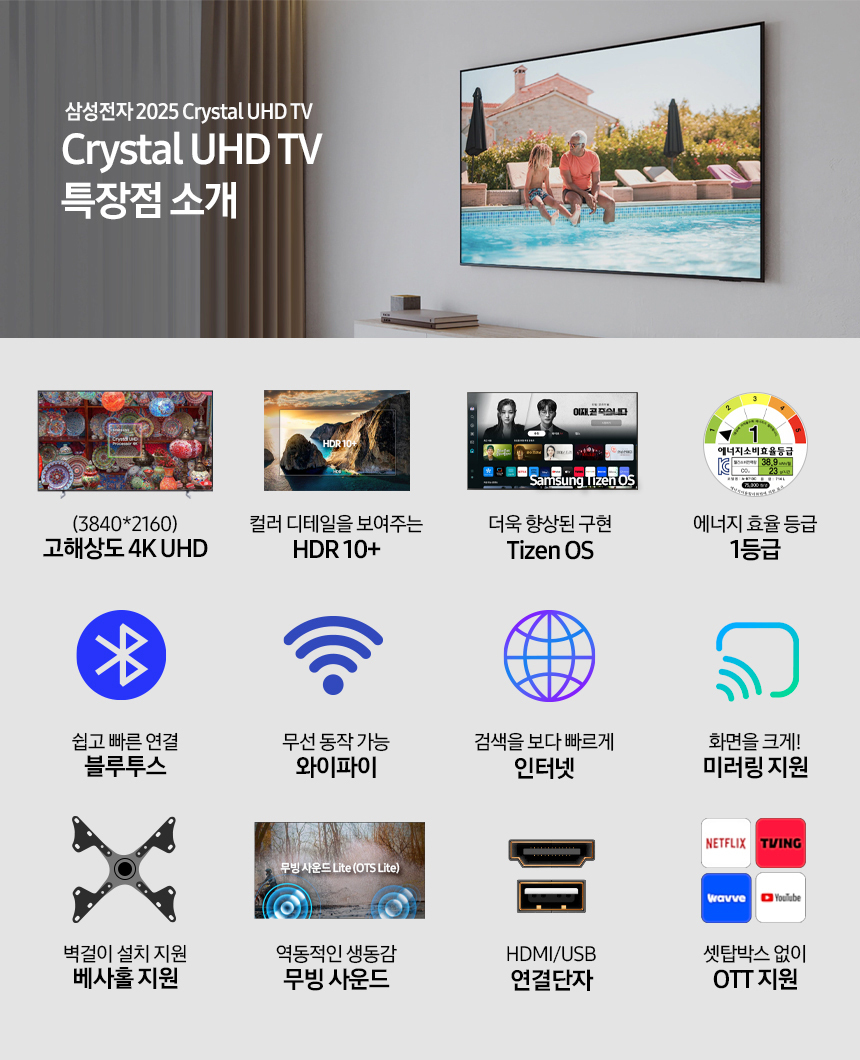
Your TV supports VESA wall mounts (600 x 400 mm). If you opt for a wall mount, ensure you use a compatible mount and follow the mount manufacturer's instructions carefully. Professional installation is recommended.
Important Wall Mount Restrictions:
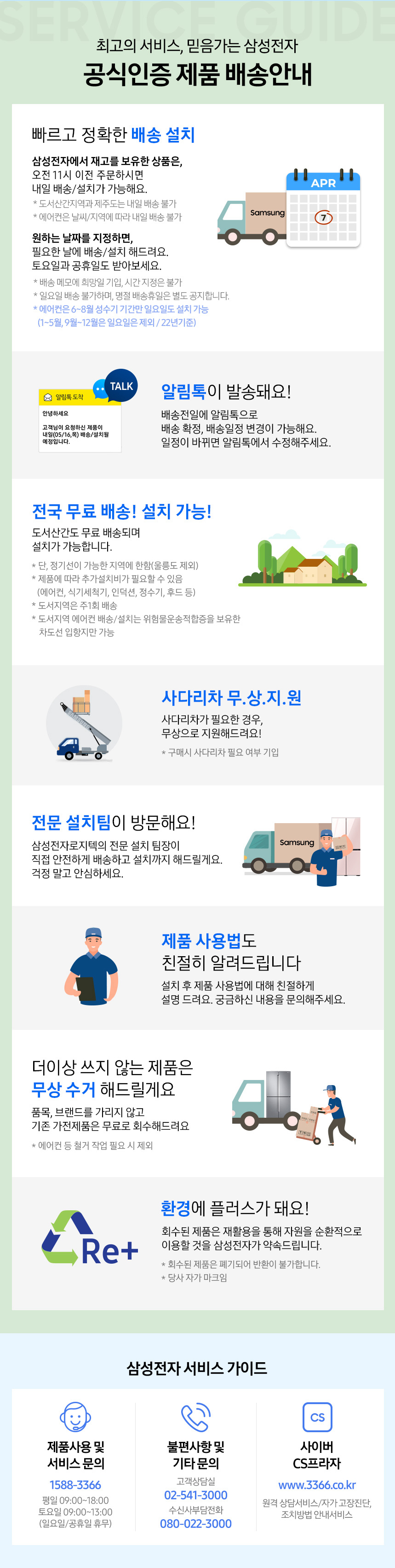
- Installation is NOT possible on gypsum board, natural marble, art walls, or wooden walls.
- If the wall requires drilling for slim fit wall mount installation, cracks may occur. Samsung Logistics Center regulations prohibit installation in such cases.
- If installation is not possible due to Samsung Logistics Center regulations, product returns may be difficult. Please verify your wall type and installation environment in advance.

2.4 شروعاتي ڪنيڪشن
- طاقت: Connect the power cable to the TV and then to a wall outlet (AC220-240V~50/60Hz).
- ٻاهرين ڊوائيسز: Connect your external devices (e.g., cable box, Blu-ray player, game console) to the HDMI ports.
- اينٽينا / ڪيبل: Connect your antenna or cable to the appropriate input if you are using a digital or analog tuner.
2.5 پهريون ڀيرو سيٽ اپ
پهرين پاور آن ٿيڻ تي، ٽي وي توهان کي شروعاتي سيٽ اپ جي عمل ذريعي رهنمائي ڪندو:
- ٻولي جي چونڊ: پنھنجي پسند جي Chooseولي چونڊيو.
- نيٽ ورڪ ڪنيڪشن: پنھنجي گھر جي وائي فائي نيٽ ورڪ سان ڳنڍيو يا وائرڊ ڪنيڪشن لاءِ ايٿرنيٽ ڪيبل استعمال ڪريو.
- چينل اسڪين: Scan for available channels if using an antenna or cable.
- سمارٽ هب سيٽ اپ: Follow the on-screen instructions to set up your Samsung Smart Hub, including agreeing to terms and conditions and logging into your Samsung account.
3. پنهنجو ٽي وي هلائڻ
3.1 بنيادي ڪم
- طاقت: Press the Power button on the remote control to turn the TV on or off.
- ان پٽ جو ذريعو: Use the 'Source' button on the remote to switch between connected devices (HDMI 1, HDMI 2, TV, etc.).
- حجم: Adjust the volume using the Volume Up/Down buttons.
- چينل: Change channels using the Channel Up/Down buttons or by entering the channel number directly.
3.2 سمارٽ ٽي وي خاصيتون (ٽزين او ايس)
Your Samsung TV runs on the Tizen OS, offering a wide range of smart features:
- سمارٽ حب: Access your favorite apps, streaming services (Netflix, YouTube, etc.), and live TV all in one place.
- انٽرنيٽ برائوزر: براؤز ڪريو web سڌو پنهنجي ٽي وي تان.
- ايپ اسٽور: سام سنگ ايپ اسٽور تان اضافي ايپليڪيشنون ڊائون لوڊ ۽ انسٽال ڪريو.

3.3 وائس ڪنٽرول
The TV supports Near-Field Voice Control. Speak commands directly to the TV to change channels, adjust volume, search for content, and more.
3.4 ڪنيڪشن
- بلوٽوٿ: بلوٽوٿ سان هلندڙ ڊوائيسز جهڙوڪ هيڊفونز يا سائونڊ بارز کي وائرليس طور تي ڳنڍيو.
- وائي فائي: انٽرنيٽ جي رسائي ۽ سمارٽ خاصيتن لاءِ پنهنجي گهر جي نيٽ ورڪ سان ڳنڍيو.
- HDMI/USB: Use the HDMI ports for high-definition video and audio input, and USB ports for media playback from storage devices.
- اسڪرين مررنگ: Share content from your smartphone or tablet directly to the TV screen.
4. سار سنڀال
4.1 توهان جي ٽي وي کي صاف ڪرڻ
- اسڪرين: نرم، سڪل مائڪروفائيبر ڪپڙي سان اسڪرين کي نرميءَ سان صاف ڪريو. ضدي داغن لاءِ، هلڪو ڊيampڪپڙي کي پاڻي يا خاص اسڪرين ڪلينر سان ڌوئڻ (ڪڏهن به سڌو سنئون اسڪرين تي اسپري نه ڪريو).
- جسم: ٽي وي فريم کي نرم، سڪل ڪپڙي سان صاف ڪريو ۽ اسٽينڊ ڪريو. رگڙيندڙ ڪلينر يا سالوينٽس استعمال ڪرڻ کان پاسو ڪريو.
- وينٽيليشن: پڪ ڪريو ته ٽي وي جي پوئين پاسي وينٽيليشن جا سوراخ بند نه آهن ته جيئن وڌيڪ گرم ٿيڻ کان بچي سگهجي.
4.2 سافٽ ويئر اپڊيٽ
Your TV may receive periodic software updates to improve performance and add new features. It is recommended to enable automatic updates or check for updates manually through the TV's settings menu to ensure your TV is running the latest software.
4.3 بجلي بچائڻ جا طريقا
- Adjust the brightness to a comfortable level for your viewماحول.
- Enable the TV's Eco Solution or Power Saving mode in the settings.
- جڏهن استعمال ۾ نه هجي ته ٽي وي بند ڪريو.
5. مسئلا حل ڪرڻ
جيڪڏهن توهان کي پنهنجي ٽي وي سان مسئلا درپيش اچن ٿا، ته هيٺ ڏنل بنيادي مسئلا حل ڪرڻ جا قدم آزمايو:
- طاقت ناهي: پڪ ڪريو ته پاور ڪيبل ٽي وي ۽ وال آئوٽليٽ ٻنهي سان محفوظ طور تي ڳنڍيل آهي. ٻئي ڊوائيس کي ساڳئي آئوٽليٽ ۾ پلگ ان ڪرڻ جي ڪوشش ڪريو ته اهو ڪم ڪري رهيو آهي.
- ڪابه تصوير/آواز ناهي: Check the input source selection. Ensure all external devices are properly connected and powered on. Try a different HDMI cable if necessary.
- خراب تصويري معيار: Check your antenna or cable connection. Adjust picture settings (brightness, contrast, sharpness) in the TV menu.
- نيٽ ورڪ ڪنيڪشن جا مسئلا: Restart your Wi-Fi router. Re-enter your Wi-Fi password in the TV's network settings.
- ريموٽ ڪنٽرول ڪم نه ڪري رهيو آهي: ريموٽ ڪنٽرول ۾ بيٽريون تبديل ڪريو. پڪ ڪريو ته ريموٽ ۽ ٽي وي جي IR رسيور جي وچ ۾ ڪا به رڪاوٽ نه آهي.
If the problem persists, refer to the detailed troubleshooting section in the full digital manual (if available) or contact Samsung customer support.
6. وضاحتون
| خاصيت | تفصيل |
|---|---|
| ماڊل نالو | KU85UF8570FXKR |
| برانڊ | سامسنگ |
| اسڪرين جي ماپ | 84.5 انچ (214 سينٽي) |
| قرارداد | 4K (3840 x 2160) |
| ٽي وي جو قسم | LED ٽي وي |
| Backlight جو قسم | سڌو LED |
| HDR معيار | HDR10+ |
| آپريٽنگ سسٽم | Tizen OS |
| اسپيڪر آئوٽ | 20W |
| آڊيو آئوٽ پٽ موڊ | OTS Lite (Object Tracking Sound Lite) |
| ڪنٽرول جو طريقو | Near-Field Voice Control |
| ڪنيڪشن جون خاصيتون | Digital tuner, Analog tuner, Bluetooth, HDR, Smart TV, Wi-Fi, Motion Interpolation, VRR |
| چڙهڻ جو قسم | Wall Mount Compatible (VESA 600 x 400 mm) |
| ڪم ڪندڙ طاقت | 225W |
| ڪم ڪرڻ وارو جلدtage | AC220-240V~50/60Hz |
| وزن (بغير موقف) | 33.4 ڪلو |
| وزن (اسٽينڊ سان) | 34.1 ڪلو |
| Dimensions (WxHxD, without stand) | 1895.4 x 1083.1 x 26.9 ملي ميٽر |
| Dimensions (WxHxD, with stand) | 1895.4 x 1144.8 x 392.2 ملي ميٽر |
| Stand Dimensions (WxD) | 1426.6 x 392.2 ملي ميٽر |
| Energy Efficiency Grade | 1 |

7. وارنٽي ۽ سپورٽ
Your Samsung TV comes with a standard manufacturer's warranty. For specific warranty terms and conditions, please refer to the warranty card included with your product or visit the official Samsung webتوهان جي علائقي لاء سائيٽ.
ڪسٽمر سپورٽ
For technical assistance, service requests, or product inquiries, please contact Samsung customer support:
- فون: 1588-3366 (Korea) or refer to your regional Samsung support contact.
- Webسائيٽ: www.samsung.com
- آن لائن چيٽ: Samsung Official Partner 1:1 Consultation via KakaoTalk (refer to the QR code in the image below for details).


8. استعمال ڪندڙ ٽوٽڪا
وڌ ۾ وڌ پنهنجو viewing experience with these helpful tips:
- تصوير جي سيٽنگن کي بهتر بڻايو: Experiment with different picture modes (e.g., Standard, Movie, Dynamic) and fine-tune settings like brightness, contrast, and color to suit your preferences and room lighting.
- Explore Smart Hub: Dive into the Smart Hub to discover new apps, games, and streaming content. Customize your home screen for quick access to your most-used services.
- وائس ڪنٽرول استعمال ڪريو: Get comfortable using voice commands for quick actions like changing channels, searching for movies, or adjusting settings without needing to navigate menus.
- Connect Soundbar/Audio System: For an enhanced audio experience, consider connecting a soundbar or home theater system via HDMI ARC/eARC or Bluetooth.
- باقاعده سافٽ ويئر اپڊيٽ: Keep your TV's software updated to ensure you have the latest features, security patches, and performance improvements.


