1. تعارف
This manual provides detailed instructions for the proper setup, operation, and maintenance of your Panasonic PV-V4640 4-Head Hi-Fi VCR. Please read this manual thoroughly before using the unit to ensure optimal performance and longevity. Keep this manual for future reference.
2. حفاظت جي ڄاڻ
بجليءَ جي جھٽڪي، باهه، يا يونٽ کي نقصان پهچڻ جي خطري کي گهٽائڻ لاءِ، مھرباني ڪري ھيٺ ڏنل حفاظتي احتياطن تي عمل ڪريو:
- هن ڊوائيس کي مينهن يا نمي کي ظاهر نه ڪريو.
- ڍڪ نه هٽايو. سروسنگ صرف قابل اهلڪارن کي حوالي ڪريو.
- مناسب وينٽيليشن کي يقيني بڻايو؛ وينٽيليشن جي سوراخن کي بند نه ڪريو.
- سامان تي مائع سان ڀريل شيون نه رکو، جهڙوڪ گلدان، سامان تي.
- Unplug the unit from the wall outlet if it will be unused for long periods.
- صارفين لاءِ خبردار: This television receiver has only an analog broadcast tuner and will require a converter box after February 17, 2009 to receive over-the-air broadcasts with an antenna because of the U.S.'s transition to digital broadcasting. Analog-only TVs should continue to work as before with cable and satellite TV services, gaming consoles, VCRs, DVD players, and similar products.
3. پيڪيج مواد
پڪ ڪريو ته سڀئي شيون پيڪيج ۾ شامل آهن:
- Panasonic PV-V4640 VCR Unit
- Universal Illuminated Remote Control
- آڊيو/وڊيو ڪيبل (آر سي اي قسم)
- هدايت نامو (هي دستاويز)
- Batteries for Remote Control (typically AA or AAA)
4. پراڊڪٽ ختمview
4.1 فرنٽ پينل
The front panel of the Panasonic PV-V4640 VCR features essential controls and indicators for basic operation.
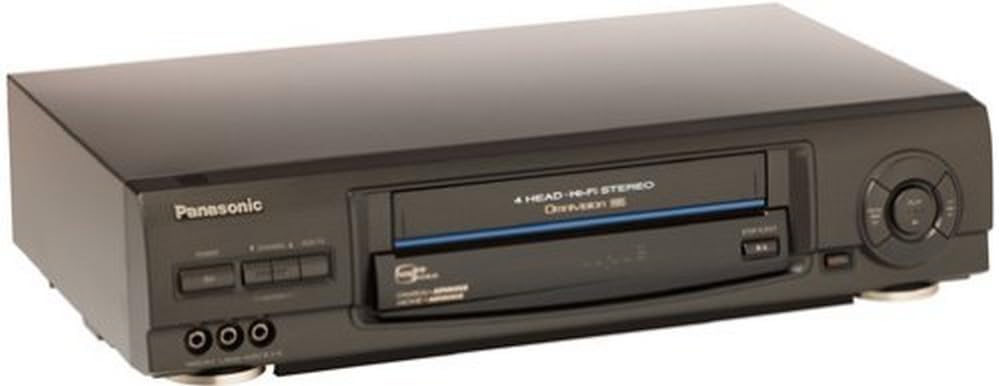
تصوير 4.1: سامهون view of the Panasonic PV-V4640 VCR. This image displays the main unit with its tape loading slot, control buttons (Power, Play, Stop, Rewind, Fast Forward, Eject), and front audio-video input jacks. The "4 HEAD HI-FI STEREO" and "VCR Plus+ GOLD" logos are visible.
Key features on the front panel include the tape loading slot, basic transport controls (Play, Stop, Rewind, Fast Forward), and front audio-video input jacks. These front jacks allow for convenient connection of camcorders or video game systems without needing to access the rear panel.
4.2 ريئر پينل ڪنيڪشن
The rear panel provides all necessary input and output connections for integrating the VCR into your home entertainment system.

تصوير 4.2: ريڙهه view of the Panasonic PV-V4640 VCR. This image highlights the various audio and video input/output ports, including RCA jacks for audio (L/R) and video (IN/OUT), and coaxial connectors for antenna/cable input and TV output.
Connections include coaxial inputs for antenna/cable, coaxial output to the TV, and RCA audio/video input and output jacks for connecting to other devices like a TV, receiver, or camcorder.
4.3 ريموٽ ڪنٽرول
The included universal illuminated remote control provides full functionality for operating your VCR from a distance.
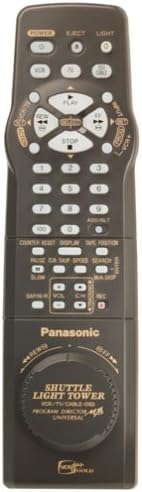
تصوير 4.3: Universal illuminated remote control for the Panasonic PV-V4640 VCR. The remote features various buttons for power, channel selection, volume, playback controls, menu navigation, and a distinctive jog/shuttle dial at the bottom.
The remote features a jog/shuttle dial, illuminated buttons for low-light conditions, and controls for all VCR functions, including programming and advanced features.
5. سيٽ اپ
5.1 ٽيليويزن سان ڳنڍڻ
There are two primary methods for connecting your VCR to a television:
- Using Coaxial Cable (RF Connection):
- Connect your antenna or cable TV line to the "IN FROM ANT." coaxial input on the VCR's rear panel.
- Connect a coaxial cable from the "OUT TO TV" coaxial output on the VCR to the antenna/cable input on your television.
- Tune your TV to channel 3 or 4 (whichever is not in use by a local broadcast) to view the VCR's output.
- Using Audio/Video (RCA) Cables:
- Connect the yellow video cable from the "VIDEO OUT" jack on the VCR to the "VIDEO IN" jack on your television.
- Connect the red audio cable from the "AUDIO R OUT" jack on the VCR to the "AUDIO R IN" jack on your television.
- Connect the white audio cable from the "AUDIO L OUT" jack on the VCR to the "AUDIO L IN" jack on your television.
- Select the corresponding video input (e.g., Video 1, AV1) on your television to view the VCR's output.
5.2 پاور ڪنيڪشن
Plug the VCR's power cord into a standard AC wall outlet. The VCR features an auto clock set function with a 24-hour backup, which will automatically set the time upon initial power-up or after a power outage.
6. بنيادي آپريشن
6.1 Playing a Videotape
- Insert a VHS videotape into the tape slot with the label facing up. The VCR will automatically load the tape.
- کي دٻايو راند ڪريو وي سي آر يا ريموٽ ڪنٽرول تي بٽڻ.
- Adjust the volume on your TV or audio system as needed.
- پلے بیک کي روڪڻ لاءِ ، دٻايو اسٽاپ بٽڻ
- ٽيپ ڪڍڻ لاءِ، دٻايو EJECT بٽڻ
6.2 پروگرام جي رڪارڊنگ
- Ensure a blank or recordable videotape is inserted.
- Tune the VCR to the desired channel using the remote control or front panel buttons.
- کي دٻايو آر اي سي button on the VCR or remote control to begin recording.
- رڪارڊنگ روڪڻ لاءِ ، پريس ڪريو اسٽاپ بٽڻ
نوٽ: The PV-V4640 supports SP (Standard Play) and SLP (Super Long Play) recording speeds. SP offers higher quality but shorter recording time, while SLP provides longer recording time at a reduced quality.
7. ترقي يافته خاصيتون
7.1 VCR Plus+ Gold Programming
VCR Plus+ Gold simplifies recording by allowing you to program your VCR using a short, two-digit code found in TV program listings. This eliminates the need for manual time and channel entry.
- Locate the VCR Plus+ Gold code for the desired program in your local TV guide.
- کي دٻايو وي سي آر پلس + ريموٽ ڪنٽرول تي بٽڻ.
- Enter the two-digit code using the numeric keypad.
- Confirm the recording settings (date, time, channel) displayed on the screen.
- دٻايو داخل ڪريو or سيٽ پروگرام جي تصديق ڪرڻ لاء.
7.2 Commercial Advance
The Commercial Advance feature allows you to skip over commercial breaks during playback of recorded programs. When activated, the system can fast-forward through approximately three minutes of commercials in about 25 seconds.
- During playback of a recorded tape, press the COMMERCIAL ADVANCE ريموٽ ڪنٽرول تي بٽڻ.
- The VCR will automatically fast-forward through detected commercial segments.
7.3 ٽائيم سينٽamp
When activated, the Time Stamp function automatically tags the beginning of each new recording. During playback, it can display the date, time, end time, and channel of the program that was recorded.
- Refer to the on-screen menu for activating and deactivating the Time Stamp خصوصيت.
- پلے بیک دوران، دٻايو ڏيکاريو بٽڻ ڏانهن view وقت stamp ڄاڻ.
7.4 Channel Caption
The Channel Caption feature allows you to assign an identification of up to four characters to each of the 34 available channels. This helps in easily identifying your favorite stations without guessing.
- Access the VCR's menu system (usually via a مينيو ريموٽ تي بٽڻ).
- Navigate to the Channel Setup or Channel Caption option.
- Select a channel and enter the desired four-character caption using the remote's numeric keypad.
7.5 Program Index Search
This feature allows you to quickly locate and play specific programs recorded on a videotape. The VCR can display an on-screen listing of up to eight programs, from which you can select the desired one.
- Insert a recorded tape.
- کي دٻايو انڊيڪس ڳولا ريموٽ تي بٽڻ.
- Use the navigation buttons to select a program from the on-screen list.
- دٻايو راند ڪريو to start playback from the selected program.
7.6 Rapid Rewind/Fast-Forward
The VCR is equipped with rapid rewind and fast-forward capabilities, allowing for quicker navigation through tapes to find desired content or the end of a recording.
- کي دٻايو REWIND or فاسٽ فارورڊ button during playback or stop mode.
- دٻايو راند ڪريو or اسٽاپ عام ڪم ٻيهر شروع ڪرڻ لاءِ.
8. سار سنڀال
8.1 Head Cleaner
The Panasonic PV-V4640 features a built-in head cleaner. Regular use of the VCR helps keep the video heads clean. If picture quality degrades, a dedicated head cleaning tape can be used, following its specific instructions.
8.2 عام صفائي
- Wipe the exterior of the VCR with a soft, dry cloth.
- Do not use liquid cleaners or aerosol cleaners, as they may damage the finish or internal components.
- وينٽيليشن جي سوراخن کي مٽي ۽ ملبي کان صاف رکو.
9. مسئلا حل ڪرڻ
سروس سان رابطو ڪرڻ کان اڳ، مھرباني ڪري ھيٺ ڏنل عام مسئلن جي جانچ ڪريو:
| مسئلو | ممڪن سبب | حل |
|---|---|---|
| طاقت نه آهي | بجلي جي تار بند ٿيل آهي؛ بجلي جو آئوٽليٽ فعال ناهي. | پڪ ڪريو ته پاور ڪنڊ محفوظ طور تي پلگ ان ٿيل آهي. ٻئي ڊوائيس سان پاور آئوٽليٽ چيڪ ڪريو. |
| No picture/sound from VCR | Incorrect TV input selected; VCR not connected properly. | Select the correct AV input on your TV (e.g., Video 1, AV1). Verify all audio/video cables are securely connected. If using coaxial, ensure TV is tuned to channel 3 or 4. |
| Tape won't eject | Power interruption; tape jammed. | Ensure VCR is powered on. Try pressing EJECT multiple times. If still stuck, unplug the VCR for a few minutes, then plug back in and try again. Do not force the tape. |
| خراب تصوير معيار | Dirty video heads; old or damaged tape. | Use a head cleaning tape. Try a different tape to rule out tape damage. |
| ريموٽ ڪنٽرول ڪم نه ڪري رهيو آهي | Dead batteries; obstruction; incorrect mode. | Replace batteries. Ensure no obstructions between remote and VCR. Check if remote is in the correct mode (if applicable). |
10. وضاحتون
| خاصيت | تفصيل |
|---|---|
| ماڊل نمبر | PV-V4640 |
| وڊيو سر | 4-هيڊ هاءِ فائي اسٽيريو |
| ٽونر جو قسم | MTS/SAP Tuner (Analog Broadcast) |
| پروگرامنگ | VCR Plus+ Gold, Allset Channel Mapping |
| خاص خاصيتون | Commercial Advance, Time Stamp, Program Index Search, Channel Caption, Rapid Rewind/Fast-Forward, Auto Clock Set with 24-hour backup, Built-in Head Cleaner |
| ريموٽ ڪنٽرول | Universal Illuminated Remote with Jog/Shuttle Dial |
| فرنٽ انپٽس | Audio/Video (RCA) |
| طول و عرض (تقريبن) | 18.5 x 14.5 x 6.5 انچ (پيڪيج طول و عرض) |
| وزن (تقريبن) | 8.73 پائونڊ (شي جو وزن) |
| بجلي جي فراهمي | AC 120V, 60Hz (Standard US) |
11. وارنٽي ۽ سپورٽ
Panasonic offers a one-year warranty for parts and labor for this product. For warranty service or technical support, please refer to the contact information provided with your purchase documentation or visit the official Panasonic support website. Please have your model number (PV-V4640) and purchase date available when contacting support.


