1. تعارف
This manual provides comprehensive instructions for the safe and efficient use of your InFocus X2 Multimedia DLP Projector. Please read this manual thoroughly before operating the projector and retain it for future reference. The InFocus X2 is designed for versatile use, suitable for both business presentations and home entertainment.
2. پراڊڪٽ ختمview
The InFocus X2 is a Digital Light Processing (DLP) projector featuring an 800x600 native resolution. It offers a bright display with up to 1500 ANSI lumens and a 2000:1 contrast ratio, ensuring clear and vibrant images. The projector includes a manual zoom and focus lens for image adjustment and a built-in 2.5-watt speaker for audio output.

شڪل 2.1: اڳيان-کاٻي view of the InFocus X2 Projector with the lens cap removed, showing the main lens and ventilation.
اهم خاصيتون:
- Digital Light Processing (DLP) technology for consistent image quality.
- Native 800x600 (SVGA) resolution, compatible with resolutions up to XGA (1024x768).
- Up to 1500 ANSI lumens brightness.
- 2000:1 contrast ratio for sharp image detail.
- Manual zoom and focus lens (1.2x magnification).
- Multiple input options for computers, video sources, and audio.
- Integrated 2.5-watt speaker.
- Supports front, rear, and ceiling projection methods.
3. سيٽ اپ
3.1 Unpacking ۽ لڳائڻ
Carefully remove the projector and all accessories from the packaging. Place the projector on a stable, flat surface or mount it securely according to the chosen projection method (front, rear, or ceiling). Ensure adequate ventilation around the projector.
3.2 Connecting the Projector
The connection panel is located at the rear of the unit. All inputs are color-coded for ease of connection.

شڪل 3.1: پوئتي view of the InFocus X2 Projector, highlighting the various input ports for computer, video, and audio connections.
- Computer Input: Connect your computer using the provided computer cable to the M1-DA port (which supports RGB, DVI, and HDTV signals) or the VGA port.
- وڊيو انپٽس: For video sources, use the S-video port or the composite video jack.
- آڊيو چيڪ Connect audio sources to the stereo RCA audio inputs.
- طاقت: Connect the power cord to the projector's power inlet and then to a suitable electrical outlet.
3.3 پاور آن/آف
- پاور آن ڪرڻ: Press the power button on the projector's control panel or the remote control. The power indicator light will illuminate.
- پاور آف ڪرڻ: Press the power button again. The projector will enter a cooling cycle before completely shutting down. Do not unplug the projector during the cooling cycle.
4. آپريٽنگ
4.1 ڪنٽرول پينل
The intuitive keypad on the top of the projector allows for easy navigation and control of various functions.
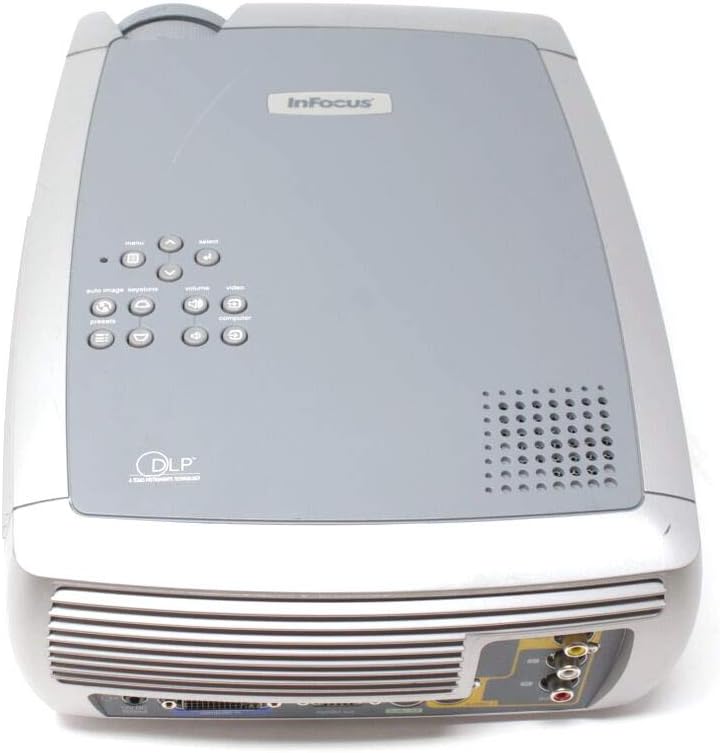
شڪل 4.1: مٿي view of the InFocus X2 Projector, displaying the control panel with buttons for menu navigation, input selection, and image adjustments.
4.2 تصويري ترتيب
- فوڪس: پروجيڪٽر لينس تي فوڪس رنگ کي گھمايو جيستائين تصوير تيز ۽ صاف نه ٿئي.
- وڏو ڪريو: تصوير جي سائيز کي تبديل ڪرڻ لاءِ پروجيڪٽر لينس تي زوم رنگ کي ترتيب ڏيو.
- ڪيسٽون جي اصلاح: Use the keystone correction function (accessible via the menu) to square the image if the projector is not perfectly perpendicular to the screen.
4.3 ان پٽ چونڊ
Use the 'Input' button on the control panel or remote control to cycle through available input sources (Computer, S-Video, Composite Video).
4.4 ريموٽ ڪنٽرول استعمال ڪندي
The included wireless Navigator remote control provides full functionality for operating the projector from a distance. Refer to the remote control's specific instructions for detailed button functions.
5. سار سنڀال
5.1 ايلamp بدلائڻ
پروجيڪٽر ايلamp has an estimated life of up to 3,000 hours in low-power mode. When the lamp needs replacement, a warning indicator will appear. Always allow the projector to cool down for at least 30 minutes before attempting to open the lamp door or replace the lamp.

شڪل 5.1: هيٺيون view of the InFocus X2 Projector, showing the warning labels and the location of the lamp access panel. Refer to this area for lamp متبادل طريقا.
WARNING: To replace the lamp, allow 30 minutes before opening the lamp door. Refer to instructions in the User's Guide to replace the lamp.
5.2 صفائي
- لينس: Use a soft, lint-free cloth and a lens cleaning solution specifically designed for optical surfaces.
- ٻاهران: Wipe the projector's exterior with a soft, damp ڪپڙو. استعمال نه ڪريو abrasive cleaners يا solvents.
- هوائي وينٽس: Ensure air vents are clear of dust and obstructions to prevent overheating. Use compressed air to gently clean the vents if necessary.
6. مسئلا حل ڪرڻ
If you encounter issues with your InFocus X2 projector, refer to the following common problems and solutions:
| مسئلو | ممڪن سبب | حل |
|---|---|---|
| اسڪرين تي ڪوبه تصوير نه آهي | Incorrect input selected; loose cable connection; projector not powered on. | Verify input source; check all cable connections; ensure projector is powered on. |
| تصوير urري آهي | لينس ڌيان کان ٻاهر. | پروجيڪٽر لينس تي فوڪس انگوزي کي ترتيب ڏيو. |
| تصوير ٽراپيزائيڊل آهي. | پروجيڪٽر اسڪرين تي عمودي نه آهي. | Use keystone correction feature in the projector menu. |
| پروجيڪٽر گرم ٿي ويندو آهي ۽ بند ٿي ويندو آهي | Blocked air vents; excessive ambient temperature. | Clear air vents; ensure proper ventilation; operate in a cooler environment. |
| نه آڊيو | Audio cables not connected; volume too low; incorrect audio input selected. | Connect audio cables; increase volume; select correct audio input. |
جيڪڏهن انهن حلن جي ڪوشش ڪرڻ کان پوءِ به مسئلو برقرار رهي، مهرباني ڪري ڪسٽمر سپورٽ سان رابطو ڪريو.
7. وضاحتون
| خاصيت | تفصيل |
|---|---|
| ڊسپلي ٽيڪنالاجي | ڊي ايل پي (ڊجيٽل لائٽ پروسيسنگ) |
| اصلي قرارداد | 800 x 600 (SVGA) |
| روشني | 1500 ANSI Lumens (وڌ کان وڌ) |
| مقابلي جي نسبت | 2000:1 |
| Lamp زندگي | Up to 3,000 hours (low power mode) |
| اسپيڪٽ ريشو | 4:3 (آبائي) |
| تصويري سائيز (Digonal) | 31" کان 258" تائين |
| پروجيڪٽ جا طريقا | اڳيان ، ريئر ، ڇت |
| بلٽ ان اسپيڪر | 2.5-watt mono |
| داخلائون | M1-DA (Computer RGB, DVI, HDTV), S-Video, Composite Video, Stereo RCA Audio |
| پيداوار جي ماپ | 12.87 x 9.8 x 4.17 انچ |
| شيءِ جو وزن | 12.39 پائونڊ |
8. دٻي ۾ ڇا آهي
The InFocus X2 Multimedia DLP Projector package typically includes:
- InFocus X2 Projector
- لينس ڪيپ
- Wireless Navigator Remote Control (with batteries)
- ڪمپيوٽر ڪيبل
- RCA Video and Audio Cable
- پاور ڪنڊ
- Projector System CD (with multi-language user guide)
- جلدي شروع ڪارڊ
- پرنٽ ٿيل يوزر گائيڊ
9. وارنٽي ۽ سپورٽ
For warranty information and technical support, please refer to the documentation included with your product or visit the official InFocus webسائيٽ. وارنٽي دعوائن لاءِ خريداري جي ثبوت طور پنهنجي خريداري جي رسيد رکو.


