1. تعارف
The Maxtec MAXO2+ Oxygen Analyzer is a portable device designed for accurate measurement of oxygen concentration. It is commonly used in various applications, including checking oxygen levels in scuba tanks, medical oxygen sources, and other gas mixtures. This manual provides essential information for the safe and effective use of your analyzer.
2. حفاظت جي ڄاڻ
Please read and understand all safety warnings and instructions before operating the device. Failure to do so may result in injury or damage to the product.
- Do not expose the analyzer to extreme temperatures or direct sunlight.
- ڊوائيس کي ڇڏڻ يا ان کي سخت اثر کان پاسو ڪريو.
- Ensure the oxygen sensor is properly installed and sealed to prevent inaccurate readings.
- Only use the device for its intended purpose of measuring oxygen concentration.
- Keep the device away from water unless specifically designed for waterproof use (refer to specifications).
- Dispose of batteries and the sensor according to local regulations.
3. پيڪيج مواد
پڪ ڪريو ته سڀئي شيون توهان جي پيڪيج ۾ موجود آهن:
- MAXO2+ Oxygen Analyzer Unit
- Oxygen Sensor (typically sealed in a protective pouch)
- T-Piece Adapter
- Tubing (for inline sampلنگ)
- 3 x AAA بيٽريون
- Waterproof Carrying Case (for some models)
- Small Screwdriver (for battery/sensor compartment)
4. پراڊڪٽ ختمview
The MAXO2+ Oxygen Analyzer features a compact design with an easy-to-read digital display. Key components include:
- ڊجيٽل ڊسپلي Shows oxygen concentration in percentage.
- ڪنٽرول بٽڻ: Typically for power on/off and calibration.
- سينسر پورٽ: Located at the bottom, where the oxygen sensor is installed.
- T-Piece Adapter: Connects to the sensor port for sampling gas from various sources.
- بيٽري جو خانو: AAA بيٽريون رکي ٿو.
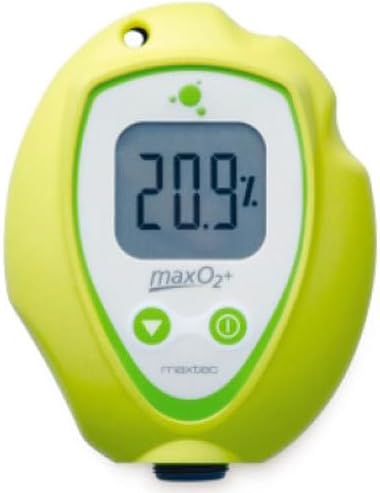
Figure 1: Maxtec MAXO2+ Oxygen Analyzer with digital display showing 20.9% oxygen.
5. سيٽ اپ ۽ شروعاتي استعمال
Follow these steps to prepare your analyzer for use:
- بيٽرين کي انسٽال ڪريو.
- Locate the battery compartment cover on the back of the analyzer.
- Use the provided small screwdriver to unscrew the retaining screws and remove the cover.
- 3 AAA بيٽريون داخل ڪريو، صحيح پولارٽي کي يقيني بڻائي.
- ڪپڙا مٽايو ۽ ان کي اسڪرو سان محفوظ ڪريو.
- Install Oxygen Sensor:
- The oxygen sensor is typically packaged separately to prevent premature exposure to air.
- Unscrew the cap from the sensor port at the bottom of the analyzer.
- Carefully remove the new oxygen sensor from its protective packaging.
- Screw the sensor into the sensor port until it is finger-tight. Do not overtighten.
- Attach T-Piece Adapter:
- The T-piece adapter allows for sampling from various gas sources.
- Firmly push the T-piece adapter onto the top port of the analyzer.
- If using tubing for inline sampling, connect one end of the tubing to one side of the T-piece.
Video 1: Demonstration of the Oxygen Analyzer's features, T-piece attachment, and sampلنگهه جو عمل.
6. آپريٽنگ هدايتون
To ensure accurate readings, proper operation and calibration are crucial.
- پاور آن: Press the power button (usually marked with an 'I' or power symbol) to turn on the analyzer. The display will illuminate and show the current oxygen concentration.
- Calibration (Fresh Air):
- Before each use, or if the device has been stored for a long time, calibrate the analyzer in fresh air (20.9% oxygen).
- Ensure the T-piece is open to ambient air, or no gas source is connected.
- Press and hold the calibration button (often marked with a 'CAL' or similar symbol) until the display shows "20.9%" or indicates successful calibration. Some models may have a one-button calibration feature.
- پڙهڻ کي مستحڪم ڪرڻ جي اجازت ڏيو.
- ماپ وٺڻ:
- Connect the T-piece adapter to your oxygen source (e.g., scuba tank valve, oxygen concentrator outlet). For scuba tanks, ensure a snug fit with the rubberized dome.
- Slowly open the valve of the oxygen source to allow gas to flow through the T-piece and over the sensor.
- Observe the digital display for the oxygen concentration reading. Allow a few seconds for the reading to stabilize.
- Once the reading is stable, note the measurement.
- Close the oxygen source valve and disconnect the analyzer.
- بجلي بند: پاور بٽڻ کي دٻايو ۽ رکو جيستائين ڊسپلي بند نه ٿئي.
7. سار سنڀال
Regular maintenance ensures the longevity and accuracy of your MAXO2+ Oxygen Analyzer.
- صفائي: تجزيي ڪندڙ جي ٻاهرين حصي کي نرم، ڊي سان صاف ڪريوamp ڪپڙو. گھڻائي صاف ڪندڙ استعمال نه ڪريو يا ڊوائيس کي پاڻي ۾ وجھو.
- سينسر جي متبادل: Oxygen sensors have a limited lifespan (typically 1-2 years, depending on usage and exposure). Replace the sensor when readings become erratic, calibration fails, or the "low sensor" indicator appears. Follow the sensor installation steps in Section 5.
- بيٽري مٽائڻ: Replace batteries when the low battery indicator appears on the display or the device fails to power on. Follow the battery installation steps in Section 5.
- اسٽوريج: Store the analyzer in its waterproof case in a cool, dry place when not in use. Ensure the sensor port is capped or the T-piece is attached to minimize sensor exposure to ambient air, prolonging its life.
8. مسئلا حل ڪرڻ
| مسئلو | ممڪن سبب | حل |
|---|---|---|
| ڊوائيس تي طاقت نه آهي. | مئل يا غلط طور تي نصب ٿيل بيٽريون. | بيٽريون تبديل ڪريو، صحيح پولارٽي کي يقيني بڻايو. |
| Inaccurate or erratic readings. | Sensor needs calibration, old sensor, or sensor not properly installed. | Perform fresh air calibration. If problem persists, replace the sensor. Ensure sensor is tightly screwed in. |
| Calibration fails. | Sensor is at the end of its life, or calibration environment is not fresh air. | Replace the oxygen sensor. Ensure calibration is performed in an area with known 20.9% oxygen. |
| No gas flow through T-piece. | Obstruction in tubing or T-piece, or gas source not properly connected/opened. | Check tubing for kinks. Ensure T-piece is clear. Verify gas source connection and valve. |
9. وضاحتون
- برانڊ: ميڪسيٽيڪ
- ماڊل نمبر: آر 217 پي 42
- شيء جو وزن: 12.8 اونس
- پيداوار جي ماپ: 6.4 x 10 x 3.7 انچ
- آڪسيجن سينسر: Honeywell (Made in Germany, as per video)
- طاقت جو ذريعو: 3 x AAA بيٽريون
- ماپ جي حد: 0-100% Oxygen (as per video)
10. وارنٽي ۽ سپورٽ
وارنٽي جي معلومات يا ٽيڪنيڪل سپورٽ لاءِ، مھرباني ڪري ٺاھيندڙ جي سرڪاري آفيس ڏانھن رجوع ڪريو webسائيٽ تي وڃو يا انهن جي ڪسٽمر سروس ڊپارٽمينٽ سان رابطو ڪريو. خريداري جي ثبوت طور پنهنجي خريداري جي رسيد رکو.


