تعارف
This manual provides comprehensive instructions for the setup, operation, and maintenance of your Coby CT-P9040 5.8 GHz Analog Cordless Phone. Please read this manual thoroughly before using your phone to ensure proper functionality and to prevent damage.
پيڪيج مواد ۽ اجزاء
شروع ڪرڻ کان اڳ، پڪ ڪريو ته سڀئي جزا پيڪيج ۾ موجود آهن:
- بي تار هينڊ سيٽ
- بنيادي يونٽ
- اي سي پاور ايڊاپٽر
- ٽيليفون لائن ڪنڊ
- Rechargeable بيٽري پيڪ
- استعمال ڪندڙ جو دستياب (ھي دستاويز)
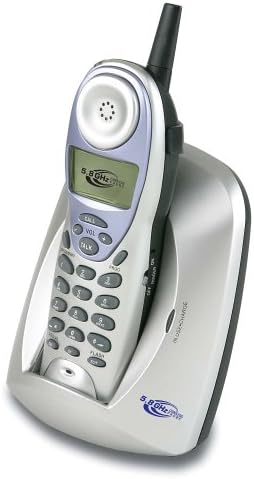
Image: The Coby CT-P9040 cordless phone, showing the handset docked in its silver base unit. The handset features a display screen, numeric keypad, and function buttons. The base unit has a charging cradle for the handset.
سيٽ اپ گائيڊ
1. بيٽري لڳائڻ
- هينڊسيٽ جي پٺيءَ تي بيٽري جي خاني کي ڳولھيو.
- بيٽري جي ڪمري واري ڍڪ کي کوليو.
- Connect the rechargeable battery pack connector to the jack inside the compartment.
- Place the battery pack into the compartment and close the cover securely.
2. بيس يونٽ ڪنيڪشن
- Connect one end of the telephone line cord to the "LINE" jack on the back of the base unit.
- ٽيليفون لائن جي ڪنڊ جي ٻئي ڇيڙي کي معياري ٽيليفون وال جيڪ سان ڳنڍيو.
- Connect the AC power adapter to the "DC IN" jack on the back of the base unit.
- Plug the AC power adapter into a standard electrical outlet.
3. شروعاتي چارجنگ
Place the handset in the base unit's charging cradle. Ensure the "IN CHARGE" indicator light on the base unit illuminates, indicating proper charging. For optimal battery performance, charge the handset for at least 12-14 hours before initial use.
آپريٽنگ هدايتون
ڪال ڪرڻ
- Pick up the handset from the base unit or press the ڳالهه بٽڻ
- هڪ ڊائل ٽون لاء ٻڌو.
- گهربل فون نمبر ڊائل ڪريو.
- ڪال ختم ڪرڻ لاءِ، دٻايو ڳالهه button again or place the handset back in the base unit.
ڪال جو جواب ڏيڻ
جڏهن فون جي گھنٽي وڄي، هينڊ سيٽ کڻو يا دٻايو ڳالهه ڪال جو جواب ڏيڻ لاءِ بٽڻ.
ريڊيل فنڪشن
ڪال ٿيل آخري نمبر کي ٻيهر ڊائل ڪرڻ لاءِ، دٻايو ريٽيل هينڊ سيٽ تي بٽڻ.
حجم جي ترتيب
ڪال دوران، استعمال ڪريو کول + ۽ جلد - buttons on the handset to adjust the earpiece volume.
فليش فنڪشن
کي دٻايو فليش button to use call waiting or transfer calls if supported by your telephone service provider.
Storing Phone Numbers (Speed Dial)
Your phone can store up to 10 numbers for frequently called contacts. Refer to the detailed instructions in the full manual for programming speed dial entries.
سار سنڀال ۽ سنڀال
- فون کي گرمي جي ذريعن، سڌي سج جي روشني ۽ نمي کان پري رکو.
- Clean the phone's surfaces with a soft, damp ڪپڙو. استعمال نه ڪريو abrasive cleaners يا solvents.
- پڪ ڪريو ته هينڊ سيٽ ۽ بيس يونٽ تي چارجنگ ڪانٽيڪٽس صاف آهن ته جيئن صحيح چارجنگ برقرار رهي سگهي.
- If the phone will not be used for an extended period, remove the battery from the handset.
مشڪلاتون
| مسئلو | ممڪن سبب | حل |
|---|---|---|
| ڪوبه ڊائل ٽون | ٽيليفون لائن جي تار ڪٽيل آهي. | پڪ ڪريو ته ٽيليفون لائن جي ڪنڊ بيس يونٽ ۽ وال جيڪ ٻنهي سان محفوظ طور تي ڳنڍيل آهي. |
| هينڊ سيٽ چارج نه ٿي رهيو آهي | هينڊسيٽ پينگهي ۾ صحيح طرح سان نه رکيل هجي يا گندي چارجنگ ڪانٽيڪٽس. | Reseat the handset in the base unit. Clean the charging contacts on both the handset and base unit with a dry cloth. |
| خراب آواز جي معيار / جامد | Interference from other electronic devices or out of range. | Move the base unit away from other electronic devices (e.g., microwaves, Wi-Fi routers). Move closer to the base unit. |
| ڪالون نه ٿو ڪري/ وصول نٿو ڪري سگهجي | Power adapter disconnected or battery low. | Check if the AC power adapter is securely plugged in. Ensure the handset battery is fully charged. |
وضاحتون
- ماڊل: CT-P9040 SVR
- تعدد: 5.8 GHz Analog
- چينل: 40 Channel Auto Scan
- ياداشت: 10-number speed dial storage
- افعال: Flash, Redial, Pause, Tone/Pulse Switch
- هيڊ سيٽ جيڪ: Built-in 2.5mm
- چڙهڻ: Desk and Wall Mountable
- طول و عرض (L x W x H): 5 x 8 x 4 انچ
- وزن: 1.8 پائونڊ
- رنگ: چاندي
- ڪالر ID: سپورٽ نه ڪئي وئي
- ملٽي لائن آپريشن: سنگل لائن آپريشن
وارنٽي ۽ سپورٽ
For warranty information and technical support, please refer to the warranty card included with your product or visit the official Coby webسائيٽ. وارنٽي دعوائن لاءِ خريداري جي ثبوت طور پنهنجي خريداري جي رسيد رکو.
For further assistance, you may contact Coby customer service. Contact details are typically available on the manufacturer's webسائيٽ يا پيداوار جي پيڪنگنگ ۾.


