1. تعارف
Thank you for choosing the Nortek Soundream 2.1 Attive Minispeaker system. This manual provides essential information for the proper setup, operation, and maintenance of your new audio system. Please read this manual thoroughly before using the product to ensure optimal performance and safety.
2. حفاظت جي ڄاڻ
باهه، بجليءَ جي جھٽڪي، يا پيداوار جي نقصان کي روڪڻ لاءِ، مھرباني ڪري ھيٺ ڏنل حفاظتي احتياطن تي عمل ڪريو:
- هن ڊوائيس کي مينهن يا نمي کي ظاهر نه ڪريو.
- اوزار تي مائع سان ڀريل شيون، جهڙوڪ گلدان، نه رکو.
- مناسب وينٽيليشن کي يقيني بڻايو. ڪنهن به وينٽيليشن جي سوراخن کي بند نه ڪريو.
- ڪنهن به گرمي جي ذريعن جي ويجهو نصب نه ڪريو جهڙوڪ ريڊيٽرز، گرمي رجسٽر، اسٽو، يا ٻيو سامان (بشمول ampلائفائرز) جيڪي گرمي پيدا ڪن ٿا.
- بجلي جي ڪنڊ کي هلان يا پنڻ کان بچايو وڃي ، خاص طور تي پلگ ، سهولت ريڪٽرن ، ۽ ان نقطي تي جتي اهي اوزار کان ٻاهر نڪرن.
- صرف ٺاھيندڙ طرفان بيان ڪيل منسلڪ / لوازمات استعمال ڪريو.
- هن اوزار کي بجليءَ جي طوفانن دوران يا جڏهن گهڻي عرصي تائين غير استعمال ٿيل هجي ان کي ان پلگ ڪريو.
3. پيڪيج مواد
مھرباني ڪري چيڪ ڪريو ته سڀ شيون پيڪيج ۾ موجود آھن:
- 1 x Nortek Soundream 2.1 Subwoofer
- 2 x سيٽلائيٽ اسپيڪر
- 1 x Power Cable (Corded Electric)
- 1 x Audio Input Cable (e.g., 3.5mm stereo jack)
- 1 x استعمال ڪندڙ دستياب (هي دستاويز)
4. پراڊڪٽ ختمview
The Nortek Soundream 2.1 system consists of a subwoofer and two satellite speakers designed to deliver enhanced audio for various devices.
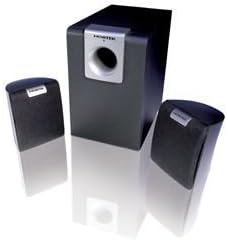
Image: The Nortek Soundream 2.1 Attive Minispeaker system, featuring a central subwoofer unit and two compact satellite speakers.
اجزاء:
- ذيلي آواز: The main unit containing the amplifier, bass driver, and primary controls.
- سيٽلائيٽ اسپيڪر: Two compact speakers for mid-range and high-frequency audio.
- ڪنٽرول: Typically located on the subwoofer, these include power on/off, master volume, and potentially bass level adjustment.
5. سيٽ اپ
Follow these steps to set up your Nortek Soundream 2.1 system:
- لڳائڻ:
- Place the subwoofer on the floor, preferably near a wall or in a corner for optimal bass response.
- Position the two satellite speakers on either side of your listening area, facing towards you. Ensure they are equidistant from your listening position for balanced stereo sound.
- سيٽلائيٽ اسپيڪرز کي ڳنڍيو:
- Connect the cables from the satellite speakers to the corresponding output jacks on the back of the subwoofer. Ensure correct polarity if applicable (e.g., red to red, black to black).
- آڊيو ذريعو ڳنڍيو:
- Connect one end of the audio input cable (e.g., 3.5mm stereo jack) to the 'Audio In' port on the subwoofer.
- Connect the other end of the audio input cable to the audio output jack of your device (e.g., computer, smartphone, MP3 player, TV).
- پاور Connectنيو:
- Plug the power cable into the power input on the subwoofer.
- پاور ڪيبل جي ٻئي ڇيڙي کي معياري اليڪٽريڪل وال آئوٽليٽ ۾ لڳايو.
6. آپريٽنگ هدايتون
Once the system is set up, follow these steps to operate your speakers:
- پاور آن: Locate the power button or switch on the subwoofer and turn it to the 'ON' position. An indicator light may illuminate.
- حجم ڪنٽرول: Turn the master volume knob on the subwoofer to a low setting before playing audio. Gradually increase the volume to your desired listening level.
- Bass Adjustment (if available): If your subwoofer has a separate bass control knob, adjust it to achieve your preferred bass level.
- آڊيو هلايو: پنهنجي ڳنڍيل ڊوائيس تان آڊيو هلائڻ شروع ڪريو.
- بجلي بند: When finished, turn the power switch on the subwoofer to the 'OFF' position. For extended periods of non-use, it is recommended to unplug the system from the power outlet.
7. سار سنڀال
Proper maintenance ensures the longevity and performance of your speaker system:
- صفائي: Disconnect the power before cleaning. Use a soft, dry cloth to wipe the surfaces of the speakers and subwoofer. Do not use liquid cleaners or abrasive materials.
- وينٽيليشن: Ensure that the ventilation openings on the subwoofer are not blocked by dust or other objects.
- اسٽوريج: If storing the system for an extended period, unplug it and store it in a cool, dry place away from direct sunlight and extreme temperatures.
- ڪيبل جي سنڀال: Avoid bending or crimping the audio and power cables excessively.
8. مسئلا حل ڪرڻ
If you encounter issues with your Nortek Soundream 2.1 system, refer to the following common problems and solutions:
- آواز ناهي:
- Ensure the power cable is securely plugged into both the subwoofer and the wall outlet.
- Verify the power switch on the subwoofer is in the 'ON' position.
- Check that the audio input cable is securely connected to both the subwoofer and your audio source.
- Increase the master volume on the subwoofer and the volume on your audio source device.
- Test with a different audio source or cable to rule out a faulty source or cable.
- مسخ ٿيل آواز:
- Reduce the volume on both the subwoofer and your audio source.
- Ensure the audio input cable is fully inserted and not damaged.
- ٻين اليڪٽرانڪ ڊوائيسز کان ڪنهن به مداخلت لاء چيڪ ڪريو.
- Only One Satellite Speaker Working:
- Check the connection of the non-working satellite speaker to the subwoofer.
- Ensure the audio source is outputting stereo sound.
9. وضاحتون
- ماڊل: Nortek Soundream 2.1
- ٺاھ جوڙ: 2.1 Channel (Subwoofer + 2 Satellite Speakers)
- Power Output (Wattage): 2 واٽ
- طاقت جو ذريعو: تار ٿيل برقي
- شيء جو وزن: تقريبن 1.5 ڪلوگرام (3.31 پائونڊ)
- ASIN: B000CFYA2C
- ٺاهيندڙ: نارٽيڪ
10. وارنٽي ۽ سپورٽ
For warranty information and technical support, please refer to the warranty card included with your product or visit the official Nortek webسائيٽ. ڪنهن به وارنٽي دعوائن لاءِ خريداري جي ثبوت طور پنهنجي خريداري جي رسيد رکو.


