1. تعارف
This manual provides comprehensive instructions for the proper use and maintenance of your Fujitsu USB Numeric Keypad, model FMV-NTKB3. Please read this manual thoroughly before using the product to ensure optimal performance and longevity. Keep this manual for future reference.
2. پيڪيج مواد
تصديق ڪريو ته هيٺ ڏنل سڀئي شيون توهان جي پراڊڪٽ پيڪيج ۾ موجود آهن:
- Fujitsu USB Numeric Keypad (FMV-NTKB3)
- مربوط USB ڪيبل
- استعمال ڪندڙ جو دستياب (ھي دستاويز)
3. پراڊڪٽ ختمview
The Fujitsu USB Numeric Keypad FMV-NTKB3 is a compact, external numeric input device designed to enhance data entry efficiency for computers lacking a dedicated number pad. It connects via a standard USB interface.
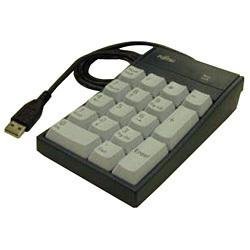
هڪ اوور هيڊ view of the Fujitsu USB Numeric Keypad FMV-NTKB3, showing its compact design, 19 keys (including 00, 0, ., Enter, +, -, *, /), and attached USB-A cable.
4. سيٽ اپ
Follow these steps to connect and begin using your numeric keypad:
- Connect the Keypad: Locate an available USB port on your computer. Insert the USB-A connector of the keypad's integrated cable firmly into the USB port.
- ڊرائيور لڳائڻ: The keypad is plug-and-play. Your operating system (Windows, macOS, Linux) should automatically detect the device and install the necessary drivers. This process may take a few moments.
- تصديق: Once the drivers are installed, the keypad is ready for use. You can test it by opening a text editor or spreadsheet program and pressing some numeric keys.
5. آپريٽنگ هدايتون
The Fujitsu USB Numeric Keypad functions like a standard numeric keypad found on full-sized keyboards.
بنيادي استعمال:
- عددي ان پٽ: Press the number keys (0-9) to input digits.
- ڊيسيمل پوائنٽ: Use the '.' key for decimal input.
- رياضي آپريٽر: The '+', '-', '*', and '/' keys function as standard arithmetic operators.
- داخل ڪريو چاٻي: The 'Enter' key functions as a carriage return or confirmation key, depending on the application.
- تالا نمبر: The keypad typically operates with Num Lock enabled by default. There is no dedicated Num Lock key on the keypad itself; its state is usually controlled by the host computer's Num Lock setting.
6. سار سنڀال
Proper care will help maintain the keypad's functionality and appearance.
- صفائي: Use a soft, dry cloth to wipe the surface of the keypad. For stubborn dirt, slightly dampڪپڙي کي پاڻي يا نرم، غير رگڙيندڙ صاف ڪندڙ سان ڌوئڻ ڏيو. گهڻي نمي کان پاسو ڪريو.
- اسٽوريج: When not in use, store the keypad in a clean, dry environment away from direct sunlight and extreme temperatures.
- مائع کان بچاء: Do not expose the keypad to liquids. Spills can cause internal damage.
- سنڀال سان سنڀال: Avoid dropping the keypad or subjecting it to strong impacts.
7. مسئلا حل ڪرڻ
If you encounter issues with your keypad, refer to the following table for common problems and solutions.
| مسئلو | ممڪن سبب | حل |
|---|---|---|
| ڪي پيڊ جواب نه ڏئي رهيو آهي. | خالي USB ڪنيڪشن. غلط USB پورٽ. ڊرائيور جو مسئلو. | پڪ ڪريو ته USB ڪيبل ڪمپيوٽر ۾ محفوظ طور تي لڳل آهي. ڪوشش ڪريو مختلف USB پورٽ. Restart your computer to allow drivers to reload. |
| Incorrect characters are displayed. | Num Lock is off on the host computer. | Ensure Num Lock is active on your computer's main keyboard. |
| Keypad feels sticky or keys are jammed. | Dirt or debris under keys. | Gently clean around and under the keys using compressed air or a soft brush. |
8. وضاحتون
Detailed technical specifications for the Fujitsu USB Numeric Keypad FMV-NTKB3:
| خاصيت | تفصيل |
|---|---|
| برانڊ | فوجيتسو |
| ماڊل نمبر | FMV-NTKB3 |
| رابطي ٽيڪنالاجي | USB |
| ڪي بورڊ جي وضاحت | جھلي |
| شامل اجزاء | USB ڪيبل |
| موضوع | عددي |
| هٿ جو رخ | وچڙندڙ |
| پيداوار جي ماپ | 16.2 x 12 x 4.4 سينٽي |
| شيءِ جو وزن | 280 جي |
9. وارنٽي ۽ سپورٽ
For warranty information and technical support, please refer to the documentation provided with your original purchase or visit the official Fujitsu support webسائيٽ. وارنٽي دعوائن لاءِ خريداري جو ثبوت رکو.


