1. تعارف
This manual provides essential information for the safe and efficient use of your Hama USB 7.1 Surround Sound Card, Model 00051620. Please read these instructions carefully before using the device and keep them for future reference. This external sound card allows you to connect headphones, microphones, or speakers with a 3.5mm jack to your computer or tablet via a USB-A port, enhancing your audio experience with simulated 7.1 surround sound.
2. حفاظتي هدايتون
- Do not open the device. Opening the device voids the warranty and may lead to electric shock.
- پيداوار کي گندگي، نمي، ۽ وڌيڪ گرم ڪرڻ کان بچايو.
- پراڊڪٽ کي صرف ان جي گهربل مقصد لاء استعمال ڪريو.
- Do not drop the product or expose it to severe shocks.
- هن پراڊڪٽ کي، سڀني برقي شين وانگر، ٻارن جي پهچ کان ٻاهر رکو.
- مقامي طور تي لاڳو ڪيل ضابطن جي مطابق فوري طور تي پيڪنگنگ مواد کي ختم ڪريو.
3. پيڪيج مواد
تصديق ڪريو ته توھان جي پيڪيج ۾ ھيٺيون شيون شامل آھن:
- 1x Hama USB 7.1 Surround Sound Card (Model 00051620)
- 1x ھدايت وارو دستور
4. پراڊڪٽ ختمview
The Hama USB 7.1 Surround Sound Card is a compact audio adapter designed to provide enhanced sound capabilities for your computer or tablet. It features a USB-A connector for easy plug-and-play functionality and includes dedicated ports for audio input and output.
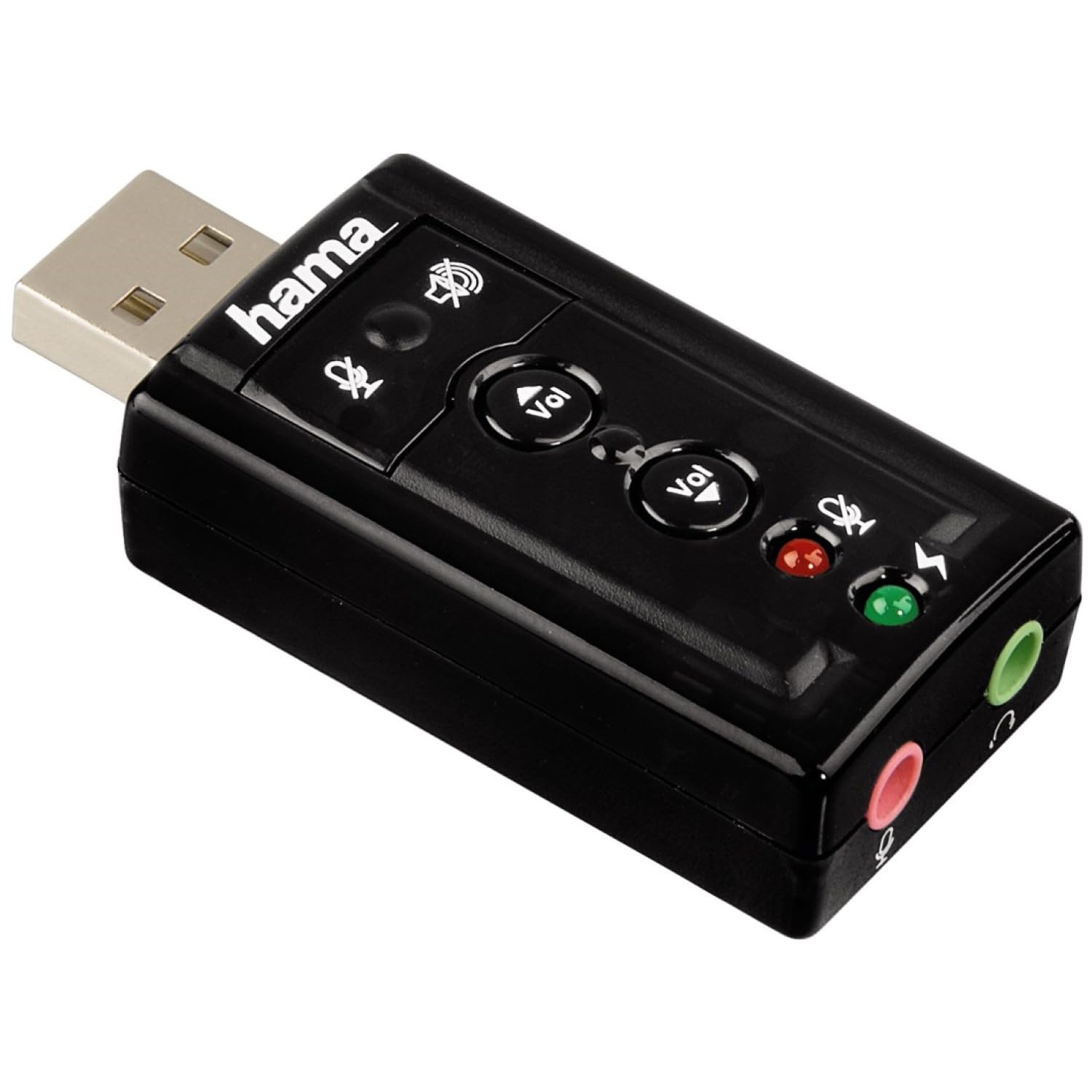
تصوير 1: مٿي view of the Hama USB 7.1 Surround Sound Card, showing the USB-A connector, volume control buttons, and mute indicators.
ڪنٽرول ۽ بندرگاهن:
- USB-A ڪنيڪٽر: For connecting to your computer or tablet.
- حجم اپ / ھيٺ بٽڻون آڊيو آئوٽ پٽ جي مقدار کي ترتيب ڏئي ٿو.
- مائڪروفون خاموش بٽڻ: Mutes or unmutes the connected microphone.
- اسپيڪر ميوٽ بٽڻ: Mutes or unmutes the audio output to headphones/speakers.
- 3.5mm Microphone Jack (Red): ٻاهرين مائڪرو فون سان ڳنڍڻ لاءِ.
- 3.5mm Headphone/Speaker Jack (Green): هيڊفون يا اسپيڪر ڳنڍڻ لاءِ.

تصوير 2: آخر view of the Hama USB 7.1 Surround Sound Card, highlighting the red microphone input jack and the green headphone/speaker output jack.
5. سسٽم گهرجون
- Operating System: Windows, macOS, or compatible tablet OS.
- موجود USB-A پورٽ.
- Headphones, microphone, or speakers with a 3.5mm jack connector.
6. تنصيب ۽ سيٽ اپ
- Connect the Sound Card: Plug the USB-A connector of the Hama USB 7.1 Surround Sound Card into an available USB-A port on your computer or tablet.
- ڊرائيور لڳائڻ: The device is typically plug-and-play, and your operating system should automatically detect and install the necessary drivers. If prompted, follow the on-screen instructions.
- ڳنڍيو آڊيو ڊوائيسز:
- For headphones or speakers, connect the 3.5mm jack into the سائو port on the sound card.
- For a microphone, connect the 3.5mm jack into the ڳاڙهو port on the sound card.
- آڊيو سيٽنگون ترتيب ڏيو: Access your operating system's sound settings to ensure the Hama USB 7.1 Surround Sound Card is selected as the default playback and recording device.
- سافٽ ويئر تنصيب (اختياري): For advanced features like XeaR-Sound 7.1 surround simulation, 10-band equalizer, and karaoke functions, install the dedicated software. Refer to the manufacturer's website for software downloads and installation instructions.
7. آپريشن
Basic Audio Control:
- حجم جي ترتيب: Use the 'Vol +' and 'Vol -' buttons on the sound card to increase or decrease the output volume.
- Mute Audio Output: Press the speaker mute button to temporarily silence the audio output. Press again to unmute.
- Mute Microphone Input: Press the microphone mute button to temporarily disable microphone input. Press again to enable.
جديد سافٽ ويئر خاصيتون:
If you have installed the optional software, you can access the following features:
- XeaR-Sound Technology: Enables simulated 7.1 crystal-clear surround sound for stereo speakers or headsets.
- 10-بينڊ برابر ڪرڻ وارو: Customize your audio experience with various presets (e.g., Jazz, Rock, Classic) or create your own.
- Additional Sound Effects: Apply various sound effects to your audio.
- Adjustable Room Acoustics: Modify the perceived acoustic environment.
- Karaoke Recording: Record karaoke performances with original voice suppression and tone adjustment capabilities.
8. سار سنڀال
The Hama USB 7.1 Surround Sound Card requires minimal maintenance.
- ڊيوائس کي صاف ڪريو ر aو ٿوري ڊي سانamp, lint-free ڪپڙو. جارحتي صفائي ايجنٽ استعمال نه ڪريو.
- Ensure the USB port and audio jacks are free from dust and debris.
9. مسئلا حل ڪرڻ
ڪوبه آواز آئوٽ:
- Ensure the sound card is securely plugged into a USB port.
- Check if your headphones/speakers are correctly connected to the green jack.
- Verify that the speaker mute button on the sound card is not active.
- Confirm that the Hama USB 7.1 Surround Sound Card is selected as the default playback device in your operating system's sound settings.
- Adjust the volume using the sound card's buttons and your computer's volume controls.
مائڪروفون ڪم نه ڪري رهيو آهي:
- Ensure your microphone is correctly connected to the red jack.
- Verify that the microphone mute button on the sound card is not active.
- Confirm that the Hama USB 7.1 Surround Sound Card is selected as the default recording device in your operating system's sound settings.
- پنهنجي آپريٽنگ سسٽم ۾ مائڪروفون جي رازداري سيٽنگون چيڪ ڪريو.
آواز جي معيار جا مسئلا:
- پڪ ڪريو ته سڀئي ڪنيڪشن محفوظ آهن.
- Try connecting the sound card to a different USB port.
- If using the optional software, check equalizer settings and disable any sound effects that might be causing distortion.
10. وضاحتون
| خاصيت | تفصيل |
|---|---|
| برانڊ | هاما |
| ماڊل نمبر | 00051620 (51620 جي نالي سان پڻ سڃاتو وڃي ٿو) |
| رنگ | ڪارو |
| ڳنڍيندڙ | USB A male |
| USB معياري | USB 2.0 |
| اسپيڪر ڪنيڪشن | 3.5mm female jack |
| هيڊ فون ڪنيڪشن | 3.5mm female jack |
| حجم ڪنٽرول | Yes, with mute function |
| آڊيو آئوٽ پٽ موڊ | چوڌاري |
| چوڌاري آواز چينل جي جوڙجڪ | 7.1 (simulated with software) |
| و S ۾ و S Sampلنگ جي شرح | 48 kHz |
| مطابقت رکندڙ ڊوائيسز | USB (PC, Laptop, Tablets) |
| ٺاهيندڙ | Hama EURL |
11. نيڪال جي ڄاڻ
Observe the applicable local regulations for the disposal of electronic devices. The product must not be disposed of with normal household waste. Dispose of the product according to the European Directive 2012/19/EU on waste electrical and electronic equipment (WEEE) at a designated collection point for electrical and electronic equipment.
12. وارنٽي
Hama GmbH & Co KG provides a limited warranty for this product. For detailed warranty terms and conditions, please refer to the official Hama webسائيٽ تي وڃو يا پنهنجي مقامي پرچون ڪندڙ سان رابطو ڪريو. وارنٽي دعوائن لاءِ خريداري جو ثبوت رکو.
13. ڪسٽمر سپورٽ
If you have any questions about this product or require technical assistance, please contact Hama customer support. You can find contact information on the official Hama webسائيٽ (www.hama.com) or through your local retailer.


