تعارف
خريد ڪرڻ لاءِ مهربانيasing the Technics SL-PD807 MASH 5 Disc CD Player. This manual provides detailed instructions for the proper setup, operation, and maintenance of your new audio component. Please read this manual thoroughly before using the unit to ensure optimal performance and longevity.
The SL-PD807 features a 5-disc carousel changer, allowing for extended playback without interruption, and incorporates MASH (Multi-stage Noise Shaping) D/A conversion for high-quality audio reproduction.
اهم حفاظتي ڄاڻ
- طاقت جو ذريعو: Ensure the unit is connected to an AC 120V, 60Hz power supply.
- وينٽيليشن: وينٽيليشن جي سوراخن کي نه روڪيو. يونٽ جي چوڌاري مناسب جاءِ ڏيو ته جيئن وڌيڪ گرم ٿيڻ کان بچي سگهجي.
- نمي: يونٽ کي مينهن يا نمي جي سامهون نه رکو. يونٽ تي مائع سان ڀريل شيون، جهڙوڪ گلدان، نه رکو.
- صفائي: صفائي ڪرڻ کان اڳ يونٽ کي ڀت جي آئوٽليٽ مان ڪڍو. صفائي لاءِ سڪل ڪپڙو استعمال ڪريو.
- خدمت ڪرڻ: هن يونٽ جي پاڻ خدمت ڪرڻ جي ڪوشش نه ڪريو. سڀني خدمتن کي قابل خدمت اهلڪارن جي حوالي ڪريو.
پيڪيج مواد
مھرباني ڪري چيڪ ڪريو ته سڀ شيون پيڪيج ۾ موجود آھن:
- Technics SL-PD807 MASH 5 Disc CD Player
- پاور ڪنڊ
- RCA آڊيو ڪيبل
Note: A remote control is not included with this unit.
سيٽ اپ ڪريو
1. Unpacking
Carefully remove the CD player and all accessories from the packaging. Retain the packaging materials for future transport or storage.
2. رکڻ
Place the CD player on a stable, level surface away from direct sunlight, heat sources, and excessive dust or vibrations. Ensure there is sufficient space around the unit for proper ventilation.

شڪل 1: سامهون view of the Technics SL-PD807 CD Player with included RCA cables.
3. ڪنيڪشن
Connect the CD player to your amplifier or receiver using the supplied RCA audio cables.
- Connect one end of the RCA audio cables (red and white plugs) to the 'LINE OUT' jacks on the rear of the SL-PD807.
- Connect the other end of the RCA audio cables to an available 'CD IN' or 'AUX IN' input on your amplifier/receiver. Match the red plug to the 'R' (right) input and the white plug to the 'L' (left) input.
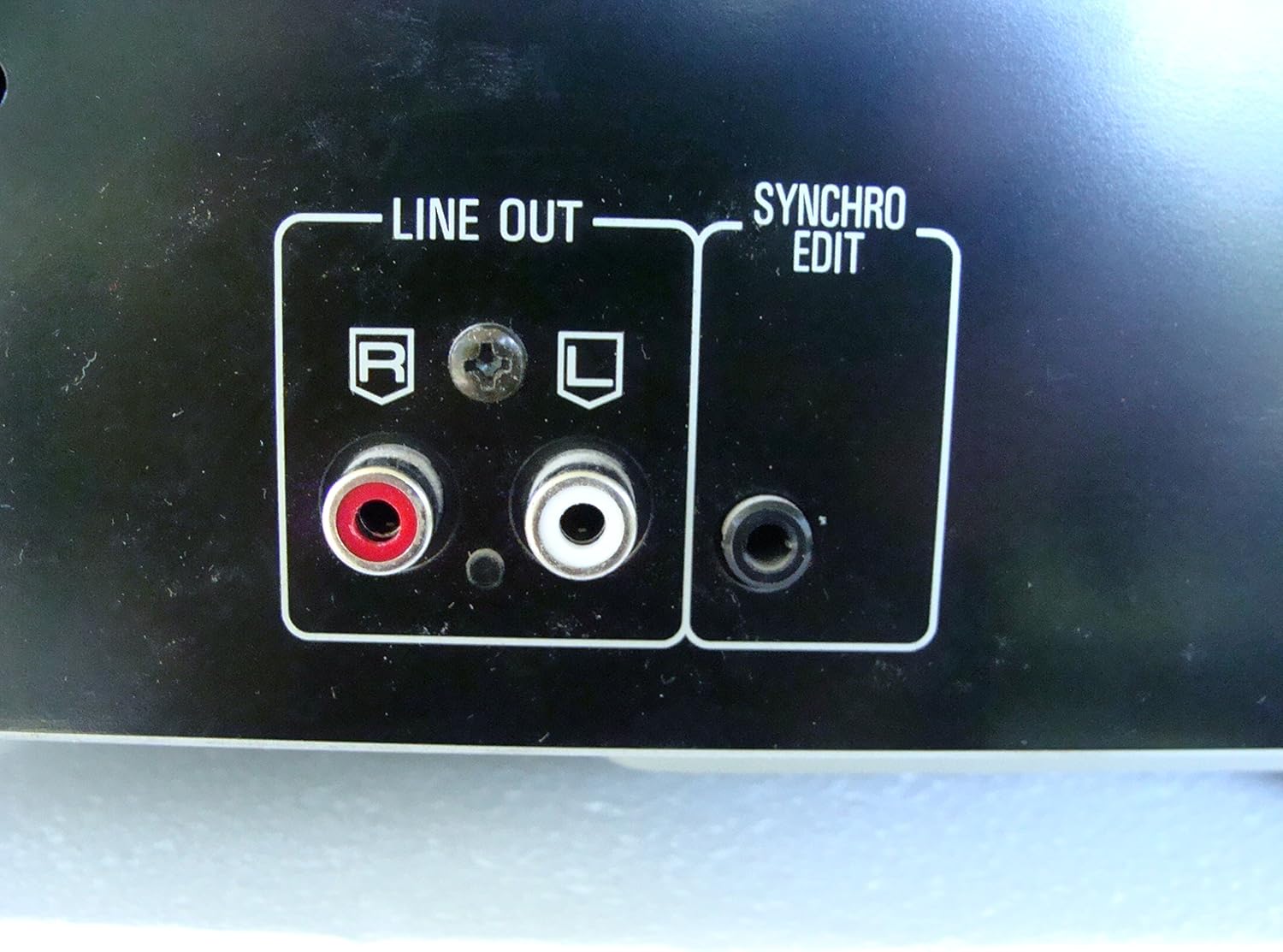
شڪل 2: Rear panel connections, highlighting the 'LINE OUT' (RCA) and 'SYNCHRO EDIT' ports.
- Plug the power cord into the AC inlet on the rear of the CD player, then plug the other end into a standard AC wall outlet.
آپريٽنگ هدايتون
1. پاور آن/آف
کي دٻايو پاور button located on the front left of the unit to turn the CD player on or off.
2. ڊسڪ لوڊ ڪرڻ
The SL-PD807 features a 5-disc carousel. Press the کوليو/ بند ڪريو button to open the disc tray. Place up to five CDs onto the numbered disc slots with the label side facing up. Press کوليو/ بند ڪريو ٻيهر ٽري کي بند ڪرڻ لاء.

شڪل 3: Front panel controls including disc tray, display, and playback buttons.
3. بنيادي پلے بیک
- راند: کي دٻايو راند ڪريو پلے بیک شروع ڪرڻ لاءِ بٽڻ (►) دٻايو.
- روڪ: کي دٻايو روڪيو button (⏸) to temporarily stop playback. Press again to resume.
- روڪيو: کي دٻايو اسٽاپ پلے بیک کي روڪڻ لاءِ بٽڻ (■) دٻايو.
- رستن کي ڇڏي ڏيو کي دٻايو SKIP buttons (⏭︎ / ⏮︎) to skip to the next or previous track.
- ڳولهي: کي دٻايو ڳولهيو buttons (⏪︎ / ⏩︎) to fast forward or rewind within a track.
4. Disc Exchange
You can exchange discs while another disc is playing. Press the ڊسڪ اسڪپ button to rotate the carousel to an empty slot or a disc you wish to remove/replace. The currently playing disc will continue to play until you select a new disc to play.
5. پلے بیک موڊس
- بي ترتيب راند: کي دٻايو بي ترتيب button to play tracks on the current disc or all loaded discs in a random order.
- پروگرام پلي: استعمال ڪريو پروگرام button to create a custom playback sequence of tracks from the loaded discs. Refer to the on-screen display for programming steps.
- ٻيهر راند ڪريو: کي دٻايو ورجائي button to repeat the current track, current disc, or all discs.
سار سنڀال
1. يونٽ جي صفائي
Wipe the exterior of the unit with a soft, dry cloth. For stubborn stains, slightly dampen the cloth with water and a mild detergent, then wipe dry. Do not use abrasive cleaners, benzene, thinner, or alcohol, as these can damage the finish.

شڪل 4: Top surface of the unit, illustrating areas that may require cleaning or show wear.
2. ڊسڪ جي سنڀال
- راند جي مٿاڇري تي آڱرين جا نشان نه هجڻ لاءِ ڊسڪ کي انهن جي ڪنارن کان هٿ ڪريو.
- Keep discs clean. Wipe from the center outwards with a soft, lint-free cloth if necessary.
- انهن جي دٻن ۾ ڊسڪ کي مٽي ۽ خراش کان بچائڻ لاءِ رکو.
مشڪلاتون
If you experience problems with your CD player, please consult the following table before seeking service.
| مسئلو | ممڪن سبب | حل |
|---|---|---|
| طاقت نه آهي | بجلي جي تار محفوظ طور تي ڳنڍيل نه آهي. | يونٽ ۽ وال آئوٽليٽ سان پاور ڪنڊ ڪنيڪشن چيڪ ڪريو. |
| آواز ڪونهي | RCA audio cables not connected correctly. Ampلائفائر/رسيور ان پٽ منتخب نه ڪيو ويو آهي. | Ensure RCA cables are securely connected to both the CD player and amplifier. Select the correct input on your ampوصول ڪندڙ / وصول ڪندڙ. |
| ڊسڪ نه ٿي هلي / ڇڏي رهيو آهي | ڊسڪ گندي يا خراب آهي. ڊسڪ غلط طريقي سان داخل ڪئي وئي آهي. | Clean the disc with a soft, lint-free cloth. Ensure the disc is placed label-side up in the tray. Try another disc. |
| Carousel does not rotate | Obstruction in the disc tray. | Ensure no foreign objects are obstructing the carousel mechanism. |
وضاحتون
The following are the technical specifications for the Technics SL-PD807 MASH 5 Disc CD Player:
| خاصيت | تفصيل |
|---|---|
| ماڊل نالو | SL-PD807 |
| ٺاهيندڙ | ٽيڪنڪس |
| ڊسڪ جي صلاحيت | 5 ڊسڪ |
| بجلي جي گهرج | AC 120V، 60Hz، 13W |
| پيڪيج جي ماپ | 17 x 17 x 5 انچ |
| شيءِ جو وزن | 15.02 پائونڊ |
| رابطي ٽيڪنالاجي | معاون، انفراريڊ |
| خاص خصوصيت | مخالف اسڪيپ تحفظ |

شڪل 5: Product label displaying model number and power specifications.
وارنٽي ۽ سپورٽ
For information regarding warranty coverage and customer support for your Technics SL-PD807 CD Player, please refer to the warranty card included with your purchase or visit the official Technics website. If you require further assistance, please contact Technics customer service.


