تعارف
This manual provides instructions for the setup, operation, and maintenance of your Microsoft Wireless Comfort Desktop 5000. This product combines a wireless keyboard and a wireless mouse designed for comfortable and efficient computer interaction.
The Microsoft Wireless Comfort Desktop 5000 features an ergonomically designed Comfort Curve keyboard and a mouse utilizing BlueTrack Technology for versatile surface tracking. It operates on a 2.4 GHz wireless connection, offering a reliable connection with a range of up to 30 feet.
سيٽ اپ گائيڊ
دٻي ۾ ڇا آهي
- Microsoft Wireless Comfort Desktop 5000 Keyboard
- Microsoft Wireless Comfort Desktop 5000 Mouse
- USB Mini-Transceiver
- 2 AA Alkaline Batteries (for keyboard)
- 1 AA Alkaline Battery (for mouse)
سسٽم گهرجون
- آپريٽنگ سسٽم: Windows 8, Windows 7, Windows Vista, Windows XP (excluding Windows XP 64-bit)
- هارڊ ڊرائيو: 100 MB free space
- پورٽ: USB پورٽ
بيٽري لڳائڻ
The keyboard requires two AA alkaline batteries, and the mouse requires one AA alkaline battery. Batteries are included with the product.
- ڪيبورڊ ۽ مائوس جي هيٺئين پاسي بيٽري جي خاني کي ڳوليو.
- بيٽري جي ڪمري واري ڍڪ کي کوليو.
- AA بيٽريون داخل ڪريو، صحيح پولارٽي (+/-) کي يقيني بڻائي.
- بيٽري جي ڪمري واري ڍڪ کي محفوظ طور تي بند ڪريو.
Connecting the Wireless Transceiver
The wireless desktop set connects to your computer via a USB mini-transceiver.
- Locate the USB mini-transceiver. It may be stored in the mouse's battery compartment for transport.
- Insert the USB mini-transceiver into an available USB port on your computer.
- توهان جي ڪمپيوٽر کي خودڪار طريقي سان ضروري ڊرائيور ڳولڻ ۽ انسٽال ڪرڻ گهرجن. هن عمل ۾ ڪجهه لمحا لڳي سگهن ٿا.
- Once drivers are installed, the keyboard and mouse should be ready for use.

Figure 1: The compact USB mini-transceiver for wireless connection.

Figure 2: The underside of the mouse showing the storage slot for the USB mini-transceiver.
آپريٽنگ هدايتون
ڪي بورڊ جون خاصيتون

شڪل 3: مٿي کان هيٺ view of the Comfort Curve keyboard layout.
- Comfort Curve Design: The keyboard features an ergonomist-approved Comfort Curve design that encourages a natural wrist posture, reducing strain during extended use.
- خاموش ٽچ ڪيز: Experience comfortable typing with low-profile, quiet-touch keys.
- پام آرام: A soft-touch palm rest is integrated to provide additional comfort and support for your wrists.
- Removable Feet: Adjustable feet on the underside allow you to set the keyboard at a preferred angle for a more comfortable wrist posture.
- Taskbar Favorites for Windows 7: Easily access programs pinned to the Windows Taskbar using dedicated shortcut keys. The keys automatically adapt if you rearrange icons in the Taskbar.
- ميڊيا سينٽر ڪنٽرول: Control media playback directly from your keyboard using dedicated media keys (e.g., play/pause, volume up/down, mute).

شڪل 4: زاويه view highlighting the integrated palm rest and Comfort Curve design.
ماؤس جون خاصيتون

شڪل 5: زاويه view of the wireless mouse.
- BlueTrack ٽيڪنالاجي: The mouse utilizes Microsoft's BlueTrack Technology, combining the power of optical with the precision of laser for remarkable tracking on virtually any surface, including granite, carpet, and wood.
- چار طرفي اسڪرولنگ: The tilt wheel allows for four-way scrolling (up, down, left, and right), enhancing efficiency and comfort when navigating documents or web صفحا.
- حسب ضرورت بٽڻ: The mouse buttons can be customized for quick access to programs, files, media, and webpages you use most often. Refer to your operating system's mouse settings for customization options.
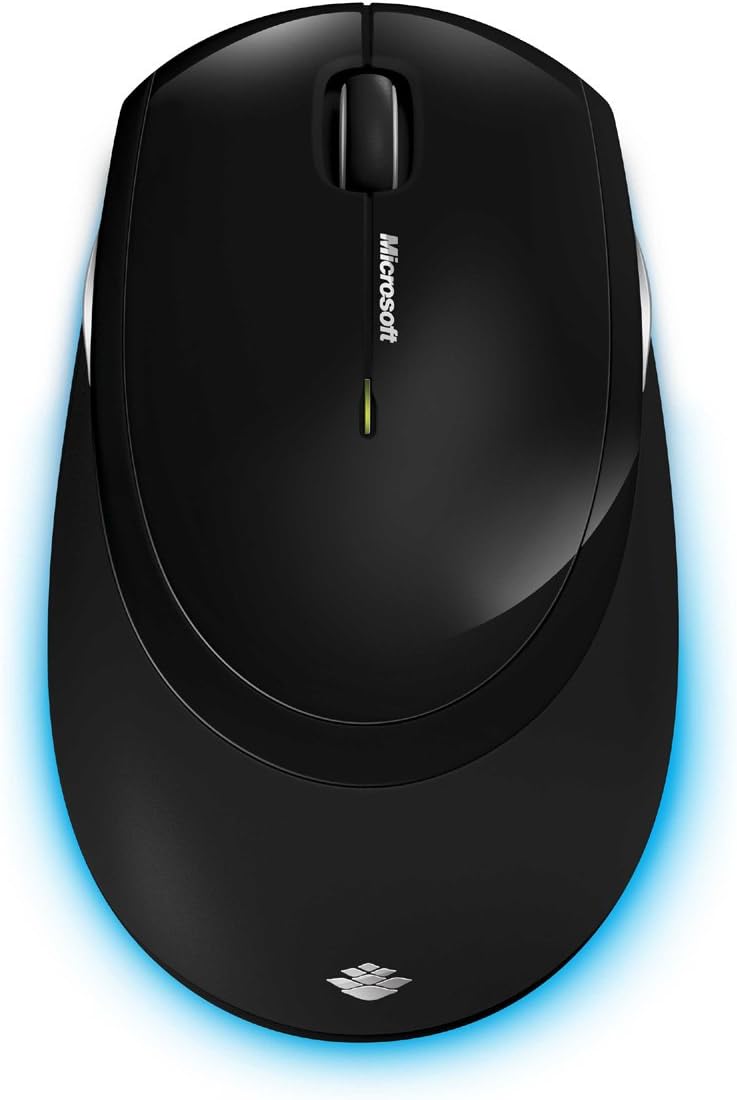
شڪل 6: مٿي کان هيٺ view of the wireless mouse.
سار سنڀال
صفائي
To maintain the performance and appearance of your Microsoft Wireless Comfort Desktop 5000, follow these cleaning guidelines:
- Disconnect the USB transceiver from your computer before cleaning.
- نرم، لِنٽ کان خالي ڪپڙو استعمال ڪريو ٿورڙو ڊيampپاڻي يا نرم صفائي جي حل سان ختم ڪيو وڃي.
- سخت ڪيميڪلز، رگڙيندڙ صاف ڪندڙ، يا محلول استعمال ڪرڻ کان پاسو ڪريو، ڇاڪاڻ ته اهي سطحن کي نقصان پهچائي سگهن ٿا.
- For the keyboard, you can use compressed air to remove dust and debris from between the keys.
- For the mouse, gently wipe the optical sensor area on the bottom to ensure optimal tracking performance.
بيٽري مٽائڻ
When the batteries are low, the indicator light on the keyboard or mouse may flash. Replace the batteries as described in the "Battery Installation" section under Setup Guide.
- Always use new, high-quality AA alkaline batteries.
- مقامي ضابطن جي مطابق استعمال ٿيل بيٽرين کي ختم ڪريو.
مشڪلاتون
ڪنيڪشن جا مسئلا
- No response from keyboard/mouse:
- Ensure the USB mini-transceiver is securely plugged into a working USB port on your computer.
- Check if the batteries in the keyboard and mouse are correctly installed and have sufficient charge. Replace if necessary.
- ٽرانسيور کي ڪنهن ٻئي USB پورٽ ۾ لڳائڻ جي ڪوشش ڪريو.
- پنهنجي ڪمپيوٽر کي ٻيهر شروع ڪريو.
- مداخلت:
- The 2.4 GHz wireless technology can be affected by other wireless devices. Move the transceiver closer to the keyboard and mouse, or move other wireless devices away.
- Avoid placing the transceiver near large metal objects, which can block the wireless signal.
Mouse Tracking Issues
- Erratic or no tracking:
- Ensure the BlueTrack sensor on the bottom of the mouse is clean and free of debris.
- Try using the mouse on a different surface. While BlueTrack is versatile, highly reflective or transparent surfaces (like clear glass) may still cause issues.
وضاحتون
| خاصيت | تفصيل |
|---|---|
| برانڊ | Microsoft |
| ماڊل نمبر | CSD-00001 |
| رابطي ٽيڪنالاجي | Wireless (USB Transceiver) |
| وائرليس جو قسم | 2.4 GHz ريڊيو فریکوئنسي |
| مطابقت رکندڙ ڊوائيسز | پرسنل ڪمپيوٽر |
| آپريٽنگ سسٽم مطابقت | Windows 8, Windows 7, Windows Vista, Windows XP (excluding Windows XP 64-bit) |
| رنگ | ڪارو |
| شيءِ جو وزن | 2.9 پائونڊ |
| پيداوار جي ماپ (LxWxH) | 8.7 x 2.9 x 18.54 انچ |
| طاقت جو ذريعو | بيٽري سان هلندڙ |
| بيٽرين جي ضرورت آهي | 3 AA batteries (2 for keyboard, 1 for mouse) |
| پهرين دستياب تاريخ | 29 جولاءِ 2009ع |
وارنٽي ڄاڻ
Specific warranty details for the Microsoft Wireless Comfort Desktop 5000 are not provided within this manual. For comprehensive warranty information, including terms, conditions, and duration, please refer to the official Microsoft webسائيٽ يا وارنٽي ڪارڊ جيڪو توهان جي پراڊڪٽ پيڪنگنگ سان شامل آهي.
حمايت
For further assistance, technical support, or to download the latest drivers and software for your Microsoft Wireless Comfort Desktop 5000, please visit the official Microsoft support webسائيٽ:
You can also visit the Microsoft Store on Amazon for product information and related accessories:
اهم معلومات
قانوني اعلان
Please note that the "Legal Disclaimer" provided with the product pertains to sales terms and conditions, such as return policies and shipping details, and is separate from the operational instructions in this user manual. For specific product usage and safety guidelines, please refer to the relevant sections of this manual.


