تعارف
This manual provides comprehensive instructions for the setup, operation, maintenance, and troubleshooting of your Logitech M510 Wireless Mouse. Designed for comfort and efficiency, the M510 offers precise control and convenient features for your computing needs.
The Logitech M510 is a comfortable wireless computer mouse featuring a USB Unifying Receiver, back/forward buttons, and side-to-side scrolling. It operates on 2 AA batteries and is compatible with Personal Computers and Macbooks running operating systems like Windows 10.
پيڪيج مواد
- Logitech M510 وائرلیس ماؤس
- لاجيٽيڪ يونيفائنگ رسيور
- 2 AA Batteries (pre-installed or included)
سيٽ اپ ڪريو
1. بيٽري لڳائڻ
The Logitech M510 mouse requires two AA batteries for operation. These are typically included with your purchase. If not already installed, follow these steps:
- مائوس جي هيٺئين پاسي بيٽري جي ڪمپارٽمينٽ ڪَوَر کي ڳوليو.
- ڪمپارٽمينٽ کولڻ لاءِ ڍڪ کي سلائڊ ڪريو يا مٿي کڻو.
- ٻہ AA بيٽريون داخل ڪريو، پڪ ڪريو ته مثبت (+) ۽ منفي (-) ٽرمينلز ڪمري اندر اشارن سان صحيح طرح سان ترتيب ڏين.
- بيٽري جي ڪمري واري ڍڪ کي محفوظ طور تي بند ڪريو.
2. Connecting the Unifying Receiver
The Logitech M510 uses a Logitech Unifying Receiver for wireless connectivity. This small USB receiver allows you to connect multiple compatible Logitech devices to your computer using a single USB port.
- Locate the Logitech Unifying Receiver. It is often stored inside the battery compartment of the mouse for safekeeping during transport.
- Plug the Unifying Receiver into an available USB port on your computer (desktop, laptop, or Macbook).
- Your computer should automatically detect the receiver and install the necessary drivers. This may take a few moments.
- Once the drivers are installed, the mouse should be ready for use. If not, ensure the mouse's power switch (if present) is in the 'ON' position.

تصوير: مٿي کان هيٺ تائين view of the Logitech M510 Wireless Mouse alongside its compact USB Unifying Receiver.
ماؤس هلائڻ
The Logitech M510 Wireless Mouse is designed for intuitive use with several programmable buttons and comfortable ergonomics.
بنيادي ڪم
- کاٻي ڪلڪ بٽڻ: شيون چونڊڻ، کولڻ لاءِ پرائمري بٽڻ files، ۽ سافٽ ويئر سان لهه وچڙ ۾.
- ساڄي ڪلڪ ڪريو بٽڻ: حوالي جي مينيو ۽ اضافي اختيارن تائين رسائي لاءِ ثانوي بٽڻ.
- اسڪرول ويل: دستاويزن ذريعي مٿي يا هيٺ اسڪرول ڪريو ۽ web صفحا. اسڪرول ويل وچولي ڪلڪ بٽڻ طور پڻ ڪم ڪري ٿو.
- Side-to-Side Scrolling: Tilt the scroll wheel left or right to scroll horizontally in applications that support this feature.
Advanced Features (Programmable Buttons)
The M510 features two thumb buttons (back/forward) on the left side, which can be customized using Logitech Options software (available for download from the Logitech website). By default, these buttons perform browser navigation functions.
- پوئتي بٽڻ: Navigates back in web برائوزر يا file ڳولا ڪندڙ
- فارورڊ بٽڻ: اڳتي نيويگيٽ ڪري ٿو web برائوزر يا file ڳولا ڪندڙ
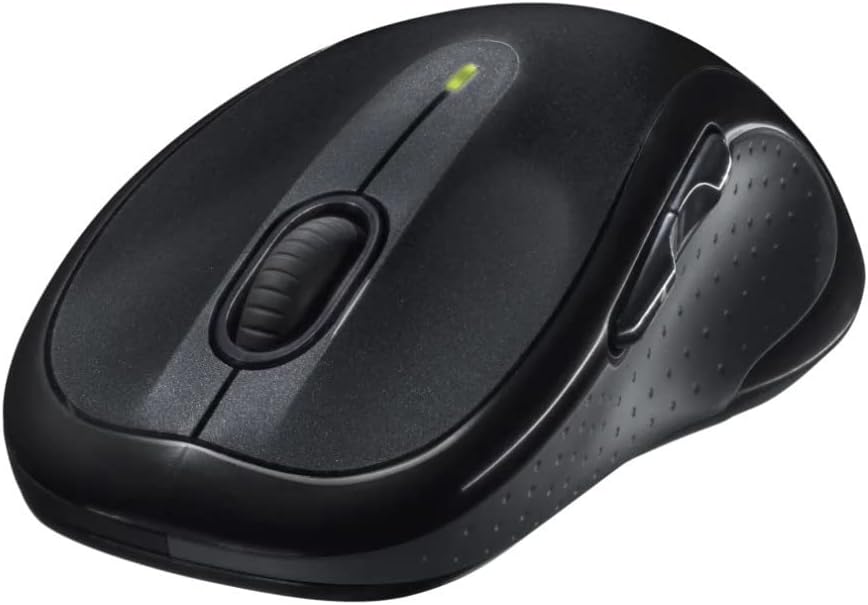
تصوير: زاويه view of the Logitech M510 Wireless Mouse, highlighting its ergonomic shape and side buttons.
سار سنڀال
توهان جي ماؤس جي صفائي
To ensure optimal performance and hygiene, regularly clean your Logitech M510 mouse:
- Disconnect the mouse from your computer by removing the Unifying Receiver.
- استعمال ڪريو نرم، lint-آزاد ڪپڙو روشنيءَ سان ڊيampened with water or a mild cleaning solution (e.g., isopropyl alcohol) to wipe down the surface of the mouse.
- For crevices and around buttons, use a cotton swab or a soft brush.
- Avoid getting liquid into the internal components or the optical sensor.
- Allow the mouse to dry completely before re-connecting.
بيٽري مٽائڻ
The Logitech M510 has an average battery life of 18 months. When the battery indicator light (if present) flashes or mouse performance degrades, it's time to replace the batteries.
- Turn off the mouse using the power switch on the underside.
- بيٽري جي ڪمري واري ڍڪ کي کوليو.
- پراڻي AA بيٽرين کي هٽايو.
- ٻه نوان AA بيٽريون داخل ڪريو، صحيح قطبيت (+/-) کي ڏسندي.
- بيٽري جي ڪمري واري ڍڪ کي بند ڪريو.
- Turn the mouse back on.
مشڪلاتون
| مسئلو | ممڪن سبب | حل |
|---|---|---|
| مائوس جواب نه ڏئي رهيو آهي | Low or dead batteries; Unifying Receiver not connected; Mouse power off; Driver issue. | Replace batteries; Ensure Unifying Receiver is securely plugged into a USB port; Turn mouse power switch to 'ON'; Reinstall Logitech Options software or check device manager for driver issues. |
| Lagging or erratic cursor movement | Interference; Dirty optical sensor; Mouse used on unsuitable surface; Low battery. | Move mouse closer to receiver; Clear obstructions; Clean optical sensor; Use a mouse pad or suitable surface; Replace batteries. |
| پاسي وارا بٽڻ ڪم نه ڪري رهيا آهن | Software not installed or configured; Application does not support custom buttons. | Download and install Logitech Options software from the official Logitech website to customize button functions. Ensure the application you are using supports these functions. |
| Unifying Receiver not recognized | Faulty USB port; Driver issue. | Try a different USB port; Restart your computer; Download and install the Logitech Unifying Software to re-pair the mouse with the receiver. |
وضاحتون
| خاصيت | تفصيل |
|---|---|
| برانڊ | Logitech |
| ماڊل نمبر | 910-001822 |
| سلسلو | M510 |
| رابطي ٽيڪنالاجي | Radio Frequency, USB (via Unifying Receiver) |
| تحريڪ جي سڃاڻپ ٽيڪنالاجي | ليزر |
| رنگ | ڳاڙهو ڳاڙهو |
| شيءِ جو وزن | 4.6 آونس (تقريبن 130 گرام) |
| پيداوار جي ماپ (LxWxH) | 4.38 x 2.5 x 1.75 انچ (تقريبن 11.13 x 6.35 x 4.45 سينٽي ميٽر) |
| طاقت جو ذريعو | بيٽري سان هلندڙ |
| بيٽرين جي ضرورت آهي | 2 AA بيٽريون (شامل) |
| سراسري بيٽري جي زندگي | 18 مهينا |
| هارڊويئر پليٽ فارم | Personal Computer, Macbook |
| آپريٽنگ سسٽم مطابقت | Windows 10 (and likely earlier versions, macOS) |
| خاص خاصيتون | Battery Life Indicator, Power Saving Mode, Programmable Buttons, Wireless |
| تاريخ پهرين دستياب | 7 جون 2010 |

تصوير: مٿي کان هيٺ تائين view of the Logitech M510 Wireless Mouse showing its approximate dimensions (4.4" length, 2.5" width).
وارنٽي ۽ سپورٽ
وارنٽي ڄاڻ
Logitech products typically come with a limited hardware warranty. For specific warranty terms and conditions applicable to your Logitech M510 Wireless Mouse, please refer to the warranty card included with your product or visit the official Logitech webسائيٽ.
ڪسٽمر سپورٽ
For further assistance, technical support, or to download the latest software (such as Logitech Options or Unifying Software), please visit the official Logitech support webسائيٽ:
You may also find helpful resources, FAQs, and community forums on their webسائيٽ.


