تعارف
This manual provides detailed instructions for the proper setup, operation, and maintenance of your Nortek NDVX 2503 DVD Player. Please read this manual thoroughly before using the device to ensure optimal performance and safety. Keep this manual for future reference.
حفاظت جي ڄاڻ
- طاقت جو ذريعو: Connect the DVD player only to the specified power supply voltage.
- وينٽيليشن: يونٽ جي چوڌاري مناسب وينٽيليشن کي يقيني بڻايو. وينٽيليشن جي سوراخن کي بند نه ڪريو.
- پاڻي ۽ نمي: Do not expose the unit to rain, moisture, or dripping/splashing liquids.
- گرمي: يونٽ کي گرمي جي ذريعن جهڙوڪ ريڊيئيٽر، گرمي رجسٽر، اسٽو، يا ٻين سامان کان پري رکو جيڪي گرمي پيدا ڪن ٿا.
- صفائي: صفائي ڪرڻ کان اڳ يونٽ کي ڀت جي آئوٽليٽ مان ڪڍو. صفائي لاءِ سڪل ڪپڙو استعمال ڪريو.
- خدمت ڪرڻ: ھن پراڊڪٽ کي پنھنجي خدمت ڪرڻ جي ڪوشش نه ڪريو. س servني خدمتن جو حوالو ڏيو قابل سروس اهلڪارن کي.
پيڪيج مواد
پڪ ڪريو ته هيٺ ڏنل سڀئي شيون توهان جي پيڪيج ۾ شامل آهن:
- Nortek NDVX 2503 DVD Player
- ريموٽ ڪنٽرول (بيٽرين سان)
- AV Cable (RCA type)
- استعمال ڪندڙ جو دستياب (ھي دستاويز)
- پاور ڪنڊ
پيداوار ختمview
Familiarize yourself with the components and controls of your DVD player.
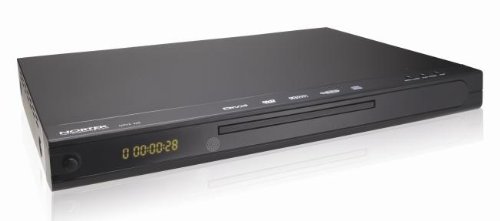
شڪل 1: سامهون view of the Nortek NDVX 2503 DVD Player. This image shows the sleek black casing, the central disc tray, the digital display on the left, and control buttons on the right side of the front panel.
فرنٽ پينل ڪنٽرول:
- پاور بٽڻ: يونٽ کي آن يا بند ڪري ٿو.
- ڊسڪ ٽري: Insert your DVD or CD here.
- ڏيکاريو: Shows playback time, track number, and other status indicators.
- کولڻ/بند ڪرڻ جو بٽڻ: ڊسڪ ٽري کي کوليو ۽ بند ڪري ٿو.
- راند/روڪ بٽڻ: ڊسڪ پلے بیک شروع ڪري ٿو يا روڪي ٿو.
- بٽڻ بند ڪريو: ڊسڪ پلے بیک کي روڪي ٿو.
- Skip Buttons (Forward/Backward): ايندڙ يا پوئين ٽريڪ/باب ڏانهن وڃو.
ريئر پينل ڪنيڪشن:
(Note: Specific connections may vary. Common connections include:)
- Audio/Video Output (RCA): Red, White (audio) and Yellow (video) jacks for connecting to a TV or ampوierيڪ زنده
- ڪواڪسيل/آپٽيڪل ڊجيٽل آڊيو آئوٽ پُٽ: For connecting to a home theater receiver for digital audio.
- پاور ان پٽ: پاور ڪنڊ کي ني ٿو.
سيٽ اپ ڪريو
1. Connecting to a Television:
- Ensure both the DVD player and your television are turned off and unplugged.
- Connect the yellow RCA video cable from the "Video Out" jack on the DVD player to the "Video In" jack on your television.
- Connect the red and white RCA audio cables from the "Audio Out" jacks (Red for Right, White for Left) on the DVD player to the corresponding "Audio In" jacks on your television or audio receiver.
- If using digital audio, connect a coaxial or optical cable from the DVD player's digital audio output to your receiver's digital audio input.
2. پاور ڪنيڪشن:
- Plug the power cord into the power input on the rear of the DVD player.
- پاور ڪنڊ جي ٻئي پڇاڙي کي وال آئوٽليٽ ۾ لڳايو.
3. Initial Power-On:
- Turn on your television and select the correct input source (e.g., AV1, Video 1) that corresponds to where you connected the DVD player.
- Press the Power button on the DVD player or its remote control to turn it on.
- The Nortek logo or a setup menu should appear on your TV screen.
آپريٽنگ هدايتون
1. Disc Playback:
- کي دٻايو کوليو/ بند ڪريو ڊسڪ ٽري کولڻ لاءِ فرنٽ پينل يا ريموٽ ڪنٽرول تي بٽڻ.
- Place a DVD, DVD+R, or Video CD disc gently into the tray with the label side facing up.
- کي دٻايو کوليو/ بند ڪريو ٽري کي بند ڪرڻ لاءِ buttonيهر بٽڻ.
- The player will automatically begin reading the disc. Playback should start shortly. If a menu appears, use the arrow keys on the remote to navigate and the داخل ڪريو چونڊڻ لاءِ بٽڻ.
- استعمال ڪريو راند/روڪ, اسٽاپ، ۽ SKIP پلے بیک کي ڪنٽرول ڪرڻ لاءِ ريموٽ يا فرنٽ پينل تي بٽڻ.
2. مينيو نيويگيشن:
- استعمال ڪريو تير buttons on the remote control to move through menu options.
- کي دٻايو داخل ڪريو or OK چونڊ جي تصديق ڪرڻ لاءِ بٽڻ دٻايو.
- جي مينيو button typically returns you to the disc's main menu.
سار سنڀال
يونٽ جي صفائي:
- Unplug the DVD player from the power outlet before cleaning.
- Use a soft, dry cloth to wipe the exterior of the unit. Do not use liquid cleaners or aerosol sprays.
- Avoid getting dust or debris inside the disc tray mechanism.
ڊسڪ جي سنڀال:
- راند جي مٿاڇري تي آڱرين جا نشان نه هجڻ لاءِ ڊسڪ کي انهن جي ڪنارن کان هٿ ڪريو.
- Store discs in their cases when not in use to prevent scratches.
- گندي ڊسڪ کي نرم، لِنٽ فري ڪپڙي سان صاف ڪريو، وچ کان ٻاهر صاف ڪريو.
مشڪلاتون
| مسئلو | ممڪن سبب | حل |
|---|---|---|
| طاقت نه آهي | بجلي جي تار ڳنڍيل نه آهي؛ بجلي جو آئوٽليٽ فعال نه آهي. | پڪ ڪريو ته پاور ڪنڊ محفوظ طور تي پلگ ان ٿيل آهي. آئوٽليٽ کي ٻئي ڊوائيس سان جانچيو. |
| ڪابه تصوير يا آواز | AV cables not connected correctly; Incorrect TV input selected. | Check all AV cable connections. Select the correct input source on your TV (e.g., AV1, Video 1). |
| ڊسڪ راند نه آهي | Disc is dirty or scratched; Disc inserted incorrectly; Incompatible disc format. | Clean the disc. Ensure the disc is inserted label-side up. Verify the disc is a supported format (DVD, DVD+R, Video CD). |
| ريموٽ ڪنٽرول ڪم نه ڪري رهيو آهي | Batteries are dead or inserted incorrectly; Obstruction between remote and player. | Replace batteries. Ensure correct battery polarity. Remove any obstructions. Point remote directly at the player's sensor. |
وضاحتون
- برانڊ: نارٽيڪ
- ماڊل نالو: NDVX 2503
- Media Types Supported: DVD, DVD+R, Video CD
- ASIN: B0044AL0TM
- ٺاهيندڙ: نارٽيڪ
- Note: Other specifications such as dimensions, weight, and power consumption are not available in the provided data.
وارنٽي ۽ سپورٽ
For warranty information or technical support, please refer to the warranty card included with your product or visit the official Nortek webسائيٽ. ڪنهن به وارنٽي دعوائن لاءِ خريداري جو ثبوت رکو.
For further assistance, you may contact Nortek customer service through their official channels.


