1. پراڊڪٽ ختمview
جي ViewSonic PJD5353 is a short throw DLP projector designed for business and education environments. It offers XGA 1024x768 native resolution, 2500 ANSI lumens brightness, and a 3000:1 contrast ratio for clear and vibrant images. Its short throw lens allows for large images from a minimal distance, making it suitable for various room sizes.
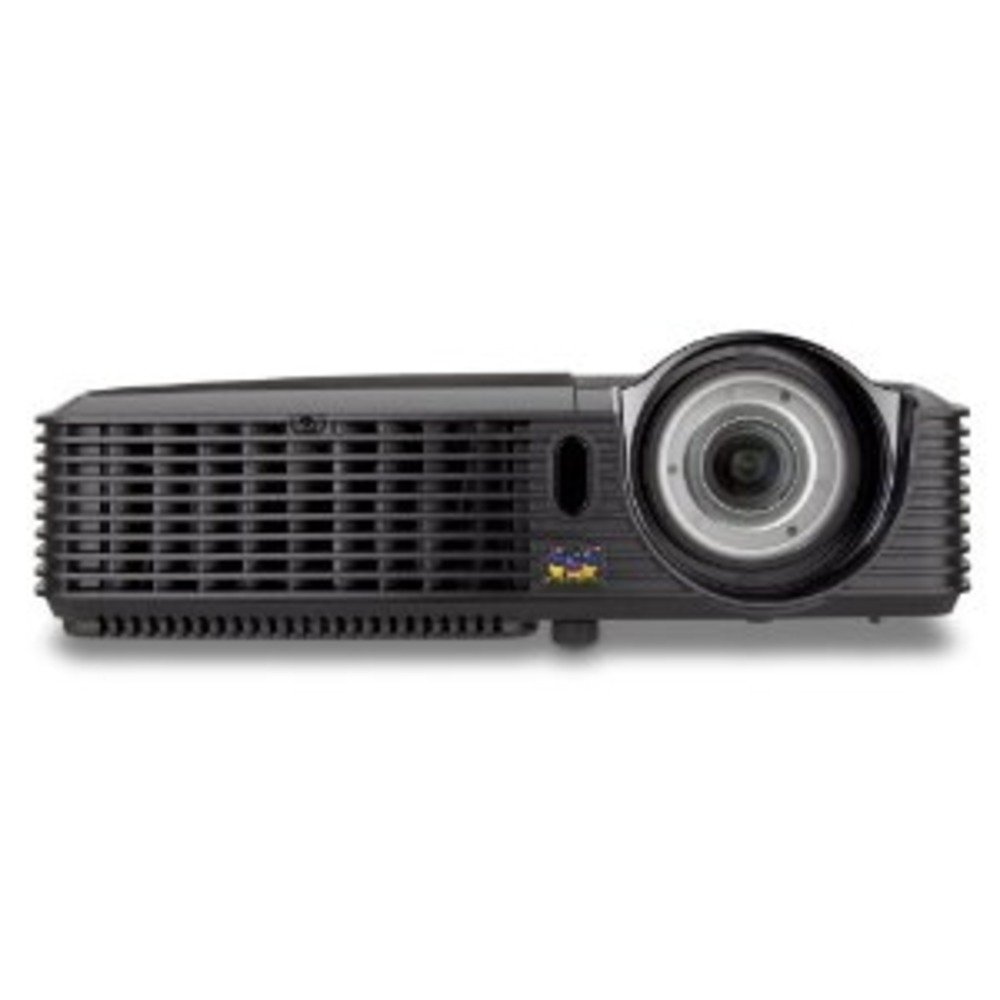
شڪل 1.1: ViewSonic PJD5353 DLP Projector. This image displays the projector from an angled perspective, highlighting the projection lens on the front and the control panel located on the top surface.
اهم خاصيتون:
- XGA 1024x768 DLP projector with 2500 ANSI Lumens and 3000:1 Contrast.
- Short Throw Ratio (TR 0.68) for large images in small spaces.
- Multiple input options: HDMI, dual RGB in, composite, S-video, RGB out, audio in/out, RS232.
- Supports HD 720p and 1080i/p via HDMI.
- 120Hz/3D-Ready technology powered by DLP Link for PC-based 3D applications.
- Digital keystone correction of +/- 40 degrees.
- انٽيگريٽيڊ 1W اسپيڪر.
- Lightweight and portable at 5.7 lbs.
- Lamp life of 5000 hours (Normal mode) / 6000 hours (Eco mode).
- Apple Mac compatible.
- 8 preset picture modes (e.g., bright, cinema, whiteboard).
- Eco Mode for energy savings, extended lamp life, and reduced operating noise.
- Includes remote control with batteries.
2. سيٽ اپ
2.1 Unpacking ۽ لڳائڻ
Carefully remove the projector and all accessories from the packaging. Place the projector on a stable, flat surface. Due to its short throw capability, the projector can be positioned close to the projection screen or wall. For example, a 50-inch image can be achieved from approximately 27 inches away.
2.2 ڳنڍڻ واري طاقت
- پاور ڪنڊ کي پروجيڪٽر جي پاور ان پٽ سان ڳنڍيو.
- پاور ڪنڊ جي ٻئي پڇاڙيءَ کي گرائونڊ ٿيل برقي آئوٽليٽ ۾ لڳايو.
2.3 وڊيو ذريعن کي ڳنڍڻ
The PJD5353 offers various input ports for connecting different devices:
- HDMI: For high-definition digital video and audio. Supports HD 720p and 1080i/p signals.
- VGA (RGB In): For connecting computers via a VGA cable. Two VGA inputs are available.
- جامع وڊيو: معياري تعريف واري وڊيو ذريعن لاءِ.
- ايس وڊيو For improved standard definition video sources.
- آڊيو ان: ٻاهرين آڊيو ذريعن کي ڳنڍڻ لاءِ.
Connect your desired video source (e.g., laptop, DVD player) to the corresponding input port on the projector using the appropriate cable.
2.4 شروعاتي پاور آن ۽ فوڪس ايڊجسٽمينٽ
- يونٽ کي آن ڪرڻ لاءِ پروجيڪٽر يا ريموٽ ڪنٽرول تي پاور بٽڻ دٻايو. پاور انڊيڪيٽر لائيٽ روشن ٿيندي.
- Allow a few moments for the projector lamp to warm up and display an image.
- Adjust the focus ring around the lens until the image on the screen is sharp and clear.
- Use the keystone correction function (digital +/- 40 degrees) via the projector's menu or remote control to square the image if the projector is not perfectly perpendicular to the screen.
3. آپريشن
3.1 بنيادي ڪنٽرول
The projector can be controlled using the control panel on the top of the unit or the included remote control.
- پاور بٽڻ: پروجيڪٽر کي آن يا آف ڪري ٿو.
- ذريعو بٽن: Cycles through available input sources (HDMI, VGA1, VGA2, Video, S-Video).
- مينيو بٽڻ: سيٽنگون ترتيب ڏيڻ لاءِ آن-اسڪرين ڊسپلي (OSD) مينيو تائين رسائي حاصل ڪري ٿو.
- تير بٽڻ: Navigate through OSD menu options.
- داخل ڪريو بٽڻ: او ايس ڊي مينيو ۾ چونڊن جي تصديق ڪري ٿو.
- Keystone Buttons: Adjusts vertical keystone correction.
3.2 تصويري موڊ
The projector features 8 preset picture modes optimized for different viewing environments and content types. These include:
- روشن
- سئنيما
- اڇو تختو
- ۽ ٻيا.
Select the appropriate picture mode from the OSD menu to enhance your viewتجربو.
3.3 ايڪو موڊ
Activate Eco Mode to reduce power consumption, extend lamp life, and lower operating noise. This mode is ideal for situations where maximum brightness is not required.
3.4 3D ڪارڪردگي
The PJD5353 is 120Hz/3D-Ready, powered by DLP Link. To utilize 3D features, you will need compatible 3D content, a 3D-capable source device (e.g., PC with 3D software), and DLP Link 3D glasses (sold separately).
4. سار سنڀال
4.1 ايلamp زندگي ۽ متبادل
پروجيڪٽر ايلamp has an estimated life of 5000 hours in Normal mode and 6000 hours in Eco mode. When the lamp reaches the end of its life, a warning message may appear, or the lamp indicator light may illuminate. Refer to the full user manual for detailed lamp replacement instructions. Always use genuine ViewSonic replacement lamps.
4.2 صفائي
- پروجيڪٽر سيasing: نرم استعمال ڪريو، ڊيamp cloth with a mild detergent to clean the exterior. Avoid abrasive cleaners.
- لينس: Gently wipe the lens with a soft, lint-free cloth specifically designed for optical surfaces. Do not use liquid cleaners directly on the lens.
- هوائي وينٽس: مناسب هوا جي وهڪري کي يقيني بڻائڻ ۽ وڌيڪ گرم ٿيڻ کان روڪڻ لاءِ وقتاً فوقتاً هوائي وينٽس کي چيڪ ڪريو ۽ صاف ڪريو. نرم برش يا دٻيل هوا استعمال ڪريو.
احتياط: صفائي ڪرڻ کان اڳ هميشه پروجيڪٽر کي پاور آئوٽليٽ مان ڪڍي ڇڏيو.
5. مسئلا حل ڪرڻ
عام مسئلا ۽ حل:
- اسڪرين تي ڪا به تصوير ناهي:
- پڪ ڪريو ته پروجيڪٽر آن آهي ۽ ايلamp روشن ٿيل آهي.
- Verify that the video cable is securely connected to both the projector and the source device.
- Press the "Source" button on the projector or remote to select the correct input source.
- Check the resolution settings of your source device; ensure it is compatible with the projector's supported resolutions.
- آواز ناهي:
- If using HDMI, ensure the audio is being sent through the HDMI cable.
- If using an analog audio cable, ensure it is properly connected to the "Audio In" port.
- پروجيڪٽر ۽ سورس ڊيوائس ٻنهي تي واليوم سيٽنگز چيڪ ڪريو.
- Ensure the integrated speaker is enabled in the projector's OSD menu.
- ريموٽ ڪنٽرول ڪم نه ڪري رهيو آهي:
- Check and replace the batteries in the remote control (2 AA batteries are included).
- Ensure there are no obstructions between the remote control and the projector's IR receiver.
- ريموٽ کي سڌو پروجيڪٽر ڏانهن اشارو ڪريو.
- تصوير مسخ ٿيل يا ڌنڌلي آهي:
- لينس تي فوڪس رنگ کي ترتيب ڏيو.
- Use the keystone correction function to correct trapezoidal distortion.
- Ensure the projector is placed on a stable surface and is not vibrating.
For more detailed troubleshooting, refer to the complete user manual or visit the Viewسونڪ سپورٽ webسائيٽ.
6. وضاحتون
| خاصيت | وصف |
|---|---|
| ماڊل نمبر | PJD5353 |
| ڊسپلي ٽيڪنالاجي | ڊي ايل پي |
| اصلي قرارداد | XGA (1024 x 768) |
| روشني | 2500 ANSI ليمن |
| مقابلي جي نسبت | 3000:1 |
| اڇلائڻ جو تناسب | 0.68 (Short Throw) |
| Keystone جو سڌارو | Digital +/- 40 degrees (Vertical) |
| Lamp زندگي (عام/ماحول) | 5000/6000 ڪلاڪ |
| رابطي | HDMI, 2x VGA In, Composite Video, S-Video, Audio In/Out, RS232 |
| HD سپورٽ | 720p, 1080i/p (via HDMI) |
| 3D تيار | 120Hz/DLP Link |
| مربوط اسپيڪر | 1W |
| پيداوار جي ماپ | 9.2 x 11.2 x 3.2 انچ |
| شيءِ جو وزن | 5.7 پائونڊ |
| شامل لوازمات | Remote control with 2 AA batteries |
7. وارنٽي ۽ سپورٽ
7.1 وارنٽي ڄاڻ
هي ViewSonic product is covered by a limited warranty. For specific warranty terms and conditions, including duration and coverage details, please refer to the warranty card included with your product or visit the official Viewسونڪ webسائيٽ. وارنٽي دعوائن لاءِ خريداري جو ثبوت رکو.
7.2 ڪسٽمر سپورٽ
For technical assistance, product registration, or to download the complete user manual, please visit the official Viewسونڪ سپورٽ website or contact their customer service department. Contact information can typically be found on the Viewسونڪ webسائيٽ يا پيداوار جي پيڪنگنگ ۾.