1. تعارف
This manual provides comprehensive instructions for the setup, operation, maintenance, and troubleshooting of your DNP DS-RX1HS Dye Sublimation Photo Printer. The DS-RX1HS is designed for high-volume photo printing, offering enhanced efficiency and print speed for various applications, including photo booths and event photography. It supports multiple print sizes and features USB iSerial connectivity for seamless integration with Mac and PC systems.

Figure 1: DNP DS-RX1HS Photo Printer, angled front view. This image shows the compact design of the printer with its front media tray and the DNP logo.
2. سيٽ اپ
Follow these steps to set up your DNP DS-RX1HS printer.
2.1 کولڻ
- ان جي پيڪنگنگ مان پرنٽر کي احتياط سان هٽايو.
- Verify that all included components are present: Printer CD, Drivers for Windows OS7 and 8.1, Printhead Cushion, Power Cord. (Print media is not included and must be purchased separately).
- Remove any protective tapes or packing materials from the printer.
2.2 پرنٽر کي ڳنڍڻ
The DS-RX1HS connects to your computer via a USB 2.0 Type B port.
- Locate the USB 2.0 Type B port on the rear of the printer.
- Connect one end of a USB 2.0 cable (not included) to the printer and the other end to an available USB port on your computer.
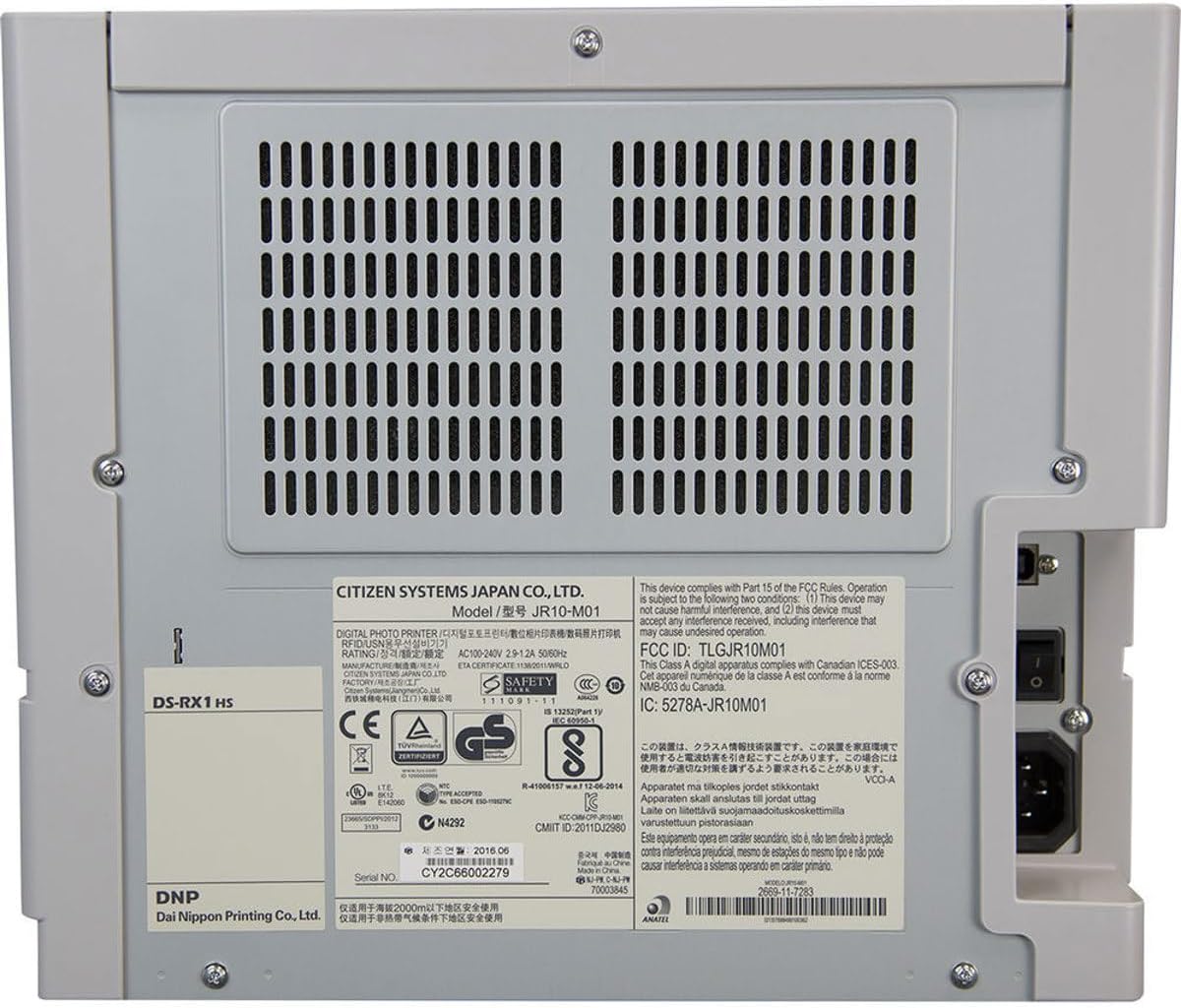
شڪل 2: پوئتي view of the DNP DS-RX1HS Photo Printer. This image highlights the power input and USB connectivity port on the back panel.
2.3 ڊرائيور لڳائڻ
Install the necessary drivers before operating the printer.
- ونڊوز لاءِ: Insert the included Printer CD and follow the on-screen instructions to install drivers for Windows OS7 and 8.1. Drivers for newer Windows versions and a printer Status App for RX1HS are available for download from the DNP webسائيٽ.
- Mac لاءِ: A Mac OS-X Print Center Driver is available for download from the DNP webسائيٽ.
2.4 Loading Print Media
The DS-RX1HS uses dye-sublimation media, consisting of a ribbon and glossy photo paper.
- پرنٽر جي سامهون ڍڪ کوليو.
- Carefully insert the paper roll into the designated slot.
- Load the ribbon cartridge according to the instructions provided with your media kit. Ensure it is securely seated.
- اڳيان ڪپڙا بند ڪريو.

شڪل 3: اندروني view of the DNP DS-RX1HS Photo Printer with media loaded. This image shows the paper roll and ribbon cartridge installed inside the printer.
2.5 پاور ڪنيڪشن
- Connect the power cord to the power input on the rear of the printer.
- بجلي جي تار جي ٻئي ڇيڙي کي مناسب بجلي جي آئوٽليٽ ۾ لڳايو.
- Press the power button, usually located on the front or side, to turn on the printer. The POWER indicator light should illuminate.
3. پرنٽر هلائڻ
Once the printer is set up and drivers are installed, you can begin printing.
3.1 Basic Printing Process
- پڪ ڪريو ته پرنٽر آن آهي ۽ توهان جي ڪمپيوٽر سان ڳنڍيل آهي.
- Open the image you wish to print using your preferred photo editing or printing software.
- Select the DNP DS-RX1HS as your printer.
- In the print settings, choose your desired print size (e.g., 4x6", 6x8") and quality (300x300dpi or 300x600dpi).
- Initiate the print command. The printer will process and output the photo.
3.2 Print Speed and Sizes
- پرنٽ جي رفتار: Approximately 12.4 seconds for a 4x6" print and 22 seconds for a 6x8" print.
- سپورٽ ٿيل سائز: The printer supports 2x6", 4x6", and 6x8" print formats.
3.3 USB iSerial Functionality
The USB iSerial feature allows for simplified management when connecting multiple DS-RX1HS units to a single computer, enhancing productivity for large-scale events. Refer to the DNP website for specific software and setup instructions for this feature.
4. سار سنڀال
باقاعده سار سنڀال بهترين ڪارڪردگي کي يقيني بڻائي ٿي ۽ توهان جي پرنٽر جي زندگي کي وڌائي ٿي.
4.1 ميڊيا جي متبادل
The printer can produce up to 700 4x6" sheets per roll. Replace the ribbon and paper roll when the media runs out or when prompted by the printer status.
- سامهون ڍڪ کوليو.
- Remove the used paper roll and ribbon cartridge.
- Install new media as described in Section 2.4.
- اڳيان ڪپڙا بند ڪريو.
4.2 Printhead Cleaning
A printhead cushion is included with the printer. Refer to the DNP official documentation for detailed instructions on printhead cleaning procedures to maintain print quality.
4.3 عام صفائي
- Wipe the exterior of the printer with a soft, dry cloth.
- سخت ڪيميائي استعمال ڪرڻ کان پاسو ڪريو يا صاف ڪندڙ صاف ڪندڙ.
- Ensure no dust or debris accumulates in the media loading area.
5. مسئلا حل ڪرڻ
This section addresses common issues you might encounter with your DS-RX1HS printer.
5.1 اشارو روشنيون
The front panel of the printer features several indicator lights to communicate its status.

شڪل 4: سامهون view of the DNP DS-RX1HS Photo Printer. This image shows the indicator lights for Power, Ribbon, Paper, and Error on the left side of the front panel.
- طاقت: ظاهر ڪري ٿو ته پرنٽر آن آهي.
- RIBBON: Illuminates when the ribbon needs replacement or is incorrectly installed.
- ڪاغذ: Illuminates when the paper roll needs replacement or is incorrectly installed.
- غلطي: Indicates a general error. Refer to the printer's Status App or driver software for specific error codes.
5.2 عام مسئلا ۽ حل
| مسئلو | ممڪن سبب | حل |
|---|---|---|
| پرنٽر آن نٿو ٿئي. | بجلي جي تار ڳنڍيل نه آهي، بجلي جي آئوٽليٽ جو مسئلو. | پڪ ڪريو ته پاور ڪنڊ پرنٽر ۽ آئوٽ ليٽ ٻنهي سان محفوظ طور تي ڳنڍيل آهي. آئوٽ ليٽ کي ٻئي ڊوائيس سان ٽيسٽ ڪريو. |
| "RIBBON" light is on. | Ribbon is empty or incorrectly installed. | Replace the ribbon cartridge or re-install it correctly. |
| "PAPER" light is on. | Paper roll is empty or incorrectly installed. | Replace the paper roll or re-install it correctly. |
| Poor print quality (streaks, incorrect colors). | Dirty printhead, old media, incorrect driver settings. | Clean the printhead (refer to Section 4.2). Replace media. Verify print settings in your software. |
| ڪمپيوٽر پرنٽر کي نٿو سڃاڻي. | Incorrect or missing drivers, loose USB connection. | Reinstall drivers (Section 2.3). Check USB cable connection. Try a different USB port or cable. |
For more detailed troubleshooting, consult the DNP Status App for Windows or the official DNP support webسائيٽ.
6. وضاحتون
Key technical specifications for the DNP DS-RX1HS Photo Printer:
| خاصيت | تفصيل |
|---|---|
| ماڊل نالو | DS-RX1HS |
| ڇپائي ٽيڪنالاجي | رنگ برنگي |
| پرنٽر آئوٽ | رنگ |
| رابطي ٽيڪنالاجي | USB 2.0 |
| سپورٽ ٿيل ميڊيا سائيز | 2x6", 4x6", 6x8" |
| پرنٽ ميڊيا جو قسم | چمڪندڙ فوٽو پيپر |
| وڌ ۾ وڌ ان پٽ شيٽ جي گنجائش | 350 sheets (for 4x6" media) |
| Maximum Print Speed (4x6") | لڳ ڀڳ. 12.4 سيڪنڊ |
| Maximum Print Speed (6x8") | لڳ ڀڳ. 22 سيڪنڊ |
| قرارداد | 300x300dpi (high speed), 300x600dpi |
| پيداوار جي ماپ | 6"ڊي x 290"ڊي x 4"ايڇ (Note: The width '290"W' appears to be a data entry anomaly; actual printer width is significantly less.) |
| شيءِ جو وزن | 30.8 پائونڊ (14 ڪلوگرام) |
| ميموري رکڻ جي صلاحيت | 64 ايم بي |
| شامل اجزاء | Printer CD, Drivers for Windows OS7 and 8.1, Printhead Cushion, Power Cord (Print Media Not Included) |
7. وارنٽي ۽ سپورٽ
For information regarding product warranty, technical support, and additional resources, please contact DNP directly or visit their official webسائيٽ.
- ٺاهيندڙ: ڊي اين پي
- سرڪاري Webسائيٽ: Refer to your product packaging or the DNP website for the most current support information and driver downloads.


