1. تعارف
خريد ڪرڻ لاءِ مهربانيasing the GPX Portable Top-Loading CD Boombox, Model BC112B. This device offers versatile audio playback options including a top-loading CD player, AM/FM radio, and a 3.5mm auxiliary line-in for connecting external audio devices. Designed for portability and ease of use, this boombox can be powered by AC current or batteries, making it suitable for various environments. This manual provides comprehensive instructions to help you set up, operate, and maintain your new audio system.
2. پيڪيج مواد
Please ensure all items listed below are included in your package:
- GPX Portable Top-Loading CD Boombox (Model BC112B)
- اي سي پاور ڪيبل
- استعمال ڪندڙ جي ھدايت
- وارنٽي ڪارڊ
Note: 6 "C" batteries are required for portable operation and are sold separately.
3. پراڊڪٽ ختمview
Familiarize yourself with the components and controls of your boombox.

شڪل 3.1: سامهون view of the GPX Portable CD Boombox, showing the top-loading CD compartment, control buttons, and dual speakers.

Figure 3.2: Labeled diagram of the GPX CD Boombox, highlighting the foldable handle, CD player, AM/FM radio, and program/shuffle/play controls.
ڪنٽرول ۽ خاصيتون:
- ٽاپ لوڊ ٿيندڙ سي ڊي پليئر: Supports CD and CD-R/RW discs with 20-track programmable memory.
- AM/FM ريڊيو: Direct tune radio with telescopic FM antenna and built-in AM antenna.
- 3.5mm Audio Line Input: Connect external MP3 players or other audio devices.
- بلٽ ان اسپيڪرز: آڊيو آئوٽ پُٽ لاءِ مربوط اسٽيريو اسپيڪر.
- 2-Digit Red LED Display: Shows track number or radio frequency.
- Foldable handle: آسان portability لاء.
- پاور جا اختيار: Operates with included AC power cable or 6 "C" batteries (sold separately).
4. سيٽ اپ
4.1 پاور ڪنيڪشن
- Ensure the unit is switched OFF.
- Insert the included AC power cable into the AC power input jack on the back of the unit.
- AC پاور ڪيبل جي ٻئي ڇيڙي کي معياري وال آئوٽليٽ ۾ لڳايو.
Note: Disconnect the AC power cable when using batteries.
4.2 بيٽري لڳائڻ
For portable use, install 6 "C" size batteries (not included).
- يونٽ جي تري ۾ بيٽري جي خاني کي ڳوليو.
- بيٽري جي ڪمري واري ڍڪ کي کوليو.
- Insert 6 "C" size batteries, ensuring correct polarity (+/-) as indicated inside the compartment.
- بيٽري جي ڪمري واري ڍڪ کي محفوظ طور تي بند ڪريو.
احتياط: Do not mix old and new batteries. Do not mix alkaline, standard (carbon-zinc), or rechargeable (nickel-cadmium) batteries. Remove batteries if the unit is not used for an extended period.
Video 4.1: This video demonstrates the battery installation process and highlights the portability of the GPX CD Boombox. It also shows the AC power connection and the AM/FM switch on the back of the unit.
5. آپريشن
5.1 سي ڊي پلے بیک
- Slide the function switch (located on the back) to the "CD/LINE IN" position.
- Open the top-loading CD compartment by gently lifting the lid.
- Place a CD or CD-R/RW disc onto the spindle with the label side facing up.
- Close the CD compartment lid securely. The display will show "00" or the number of tracks.
- کي دٻايو Play/Pause (►⏸) button to begin playback. The track number will appear on the LED display.
- استعمال ڪريو Skip Forward (►►) or Skip Back (◄◄) ٽريڪ جي وچ ۾ نيويگيٽ ڪرڻ لاءِ بٽڻ.
- کي دٻايو روڪيو (■) پلے بیک کي روڪڻ لاءِ بٽڻ
- ٽريڪ پروگرام ڪرڻ لاءِ، دٻايو پروگرام (پي) button while the CD is stopped. Select tracks using the Skip buttons and press Program again to confirm each track. Press Play to start the programmed sequence.
5.2 ايم/ايف ايم ريڊيو
- Slide the function switch (located on the back) to the "FM" or "AM" position.
- Extend the telescopic FM antenna for optimal FM reception. For AM reception, the unit has a built-in antenna.
- گھمايو ٽيوننگ dial (located on the side) to select your desired radio station.
- ترتيب ڏيو حجم dial to your preferred listening level.
5.3 Line-In (Auxiliary Input)
Connect an external audio device (e.g., MP3 player, smartphone) to play audio through the boombox speakers.
- Slide the function switch (located on the back) to the "CD/LINE IN" position.
- Connect a 3.5mm audio cable (not included) from the headphone jack or line-out of your external device to the لائن اندر jack on the back of the boombox.
- توهان جي ٻاهرين آڊيو ڊوائيس تي پلے بیک شروع ڪريو.
- حجم کي استعمال ڪندي ترتيب ڏيو حجم dial on the boombox and/or the volume controls on your external device.
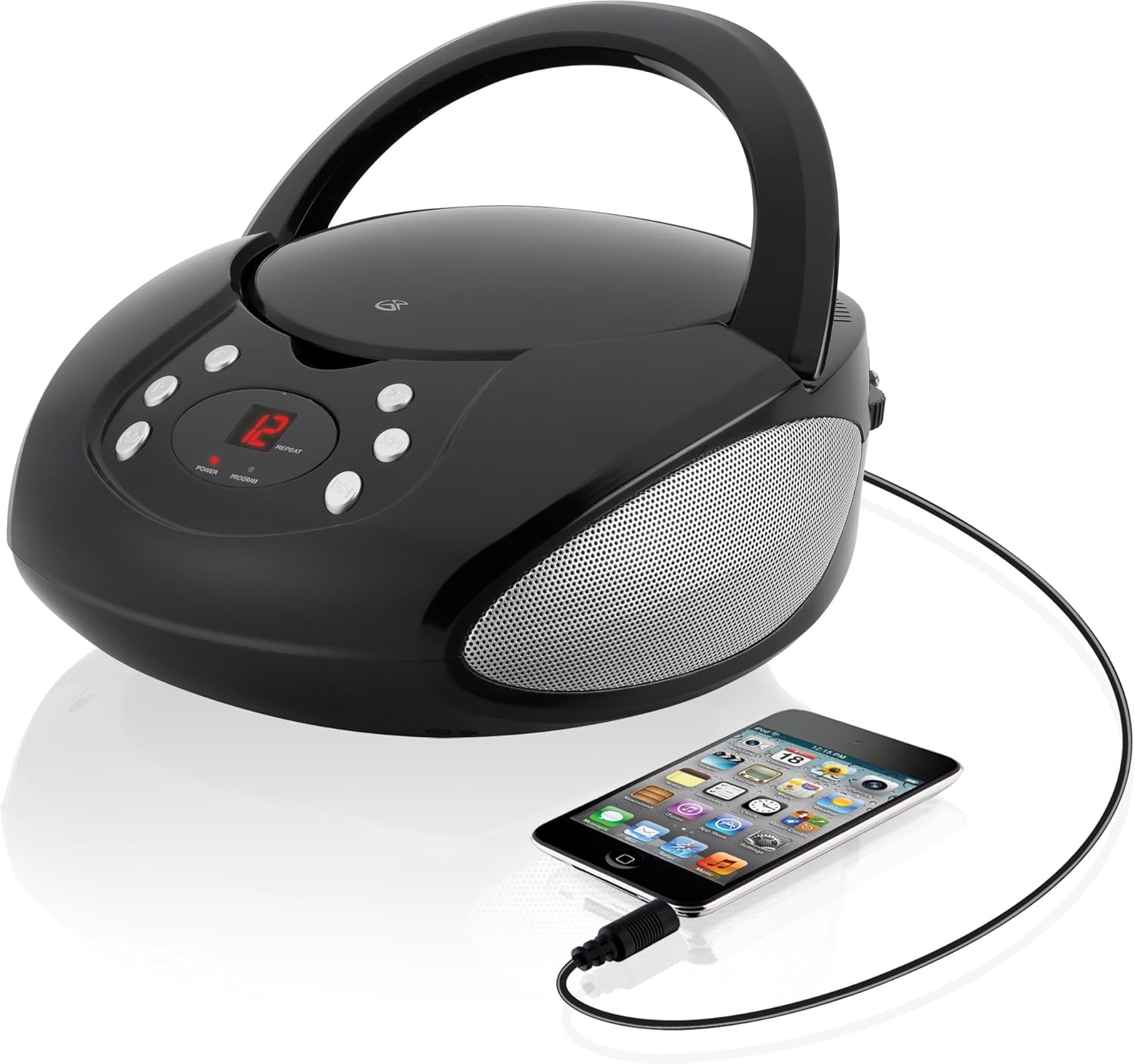
Figure 5.1: The GPX CD Boombox with a smartphone connected via the 3.5mm Line-In port, demonstrating auxiliary audio playback.
6. سار سنڀال
- صفائي: يونٽ جي ٻاهرين حصي کي صاف ڪرڻ لاءِ نرم، سڪل ڪپڙو استعمال ڪريو. رگڙيندڙ صاف ڪندڙ يا محلول استعمال نه ڪريو.
- سي ڊي پليئر جي سنڀال: Keep the CD compartment clean and free of dust. Avoid touching the lens inside the CD player.
- اسٽوريج: When not in use for extended periods, store the unit in a cool, dry place. Remove batteries if storing for a long time to prevent leakage.
- اينٽينا جي سنڀال: Handle the telescopic FM antenna gently to prevent damage.
7. مسئلا حل ڪرڻ
| مسئلو | ممڪن سبب | حل |
|---|---|---|
| طاقت نه آهي | AC cable not connected; Batteries depleted or incorrectly installed. | Ensure AC cable is securely plugged in. If using batteries, check battery polarity and replace if necessary. |
| CD not playing / "ER" displayed | CD inserted incorrectly; Disc is dirty or scratched; Function switch not in CD/LINE IN mode. | Re-insert CD with label side up. Clean the disc. Set function switch to CD/LINE IN. |
| ناقص ريڊيو استقبال | FM antenna not extended; Unit too close to interference sources. | Fully extend the FM telescopic antenna. Reposition the unit away from other electronic devices. |
| No sound from Line-In | Audio cable not connected; Volume too low on boombox or external device. | Ensure 3.5mm audio cable is securely connected. Increase volume on both the boombox and the external device. |
8. وضاحتون
- ماڊل: BC112B
- طاقت جو ذريعو: AC 120V ~ 60Hz or 6 x "C" Batteries (DC 9V)
- سي ڊي مطابقت: سي ڊي ، سي ڊي-آر / آر وي
- ريڊيو فريڪوئنسي: ايم، ايف ايم
- داخلائون: 3.5mm آڊيو لائن اندر
- طول و عرض (L x W x H): 9.19 x 5.17 x 10.42 انچ
- وزن: 2.51 پائونڊ
- ٺاهيندڙ: ڊي پي آئي
9. وارنٽي ۽ سپورٽ
This product comes with a limited warranty. Please refer to the included warranty card for detailed terms and conditions, including warranty period and coverage. For technical support or service inquiries, please contact GPX customer service. Contact information can typically be found on the warranty card or the official GPX webسائيٽ.
تجويز 65 خبردار: اها پراڊڪٽ شايد ڪيميائي رياست ڪيليفورنيا جي مشهور cancerاڻندڙ ڪينسر ۽ پيدائشي نقصن يا ٻين توليد جي نقصان جو سبب بڻجي سگھي ٿو.


