1. تعارف
This manual provides essential instructions for the installation, operation, and maintenance of your Intel Server Board S1200BTLR. This server board is designed to support Intel Xeon Processor E3-1200 series based on the Next-Generation Intel Microarchitecture (Sandy Bridge).
اهم خاصيتون شامل آهن:
- 4 DDR3 (1066/1333MHz) ECC UDIMM sockets (Unbuffered)
- Multiple PCI Express slots for expansion: 1x PCIe 2.0 x8 (x16 mechanical), 1x PCIe 2.0 x8 (x8 mechanical), 1x PCIe 2.0 x4 (x8 mechanical), 1x PCIe x4 (x8 mechanical), and 1x PCI 32/33 (5V) slot
- 6 SATA ports (2x 6Gbps, 4x 3Gbps) via Intel C204 chipset with Intel Embedded Server RAID Technology and Intel RST
- Embedded Intel Dual Gigabit Controller 82574L and 82578DM
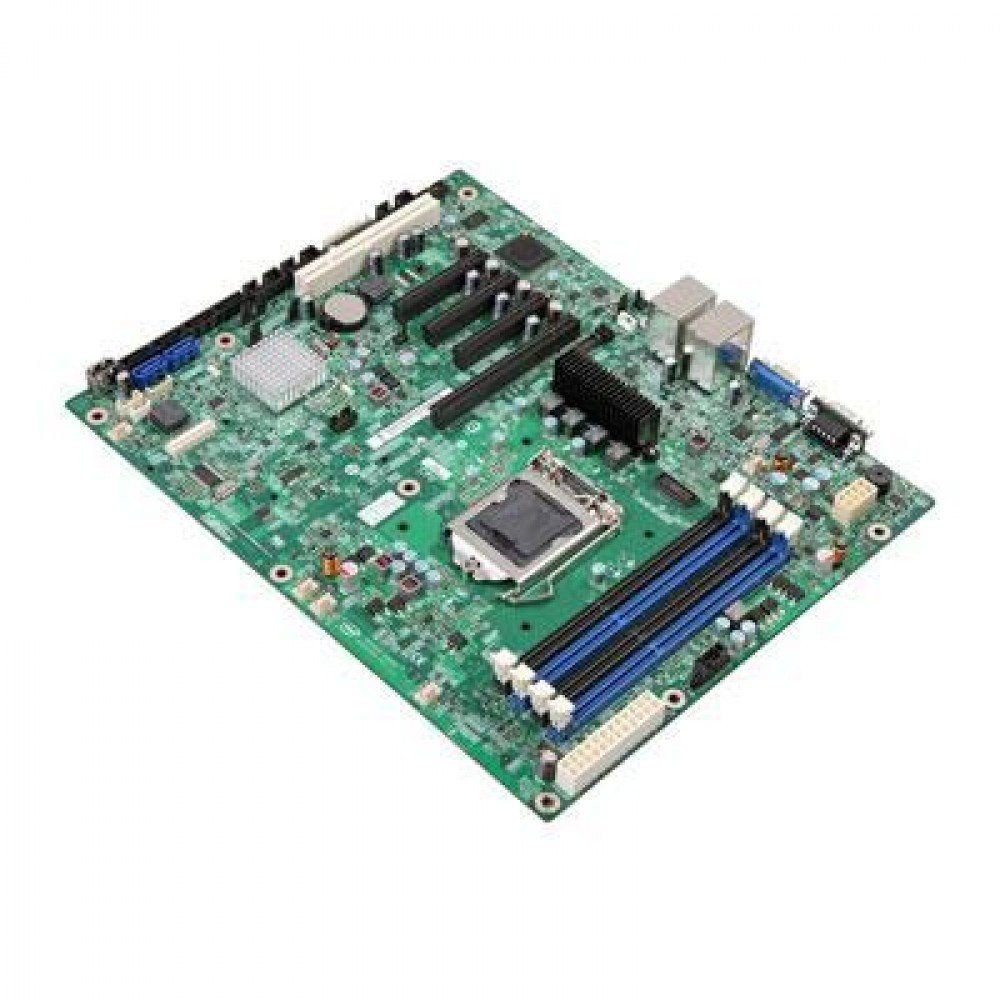
شڪل 1: Intel Server Board S1200BTLR. This image displays the full layout of the server motherboard, highlighting the CPU socket, RAM slots, PCI Express slots, and various connectors.
2. سيٽ اپ ۽ تنصيب
Before beginning installation, ensure your workspace is clean, well-lit, and static-free. Use an anti-static wrist strap to prevent damage to components.
2.1. گهربل جزا
- Intel Xeon Processor E3-1200 series (LGA 1155 socket compatible)
- DDR3 ECC UDIMM memory modules (1066/1333MHz)
- Compatible power supply unit (PSU)
- Storage devices (SATA hard drives or SSDs)
- Server chassis
- Operating system installation media
2.2. پروسيسر جي انسٽاليشن
- مدر بورڊ تي LGA 1155 CPU ساکٽ ڳوليو.
- Gently lift the load plate lever and open the load plate.
- Align the processor's triangular mark with the corresponding mark on the socket. Carefully place the processor into the socket without forcing it.
- Close the load plate and secure it with the lever.
- ٿرمل پيسٽ لڳايو ۽ سي پي يو ڪولر کي ان جي ٺاهيندڙ جي هدايتن مطابق انسٽال ڪريو.
2.3. ياداشت جي انسٽاليشن
- Identify the four DDR3 UDIMM sockets.
- Open the retention clips at both ends of the memory slot.
- ميموري ماڊيول جي نشان کي سلاٽ ۾ موجود چاٻي سان ترتيب ڏيو.
- Insert the module firmly into the slot until the retention clips snap into place.
- Repeat for additional memory modules, ensuring proper channel configuration as per your system requirements.
2.4. اسٽوريج ڊيوائس ڪنيڪشن
- Connect SATA data cables from your storage devices to the SATA ports on the motherboard. The board features 2x 6Gbps ports and 4x 3Gbps ports.
- Connect power cables from the PSU to your storage devices.
2.5. پاور سپلائي ڪنيڪشن
- Connect the 24-pin ATX main power connector from the PSU to the corresponding socket on the motherboard.
- Connect the 8-pin (or 4-pin) ATX 12V CPU power connector to the motherboard.
2.6. ايڪسپينشن ڪارڊ جي انسٽاليشن
The server board includes various PCI Express and PCI slots:
- 1x PCI Express 2.0 x8 slot (x16 mechanical)
- 1x PCI Express 2.0 x8 slot (x8 mechanical)
- 1x PCI Express 2.0 x4 slot (x8 mechanical)
- 1x PCI Express x4 slot (x8 mechanical)
- 1x PCI 32/33 (5V) slot
Insert expansion cards firmly into the appropriate slots and secure them with the chassis retention mechanism.
3. آپريٽنگ هدايتون
3.1. شروعاتي پاور آن
- After all components are installed and connected, ensure the power supply is switched on.
- Press the power button on your server chassis.
- Monitor the POST (Power-On Self-Test) sequence.
3.2. BIOS/UEFI ترتيب
During POST, press the designated key (usually ڊي ايل or F2) to enter the BIOS/UEFI setup utility. Here you can configure:
- بوٽ آرڊر
- SATA controller mode (AHCI, RAID)
- ميموري سيٽنگون
- Integrated peripherals
- سسٽم جو وقت ۽ تاريخ
Refer to the Intel documentation for detailed BIOS/UEFI settings specific to the S1200BTLR.
3.3. آپريٽنگ سسٽم جي انسٽاليشن
Insert your operating system installation media (USB drive or DVD) and configure the BIOS/UEFI to boot from it. Follow the on-screen instructions to install your preferred server operating system (e.g., Linux, Windows Server).
3.4. ڊرائيور لڳائڻ
After OS installation, install all necessary drivers for the motherboard components, including chipset, network controllers (Intel Dual Gigabit Controller 82574L and 82578DM), and any integrated graphics or RAID controllers. Drivers are typically available on the Intel support webسائيٽ.
4. سار سنڀال
Regular maintenance ensures optimal performance and longevity of your Intel Server Board S1200BTLR.
4.1. Dust Removal
Periodically clean the interior of the server chassis to prevent dust buildup, which can lead to overheating. Use compressed air to gently remove dust from heatsinks, fans, and other components. Ensure the system is powered off and unplugged before cleaning.
4.2. Firmware and Driver Updates
باقاعدي طور تي انٽيل سپورٽ چيڪ ڪريو website for updated BIOS/UEFI firmware and device drivers. Keeping these components up-to-date can improve stability, performance, and security.
4.3. جزو جي چڪاس
Occasionally inspect the motherboard for any signs of damage, loose connections, or bulging capacitors. Address any issues promptly.
5. مسئلا حل ڪرڻ
هي حصو انهن عام مسئلن جو حل فراهم ڪري ٿو جيڪي توهان کي درپيش اچي سگهن ٿا.
5.1. ڪابه طاقت
- Verify that the power supply unit (PSU) is connected correctly to the motherboard (24-pin ATX and 8-pin/4-pin CPU power).
- Ensure the PSU is switched on and connected to a working power outlet.
- Check the power button connection from the chassis to the motherboard.
- Test the PSU with another system or a PSU tester if available.
5.2. ڪوبه ڊسپلي آئوٽ پٽ ناهي
- Ensure the monitor is connected to the correct video output port and is powered on.
- Reseat the memory modules. Incorrectly seated RAM is a common cause of no display.
- If using a dedicated graphics card, ensure it is properly seated in its PCIe slot and has auxiliary power connected (if required).
- Try booting with only one memory module installed.
5.3. System Instability or Crashes
- Check CPU and system temperatures. Overheating can cause instability. Ensure CPU cooler is properly installed.
- ناقص RAM ماڊلز جي جانچ ڪرڻ لاءِ ميموري تشخيصي اوزار هلايو.
- Verify that all drivers are correctly installed and up-to-date.
- BIOS/UEFI اپڊيٽس جي جانچ ڪريو.
- Ensure the power supply is sufficient for all installed components.
5.4. اسٽوريج ڊيوائس نه ملي
- Verify SATA data and power cables are securely connected to both the drive and the motherboard.
- Check BIOS/UEFI settings to ensure SATA ports are enabled and configured correctly (e.g., AHCI mode).
- Test the drive on another system or with a different SATA cable.
6. وضاحتون
| خاصيت | تفصيل |
|---|---|
| ماڊل نالو | S1200BTLR |
| برانڊ | Intel |
| سي پي يو ساکٽ | LGA 1155 |
| مطابقت رکندڙ پروسيسر | انٽيل ايون اي 3-1200 سيريز |
| چپ سيٽ جو قسم | Intel C204 |
| رام ميموري ٽيڪنالاجي | DDR3 ECC UDIMM |
| ياداشت جي گھڙي جي رفتار | 1066 MHz، 1333 MHz |
| ميموري سلاٽ | 4 |
| وڌ ۾ وڌ ميموري اسٽوريج جي گنجائش | 16 GB (per input) |
| پي سي آءِ ايڪسپريس سلاٽ | 1x PCIe 2.0 x8 (x16 mechanical), 1x PCIe 2.0 x8 (x8 mechanical), 1x PCIe 2.0 x4 (x8 mechanical), 1x PCIe x4 (x8 mechanical) |
| PCI سلاٽ | 1x PCI 32/33 (5V) |
| SATA بندرگاهن | 6 (2x 6Gbps, 4x 3Gbps) with Intel Embedded Server RAID Technology and Intel RST |
| نيٽورڪ ڪنٽرولر | Embedded Intel Dual Gigabit Controller 82574L and 82578DM |
| مطابقت رکندڙ ڊوائيسز | Personal Computer (Server) |
| پليٽ فارم | Linux (and other server OS) |
| شيءِ جو وزن | 3.75 پائونڊ |
| تاريخ پهرين دستياب | مئي 24، 2012 |
7. سپورٽ ۽ وارنٽي
7.1. ٽيڪنيڪل سپورٽ
For technical assistance, driver downloads, and additional documentation, please visit the official Intel support website. You can find product-specific information by searching for "Intel Server Board S1200BTLR" or "S1200BTLR".
Intel's support resources typically include:
- Knowledge base articles
- ڊرائيور ۽ سافٽ ويئر ڊائون لوڊ
- ڪميونٽي فورمز
- سڌي مدد لاءِ رابطي جي معلومات
7.2. وارنٽي ڄاڻ
Warranty terms and conditions for the Intel Server Board S1200BTLR are provided by Intel. Please refer to the warranty documentation included with your product or visit the Intel website for the most current warranty policy. Keep your proof of purchase for warranty claims.


