تعارف
This manual provides comprehensive instructions for the setup, operation, maintenance, and troubleshooting of your DISH DISH211 4-Device Universal Remote. Designed for ease of use, this remote supports DISH TV receivers and can control up to four different devices, including TVs and other entertainment systems. Its ability to learn commands from original remotes makes it a versatile replacement.
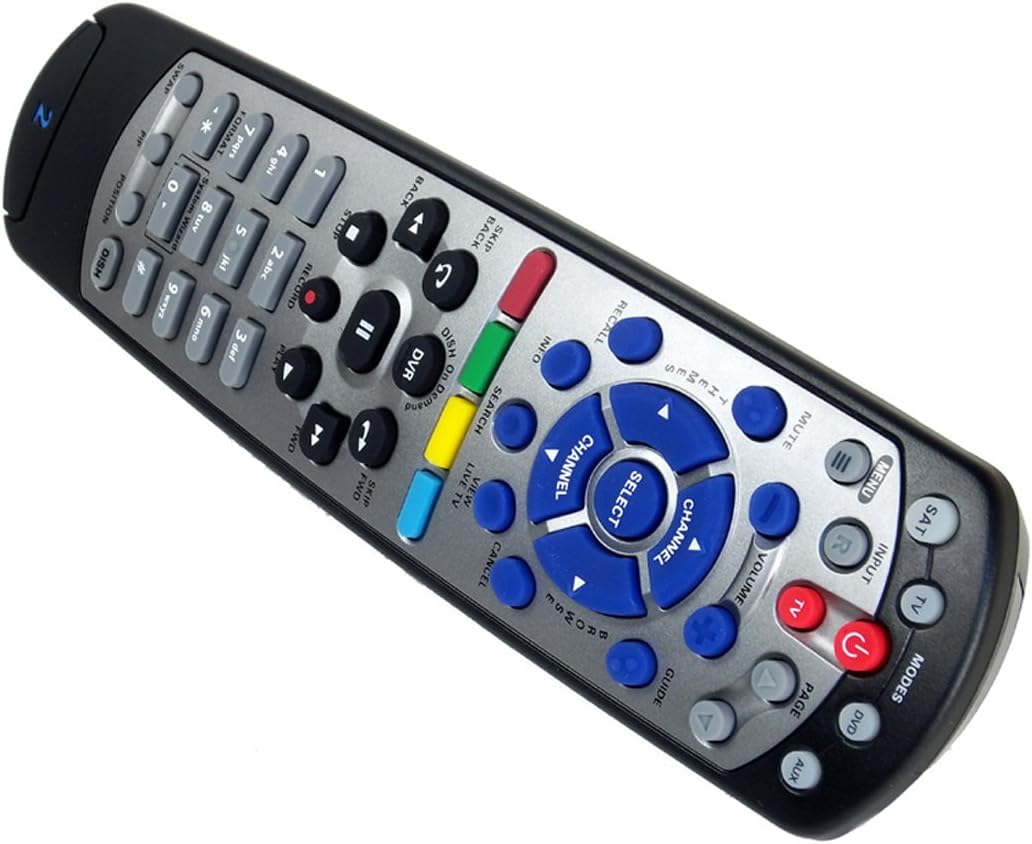
Figure 1: The DISH DISH211 4-Device Universal Remote, showcasinان جي ergonomic ڊيزائن ۽ بٽڻ جي ترتيب جي ڪري.
سيٽ اپ ڪريو
1. بيٽري لڳائڻ
The DISH211 remote requires two (2) AA batteries for operation. To install:
- ريموٽ جي پٺي تي بيٽري جي خاني کي ڳولھيو.
- بيٽري جي ڍڪ کي هيٺئين طرف سلائڊ ڪريو ۽ کولڻ لاءِ مٿي کڻو.
- Insert two AA batteries, ensuring the positive (+) and negative (-) terminals align with the indicators inside the compartment.
- بيٽري جي ڍڪ کي مٿي سلائڊ ڪندي تبديل ڪريو جيستائين اهو جاءِ تي ڪلڪ نه ڪري.
2. Device Pairing and Programming
The DISH211 remote can be programmed to control your DISH receiver and other devices. It supports both Infrared (IR) and Ultra High Frequency (UHF) communication, depending on your receiver model.

Figure 2: Cover of the official DISH Remote User Guide, which provides detailed programming instructions.
For DISH Receiver Pairing (UHF/IR):
Some DISH receivers may require setting the remote's address and communication type (UHF or IR). A small switch near the battery compartment may allow selection between UHF and IR modes. Ensure this switch is set correctly for your receiver type.
To address the remote to your receiver:
- کي دٻايو سسٽم جي ڄاڻ button on the front of your receiver to access the system information screen.
- کي دٻايو ۽ رکو SAT button on the remote until all mode lights illuminate.
- Enter a number between 1-15 on the remote keypad. This number corresponds to the TV-2 UHF address displayed on your receiver's screen.
- کي دٻايو # (pound) button once.
- کي دٻايو رڪارڊ بٽڻ ٽي ڀيرا.
- چونڊيو ٿي ويو on the system info screen and test the remote's functionality.
For Other Devices (TV, DVD, AUX):
The remote has a large code library and can learn commands from your original remotes. Refer to the official DISH remote user guide (often included with the product or available online) for specific programming codes and learning instructions for various brands and device types.

Figure 3: The back of the DISH remote packaging, indicating compatible DISH receiver models for both IR and IR/UHF configurations.
آپريٽنگ هدايتون
The DISH211 remote is designed for intuitive control of your entertainment system. It features backlit active MODE keys for visibility in low light conditions and dedicated DVR controls.
1. موڊ چونڊ
Press the desired mode button (e.g., SAT for DISH receiver, TV for television, ڊي وي ڊي for DVD player, AUX for auxiliary device) at the top of the remote to select the device you wish to control. The selected mode button will illuminate.
2. بنيادي ڪنٽرول
- طاقت: کي دٻايو پاور button to turn the selected device on or off.
- حجم: استعمال ڪريو حجم مٿي / هيٺ buttons to adjust the audio level of your television.
- چينل: استعمال ڪريو چينل مٿي/ھي buttons to change channels on your DISH receiver or television.
- خاموش: کي دٻايو خاموش button to silence the audio.
- ان پٽ: کي دٻايو INPUT button to cycle through video inputs on your television.
3. DVR Controls
The remote includes dedicated buttons for DVR functionality:
- رڪارڊ: Initiates recording of the current program.
- راند/روڪ: Starts or pauses playback of recorded content or live TV.
- روڪيو: پلے بیک کي روڪي ٿو.
- ريوائنڊ/فاسٽ فارورڊ: Controls playback speed and direction.
- Skip Forward (DISH Skip Forward): Allows quick skipping through commercials or segments.
- واپس وڃايو: Skips backward in recorded content.

شڪل 4: بند اپ view of the DISH DISH211 remote, highlighting the central navigation and DVR control buttons.
سار سنڀال
1. بيٽري مٽائڻ
When the remote's performance degrades or buttons become unresponsive, it is likely time to replace the batteries. Follow the battery installation steps outlined in the Setup section.
2. صفائي
پنهنجي ريموٽ کي صاف ڪرڻ لاءِ، نرم، سڪل ڪپڙي سان مٿاڇري کي نرميءَ سان صاف ڪريو. ضدي مٽيءَ لاءِ، ٿورو ڊيampen the cloth with water or a mild, non-abrasive cleaner. Avoid using excessive liquid or harsh chemicals, as these can damage the remote's electronics or finish.
مشڪلاتون
ريموٽ جواب نه ڏيڻ
- بيٽري چيڪ ڪريو: پڪ ڪريو ته بيٽريون صحيح طرح سان نصب ٿيل آهن ۽ ڪافي چارج آهن. جيڪڏهن ضروري هجي ته تبديل ڪريو.
- Line of Sight (IR): If using IR mode, ensure there is a clear line of sight between the remote and the device's IR receiver. Obstructions can block the signal.
- موڊ جي چونڊ: Verify that the correct mode button (e.g., SAT, TV) is selected for the device you are trying to control.
- Remote Address/UHF-IR Switch: For DISH receivers, confirm the remote's address is correctly set and the UHF/IR switch (if present) matches your receiver's configuration. Incorrect settings can prevent communication.
وقفي واري ڪارڪردگي
- مداخلت: Other electronic devices or strong light sources (like plasma TV IR interference) can sometimes interfere with IR signals. Try operating the remote from a different angle or location.
- DVR Directory Update: If experiencing lag or unresponsiveness with DVR functions, ensure your DVR's directory is updated. Consult your DISH receiver's manual for instructions on updating its software or directory.
بٽڻ ڪم نه ڪري رهيا آهن
- صاف ريموٽ: Dirt or debris under buttons can cause them to stick or become unresponsive. Clean the remote as described in the Maintenance section.
- ٻيهر پروگرام: If specific buttons for a device are not working, the remote may need to be reprogrammed for that device.
وضاحتون
| خاصيت | تفصيل |
|---|---|
| ماڊل نمبر | DISH211 |
| برانڊ | ڊش |
| پيداوار جي ماپ | 1.75 x 4.81 x 11.38 انچ |
| شيءِ جو وزن | 9.6 اونس |
| بيٽرين جي ضرورت آهي | 2 AA بيٽريون |
| سپورٽ ٿيل ڊوائيسز جو وڌ ۾ وڌ تعداد | 4 |
| مطابقت رکندڙ ڊوائيسز | Television, DISH TV receivers (TV1 and TV2 locations) |
| رابطي ٽيڪنالاجي | Infrared (IR), Ultra High Frequency (UHF) |
| خاص خاصيتون | Backlit keys, Universal compatibility, Learning capability |
وارنٽي ۽ سپورٽ
وارنٽي ڄاڻ
The DISH DISH211 Universal Remote typically comes with a محدود 90-ڏينهن وارنٽي. Please refer to the documentation enclosed with your product for specific terms, conditions, and details regarding warranty claims.
ڪسٽمر سپورٽ
For further assistance with programming, troubleshooting, or general inquiries, it is recommended to consult the official DISH Network support resources. This may include their website, online user guides, or customer service contact information. The manufacturer of this product is Audiovox Accessories Corporation.


