1. تعارف
This manual provides comprehensive instructions for the installation, operation, and maintenance of your ZENEC ZE-NC620DMH 2-DIN Navigation Receiver. Designed specifically for motorhomes and caravans, this device integrates advanced navigation with multimedia functionalities. Please read this manual thoroughly before using the product to ensure correct operation and to prevent damage.
2. حفاظت جي ڄاڻ
- تنصيب: Ensure installation is performed by a qualified technician to avoid damage to the vehicle or the device. Incorrect installation can lead to malfunction or accidents.
- بجلي جي فراهمي: Connect the device only to a 12V DC vehicle power supply with a negative ground.
- Operation While Driving: ڊوائيس کي اهڙي طريقي سان نه هلايو جيڪو توهان کي ڊرائيونگ کان پريشان ڪري. هميشه روڊ جي حفاظت کي ترجيح ڏيو.
- صفائي: صفائي لاءِ نرم، سڪل ڪپڙو استعمال ڪريو. رگڙيندڙ صاف ڪندڙ يا محلول استعمال نه ڪريو.
- گرمي پد: ڊگھي عرصي تائين ڊيوائس کي انتهائي گرمي پد يا سڌي سج جي روشنيءَ کي بي نقاب ڪرڻ کان پاسو ڪريو.
3. پراڊڪٽ ختمview
The ZENEC ZE-NC620DMH is a versatile 2-DIN navigation and multimedia system. It features a 6.2-inch touchscreen display and various input/output options.
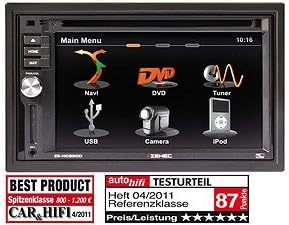
Figure 3.1: Main Menu Interface. This image displays the primary menu screen of the ZENEC ZE-NC620DMH. Key functions are accessible via touch icons, including Navigation (Navi), DVD playback, Radio Tuner, USB media, Camera input, and iPod connectivity. The top right corner shows the current time (10:16).
3.1 Main Menu Functions
- نيوي: Access the integrated navigation system with specialized POIs for campers
- ڊي وي ڊي: Play DVDs and CDs via the built-in optical drive.
- ٽونر: Select and listen to radio stations.
- USB: ميڊيا پلے بیک لاءِ USB اسٽوريج ڊوائيسز ڳنڍيو.
- ڪئميرا: View input from a connected rearview or front camera.
- آئي پوڊ: Connect and control compatible iPod/iPhone devices for audio playback.
4. سيٽ اپ
4.1 تنصيب
The ZE-NC620DMH is designed for dashboard mounting in vehicles with a 2-DIN slot. Professional installation is highly recommended. Ensure all wiring connections (power, ground, speakers, antenna, GPS antenna, external microphone, camera inputs, USB) are secure and correctly polarized according to the wiring diagram provided in the separate installation guide.
4.2 شروعاتي ترتيب
- پاور آن: Turn on your vehicle's ignition. The device should power on automatically.
- ٻولي جي چونڊ: پنهنجي پسنديده ٻولي چونڊڻ لاءِ اسڪرين تي ڏنل هدايتن تي عمل ڪريو.
- وقت ۽ تاريخ: صحيح ٽائيم زون، تاريخ ۽ وقت مقرر ڪريو.
- جي پي ايس سيٽ اپ: پڪ ڪريو ته GPS اينٽينا صاف جاءِ تي نصب ٿيل آهي view of the sky. The system will acquire satellite signals automatically.
- بلوٽيون ٺاھڻ: To pair your mobile phone, navigate to the Bluetooth menu, enable pairing mode on your phone, and select the ZE-NC620DMH from the list of available devices.
5. آپريٽنگ هدايتون
5.1 نيويگيشن سسٽم
- Tap the "Navi" icon on the main menu to launch the navigation software.
- آن اسڪرين ڪيبورڊ استعمال ڪندي پنهنجي منزل داخل ڪريو.
- Select route preferences (e.g., fastest, shortest, avoid tolls).
- The system provides turn-by-turn voice guidance and visual map display.
- Access specialized POIs (Points of Interest) for campers, such as campsites, service stations, and parking areas.
5.2 Multimedia Playback (DVD/CD, USB, iPod)
- ڊي وي ڊي/سي ڊي: Insert a disc into the slot. The device will automatically switch to DVD/CD mode. Use the on-screen controls for playback.
- USB: Connect a USB flash drive to the designated USB port. Tap the "USB" icon to browse and play media files (آڊيو، وڊيو، تصويرون).
- آئي پوڊ: Connect your iPod/iPhone using a compatible cable. Tap the "iPod" icon to access your music library and control playback.
5.3 Radio Tuner
- Tap the "Tuner" icon to access the radio.
- دستياب اسٽيشنن کي ڳولڻ لاءِ اسڪين فنڪشن استعمال ڪريو يا دستي طور تي فريڪوئنسي تي ٽيون ڪريو.
- جلدي رسائي لاءِ پنهنجي پسنديده اسٽيشنن کي پري سيٽ طور محفوظ ڪريو.
5.4 ڪئميرا ان پٽ
- جيڪڏهن هڪ پٺتيview ڪئميرا ڳنڍيل آهي، ڊسپلي خودڪار طريقي سان ڪئميرا ڏانهن سوئچ ڪندو view جڏهن گاڏي کي ريورس ۾ رکيو ويندو آهي.
- Tap the "Camera" icon to manually view the camera feed (if supported by your camera setup).
6. سار سنڀال
- اسڪرين جي صفائي: Gently wipe the touchscreen with a soft, lint-free cloth. For stubborn smudges, slightly dampڪپڙي کي پاڻي يا اسڪرين محفوظ ڪلينر سان ڌوئڻ ڏيو. اسڪرين تي سڌو سنئون مائع نه اسپري ڪريو.
- سافٽ ويئر اپڊيٽ: Periodically check the ZENEC website for available software and map updates to ensure optimal performance and the latest navigation data.
- ڊسڪ ڊرائيو: Keep the disc slot free from dust and debris. Avoid inserting damaged or dirty discs.
7. مسئلا حل ڪرڻ
| مسئلو | ممڪن سبب | حل |
|---|---|---|
| طاقت نه آهي | ڦاٽل فيوز، غلط وائرنگ، ڍلو ڪنيڪشن. | Check vehicle fuses. Verify power and ground connections. Consult an installer. |
| ڪوبه GPS سگنل ناهي | GPS اينٽينا بند يا ڪٽيل آهي. | Ensure antenna has a clear view آسمان جو. اينٽينا ڪنيڪشن چيڪ ڪريو. |
| نه آڊيو | Volume too low, mute activated, speaker wiring issue. | Increase volume. Check mute status. Verify speaker connections. |
| ٽچ اسڪرين غير جوابي | عارضي سافٽ ويئر جي خرابي. | Perform a soft reset (refer to installation guide for reset button location, usually a small pinhole). |
If problems persist after attempting these solutions, please contact ZENEC customer support or a qualified service center.
8. وضاحتون
- برانڊ: زينڪ
- ماڊل نالو: ZENEC ZE-NC620DMH
- گاڏين جي خدمت جو قسم: ٽرڪ (Note: Optimized for Motorhome/Caravan use)
- اسڪرين جي ماپ: 6.2 انچ
- خاص خصوصيت: Adaptation for motorhomes and caravans
- رابطي ٽيڪنالاجي: بلوٽوٿ، يو ايس بي
- نقشي جو قسم: يورپ
- شامل اجزاء: CD/DVD player, external microphone
- آڊيو آئوٽ موڊ: اسٽيريو
- چڙهڻ جو قسم: ڊيش بورڊ جبل
9. وارنٽي ۽ سپورٽ
For warranty information, please refer to the warranty card included with your product or visit the official ZENEC website. Technical support and service inquiries should be directed to your authorized ZENEC dealer or the ZENEC customer service department.
مھرباني ڪري وارنٽي دعوائن لاءِ خريد ڪرڻ جو پنھنجو ثبوت رکو.


