تعارف
The Plantronics M25 Bluetooth headset is designed for convenient wireless communication and audio playback. It features an extended battery life with DeepSleep mode, ensuring readiness when needed. The headset provides whispered alerts for battery status and connection information, and allows for listening to music, internet radio, or navigation directions while managing calls.
پيڪيج مواد
پڪ ڪريو ته سڀئي شيون توهان جي پيڪيج ۾ موجود آهن:
- Plantronics M25 بلوٽوت هيڊ سيٽ
- AC Charger (100-240v)
- Clip-on Earloop
سيٽ اپ ڪريو
1. هيڊ سيٽ کي چارج ڪرڻ
Before first use, fully charge the headset. Connect the AC charger to the headset's charging port. The indicator light will change to show charging status and turn off or change color when fully charged. A full charge can provide up to 5 months of readiness in DeepSleep mode.
2. هڪ ڊوائيس سان جوڙڻ
To pair your Plantronics M25 headset with a Bluetooth-enabled device (e.g., smartphone, tablet):
- پڪ ڪريو ته هيڊ سيٽ چارج ٿيل ۽ بند ٿيل آهي.
- Press and hold the Call button on the headset until the indicator light flashes red and blue, indicating pairing mode.
- پنهنجي ڊوائيس تي، بلوٽوٿ کي فعال ڪريو ۽ نوان ڊوائيسز ڳوليو.
- Select "Plantronics M25" from the list of available devices.
- جيڪڏهن پاس ڪوڊ لاءِ چيو وڃي ته، "0000" (چار صفر) داخل ڪريو.
- Once paired, the headset's indicator light will stop flashing and a voice prompt will confirm the connection.
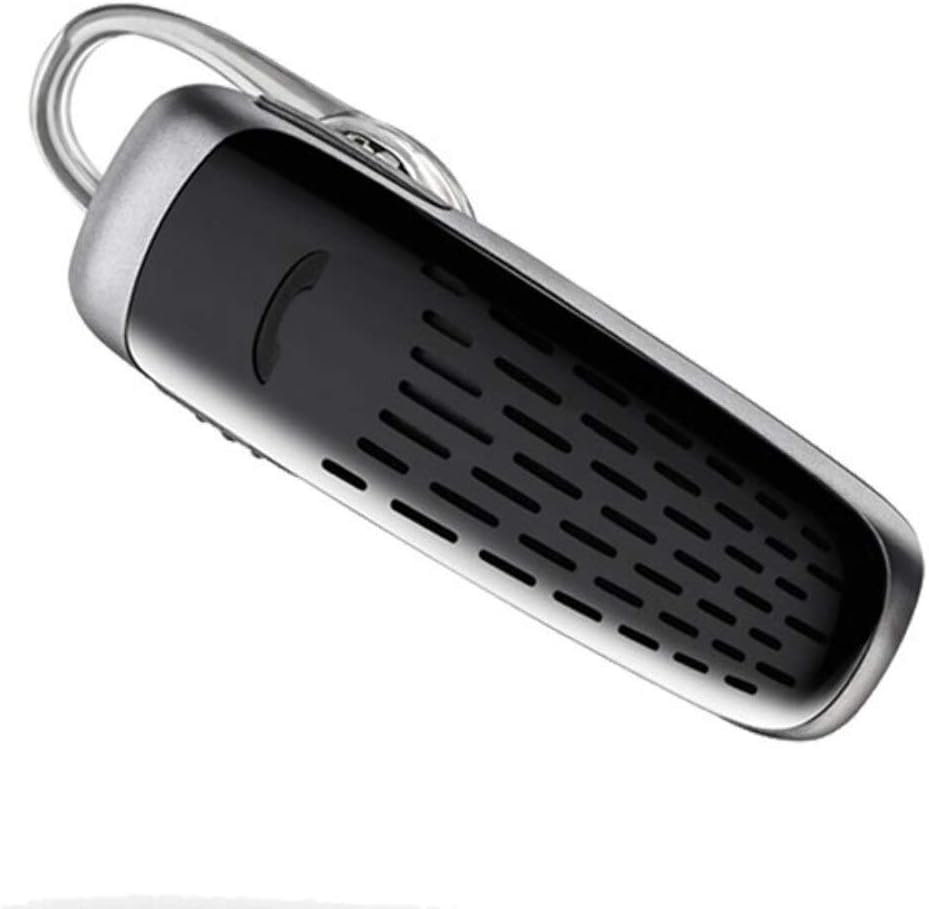
Image: The Plantronics M25 Bluetooth Headset, a compact black and silver device with an earloop, shown from an angled perspective. The call button is visible on the side.
آپريٽنگ هدايتون
پاور آن / آف
- پاور آن: Press and hold the Power button until the indicator light flashes blue.
- بجلي بند: Press and hold the Power button until the indicator light flashes red.
ڪالون ٺاهڻ ۽ وصول ڪرڻ
- جواب ڏيو ڪال: ڪال بٽڻ کي دٻايو.
- ڪال ختم ڪريو: ڪال بٽڻ کي دٻايو.
- ڪال رد ڪريو: 2 سيڪنڊن لاءِ ڪال بٽڻ کي دٻايو ۽ رکو.
- ريڊل آخري نمبر: ڪال بٽڻ کي ٻٽي دٻايو.
آڊيو پلے بیک
The headset supports streaming audio from your device, including music, podcasts, and GPS directions.
- راند/روڪ: Press the Call button during audio playback.
ڊيپ سليپ موڊ
The headset enters DeepSleep power-saving mode if it is disconnected from your phone for over 90 minutes. To wake it up when it's back in range (within 33 feet), simply tap the Call button.
سار سنڀال
- صفائي: هيڊ سيٽ صاف ڪرڻ لاءِ نرم، سڪل ڪپڙو استعمال ڪريو. مائع صاف ڪندڙ يا ايروسول استعمال نه ڪريو.
- اسٽوريج: هيڊ سيٽ کي انتهائي گرمي پد کان پري ٿڌي، سڪل جاءِ تي رکو.
- بيٽري جي سنڀال: To preserve battery life, avoid fully discharging the battery frequently. Charge the headset regularly, even if not in use.
- پاڻي جي مزاحمت: هن ڊوائيس آهي نه پاڻي مزاحمتيپاڻي يا گهڻي نمي جي سامهون اچڻ کان پاسو ڪريو.
مشڪلاتون
| مسئلو | حل |
|---|---|
| هيڊ سيٽ آن نٿو ٿئي. | Ensure the headset is charged. Connect it to the AC charger and allow it to charge for at least 30 minutes before attempting to power on. |
| منهنجي ڊوائيس سان هيڊ سيٽ جوڙو نٿو جوڙي سگهجي. |
|
| No audio or low audio volume. |
|
| Headset frequently disconnects. |
|
وضاحتون
| خاصيت | تفصيل |
|---|---|
| ماڊل نالو | Plantronics M25 |
| رابطي ٽيڪنالاجي | بلوٽوٿ |
| وائرليس ڪميونيڪيشن ٽيڪنالاجي | بلوٽوٿ |
| مطابقت رکندڙ ڊوائيسز | Smartphones, Laptops, Desktops, Tablets, Smart Speakers, Televisions |
| ڪنٽرول قسم | ڪال ڪنٽرول |
| شيءِ جو وزن | 0.3 آونس (تقريبن 8.5 گرام) |
| پاڻي جي مزاحمت جي سطح | نه پاڻي مزاحمتي |
| تعدد جي حد | 20 Hz کان 20,000 Hz تائين |
| Battery Life (DeepSleep) | 150 ڏينهن تائين |
| بلوٽوٿ رينج | 10 ميٽر (33 فوٽ) تائين |
| ڪن جي جڳهه | ڪن ۾ |
| فارم فيڪٽر | One Ear |
| شور ڪنٽرول | فعال شور منسوخي |
| پيداوار جي ماپ | 1.85 x 0.59 x 0.35 انچ |
| رنگ | ڪارو |
| ٺاهيندڙ | پلانٽونڪس |
وارنٽي ۽ سپورٽ
وارنٽي ڄاڻ: Please note that this product is sold with No Warranty or Return as per the provided information. Users are advised to verify product condition upon receipt.
For further assistance or inquiries, please refer to the official POLY support channels or visit their website. Contact information may be available on the product packaging or the manufacturer's official webسائيٽ.
Disclaimer: Product specifications and features are subject to change without notice. Always refer to the latest information provided by the manufacturer.


