1. تعارف
Thank you for choosing the TFA 30.5027.02 Digital Thermometer/Hygrometer. This device is designed to accurately measure and display indoor temperature and humidity, providing a clear indication of the comfort level in your environment. Its ultra-flat design and high-gloss surface make it a discreet and functional addition to any room. Please read this manual carefully to ensure proper setup and operation.
2. حفاظت جي ڄاڻ
- ھن ھدايت واري دستياب کي مستقبل جي حوالي سان رکو.
- هي ڊوائيس صرف اندروني استعمال لاء آهي.
- Do not expose the device to extreme temperatures, direct sunlight, moisture, or strong vibrations.
- ڊوائيس کي پاڻي يا ٻين مائع ۾ نه وجھو.
- Do not attempt to open or modify the device. This will void the warranty.
- بيٽرين کي ٻارن جي پهچ کان پري رکو. جيڪڏهن نگلجي وڃي، فوري طور تي طبي ڌيان طلب ڪريو.
- مقامي ضابطن جي مطابق استعمال ٿيل بيٽرين کي ختم ڪريو.
- ڊوائيس کي نرم سان صاف ڪريو، ڊيamp ڪپڙو. استعمال نه ڪريو abrasive cleaners يا solvents.
3. پيڪيج مواد
مھرباني ڪري چيڪ ڪريو ته سڀئي جزا موجود آھن ۽ نقصان کان بچيل آھن:
- 1x TFA 30.5027.02 Digital Thermometer/Hygrometer
- 1x CR2 Lithium Battery (pre-installed or separate)
- 1x هدايت نامو (هي دستاويز)
4. پراڊڪٽ ختمview
The TFA 30.5027.02 features a clear digital display showing current temperature and humidity. It also includes a comfort level indicator and a maximum/minimum value memory function.

شڪل 1: سامهون view of the TFA 30.5027.02 Digital Thermometer/Hygrometer. The display shows temperature in Celsius and relative humidity percentage, along with a comfort level icon.
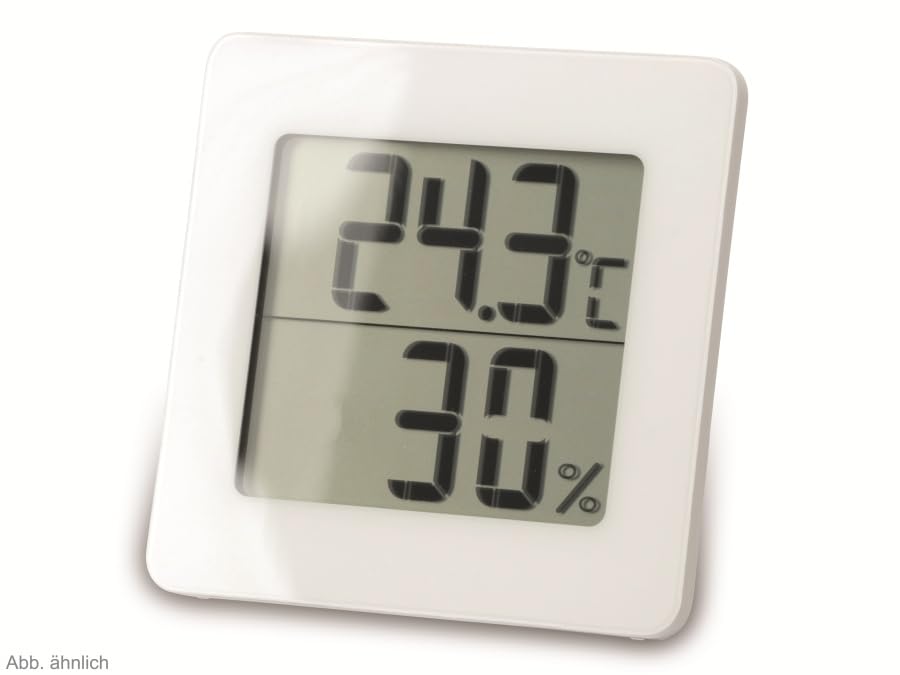
شڪل 2: متبادل view of the TFA 30.5027.02 showing different temperature and humidity readings, demonstrating the device's clear digital display.
اهم خاصيتون:
- Digital display for temperature (°C) and humidity (% RH)
- Ultra-flat design with high-gloss finish
- Comfort level indicator (smiley icon)
- Maximum and minimum value memory function
- ڀت لڳائڻ جي قابل
5. سيٽ اپ
5.1 بيٽري لڳائڻ
- ڊوائيس جي پوئين پاسي بيٽري جي ڪمپارٽمينٽ ڪَوَر کي ڳوليو.
- Remove the cover by sliding or gently prying it open.
- Insert one CR2 Lithium battery, ensuring the correct polarity (+/-) as indicated inside the compartment.
- بيٽري جي ڪمري واري ڍڪ کي محفوظ طور تي تبديل ڪريو.
- The device display should activate, showing current temperature and humidity readings.
5.2 شروعاتي جڳهه
For accurate readings, place the thermometer/hygrometer in a location free from direct sunlight, drafts, or heat sources. The device can be placed on a flat surface or mounted on a wall using the integrated mounting hole on the back.
- ڀت لڳائڻ: Use a small screw (not included) suitable for your wall type. Hang the device securely.
- ٽيبل ٽاپ جي جڳھ: Ensure the device is stable on a flat, level surface.
6. آپريٽنگ هدايتون
6.1 ڊسپلي اوورview
The large digital display shows two main values:
- اپر ڊسپلي: Current temperature in degrees Celsius (°C).
- هيٺيون ڊسپلي: Current relative humidity in percentage (% RH).
- آرام جي سطح اشارو: A small icon (e.g., a smiley face) indicates the current indoor climate comfort level based on temperature and humidity.
6.2 وڌ ۾ وڌ / منٽ فنڪشن
The device records the maximum and minimum temperature and humidity values measured since the last reset. To access these values:
- کي دٻايو MAX/MIN button (if present, typically on the back or side). The display will show the maximum recorded temperature and humidity.
- کي دٻايو MAX/MIN بٽڻ ٻيهر view the minimum recorded temperature and humidity.
- کي دٻايو MAX/MIN button a third time to return to current readings.
To reset the MAX/MIN values, press and hold the MAX/MIN button for a few seconds while viewing the MAX or MIN values. The memory will clear, and new maximum and minimum values will begin recording from that point.
6.3 آرام جي سطح جو اشارو
The comfort level indicator provides a quick visual reference for indoor climate conditions:
- Happy Face: Indicates optimal comfort (e.g., 20-25°C and 40-70% RH).
- Neutral Face: Indicates acceptable but not optimal conditions.
- Sad Face: Indicates uncomfortable conditions (e.g., too dry, too humid, too hot, or too cold).
Note: Specific ranges for comfort levels may vary slightly by model. Refer to the device's display for the exact icon representation.
7. سار سنڀال
7.1 صفائي
ڊوائيس کي نرم، ٿورڙي ڊي سان صاف ڪريوamp cloth. Do not use abrasive cleaning agents, solvents, or alcohol, as these can damage the surface and display.
7.2 بيٽري مٽائڻ
When the battery power is low, a low battery indicator (if available) will appear on the display. Replace the battery as follows:
- ڊوائيس جي پٺي تي بيٽري جي ڪمري واري ڍڪ کي کوليو.
- پراڻي CR2 ليٿيم بيٽري هٽايو.
- Insert a new CR2 Lithium battery, observing the correct polarity (+/-).
- بيٽري جي ڪمري واري ڍڪ کي بند ڪريو.
Note: After battery replacement, the device may reset, and MAX/MIN values will be cleared.
8. مسئلا حل ڪرڻ
| مسئلو | ممڪن سبب | حل |
|---|---|---|
| ڪابه ڊسپلي يا ڪمزور ڊسپلي ناهي | بيٽري ختم ٿي وئي آهي يا غلط طور تي داخل ڪئي وئي آهي. | Replace the battery with a new CR2 Lithium battery, ensuring correct polarity. |
| غلط پڙھڻ | Device is placed in an unsuitable location (e.g., near a window, heat source, or vent). | Relocate the device to a stable indoor environment away from direct influences. Allow 15-30 minutes for readings to stabilize. |
| Comfort indicator always shows the same face | Environmental conditions are consistently outside or within a specific comfort range. | This indicates the device is functioning correctly. Adjust your indoor environment if desired. |
9. وضاحتون
- ماڊل نمبر: 30.5027.02
- برانڊ: TFA
- رنگ: اڇو
- پيداوار جي ماپ (L x W x H): 10 x 1.2 x 8.2 سينٽي (3.94 x 0.47 x 3.23 انچ)
- شيء جو وزن: 70 گرام (2.47 آونس)
- بيٽري: 1 x CR2 ليٿيم (شامل)
- چڙهڻ جو قسم: ڀت جبل
- Operational Humidity Range: 20٪ کان 95٪ RH
- Upper Rated Temperature: 50°C (122°F)
- درجه حرارت جي درستگي: ±1°C
- درجه حرارت پڙهڻ جي درستگي: ±1°C
10. وارنٽي ۽ سپورٽ
For warranty information and customer support, please refer to the terms and conditions provided by your retailer or contact the manufacturer directly. Keep your proof of purchase for any warranty claims.
ٺاهيندڙ: TFA دوستمن GmbH & Co. KG
For further assistance, please visit the official TFA webسائيٽ يا انهن جي ڪسٽمر سروس کاتي سان رابطو ڪريو.


