1. اھم حفاظتي ھدايتون
Please read these instructions carefully before operating the unit and retain them for future reference. Following these guidelines will ensure safe and proper use of your GPX R602B radio.
- پاڻي ۽ نمي: Do not use this apparatus near water. Avoid exposure to rain or moisture.
- گرمي جا ذريعا: ڪنهن به گرمي جي ذريعن جي ويجهو نصب نه ڪريو جهڙوڪ ريڊيٽرز، گرمي رجسٽر، اسٽو، يا ٻيو سامان (بشمول ampلائفائرز) جيڪي گرمي پيدا ڪن ٿا.
- وينٽيليشن: مناسب وينٽيليشن کي يقيني بڻايو. ڪنهن به وينٽيليشن جي سوراخن کي بند نه ڪريو.
- طاقت جا ذريعا: Operate only from the type of power source indicated on the marking label.
- صفائي: صرف سڪل ڪپڙي سان صاف ڪريو.
- منسلڪات: ٺاهيندڙ طرفان بيان ڪيل صرف منسلڪ / لوازمات استعمال ڪريو.
- خدمت ڪرڻ: سڀني خدمتن جو حوالو ڏيو قابل خدمت اهلڪارن ڏانهن. خدمت ڪرڻ جي ضرورت پوندي آهي جڏهن سامان ڪنهن به طريقي سان خراب ٿي ويو آهي، جهڙوڪ پاور سپلائي ڪنڊ يا پلگ خراب ٿي ويو آهي، مائع ڦوڪيو ويو آهي يا شيون اپريٽس ۾ گر ٿي ويا آهن، سامان مينهن يا نمي جي سامهون آيو آهي، عام طور تي ڪم نٿو ڪري. ، يا ڇڏيو ويو آهي.
بيٽري جي حفاظت
- پراڻي ۽ نئين بيٽرين کي گڏ نه ڪريو.
- الڪائن، معياري (ڪاربن-زنڪ)، يا ريچارج لائق (نڪل-ڪيڊيميم) بيٽرين کي نه ملايو.
- Insert batteries correctly, observing the + and - polarities.
- ختم ٿيل بيٽرين کي فوري طور تي هٽايو.
- بيٽرين کي صحيح طور تي ختم ڪريو. نه ٻاريو.
2. خاصيتون
The GPX R602B Portable AM/FM Radio offers a range of features designed for convenience and versatility:
- Portable AM/FM radio with a built-in handle for easy transport.
- Integrated speakers with analog volume control and durable metal grills.
- Digital clock with user-friendly setting buttons.
- Operates using the built-in AC power cable.
- Can also be powered by 3 C batteries (sold separately) for portable use.
- 3.5mm audio line input jack for connecting external audio devices.
- Telescopic antenna for improved FM reception.
- Stereo headphone jack for private listening.

Figure 2.1: Key features and connection points of the GPX R602B radio.
3. پيڪيج مواد
Upon unpacking your GPX R602B radio, please ensure all the following items are present:
- GPX R602B Portable AM/FM Radio Unit
- مالڪ جو دستور
- Built-in AC Power Adapter
4. ڪنٽرول ۽ اشارا
Familiarize yourself with the controls and indicators on your radio for optimal operation.
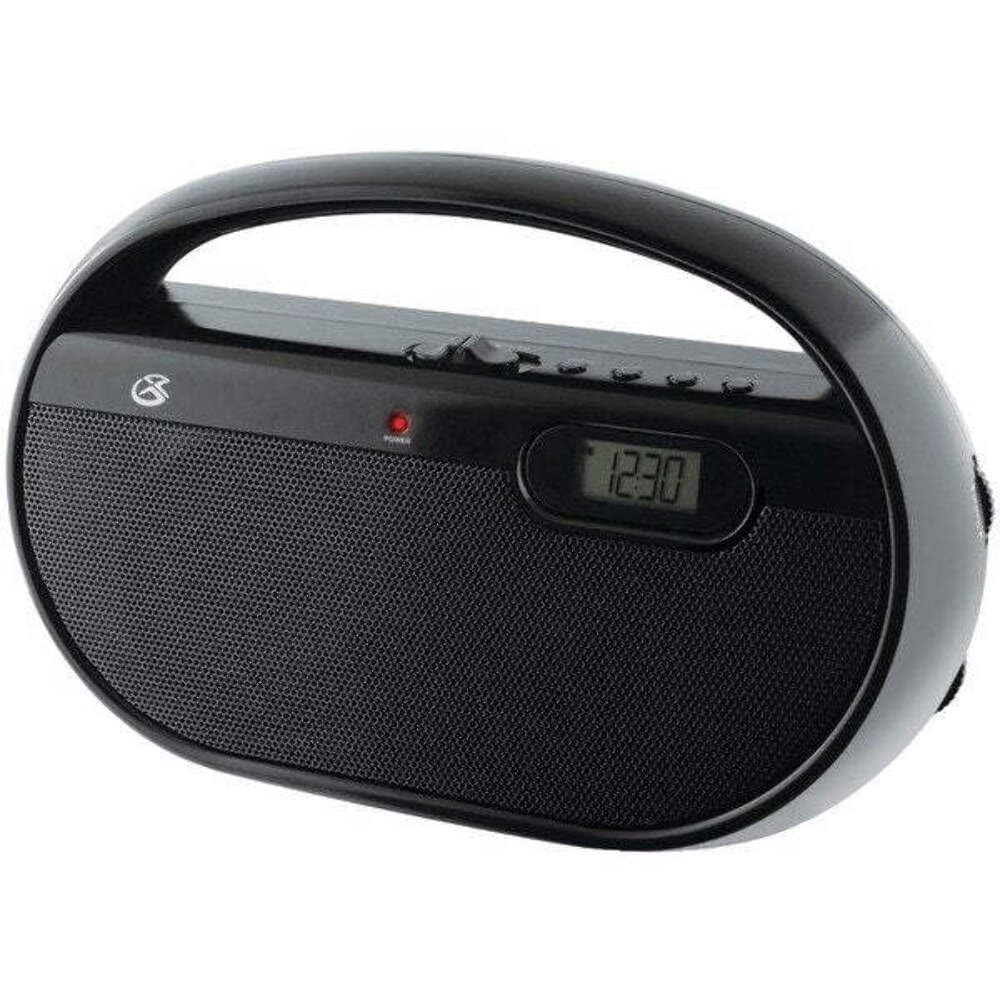
شڪل 4.1: سامهون view of the GPX R602B radio.
Control Layout (Refer to Figure 4.1)
- طاقت / حجم نوب: Rotates to turn the unit ON/OFF and adjust the volume level.
- ڳنڍڻ وارو ڪنب: Rotates to select AM or FM radio stations.
- بينڊ چونڊيندڙ سوئچ: Slides to select between AM and FM radio bands.
- ڊجيٽل ڊسپلي Shows the current time or radio frequency.
- وقت جو بٽڻ مقرر ڪريو: Used in conjunction with H/M buttons to set the clock.
- H/M Buttons: Used to adjust hours and minutes when setting the clock.
- Display Time Button: Briefly shows the time when the radio is playing.
- Aux In Jack (3.5mm): ٻاهرين آڊيو ڊوائيسز کي ڳنڍيو.
- هيڊ فون جڪ (3.5mm): نجي listeningڻ لاءِ هيڊ فون جوڙيو.
- Telescopic FM Antenna: Extend and adjust for optimal FM reception.
5. يونٽ کي طاقت ڏيڻ
The GPX R602B radio can be powered by either AC power or batteries.
اي سي پاور آپريشن
- Locate the built-in AC power cord. This cord is typically stored in the battery compartment when not in use.
- Plug the AC power cord into a standard wall outlet (120V AC, 60Hz).
- يونٽ هاڻي آپريشن لاء تيار آهي.
بيٽري پاور آپريشن
For portable use, the radio requires 3 'C' size batteries (not included).
- يونٽ جي پوئين پاسي بيٽري جي ڀرپاسي جا coverڪ کوليو.
- Insert 3 'C' size batteries, ensuring the correct polarity (+ and -) as indicated inside the compartment.
- بيٽري جي ڪمري واري ڍڪ کي محفوظ طور تي بند ڪريو.
- The unit is now ready for battery-powered operation.

Figure 5.1: Power options for the GPX R602B radio.
6. سيٽ اپ ۽ بنيادي آپريشن
شروعاتي سيٽ اپ
- پاور ڪنيڪشن: Connect the radio to AC power or insert batteries as described in Section 5.
- اينٽينا جي ترتيب: For FM reception, extend the telescopic antenna fully. For AM reception, the unit has a built-in antenna, so no external adjustment is needed. Position the unit for best AM reception.
ريڊيو آپريٽنگ
- هلايو: Rotate the Power/Volume knob clockwise until it clicks and the unit powers on.
- بينڊ چونڊيو: Slide the Band Selector switch to either AM or FM.
- ٽيون اسٽيشن: Rotate the Tuning knob to find your desired radio station. The frequency will be displayed on the digital screen.
- حجم کي ترتيب ڏيو: Rotate the Power/Volume knob to adjust the sound level.
- بند ڪريو: Rotate the Power/Volume knob counter-clockwise until it clicks and the unit powers off.
Using the Line Input (Aux In)
You can connect external audio devices, such as smartphones or MP3 players, to play audio through the radio's speakers.
- Connect a 3.5mm audio cable (not included) from the headphone jack or line-out jack of your external device to the Aux In jack on the radio.
- Turn on the radio and your external device.
- Adjust the volume on both the radio and your external device for optimal sound.

Figure 6.1: Devices compatible with the Aux In feature.
هيڊفون استعمال ڪندي
For private listening, plug standard 3.5mm headphones (not included) into the Headphone Jack. The internal speakers will automatically mute.
ڊجيٽل ڪلاڪ سيٽنگ
The digital clock can be set when the radio is turned off.
- Ensure the radio is turned OFF using the Power/Volume knob.
- ٻنهي کي دٻايو ۽ رکو وقت مقرر ڪريو بٽڻ ۽ ايڇ/ ايم ساڳئي وقت بٽڻ.
- رکڻ دوران وقت مقرر ڪريو button, repeatedly press the ايڇ/ ايم button to adjust the hour and then the minutes.
- جاري ڪريو وقت مقرر ڪريو button once the desired time is set.
- جي طرف view the time while the radio is playing, press the ڊسپلي وقت button. The time will appear briefly on the digital display.
7. سار سنڀال
Proper care and maintenance will ensure the longevity of your GPX R602B radio.
- صفائي: يونٽ جي ٻاهرين حصي کي نرم، سڪل ڪپڙي سان صاف ڪريو. رگڙيندڙ صاف ڪندڙ، موم، يا محلول استعمال نه ڪريو.
- بيٽري مٽائڻ: If using batteries, replace all three 'C' batteries when the unit's performance diminishes. Always replace with new batteries of the same type.
- اسٽوريج: جيڪڏهن يونٽ کي گهڻي عرصي تائين ذخيرو ڪري رهيا آهيو، ته پوءِ بيٽرين کي هٽائي ڇڏيو ته جيئن رسي ۽ سنکنرن کي روڪي سگهجي.
8. مسئلا حل ڪرڻ
If you encounter issues with your GPX R602B radio, refer to the following common problems and solutions:
| مسئلو | ممڪن سبب | حل |
|---|---|---|
| طاقت نه آهي | AC cord not plugged in; Batteries exhausted or incorrectly inserted. | Ensure AC cord is securely plugged into a live outlet. Replace batteries with new ones, checking polarity. |
| ناقص ريڊيو استقبال | Antenna not extended (FM); Unit poorly positioned (AM); Weak signal. | Extend and adjust the telescopic FM antenna. For AM, rotate the unit for better reception. Try moving the radio to a different location. |
| .الهائيندڙن مان آواز ڪونهي | آواز تمام گهٽ آهي؛ هيڊفون ڳنڍيل آهن. | Increase the volume using the Power/Volume knob. Disconnect headphones if not desired. |
| Clock not setting correctly | غلط بٽڻ جي ترتيب. | Ensure the radio is OFF. Press and hold both 'Set Time' and 'H/M' buttons simultaneously, then repeatedly press 'H/M' to adjust. Release 'Set Time' when done. |
| آواز خراب يا غير واضح | Volume too high; Poor reception; External device volume too high. | Lower the volume. Adjust antenna or unit position for better reception. If using Aux In, adjust volume on the external device. |
9. وضاحتون
Detailed technical specifications for the GPX R602B Portable AM/FM Radio:
- ماڊل نمبر: آر 602 بي
- پيداوار جي ماپ (L x W x H): 9.62 x 3.74 x 6.3 انچ (24.43 x 9.50 x 16.00 سينٽي)
- شيء جو وزن: 1.76 پائونڊ (0.80 ڪلوگرام)
- طاقت جو ذريعو: AC 120V, 60Hz or 3 x 'C' size batteries (not included)
- ٽونر ٽيڪنالاجي: ايم / ايف ايم
- ريڊيو بينڊ جي حمايت ڪئي وئي: 2-Band (AM/FM)
- رابطي ٽيڪنالاجي: Radio, 3.5mm Aux In
- خاص خاصيتون: Built-In AM Antenna, Built-In Clock, Portable, Telescopic FM Antenna, 3.5mm Headphone Jack
- رنگ: ڪارو
- ٺاهيندڙ: ڊجيٽل پراڊڪٽس انٽرنيشنل, Inc.
- تاريخ پهرين دستياب: 5 جون 2012
10. وارنٽي ۽ سپورٽ
For warranty information and customer support regarding your GPX R602B radio, please refer to the warranty card included with your purchase or visit the official GPX webسائيٽ. ڪنهن به وارنٽي دعوائن لاءِ خريداري جي ثبوت طور پنهنجي خريداري جي رسيد رکو.
If you require technical assistance or have questions not covered in this manual, please contact GPX customer service directly. Contact details are typically available on the manufacturer's webسائيٽ يا پيداوار جي پيڪنگنگ ۾.


