تعارف
This manual provides detailed instructions for the installation, operation, and maintenance of your Akasa AK-CC7108EP01 CPU Cooler. Please read this manual thoroughly before installation and use to ensure proper function and longevity of the product. This CPU cooler is designed to efficiently dissipate heat from your computer's central processing unit (CPU), maintaining optimal operating temperatures.
حفاظت جي ڄاڻ
- ڪنهن به جزو کي انسٽال ڪرڻ يا هٽائڻ کان اڳ هميشه پنهنجي ڪمپيوٽر مان بجلي بند ڪريو.
- Handle the CPU cooler and CPU with care to avoid damage to pins or components.
- Wear an anti-static wrist strap or frequently touch a grounded metal object to prevent electrostatic discharge (ESD) damage to sensitive electronic components.
- ٻارن جي پهچ کان پري رکو.
- Ensure proper ventilation inside your computer case.
پيڪيج مواد
پڪ ڪريو ته سڀئي شيون پيڪيج ۾ موجود آهن:
- Akasa AK-CC7108EP01 CPU Cooler (Heatsink with pre-attached fan)
- Integrated push-pin mounting mechanism
- Pre-applied thermal interface material (TIM) on the heatsink base
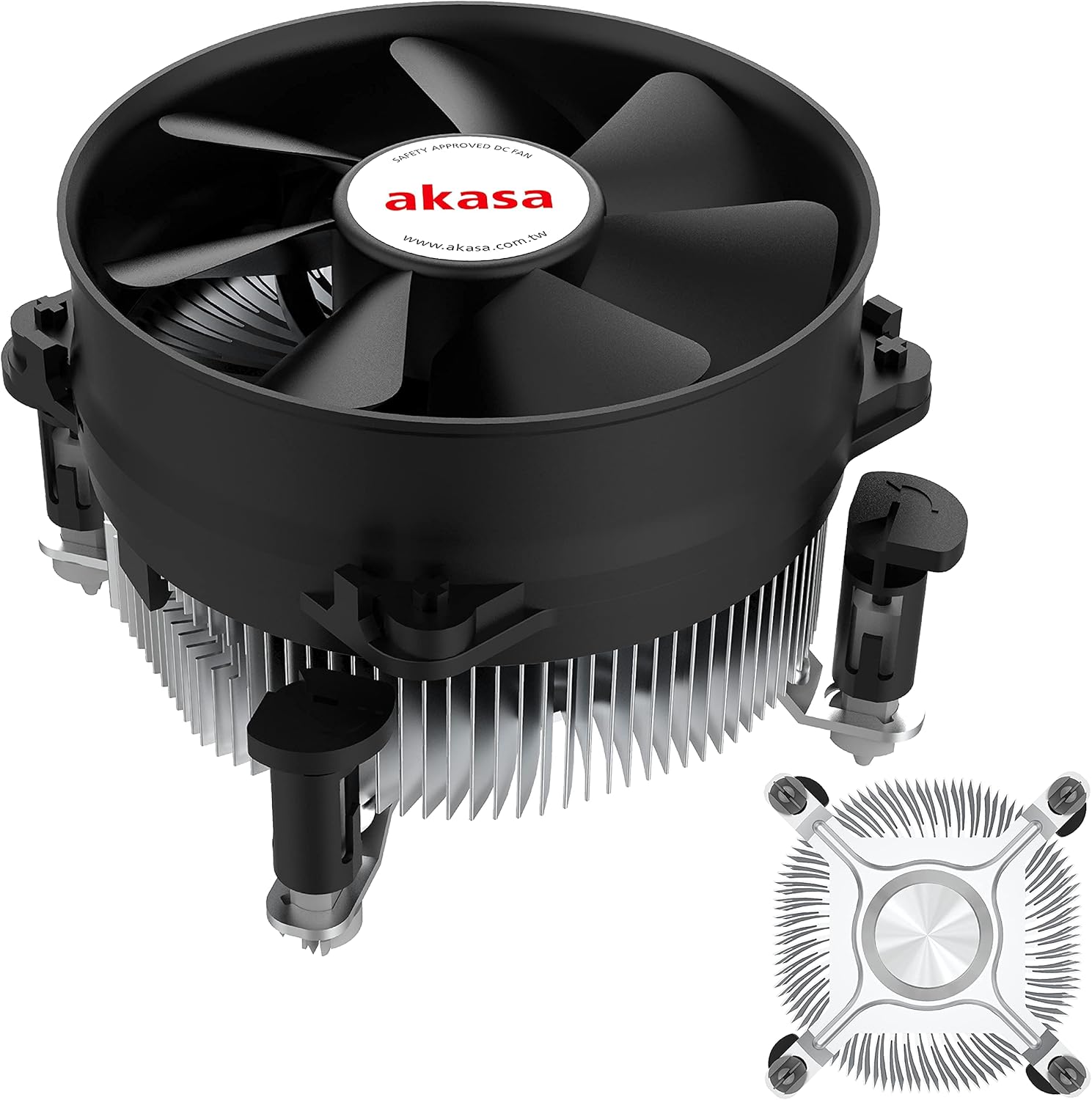
شڪل 1: The Akasa AK-CC7108EP01 CPU Cooler, showing the fan, heatsink, and push-pin mounting system.
سيٽ اپ ۽ تنصيب
This section details the steps required to install the Akasa AK-CC7108EP01 CPU cooler onto your motherboard. This cooler utilizes a push-pin mounting system compatible with specific Intel sockets (e.g., LGA775, LGA115x).
1. تياري
- بجلي بند: پڪ ڪريو ته توهان جو ڪمپيوٽر مڪمل طور تي بند آهي ۽ وال آئوٽليٽ کان ان پلگ ٿيل آهي.
- Access Motherboard: Open your computer case to gain access to the motherboard and CPU socket.
- Remove Old Cooler (if applicable): If replacing an existing cooler, carefully remove it. Clean any old thermal paste from the CPU surface using isopropyl alcohol and a lint-free cloth.
- Inspect CPU: پڪ ڪريو ته سي پي يو صحيح طرح سان ان جي ساڪٽ ۾ رکيل آهي ۽ برقرار رکڻ وارو بازو بند ٿيل آهي.
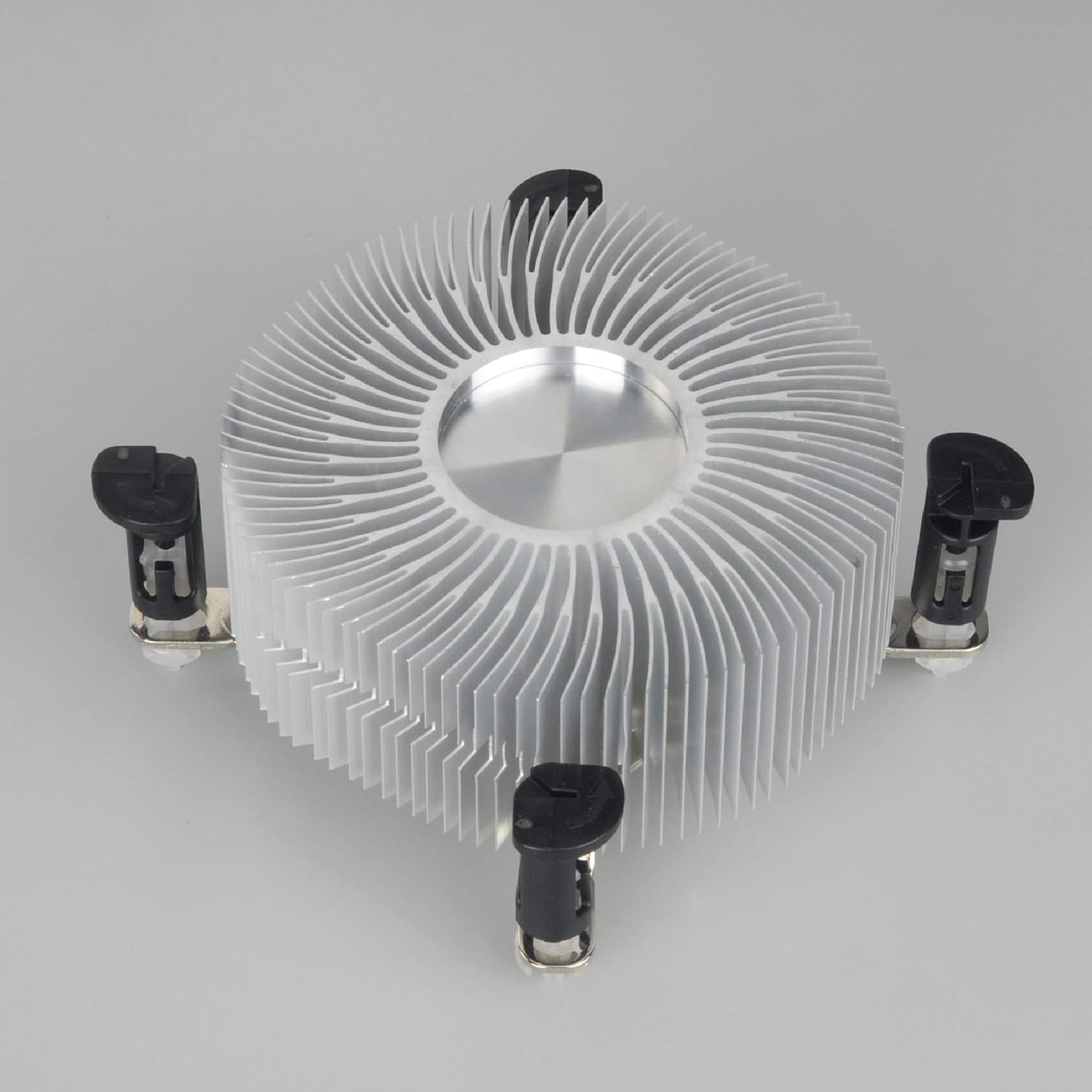
شڪل 2: هيٺان view of the heatsink, showing the pre-applied thermal paste and the four push-pin mounting posts.
2. Mounting the Cooler
- Align Cooler: Carefully align the four push-pins on the cooler with the four mounting holes around the CPU socket on the motherboard.
- Push Pins Down: Press down firmly and evenly on each of the four push-pins until they click into place. You should hear a distinct click for each pin, indicating it has secured properly. Ensure all four pins are fully engaged.
- محفوظ فٽ جي تصديق ڪريو: Gently tug on the cooler to ensure it is securely attached to the motherboard and does not wobble. If it feels loose, re-engage the push-pins.
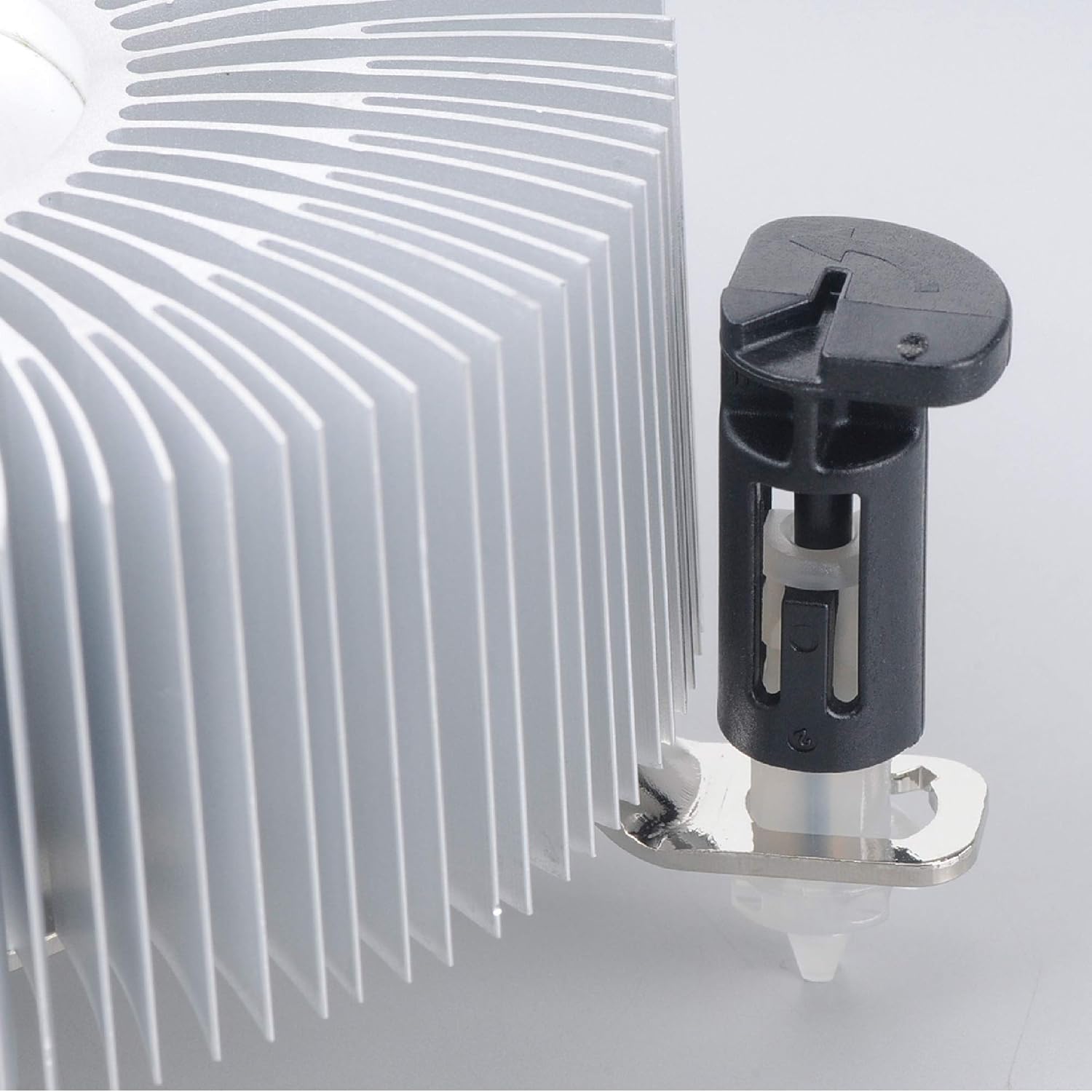
شڪل 3: Detail of the push-pin mechanism. Ensure the black pin is pushed down through the white anchor to secure the cooler.
3. Connecting the Fan
- Locate CPU_FAN Header: Find the 4-pin CPU_FAN header on your motherboard. Refer to your motherboard manual if you are unsure of its location.
- فين ڪيبل ڳنڍيو: Connect the 4-pin fan cable from the Akasa cooler to the CPU_FAN header on the motherboard. Ensure the connector is oriented correctly.

شڪل 4: پاسي view of the Akasa CPU cooler, highlighting the 4-pin fan power cable for connection to the motherboard.
4. آخري مرحلو
- ڪيس بند ڪريو: Once the cooler is securely installed and the fan connected, close your computer case.
- پاور آن: پنهنجي ڪمپيوٽر تي پاور ڪيبل ۽ پاور کي ٻيهر ڳنڍيو.
- BIOS/UEFI چيڪ: Enter your system's BIOS/UEFI settings to verify that the CPU fan is detected and operating at appropriate speeds. Monitor CPU temperatures during initial use to ensure proper cooling.
آپريٽنگ هدايتون
The Akasa AK-CC7108EP01 CPU cooler operates automatically once installed and connected to the motherboard's CPU_FAN header. The 4-pin connector allows the motherboard to control the fan speed (PWM - Pulse Width Modulation) based on CPU temperature, optimizing cooling performance and noise levels.
- خودڪار رفتار ڪنٽرول: The fan speed will adjust dynamically according to the CPU's thermal load.
- نگراني: You can monitor CPU temperatures and fan speeds using motherboard monitoring software or within the BIOS/UEFI settings.
- بهترين ڪارڪردگي: Ensure adequate airflow within your computer case to support the cooler's performance.
سار سنڀال
Regular maintenance helps ensure optimal performance and extends the lifespan of your CPU cooler.
- مٽي هٽائڻ: Periodically (e.g., every 3-6 months), power off and unplug your computer. Open the case and use compressed air to gently blow dust out of the heatsink fins and fan blades. Hold the fan blades to prevent them from spinning rapidly during cleaning, which can damage the fan motor.
- چڪاس: Check the fan for any signs of damage or excessive noise. Ensure the cooler remains securely mounted to the motherboard.
- حرارتي پيسٽ: The pre-applied thermal paste is designed for long-term use. If you ever need to remove and re-install the cooler, it is recommended to clean off the old thermal paste from both the CPU and heatsink and apply a fresh layer of high-quality thermal paste.
مشڪلاتون
If you encounter issues with your Akasa AK-CC7108EP01 CPU cooler, refer to the following common problems and solutions:
- مسئلو: CPU temperatures are high.
حل:
- Ensure the cooler is securely mounted and all four push-pins are fully engaged.
- Verify the fan cable is correctly connected to the CPU_FAN header on the motherboard.
- Check for excessive dust buildup on the heatsink fins and fan blades, and clean if necessary.
- Confirm that the thermal paste application is adequate. If the cooler was removed and reinstalled without fresh thermal paste, reapply it.
- Ensure proper airflow within the computer case.
- مسئلو: فين نه ٿو ڦري.
حل:
- Check the fan cable connection to the CPU_FAN header.
- Verify that the CPU_FAN header is enabled in the BIOS/UEFI settings.
- Ensure no cables or obstructions are preventing the fan blades from spinning.
- مسئلو: پنکڙو تمام گهڻو شور ڪري رهيو آهي.
حل:
- Clean any dust from the fan blades.
- Check if the fan is rubbing against any cables or components.
- In BIOS/UEFI, adjust fan speed curves if available, to reduce fan speed at lower temperatures.
- If the noise persists and is a grinding or rattling sound, the fan bearing may be failing, and replacement might be necessary.
وضاحتون
The following table outlines the technical specifications for the Akasa AK-CC7108EP01 CPU Cooler:
| خاصيت | تفصيل |
|---|---|
| برانڊ | اڪاسا |
| ماڊل | AK-CC7108EP01 |
| مطابقت رکندڙ ڊوائيسز | Desktop (Intel LGA775, LGA115x) |
| کولڻ جو طريقو | هوا |
| مواد | المونيم |
| وڌ ۾ وڌ گھمڻ واري رفتار | 1800 RPM |
| شور جي سطح | 92 ڊيسيبل (وڌ ۾ وڌ) |
| جلدtage | 12 وولٽ |
| واتtage | 77 واٽ (ٽي ڊي پي) |
| پاور کنیکٹر جو قسم | 4-Pin PWM |
| پيداوار جي ماپ | 9.5 x 9.5 x 5.85 سينٽي |
| شيءِ جو وزن | 290.3 جي |
وارنٽي ۽ سپورٽ
For warranty information and technical support, please refer to the official Akasa webسائيٽ تي وڃو يا پنهنجي پرچون ڪندڙ سان رابطو ڪريو. وارنٽي دعوائن لاءِ خريداري جو ثبوت رکو.


