تعارف
This manual provides comprehensive instructions for the installation, operation, and maintenance of your Dell DW1397 Broadcom 802.11a/b/g Wireless Card. Please read this manual carefully before proceeding with installation to ensure proper functionality and to avoid potential issues.
Important Compatibility Note: This wireless card is not compatible with IBM, Lenovo, Thinkpad, or HP brand laptops. Attempting to install it in these systems may result in non-functionality or system instability.
پيداوار ختمview

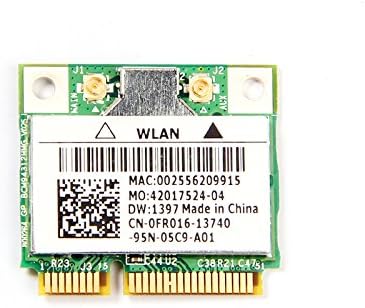
The Dell DW1397 Broadcom Wireless Card is an internal Mini PCI Express component designed to provide wireless network connectivity to compatible laptops. It supports 802.11a/b/g standards, operating on both 2.4 GHz and 5 GHz frequency bands, with a maximum data transfer rate of 54 Mbps.
- ماڊل: Dell DW1397 (Broadcom BCM94312HMG)
- وائرليس معيار: 802.11a/b/g compliant
- فريسي بيڊس: 2.4 GHz يا 5 GHz
- ڊيٽا جي شرح: 54 Mbps تائين
- انٽرفيس: ميني PCI ايڪسپريس
سيٽ اپ ۽ تنصيب
Installing the Dell DW1397 wireless card requires opening your laptop. If you are not comfortable performing this procedure, it is recommended to seek assistance from a qualified technician. Ensure your laptop is powered off and disconnected from all power sources before beginning.
- پنھنجي ڪم جي جڳھ کي تيار ڪريو: صاف، جامد کان پاڪ مٿاڇري تي ڪم ڪريو. اينٽي اسٽيٽڪ کلائي پٽي استعمال ڪرڻ تي غور ڪريو.
- Power Down Laptop: Shut down your laptop completely and remove the battery. Disconnect the AC adapter.
- Access Mini PCI Express Slot: Refer to your laptop's service manual for instructions on how to open the chassis and locate the Mini PCI Express slot. This often involves removing a bottom panel or keyboard.
- پراڻو ڪارڊ هٽايو (جيڪڏهن قابل اطلاق هجي): If replacing an existing wireless card, carefully disconnect any antenna cables attached to it and remove the screw securing the card. Gently slide the old card out of the slot.
- Install New Card: Align the Dell DW1397 card with the Mini PCI Express slot. Gently push the card into the slot at an angle until it is fully seated. Press the card down and secure it with the screw.
- اينٽينا ڳنڍيو: Carefully reattach the antenna cables to the corresponding connectors on the new wireless card. Ensure a secure connection.
- ليپ ٽاپ کي ٻيهر گڏ ڪريو: Close the laptop chassis, reinsert the battery, and reconnect the AC adapter.
- انسٽال ڪريو ڊرائيور: Power on your laptop. Windows may automatically detect and install basic drivers. If not, you may need to download the latest drivers from the Dell or Broadcom support website for your specific laptop model and operating system.
آپريٽنگ هدايتون
Once the wireless card is installed and drivers are in place, you can connect to wireless networks.
- وائي فائي کي فعال ڪريو: Ensure your laptop's Wi-Fi function is enabled. This is often done via a physical switch, a function key combination (e.g., Fn + F2), or through software settings in your operating system.
- Connect to a Network (Windows):
- Click the Wi-Fi icon in the system tray (usually bottom-right corner).
- Select your desired wireless network from the list of available networks.
- "ڪنيڪٽ" تي ڪلڪ ڪريو ۽ جيڪڏهن اشارو ڪيو وڃي ته نيٽ ورڪ سيڪيورٽي ڪي (پاسورڊ) داخل ڪريو.
- هڪ دفعو ڳنڍيل ٿيڻ کان پوءِ، وائي فائي آئڪن هڪ فعال ڪنيڪشن جي نشاندهي ڪندو.
- Connect to a Network (Other OS): Consult your operating system's documentation for specific steps to connect to a wireless network.
سار سنڀال
The Dell DW1397 wireless card requires minimal maintenance. Follow these guidelines to ensure optimal performance:
- ڊرائيور اپڊيٽ: Periodically check the Dell or Broadcom support websites for updated drivers. Keeping your drivers current can improve performance, stability, and security.
- سسٽم تازه ڪاريون: Ensure your operating system is up-to-date, as system updates often include network-related improvements.
- جسماني معائنو: If you experience persistent issues, a physical inspection of the card and antenna connections (after powering down the laptop) can help identify loose connections.
مشڪلاتون
| مسئلو | ممڪن سبب | حل |
|---|---|---|
| No Wi-Fi networks detected. | Wi-Fi disabled, incorrect drivers, card not seated correctly. |
|
| Cannot connect to a specific network. | Incorrect password, network out of range, router issue. |
|
| وائي فائي جي رفتار گهٽ. | Interference, outdated drivers, network congestion. |
|
| Card not recognized by laptop. | Incompatible laptop model, improper installation, faulty card. |
|
وضاحتون
| خاصيت | تفصيل |
|---|---|
| برانڊ | براڊڪام |
| ماڊل | DW1397 (BCM94312HMG) |
| ھارڊويئر انٽرفيس | ميني PCI ايڪسپريس |
| وائرليس معيار | 802.11a/b/g |
| فريکوئنسي بينڊ | 2.4 GHz، 5 GHz |
| ڊيٽا جي منتقلي جي شرح | 54 Mbps تائين |
| مطابقت رکندڙ ڊوائيسز | Laptop (excluding IBM/Lenovo/Thinkpad/HP) |
| شيءِ جو وزن | 0.8 اونس |
| پيڪيج جي ماپ | 6.4 x 4.8 x 0.4 انچ |
| يو پي سي | 613846759409 |
وارنٽي ۽ سپورٽ
This product is typically covered by the manufacturer's standard warranty. For specific warranty terms, duration, and support, please refer to the documentation provided with your purchase or visit the official Broadcom support website. For driver downloads and further technical assistance, please visit the Dell or Broadcom support portals.
- Broadcom Support: www.broadcom.com/support
- Dell Support: www.dell.com/ سپورٽ


