1. تعارف
The Planet GT-802S is a Gigabit Media Converter designed to convert 10/100/1000Base-T Ethernet signals to 1000Base-LX fiber optic signals. This device facilitates the extension of network distances over single-mode fiber, supporting distances up to 10 kilometers. It is compatible with IEEE 802.3, 802.3u, 802.3ab, and 802.3z standards, offering a reliable solution for various networking environments.
2. خاصيتون
- Converts 10/100/1000Base-T to 1000Base-LX fiber.
- Supports single-mode fiber with SC connector.
- Operates at 1310nm wavelength.
- Extends network distance up to 10 kilometers.
- پلگ ۽ راند جي انسٽاليشن.
- Can operate standalone or within a media converter chassis (e.g., Planet MC-700/MC-1000R/MC-1500).
3. پيڪيج مواد
تصديق ڪريو ته توھان جي پيڪيج ۾ ھيٺيون شيون شامل آھن:
- Planet GT-802S Gigabit Media Converter
- 5V DC پاور اڊاپٽر
- استعمال ڪندڙ جو دستياب (ھي دستاويز)

شڪل 3.1: Package contents showing the GT-802S media converter and its power adapter.
4. جسماني تفصيل
4.1 فرنٽ پينل
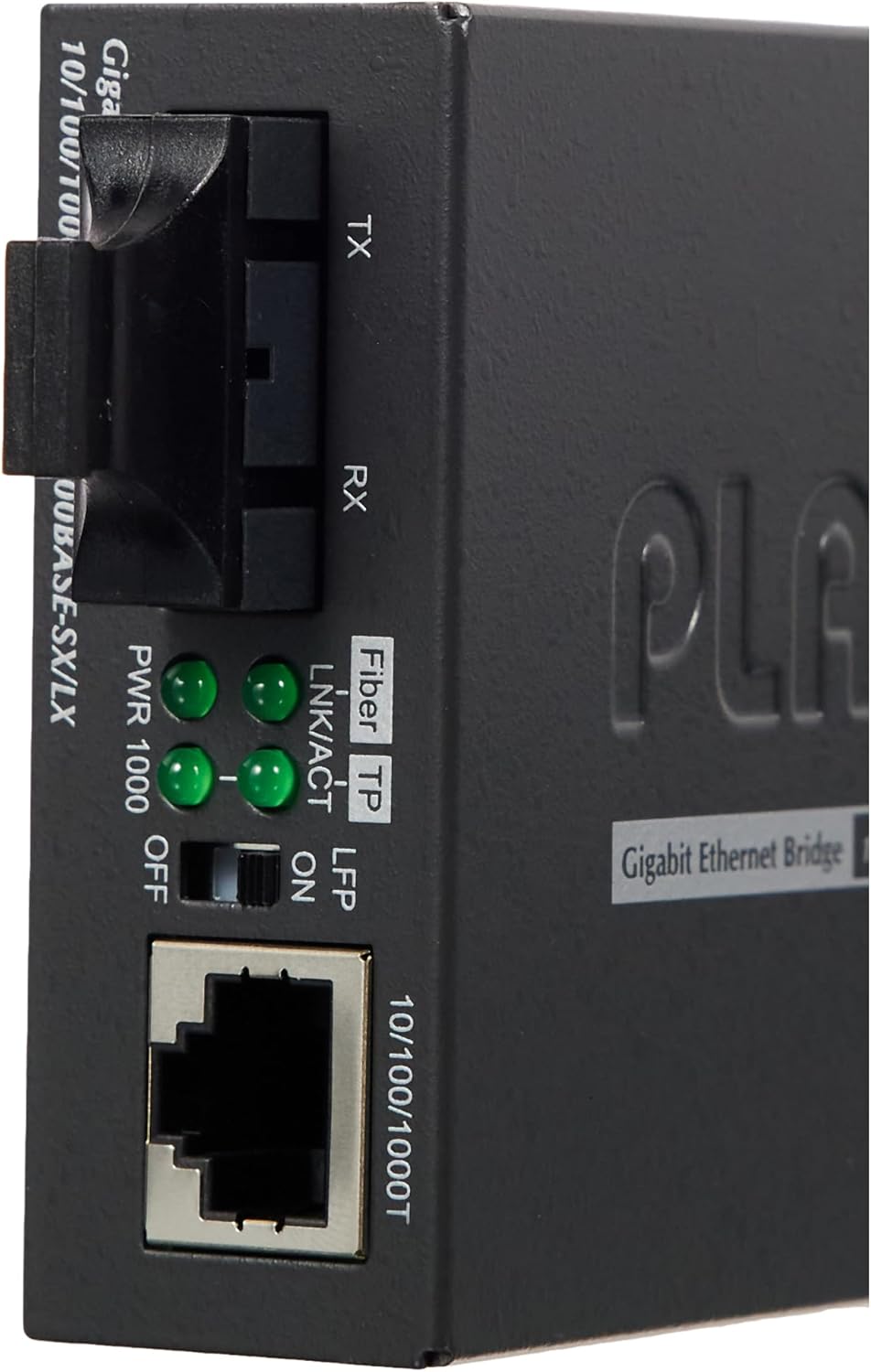
شڪل 4.1: سامهون پينل view of the GT-802S with ports and LED indicators.
The front panel of the GT-802S features the following components:
- 10/100/1000T Port: An RJ-45 connector for connecting to an Ethernet network device (e.g., switch, router, computer) using a standard Ethernet cable.
- Fiber Port (SC): An SC-type connector for single-mode fiber optic cable connection. This port consists of two parts: TX (transmit) and RX (receive).
- LED اشارا: Several LEDs provide status information:
- PWR: پاور انڊيڪيٽر. جڏهن ڊوائيس آن هجي ته روشني ٿئي ٿي.
- 1000: Indicates a 1000Mbps (Gigabit) Ethernet connection on the RJ-45 port.
- LNK/ACT (TP): Link/Activity indicator for the RJ-45 (Twisted Pair) port. Lit when a link is established, blinks when data is being transmitted or received.
- LNK/ACT (Fiber): Link/Activity indicator for the Fiber port. Lit when a fiber link is established, blinks when data is being transmitted or received.
- LFP (Link Fault Pass-through): Indicates the status of the Link Fault Pass-through function.
4.2 ريئر پينل

شڪل 4.2: پوئتي پينل view of the GT-802S with power input and product label.
The rear panel includes the 5V DC پاور ان پٽ for connecting the provided power adapter. It also features the product label with model number, serial number (e.g., AA402422302069), input specifications (5V, 2A), and regulatory compliance markings.

شڪل 4.3: Close-up of the GT-802S product label.
4.3 طول و عرض

شڪل 4.4: GT-802S size comparison.
The device measures approximately 2.72 x 3.82 x 1.02 inches (6.9 x 9.7 x 2.6 cm).
5. سيٽ اپ
Follow these steps to set up your GT-802S Media Converter:
- پاور ڪنيڪشن: Connect the provided 5V DC power adapter to the power input port on the rear panel of the GT-802S. Plug the adapter into a standard electrical outlet. The PWR LED on the front panel should illuminate.
- Ethernet ڪنيڪشن: Connect one end of an Ethernet cable (Cat5e or higher) to the 10/100/1000T RJ-45 port on the GT-802S. Connect the other end of the Ethernet cable to your network device (e.g., switch, router, PC). The LNK/ACT (TP) LED should light up, and the 1000 LED should light up if a Gigabit connection is established.
- Fiber Optic Connection: Connect a single-mode fiber optic cable with SC connectors to the Fiber TX and RX ports on the GT-802S. Ensure the fiber cable is connected to a compatible fiber optic device at the other end. The LNK/ACT (Fiber) LED should light up when a stable fiber link is established.
نوٽ: Ensure all cables are securely connected. For optimal performance, use high-quality cables.
6. آپريٽنگ
Once properly set up, the GT-802S operates automatically. The LED indicators provide real-time status information:
- PWR (سائو): اشارو ڪري ٿو ته ڊوائيس طاقت حاصل ڪري رهي آهي.
- 1000 (سائو): Indicates the RJ-45 port is operating at 1000Mbps. If off, it's operating at 10/100Mbps.
- LNK/ACT (TP) (Green): Solid light indicates a valid Ethernet link. Blinking indicates data activity.
- LNK/ACT (Fiber) (Green): Solid light indicates a valid fiber link. Blinking indicates data activity.
- LFP (Green): Indicates the status of the Link Fault Pass-through function. Consult the full product manual for detailed LFP functionality.
7. سار سنڀال
To ensure the longevity and proper functioning of your GT-802S Media Converter, observe the following maintenance guidelines:
- Keep the device in a cool, dry environment, away from direct sunlight and heat sources.
- يونٽ جي چوڌاري مناسب وينٽيليشن کي يقيني بڻايو وڃي.
- نرم، سڪل ڪپڙي سان ٻاهرين حصي کي صاف ڪريو. مائع يا ايروسول ڪلينر استعمال نه ڪريو.
- Regularly inspect fiber optic connectors for dust or damage. Clean fiber connectors using appropriate fiber cleaning tools if necessary.
- ڊوائيس جي چوٽي تي ڳري شيون رکڻ کان پاسو ڪريو.
8. مسئلا حل ڪرڻ
If you encounter issues with your GT-802S, refer to the following common problems and solutions:
| مسئلو | ممڪن سبب | حل |
|---|---|---|
| بجلي ناهي (PWR LED بند) | پاور اڊاپٽر ڳنڍيل نه آهي يا خراب آهي؛ پاور آئوٽليٽ ڪم نه ڪري رهيو آهي. | Ensure power adapter is securely connected to the device and a working power outlet. Test the outlet with another device. Replace power adapter if faulty. |
| No Ethernet Link (LNK/ACT TP LED off) | Ethernet cable faulty or disconnected; connected device is off or faulty; incorrect cable type. | Check Ethernet cable connections. Try a different cable. Ensure the connected network device is powered on and functioning correctly. |
| No Fiber Link (LNK/ACT Fiber LED off) | Fiber cable faulty or disconnected; fiber connectors dirty; connected fiber device is off or faulty; incorrect fiber type. | Check fiber cable connections. Ensure fiber connectors are clean. Verify the connected fiber device is operational and compatible. Ensure single-mode fiber is used. |
| Slow Ethernet Speed (1000 LED off) | Connected Ethernet device does not support Gigabit speed; cable quality. | Ensure the connected device's port supports 1000Mbps. Use a high-quality Cat5e or Cat6 Ethernet cable. |
9. وضاحتون
| خاصيت | تفصيل |
|---|---|
| ماڊل | جي تي-802S |
| Ethernet پورٽ | 1 x 10/100/1000Base-T RJ-45 |
| فائبر پورٽ | 1 x 1000Base-LX SC (Single Mode) |
| موج | 1310nm |
| مفاصلو | 10 ڪلوميٽر |
| معيار | IEEE 802.3, 802.3u, 802.3ab, 802.3z |
| پاور ان پٽ | 5V ڊي سي، 2 اي |
| پيداوار جي ماپ (L x W x H) | 3.82 x 2.72 x 1.02 انچ (9.7 x 6.9 x 2.6 سينٽي) |
| شيءِ جو وزن | 7.1 آونس (201 گرام) |
| آپريٽنگ جي درجه حرارت | 0°C کان 50°C (32°F کان 122°F) (عام) |
| اسٽوريج جي درجه حرارت | -20°C to 70°C (-4°F to 158°F) (Typical) |
| نمي | 5٪ کان 90٪ غير ڪنڊينسنگ |
| ٺاهيندڙ | سيارو ٽيڪنالاجي |
| تاريخ پهرين دستياب | اپريل 21، 2013 |
10. وارنٽي ۽ سپورٽ
The Planet GT-802S Media Converter is manufactured by Planet Technology. For warranty information, technical support, or service inquiries, please refer to the official Planet Technology website or contact their customer support directly. Specific warranty terms and conditions may vary by region and retailer.


