1. تعارف ۽ اوورview
This manual provides comprehensive instructions for the setup, operation, maintenance, and troubleshooting of your InFocus IN3124 Projector. Designed for clarity and ease of use, this guide will help you maximize your projector's performance and longevity.
The InFocus IN3124 is a high-performance projector featuring XGA (1024 x 868) native resolution, 4800 lumens of brightness, and a 3000:1 contrast ratio, making it suitable for various presentation environments. Its portable design allows for flexible placement and usage.
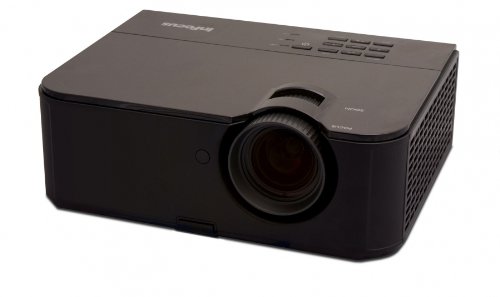
شڪل 1: اڳيون پاسو view of the InFocus IN3124 Projector, highlighting the main lens and the top-mounted control panel.
2. سيٽ اپ
2.1 کولڻ
Carefully remove the projector and all accessories from the packaging. Verify that all components listed in the packing list are present. Retain the original packaging for future transport or storage.
2.2 لڳائڻ
Position the projector on a stable, level surface. Ensure adequate ventilation around the unit to prevent overheating. Maintain a clear path between the projector lens and the projection screen or surface. The optimal projection distance will vary based on the desired screen size.
2.3 ڳنڍڻ واري طاقت
- پاور ڪنڊ کي پروجيڪٽر جي پاور ان پٽ سان ڳنڍيو.
- پاور ڪنڊ جي ٻئي پڇاڙيءَ کي گرائونڊ ٿيل برقي آئوٽليٽ ۾ لڳايو.
2.4 ان پٽ ذريعن کي ڳنڍڻ
The IN3124 projector supports various input sources. Connect your video source (e.g., computer, DVD player) to the appropriate input port on the projector. Common ports include VGA and HDMI (if available on your specific model).
- VGA: Use a VGA cable to connect to a computer's video output.
- HDMI: Use an HDMI cable for digital video and audio (check projector for HDMI port availability).
3. آپريٽنگ هدايتون
3.1 پاور آن/آف
- پاور آن ڪرڻ: Press the power button on the projector's control panel or the remote control. The power indicator light will illuminate.
- پاور آف ڪرڻ: Press the power button twice. The projector will enter a cooling cycle before shutting down completely. Do not unplug the projector during the cooling cycle.
3.2 Adjusting Focus and Zoom
Rotate the focus ring on the projector lens until the image appears sharp and clear. Use the zoom ring (if present) to adjust the image size to fit your screen.
3.3 ان پٽ ذريعن جي چونڊ
Press the "Source" or "Input" button on the projector's control panel or remote control to cycle through available input sources (e.g., VGA, HDMI). Select the input corresponding to your connected device.
3.4 Menu Navigation and Keystone Correction
Use the menu buttons on the projector or remote to access the On-Screen Display (OSD). Navigate through the menu options to adjust settings such as brightness, contrast, color, and keystone correction. Keystone correction helps to square the image if the projector is not perfectly perpendicular to the screen.
4. سار سنڀال
4.1 لينس صاف ڪرڻ
پروجيڪٽر لينس کي نرم، لِنٽ فري ڪپڙي سان نرميءَ سان صاف ڪريو جيڪو خاص طور تي آپٽيڪل سطحن لاءِ ٺهيل آهي. رگڙيندڙ ڪلينر يا گهڻي طاقت استعمال نه ڪريو، ڇاڪاڻ ته اهو لينس کي ڇڪي سگهي ٿو.
4.2 صفائي ايئر فلٽر
Regularly check and clean the projector's air filters to ensure proper airflow and prevent overheating. Refer to the projector's specific filter access instructions. Use a soft brush or vacuum cleaner to remove dust accumulation.
4.3 ايلamp بدلائڻ
پروجيڪٽر ايلamp هڪ محدود عمر آهي. جڏهن lamp life indicator appears or the image becomes dim, the lamp may need replacement. Consult the full service manual or manufacturer's website for detailed lamp replacement procedures and compatible lamp models. Always allow the projector to cool down completely before attempting lamp متبادل.
4.4 اسٽوريج
جڏهن گهڻي عرصي تائين استعمال ۾ نه هجي، ته پروجيڪٽر کي ٿڌي، سڪل جاءِ تي، سڌي سج جي روشني ۽ انتهائي گرمي پد کان پري رکو. مٽي ۽ نقصان کان بچڻ لاءِ اصل پيڪنگنگ يا حفاظتي ڪيس استعمال ڪريو.
5. مسئلا حل ڪرڻ
This section addresses common issues you might encounter with your InFocus IN3124 Projector. For more complex problems, contact customer support.
- ڪابه تصوير ڏيکاريل ناهي:
- Ensure the projector is powered on and the power indicator is solid.
- Verify that the input source cable (VGA, HDMI) is securely connected to both the projector and the source device.
- "ذريعو" بٽڻ استعمال ڪندي صحيح ان پٽ ذريعو چونڊيو.
- Check if the source device is outputting a signal.
- Dim or Faded Image:
- Adjust brightness and contrast settings in the OSD menu.
- ايل کي يقيني بڻايو وڃيamp is not nearing the end of its lifespan.
- Clean the projector lens and air filters.
- Check the projection mode (e.g., Eco mode might reduce brightness).
- تصوير ڌنڌلي آهي:
- پروجيڪٽر لينس تي فوڪس انگوزي کي ترتيب ڏيو.
- پڪ ڪريو ته پروجيڪشن جي مٿاڇري برابر آهي ۽ پروجيڪٽر مستحڪم آهي.
- Check the resolution settings of your source device to match the projector's native resolution.
- ريموٽ ڪنٽرول ڪم نه ڪري رهيو آهي:
- ريموٽ ڪنٽرول ۾ بيٽرين کي تبديل ڪريو.
- پڪ ڪريو ته ريموٽ ۽ پروجيڪٽر جي IR رسيور جي وچ ۾ ڪا به رڪاوٽ نه آهي.
- ريموٽ کي سڌو پروجيڪٽر ڏانهن اشارو ڪريو.
6. وضاحتون
The following table outlines the key technical specifications for the InFocus IN3124 Projector:
| خاصيت | تفصيل |
|---|---|
| ماڊل نمبر | IN3124 |
| ڊسپلي ريزوليوشن (اصلي) | XGA (1024 x 868) |
| روشني | 4800 ليمن |
| مقابلي جي نسبت | 3000:1 |
| ڊسپلي جو قسم | LCD, LCoS |
| شيءِ جو وزن | 8.16 پائونڊ (3.7 ڪلوگرام) |
| پيداوار جي ماپ (L x W x H) | 12.83 x 10.43 x 4.8 انچ (32.59 x 26.49 x 12.19 سينٽي) |
| خاص خصوصيت | پورٽبل |
7. وارنٽي ۽ سپورٽ
For detailed warranty information, please refer to the warranty card included with your product packaging or visit the official InFocus webسائيٽ. وارنٽي عام طور تي خريداري جي تاريخ کان هڪ مخصوص مدت لاءِ پيداوار جي خرابين کي ڍڪيندي آهي.
If you encounter issues that cannot be resolved using the troubleshooting guide, or require technical assistance, please contact InFocus customer support. Contact details can usually be found on the manufacturer's webسائيٽ يا توهان جي پراڊڪٽ دستاويزن ۾.


