1. تعارف
This manual provides comprehensive instructions for the proper use and maintenance of your Horizon SF-400D Digital Precision Scale. Please read this manual thoroughly before operating the device to ensure accurate measurements and prolong its lifespan.
The Horizon SF-400D is a versatile digital precision scale designed for various weighing applications, including jewelry, coins, herbs, spices, and medication. It offers high accuracy and multiple weighing modes, along with a convenient counting function.

شڪل 1: Horizon SF-400D Digital Precision Scale. This image shows the overall design of the scale, featuring a black body, a stainless steel weighing platform, and a blue backlit LCD display with control buttons.
2. حفاظتي احتياط
- اسڪيل کي ان جي وڌ ۾ وڌ گنجائش 500 گرام کان وڌيڪ نه لوڊ ڪريو.
- پيماني کي انتهائي گرمي پد، نمي، يا سڌي سج جي روشني ۾ ظاهر ڪرڻ کان پاسو ڪريو.
- اسڪيل کي مضبوط برقي مقناطيسي ميدانن کان پري رکو.
- اسڪيل کي نرم سان صاف ڪريو، ڊيamp ڪپڙو. گھڙڻ وارا صاف ڪندڙ استعمال نه ڪريو يا يونٽ کي پاڻيءَ ۾ نه ٻوڙيو.
- Ensure the scale is placed on a stable, level surface during operation to ensure accuracy.
3. پيداوار جا حصا
Familiarize yourself with the main parts of your SF-400D scale:
- وزن جي پليٽ فارم: Stainless steel surface for placing items.
- LCD ڊسپلي: Backlit screen showing weight, units, and other indicators.
- آن / آف بٽڻ: طاقت جي ماپ کي آن يا بند ڪري ٿو.
- موڊ بٽڻ: Changes weighing units (g, oz, ct, dwt, gn, T).
- TARE بٽڻ: Resets the display to zero, useful for weighing items in a container.
- پي سي ايس بٽڻ: ٽڪرن جي ڳڻپ جي فنڪشن کي چالو ڪري ٿو.
- CAL بٽڻ: Used for calibration.
- ترتيب ڏيڻ وارا پير: Located on the bottom for leveling the scale.
- بلبل سطح: Integrated on the scale to assist with leveling.
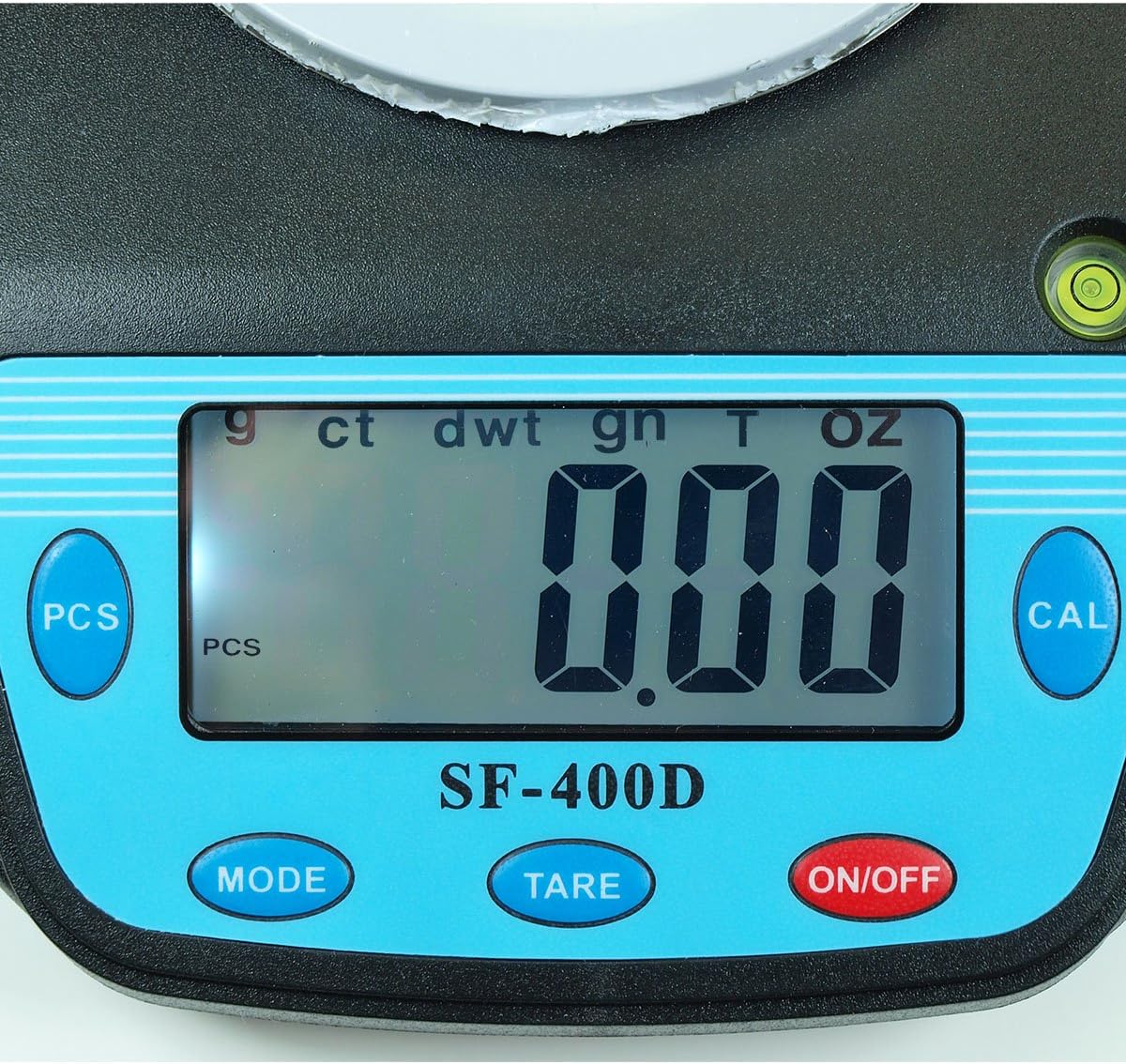
شڪل 2: Close-up of the SF-400D display and control buttons. This image highlights the LCD screen, showing various unit indicators (g, ct, dwt, gn, T, oz), and the function buttons: PCS, MODE, TARE, ON/OFF, and CAL.

شڪل 3: Underside of the SF-400D scale showing adjustable legs. Green arrows indicate the location of the four adjustable feet, which are used to level the scale for accurate measurements.
4. سيٽ اپ
4.1. بجلي جي فراهمي
The SF-400D scale operates on two AA batteries (included) or an optional AC power adapter (not included).
- اسڪيل جي هيٺئين پاسي بيٽري جي ڪمپارٽمينٽ جو ڍڪ کوليو.
- ٻه AA بيٽريون داخل ڪريو، صحيح پولارٽي کي يقيني بڻائي (+/-).
- بيٽري جي ڪمري کي بند ڪريو.
- Alternatively, connect a compatible AC power adapter (6V, amperage not specified in product details, consult manufacturer if needed) to the power port.
4.2. جڳهه ۽ ليولنگ
For optimal accuracy, the scale must be placed on a stable, flat, and level surface.
- Place the scale on your desired weighing surface.
- Observe the integrated bubble level.
- Adjust the four adjustable legs on the bottom of the scale by rotating them until the bubble is centered within the level indicator.
5. آپريٽنگ هدايتون
5.1. بنيادي وزن
- کي دٻايو آن/بند button to turn on the scale. The display will show "88888" and then "0.00" (or "0.0" depending on the unit).
- If the display does not show zero, press the تارو اسڪيل کي صفر ڪرڻ لاءِ بٽڻ.
- کي دٻايو موڊ button to select your desired weighing unit (g, oz, ct, dwt, gn, T).
- Gently place the item(s) to be weighed on the center of the stainless steel platform.
- Read the stable weight displayed on the LCD screen.
- اسڪيل کي بند ڪرڻ لاءِ، دٻايو ۽ رکو آن/بند button for a few seconds. The scale also features an auto shut-off function to conserve battery power.
5.2. ٽائر فنڪشن
The Tare function allows you to subtract the weight of a container, so only the contents are weighed.
- وزن کڻڻ واري پليٽ فارم تي هڪ خالي ڪنٽينر رکو.
- Wait for the display to stabilize and show the container's weight.
- کي دٻايو تارو button. The display will reset to "0.00" (or "0.0").
- اهي شيون جيڪي توهان وزن ڪرڻ چاهيو ٿا انهن کي ڪنٽينر ۾ شامل ڪريو. ڊسپلي هاڻي صرف شين جو خالص وزن ڏيکاريندو.
- ٽائر صاف ڪرڻ لاءِ، پليٽ فارم تان سڀئي شيون هٽايو ۽ دٻايو تارو again if the display does not return to zero automatically.
5.3. Piece Counting Function (PCS)
This function is useful for counting multiple identical items.
- Turn on the scale and ensure it is zeroed.
- کي دٻايو پي سي ايس button. The display will show "PCS" and a sample size (e.g., "25", "50", "75", "100").
- کي دٻايو موڊ button to cycle through the available sample sizes (25, 50, 75, 100 pieces). Select the sample size that matches the number of items you will place on the scale for sampلنگهه.
- Place the exact number of sample items (e.g., 25 pieces) onto the weighing platform according to your selected sampلي سائيز.
- کي دٻايو پي سي ايس ايس جي تصديق ڪرڻ لاءِ ٻيهر بٽڻ دٻايوample. The display will now show the number of pieces.
- You can now add more items of the same type, and the scale will display the total count.
- To exit the counting mode, press the موڊ بٽڻ
5.4. حساب ڪتاب
Calibration ensures the accuracy of your scale. It is recommended to calibrate the scale periodically or if you suspect inaccurate readings. You will need a known calibration weight (e.g., 500g) for this process.

شڪل 4: SF-400D display showing "CAL" during calibration mode. This image illustrates the scale's screen indicating it is in calibration mode, prompting the user to place a calibration weight.
- Ensure the scale is on a stable, level surface and turned off.
- کي دٻايو ۽ رکو CAL بٽڻ دٻايو، پوء دٻايو آن/بند button simultaneously. Release both buttons when the display shows "CAL".
- The display will then show a flashing weight value (e.g., "500.00g"). This is the required calibration weight.
- Place the exact calibration weight (e.g., 500g) onto the center of the weighing platform.
- Wait for the display to stabilize and show "PASS" or return to normal weighing mode. This indicates successful calibration.
- Remove the calibration weight. The scale is now calibrated and ready for use.
- If "FAIL" or an error message appears, repeat the calibration process.
6. سار سنڀال
6.1. صفائي
- Wipe the scale surface with a soft, slightly damp ڪپڙو.
- سخت ڪيميڪل، رگڙيندڙ صاف ڪندڙ استعمال نه ڪريو، يا اسڪيل کي پاڻي ۾ نه ٻوڙيو.
- اسٽوريج يا ايندڙ استعمال کان اڳ پڪ ڪريو ته اسڪيل مڪمل طور تي سڪي ويو آهي.
6.2. اسٽوريج
- اسڪيل کي ٿڌي، سڪل جاءِ تي، سڌي سج جي روشني ۽ انتهائي گرمي پد کان پري رکو.
- جيڪڏهن گهڻي عرصي تائين ذخيرو ڪري رهيا آهيو، ته پوءِ ليڪيج کي روڪڻ لاءِ بيٽريون هٽايو.
7. مسئلا حل ڪرڻ
| مسئلو | ممڪن سبب | حل |
|---|---|---|
| اسڪيل نه ٿو ڦري. | Low or dead batteries; incorrect battery installation; no power from AC adapter. | Replace batteries; check battery polarity; ensure AC adapter is properly connected and functional. |
| غلط پڙھڻ. | Scale not level; unstable surface; needs calibration; overloaded; strong air currents or vibrations. | Ensure scale is level using adjustable legs and bubble level; place on stable surface; perform calibration; do not exceed 500g capacity; operate in a stable environment. |
| "O_Ld" or "EEEE" displayed. | پيمانو اوور لوڊ ٿيل آهي. | فوري طور تي اضافي وزن هٽايو. 500 گرام جي گنجائش کان وڌيڪ نه ڪريو. |
| Display shows "UNST". | Unstable environment or surface. | Move the scale to a more stable location, away from vibrations or drafts. |
| Counting function not working correctly. | غلط ايسample size selected; sample items not identical in weight. | ايس کي يقيني بڻايو وڃيample size matches the number of items placed for sampling; use identical items for accurate counting. |
8. وضاحتون
| خاصيت | تفصيل |
|---|---|
| ماڊل | SF-400D |
| ظرف | 500 grams (g) / 17.5 ounces (oz) |
| Accuracy (Readability) | 0.01 grams (g) / 0.0005 ounces (oz) |
| وزن جا طريقا | g (grams), oz (ounces), ct (carats), dwt (pennyweights), gn (grains), T (troy ounces), pcs (pieces) |
| پليٽ فارم مواد | بي داغ لوه |
| Platform Diameter | 4.2 انچ |
| ڏيکاريو | LCD backlight سان |
| طاقت | 2 x AA batteries (included) or 6V AC adapter (not included) |
| طول و عرض (L x W x H) | 8.25" x 6.0" x 1.75" |
| خاصيتون | Tare function, Piece Counting, Auto Shut-Off, Backlit Display, Adjustable Legs, Bubble Level |
9. وارنٽي ۽ سپورٽ
For warranty information or technical support, please refer to the documentation included with your purchase or contact the retailer. Specific warranty terms may vary by region and retailer.
For general inquiries or to explore other products, you may visit the Horizon Store on Amazon.


