تعارف
This manual provides essential information for setting up, operating, and maintaining your Microsoft Xbox 360 E 250GB Console. Please read this guide thoroughly before using your console to ensure proper function and longevity.
پيڪيج مواد
تصديق ڪريو ته توھان جي پيڪيج ۾ ھيٺيون شيون شامل آھن:
- Xbox 360 E 250GB Console
- Xbox 360 وائرليس ڪنٽرولر (ڪارو)
- پاور سپلائي ۽ پاور ڪنڊ
- HDMI ڪيبل
- AA Batteries for Wireless Controller
ڪنسول ختمview
Familiarize yourself with the various ports and buttons on your Xbox 360 E console.

Image: Microsoft Xbox 360 E 250GB Console. This image displays the front and side view of the Xbox 360 E console, showing its compact design and disc drive slot.
سامهون پينل
- پاور بٽڻ: Turns the console on or off.
- ڊسڪ ڊرائيو: Insert game discs or DVDs.
- USB بندرگاهن: Connect accessories like USB drives or wired controllers.
- Controller Connect Button: Used to wirelessly sync controllers.
پوئتي پينل
- پاور پورٽ: پاور سپلائي کي ڳنڍيو.
- HDMI پورٽ: Connect to a TV or monitor for high-definition video and audio.
- اي وي پورٽ: For older composite or component cables (not included with all models).
- ايٿنيٽ پورٽ: وائرڊ نيٽ ورڪ سان ڳنڍيو.
- USB بندرگاهن: Additional ports for accessories.
Wireless Controller Overview
The Xbox 360 Wireless Controller allows for intuitive gameplay. Familiarize yourself with its buttons and functions.
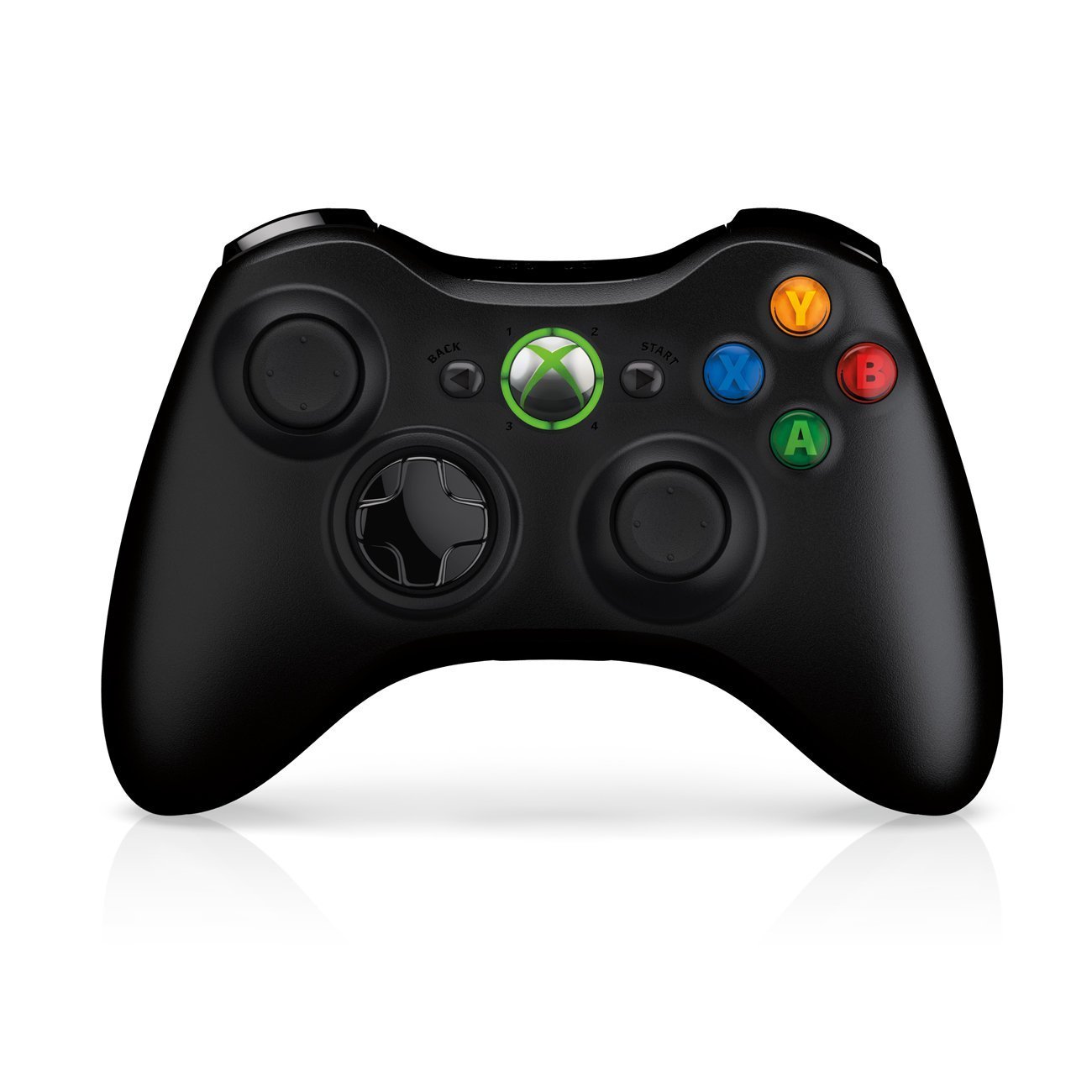
Image: Xbox 360 Wireless Controller. This image displays the front view of the black wireless controller, highlighting the D-pad, analog sticks, face buttons (A, B, X, Y), Guide button, Start button, and Back button.
ڪنٽرولر بٽڻ ۽ افعال
- کاٻي/ساڄي اينالاگ اسٽڪس: حرڪت ۽ ڪئميرا ڪنٽرول لاءِ.
- ڊي-پيڊ (ڊائريڪشنل پيڊ): For menu navigation and specific game controls.
- الف، ب، ايڪس، وائي بٽڻ: Primary action buttons, color-coded (Green A, Red B, Blue X, Yellow Y).
- شروع بٽڻ: Pauses games or opens in-game menus.
- پوئتي بٽڻ: Returns to previous screens or opens specific game functions.
- Guide Button (Xbox Logo): Powers on the console, accesses the Xbox Guide, or turns off the controller.
- Left/Right Bumpers (LB, RB): Shoulder buttons for various in-game actions.
- Left/Right Triggers (LT, RT): Analog triggers for precise control, often used for acceleration/braking or firing weapons.
بيٽري لڳائڻ
The wireless controller requires two AA batteries. To install:
- Press the tab on the top of the battery pack and pull down to remove it.
- ٻه AA بيٽريون داخل ڪريو، صحيح پولارٽي کي يقيني بڻائي (+/-).
- Slide the battery pack back into the controller until it clicks into place.
سيٽ اپ گائيڊ
1. ڪنسول کي ڳنڍڻ
- پاور ڪنيڪشن: Connect the power cord to the power supply, then connect the power supply to the console's power port. Plug the power cord into a wall outlet.
- وڊيو/آڊيو ڪنيڪشن: Connect one end of the HDMI cable to the HDMI port on the back of your Xbox 360 E console. Connect the other end to an available HDMI input on your TV or monitor.
- انٽرنيٽ ڪنيڪشن (اختياري): For wired internet, connect an Ethernet cable from your router/modem to the Ethernet port on the console. For wireless, the console has built-in Wi-Fi.
2. وائرليس ڪنٽرولر کي ڳنڍڻ
- Ensure batteries are installed in the controller.
- Turn on the console by pressing the Power button on the console or the Guide button on the controller.
- Press and release the Connect button on the console (small button near the USB ports on the front).
- Within 20 seconds, press and release the Connect button on the controller (small button on the top edge, between the bumpers).
- The lights around the Guide button on the controller and the console will flash and then glow steadily, indicating a successful connection.
3. Initial Power On and System Settings
After connecting, turn on your console. Follow the on-screen prompts to:
- پنھنجي ٻولي ۽ علائقو چونڊيو.
- Adjust display settings (resolution, aspect ratio).
- Set up your internet connection (wired or wireless).
- Create or sign in to an Xbox Live profile.
توهان جي ڪنسول کي هلائڻ
رانديون ۽ ميڊيا کيڏڻ
- Turn on your console and TV.
- Open the disc tray by pressing the eject button on the console.
- Place a game disc or DVD/Blu-ray disc into the tray, label side up.
- Close the disc tray. The console should automatically start the game or media. If not, select it from the dashboard.
- Digital games can be launched directly from the Xbox Dashboard.
Connecting to Xbox Live
Xbox Live allows you to play online, download games and content, and access streaming services. Ensure your console is connected to the internet.
- From the Xbox Dashboard, navigate to the "Social" or "Settings" tab.
- Select "Join Xbox Live" or "Network Settings" to configure your connection and create/manage your profile.
- A 1-month Xbox LIVE Gold trial may be included with your console.
سسٽم سيٽنگون
Access system settings to customize your console experience:
- ڊسپلي ۽ آواز: Adjust resolution, audio output, and screen format.
- اسٽوريج: Manage your 250GB hard drive, view free space, and delete content.
- نيٽ ورڪ سيٽنگون: Configure wired or wireless internet connections.
- Family Settings: Set parental controls for content and online access.
سار سنڀال
Cleaning Your Console
- Always power off and unplug the console before cleaning.
- Use a soft, dry, lint-free cloth to wipe down the exterior of the console and controller.
- Do not use liquid cleaners, aerosols, or abrasive materials.
- Keep ventilation openings clear of dust and obstructions to ensure proper airflow.
Storage and Placement
- Place the console on a stable, flat surface.
- Ensure adequate ventilation around the console. Do not place it in an enclosed cabinet or on soft surfaces that can block vents.
- Avoid exposing the console to direct sunlight, excessive heat, or extreme cold.
مشڪلاتون
If you encounter issues with your Xbox 360 E console, refer to the following common solutions:
No Power / Console Not Turning On
- Ensure the power cord is securely connected to the console, power supply, and wall outlet.
- Check the power supply unit (PSU) indicator light. If it's off or red, try a different outlet or contact support.
- ڪوشش ڪريو مختلف پاور آئوٽليٽ.
No Video or Audio Output
- Verify the HDMI cable is securely connected to both the console and your TV/monitor.
- پڪ ڪريو ته توهان جو ٽي وي/مانيٽر صحيح HDMI ان پٽ سورس تي سيٽ ٿيل آهي.
- پنهنجي ٽي وي تي هڪ مختلف HDMI ڪيبل يا هڪ مختلف HDMI پورٽ آزمايو.
- پنهنجي ٽي وي جي واليوم ۽ ميوٽ سيٽنگ چيڪ ڪريو.
ڊسڪ پڙهڻ جون غلطيون
- پڪ ڪريو ته ڊسڪ صاف آهي ۽ ان ۾ خراشون يا داغ نه آهن. وچ کان ٻاهر نرم ڪپڙي سان نرميءَ سان صاف ڪريو.
- Try a different game or movie disc to determine if the issue is with the disc or the console.
- Ensure the console is placed on a stable, flat surface and not being moved during disc operation.
Wireless Controller Not Connecting
- Ensure the controller has fresh batteries.
- Resync the controller by pressing the Connect buttons on both the console and controller as described in the "Setup Guide".
- پڪ ڪريو ته ويجهو ڪو به مضبوط وائرليس مداخلت نه آهي.
For further assistance, please refer to the official Microsoft Xbox support webسائيٽ.
وضاحتون
| خاصيت | تفصيل |
|---|---|
| ماڊل نمبر | M9V-00001 |
| ذخيرو | 250 GB هارڊ ڊرائيو |
| وائرليس ڪنيڪشن | بلٽ ان وائي فائي |
| ڪنٽرولر | 1 Black Wireless Controller |
| علائقي جو ڪوڊ | NTSC |
| پيداوار جي ماپ | 12 x 6 x 24 انچ |
| شيءِ جو وزن | 10.32 پائونڊ |
| بيٽرين جي ضرورت آهي | 2 AA batteries for controller |
| ڇڏڻ جي تاريخ | 1 جون 2013 |
وارنٽي ڄاڻ
For detailed warranty information regarding your Microsoft Xbox 360 E 250GB Console, please refer to the warranty card included with your product or visit the official Microsoft Xbox support webسائيٽ. وارنٽي جون شرطون ۽ ضابطا علائقي ۽ خريداري جي تاريخ جي لحاظ کان مختلف ٿي سگهن ٿا.
حمايت
If you require technical assistance, have questions about your console, or need to report an issue, please contact Microsoft Xbox Support:
- آن لائن سپورٽ: سرڪاري دورو ڪريو Xbox سپورٽ webسائيٽ اڪثر پڇيا ويندڙ سوالن، مسئلن جي حل جي رهنمائي، ۽ رابطي جي اختيارن لاءِ.
- فون سپورٽ: Refer to your product packaging or the Xbox Support webعلائقائي فون نمبرن لاءِ سائيٽ.


